
摘要:
 How to boot the Raspberry Pi system from a USB Mass Storage Device All In One
如何从 USB 启动树莓派引导系统 / 如何从 USB 大容量存储设备启动 Raspberry Pi 系统
阅读全文
How to boot the Raspberry Pi system from a USB Mass Storage Device All In One
如何从 USB 启动树莓派引导系统 / 如何从 USB 大容量存储设备启动 Raspberry Pi 系统
阅读全文
How to boot the Raspberry Pi system from a USB Mass Storage Device All In One
如何从 USB 启动树莓派引导系统 / 如何从 USB 大容量存储设备启动 Raspberry Pi 系统
阅读全文
posted @ 2023-05-28 14:02
xgqfrms
阅读(489)
评论(12)
推荐(0)
 使用 Linux 命令如何恢复被覆盖的文件 All In One
数据还原/数据恢复
使用 Linux 命令如何恢复被覆盖的文件 All In One
数据还原/数据恢复
 How to Control an External USB Web Camera Using a Raspberry Pi All In One
如何使用树莓派控制外接 USB 网络摄像头
How to Control an External USB Web Camera Using a Raspberry Pi All In One
如何使用树莓派控制外接 USB 网络摄像头
 ARM Cortex-A72 CPU All In One
Raspberry Pi 4B, 4 核心 1.5GHz 64 位 CPU
Raspberry Pi 4B, 4 核心 1.8GHz 64 位 CPU
BCM2711
BCM2835
ARM Cortex-A72 CPU All In One
Raspberry Pi 4B, 4 核心 1.5GHz 64 位 CPU
Raspberry Pi 4B, 4 核心 1.8GHz 64 位 CPU
BCM2711
BCM2835
 Linux shutdown & reboot & poweroff All In One
Raspberry Pi
$ sudo shutdown -h now
$ sudo reboot
$ sudo poweroff
Linux shutdown & reboot & poweroff All In One
Raspberry Pi
$ sudo shutdown -h now
$ sudo reboot
$ sudo poweroff
 软路由 & 旁路由 All In One
路由器
KeXUe上网
如何使用 Raspberry Pi 4B (8G) 搭建一个家用软路由
OpenWrt
软路由 & 旁路由 All In One
路由器
KeXUe上网
如何使用 Raspberry Pi 4B (8G) 搭建一个家用软路由
OpenWrt
 How to change the default Python2 to Python3 on Linux All In One
在 Linux 中如何把默认的 Python2 更改为 Python3
.bashrc / .zshrc alias
symbolic link
符号链接 (软链接/硬链接)
How to change the default Python2 to Python3 on Linux All In One
在 Linux 中如何把默认的 Python2 更改为 Python3
.bashrc / .zshrc alias
symbolic link
符号链接 (软链接/硬链接)
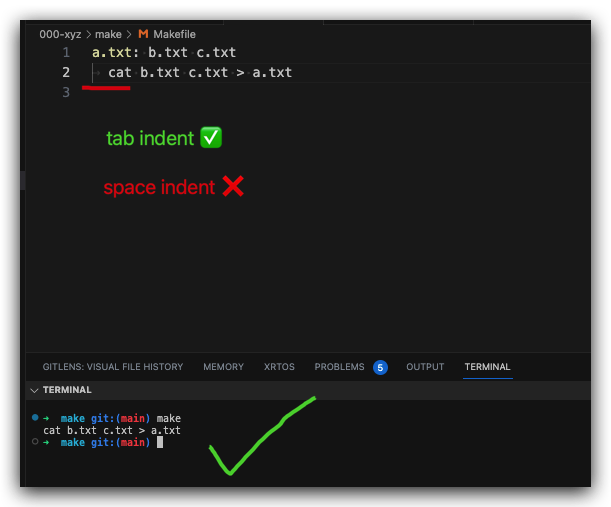 Linux shell command make & Makefile All In One
脚本自动化构建工具
Makefile 是在 Linux 编程环境下 C/C++ 程序开发必须要掌握的一个工程管理文件;
当使用 make 命令去编译一个工程项目时,如果没有指定自定义的 Makefile 文件,make 才会首先到项目的根目录下去寻找默认文件名为 Makefile 的文件,然后再根据这个 Makefile 文件去执行编译程序;
Linux shell command make & Makefile All In One
脚本自动化构建工具
Makefile 是在 Linux 编程环境下 C/C++ 程序开发必须要掌握的一个工程管理文件;
当使用 make 命令去编译一个工程项目时,如果没有指定自定义的 Makefile 文件,make 才会首先到项目的根目录下去寻找默认文件名为 Makefile 的文件,然后再根据这个 Makefile 文件去执行编译程序;
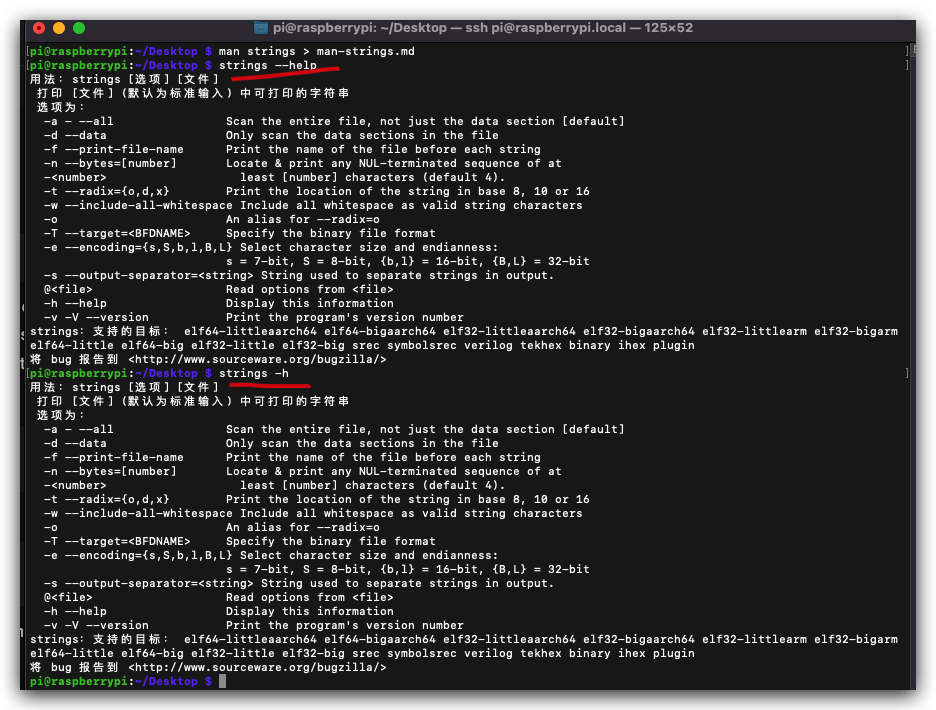 Linux shell command strings All In One
打印文件(默认为标准输入) 中可打印的字符串
Linux shell command strings All In One
打印文件(默认为标准输入) 中可打印的字符串
 浙公网安备 33010602011771号