
Linux shell command make & Makefile All In One
Linux shell command make & Makefile All In One
脚本
自动化构建工具
make & makefile
https://linux.xgqfrms.xyz/linux_basic/1010index.htm
make 第二十二章、1.3
https://linux.xgqfrms.xyz/linux_basic/0520source_code_and_tarball.htm#intro_make
makefile 第二十二章、3.2
https://linux.xgqfrms.xyz/linux_basic/0520source_code_and_tarball.htm#make_makefile
Makefile 是在 Linux 编程环境下 C/C++ 程序开发必须要掌握的一个工程管理文件;
当使用 make 命令去编译一个工程项目时,如果没有指定自定义的 Makefile 文件,make 才会首先到项目的根目录下去寻找默认文件名为 Makefile 的文件,然后再根据这个 Makefile 文件去执行编译程序;
C 程序的
编译连接过程
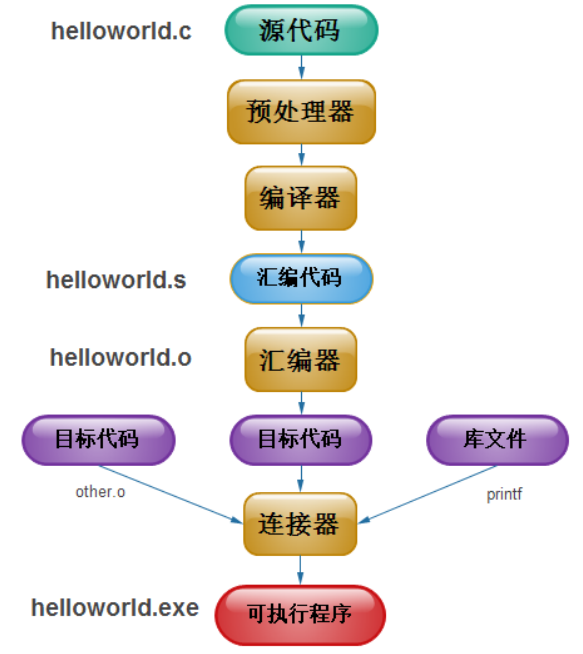
GNU make
macOS
$ man make

# 使用 vscode fix 输出 man doc 乱码问题 ✅
$ man make > man-make.md
$ man make
# 使用 vscode fix 输出 man doc 乱码问题 ✅
$ man make > man-make.md
MAKE(1)                       LOCAL USER COMMANDS                      MAKE(1)

NAME
       make - GNU make utility to maintain groups of programs

SYNOPSIS
       make  [ -f makefile ] [ options ] ... [ targets ] ...

WARNING
       This man page is an extract of the documentation of GNU make.  It is
       updated only occasionally, because the GNU project does not use nroff.
       For complete, current documentation, refer to the Info file make.info
       which is made from the Texinfo source file make.texi.

DESCRIPTION
       The purpose of the make utility is to determine automatically which
       pieces of a large program need to be recompiled, and issue the commands
       to recompile them.  The manual describes the GNU implementation of
       make, which was written by Richard Stallman and Roland McGrath, and is
       currently maintained by Paul Smith.  Our examples show C programs,
       since they are most common, but you can use make with any programming
       language whose compiler can be run with a shell command.  In fact, make
       is not limited to programs.  You can use it to describe any task where
       some files must be updated automatically from others whenever the
       others change.

       To prepare to use make, you must write a file called the makefile that
       describes the relationships among files in your program, and the states
       the commands for updating each file.  In a program, typically the
       executable file is updated from object files, which are in turn made by
       compiling source files.

       Once a suitable makefile exists, each time you change some source
       files, this simple shell command:

              make

       suffices to perform all necessary recompilations.  The make program
       uses the makefile data base and the last-modification times of the
       files to decide which of the files need to be updated.  For each of
       those files, it issues the commands recorded in the data base.

       make executes commands in the makefile to update one or more target
       names, where name is typically a program.  If no -f option is present,
       make will look for the makefiles GNUmakefile, makefile, and Makefile,
       in that order.

       Normally you should call your makefile either makefile or Makefile.
       (We recommend Makefile because it appears prominently near the
       beginning of a directory listing, right near other important files such
       as README.) The first name checked, GNUmakefile, is not recommended for
       most makefiles.  You should use this name if you have a makefile that
       is specific to GNU make, and will not be understood by other versions
       of make.  If makefile is `-', the standard input is read.

       make updates a target if it depends on prerequisite files that have
       been modified since the target was last modified, or if the target does
       not exist.

OPTIONS
       -b, -m
            These options are ignored for compatibility with other versions of
            make.

       -B, --always-make
            Unconditionally make all targets.

       -C dir, --directory=dir
            Change to directory dir before reading the makefiles or doing
            anything else.  If multiple -C options are specified, each is
            interpreted relative to the previous one: -C / -C etc is
            equivalent to -C /etc.  This is typically used with recursive
            invocations of make.

       -d   Print debugging information in addition to normal processing.  The
            debugging information says which files are being considered for
            remaking, which file-times are being compared and with what
            results, which files actually need to be remade, which implicit
            rules are considered and which are applied---everything
            interesting about how make decides what to do.

       --debug[=FLAGS]
            Print debugging information in addition to normal processing.  If
            the FLAGS are omitted, then the behavior is the same as if -d was
            specified.  FLAGS may be a for all debugging output (same as using
            -d), b for basic debugging, v for more verbose basic debugging, i
            for showing implicit rules, j for details on invocation of
            commands, and m for debugging while remaking makefiles.

       -e, --environment-overrides
            Give variables taken from the environment precedence over
            variables from makefiles.

       +-f file, --file=file, --makefile=FILE
            Use file as a makefile.

       -i, --ignore-errors
            Ignore all errors in commands executed to remake files.

       -I dir, --include-dir=dir
            Specifies a directory dir to search for included makefiles.  If
            several -I options are used to specify several directories, the
            directories are searched in the order specified.  Unlike the
            arguments to other flags of make, directories given with -I flags
            may come directly after the flag: -Idir is allowed, as well as -I
            dir.  This syntax is allowed for compatibility with the C
            preprocessor's -I flag.

       -j [jobs], --jobs[=jobs]
            Specifies the number of jobs (commands) to run simultaneously.  If
            there is more than one -j option, the last one is effective.  If
            the -j option is given without an argument, make will not limit
            the number of jobs that can run simultaneously.

       -k, --keep-going
            Continue as much as possible after an error.  While the target
            that failed, and those that depend on it, cannot be remade, the
            other dependencies of these targets can be processed all the same.

       -l [load], --load-average[=load]
            Specifies that no new jobs (commands) should be started if there
            are others jobs running and the load average is at least load (a
            floating-point number).  With no argument, removes a previous load
            limit.

       -L, --check-symlink-times
            Use the latest mtime between symlinks and target.

       -n, --just-print, --dry-run, --recon
            Print the commands that would be executed, but do not execute
            them.

       -o file, --old-file=file, --assume-old=file
            Do not remake the file file even if it is older than its
            dependencies, and do not remake anything on account of changes in
            file.  Essentially the file is treated as very old and its rules
            are ignored.

       -p, --print-data-base
            Print the data base (rules and variable values) that results from
            reading the makefiles; then execute as usual or as otherwise
            specified.  This also prints the version information given by the
            -v switch (see below).  To print the data base without trying to
            remake any files, use make -p -f/dev/null.

       -q, --question
            ``Question mode''.  Do not run any commands, or print anything;
            just return an exit status that is zero if the specified targets
            are already up to date, nonzero otherwise.

       -r, --no-builtin-rules
            Eliminate use of the built-in implicit rules.  Also clear out the
            default list of suffixes for suffix rules.

       -R, --no-builtin-variables
            Don't define any built-in variables.

       -s, --silent, --quiet
            Silent operation; do not print the commands as they are executed.

       -S, --no-keep-going, --stop
            Cancel the effect of the -k option.  This is never necessary
            except in a recursive make where -k might be inherited from the
            top-level make via MAKEFLAGS or if you set -k in MAKEFLAGS in your
            environment.

       -t, --touch
            Touch files (mark them up to date without really changing them)
            instead of running their commands.  This is used to pretend that
            the commands were done, in order to fool future invocations of
            make.

       -v, --version
            Print the version of the make program plus a copyright, a list of
            authors and a notice that there is no warranty.

       -w, --print-directory
            Print a message containing the working directory before and after
            other processing.  This may be useful for tracking down errors
            from complicated nests of recursive make commands.

       --no-print-directory
            Turn off -w, even if it was turned on implicitly.

       -W file, --what-if=file, --new-file=file, --assume-new=file
            Pretend that the target file has just been modified.  When used
            with the -n flag, this shows you what would happen if you were to
            modify that file.  Without -n, it is almost the same as running a
            touch command on the given file before running make, except that
            the modification time is changed only in the imagination of make.

       --warn-undefined-variables
            Warn when an undefined variable is referenced.

EXIT STATUS
       GNU make exits with a status of zero if all makefiles were successfully
       parsed and no targets that were built failed.  A status of one will be
       returned if the -q flag was used and make determines that a target
       needs to be rebuilt.  A status of two will be returned if any errors
       were encountered.

SEE ALSO
       The GNU Make Manual

BUGS
       See the chapter `Problems and Bugs' in The GNU Make Manual.

AUTHOR
       This manual page contributed by Dennis Morse of Stanford University.
       It has been reworked by Roland McGrath.  Further updates contributed by
       Mike Frysinger.

COPYRIGHT
       Copyright (C) 1992, 1993, 1996, 1999 Free Software Foundation, Inc.
       This file is part of GNU make.

       GNU make is free software; you can redistribute it and/or modify it
       under the terms of the GNU General Public License as published by the
       Free Software Foundation; either version 2, or (at your option) any
       later version.

       GNU make is distributed in the hope that it will be useful, but WITHOUT
       ANY WARRANTY; without even the implied warranty of MERCHANTABILITY or
       FITNESS FOR A PARTICULAR PURPOSE.  See the GNU General Public License
       for more details.

       You should have received a copy of the GNU General Public License along
       with GNU make; see the file COPYING.  If not, write to the Free
       Software Foundation, Inc., 51 Franklin St, Fifth Floor, Boston, MA
       02110-1301, USA.

GNU                             22 August 1989                         MAKE(1)
# Makefile
$ make
$ make -f Makefile
$ make -f Makefile.txt
# 或者
$ make --file=Makefile.txt
errors
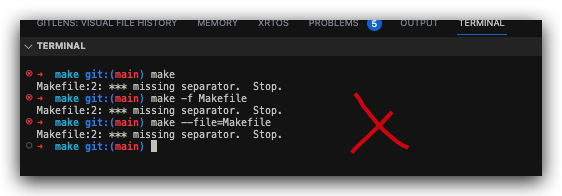
Makefile:2: *** missing separator. Stop.❌
# space indent error ❌
$ make
# Makefile:2: *** missing separator.  Stop.
$  make -f Makefile
# Makefile:2: *** missing separator.  Stop.
$ make --file=Makefile
# Makefile:2: *** missing separator.  Stop.
如果构建的出的文件已经存在了,就要先删除后,才能重新构建;否则,会提示你文件没有任何更新(文件是最新的) ⚠️;
$ make --file Makefile
make: `a.txt' is up to date.
solutions
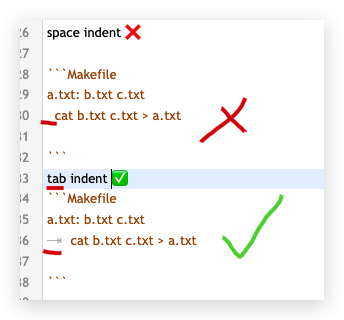
You need a real tab instead of space in front of g++ and rm commands.
https://stackoverflow.com/questions/23927212/makefile2-missing-separator-stop
https://stackoverflow.com/questions/920413/make-error-missing-separator
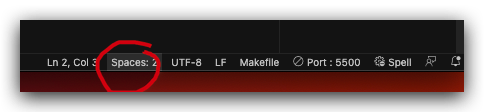
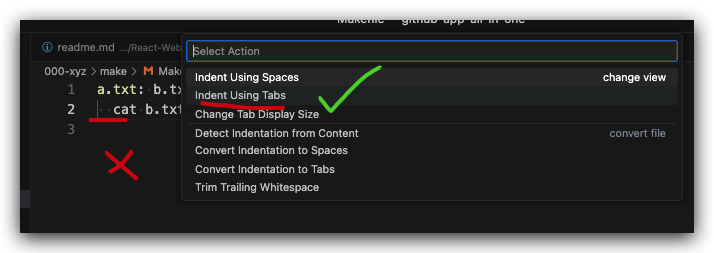
vscodespace to tab 🚀
demos
$ touch b.txt c.txt
$ echo b file > b.txt
$ echo c file > c.txt
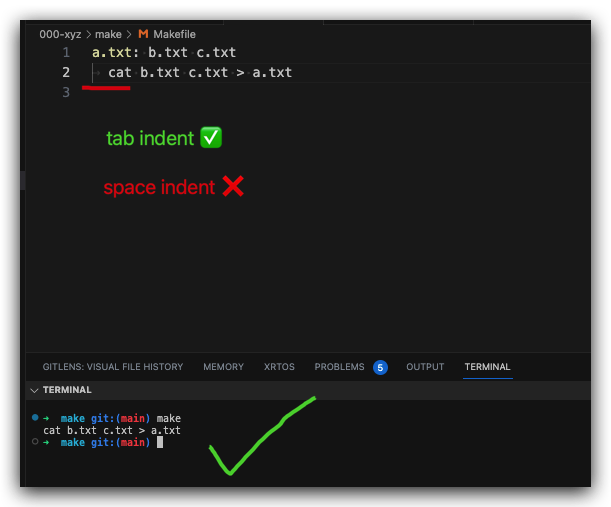
spaceindent ❌
a.txt: b.txt c.txt
  cat b.txt c.txt > a.txt
tabindent ✅
a.txt: b.txt c.txt
	  cat b.txt c.txt > a.txt
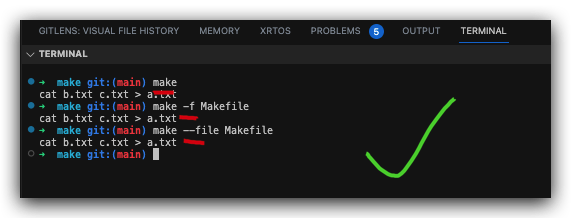
# default `Makefile`
$ make
cat b.txt c.txt > a.txt
# OR
$ make -f Makefile
cat b.txt c.txt > a.txt

# OR
$ make --file Makefile
cat b.txt c.txt > a.txt
# OR
$ make -f your-custom-makefile-name-without-extension
# OR
$ make -f your-custom-makefile-name.with-any-extension
(🐞 反爬虫测试!打击盗版⚠️)如果你看到这个信息, 说明这是一篇剽窃的文章,请访问 https://www.cnblogs.com/xgqfrms/ 查看原创文章!
Makefile
本期 podcast 是一个关于 Makefile 的全面指南,旨在帮助开发者理解如何通过 make 工具自动化软件构建过程、提高开发效率并确保构建的可重复性。
核心内容的摘要:
-
Makefile 的核心概念与组成
Makefile 是一个定义构建规则的文本文件,其基本结构包含三个部分:
目标 (Target):通常是要生成的文件名(如可执行文件或目标文件),也可以是要执行的任务名称(如 clean)。
先决条件 (Prerequisites):生成目标所依赖的文件或其它目标。
配方 (Recipes):生成目标需要执行的 Shell 命令,必须以 Tab 键开头。
make 的强大之处在于它会检查文件的时间戳:只有当先决条件比目标文件更新时,才会执行相应的配方,从而避免不必要的重复编译,节省时间和资源。 -
关键高级特性
变量与标志 (Variables & Flags):支持定义变量以减少重复。常见的变量赋值方式包括递归扩展(=)和简单扩展(:=)。此外,文档强调了使用标准标志(如 CFLAGS、CXXFLAGS)的重要性,以便于在命令行中覆盖配置而无需修改 Makefile。
自动变量 (Automatic Variables):如 $@(目标文件名)和 $<(第一个先决条件),用于简化规则编写。
伪目标 (.PHONY):用于声明不对应实际文件的目标(如 all、clean),防止因目录下存在同名文件而导致规则失效。
通配符与模式规则:使用 % 字符定义通用规则(如将所有 .cpp 编译为 .o),提高 Makefile 的灵活性。 -
多语言与工具生态集成
文档详细介绍了 Makefile 在不同技术栈中的应用:
编程语言:涵盖了 C++ (G++) 的编译流程、Python 的任务自动化(如管理虚拟环境 venv) 以及 Go (Golang) 的多平台构建和测试自动化。
Docker:展示了如何利用 Makefile 简化 Docker 镜像的构建、版本控制(利用 Git SHA)和推送流程。
IDE 集成:介绍了 Visual Studio Code 的 Makefile Tools 扩展,使开发者能在编辑器中直接进行构建和调试。
Autotools:讲解了如何使用 autoconf 和 automake 制作可移植的软件发行包。 -
跨平台支持与最佳实践
Windows 支持:讨论了在 Windows 上运行 Makefile 的多种途径,包括 Chocolatey、Cygwin、NMAKE、CMake 以及 WSL。
团队协作与维护:建议在大型团队中保持 Makefile 的简洁性,优先使用 .PHONY 目标,避免过度使用复杂的变量逻辑,以便于跨团队协作。
可重复构建:提倡将 Makefile、Dockerfile 和 Bash 脚本结合作为“胶水层 (Glue Layer)”,以实现在 CI 环境和本地开发机上完全一致的构建体验。
<iframe width="600" height="400" src="https://player.bilibili.com/player.html?bvid=BV1YPAJzAEWn&autoplay=false" scrolling="no" border="0" frameborder="no" framespacing="0" allowfullscreen="true"></iframe>
refs
Make
https://www.cnblogs.com/xgqfrms/p/17369547.html
CMake
https://www.cnblogs.com/xgqfrms/p/17059729.html
https://www.ruanyifeng.com/blog/2015/02/make.html
https://www.zhaixue.cc/makefile/makefile-intro.html
©xgqfrms 2012-2021
www.cnblogs.com/xgqfrms 发布文章使用:只允许注册用户才可以访问!
原创文章,版权所有©️xgqfrms, 禁止转载 🈲️,侵权必究⚠️!
本文首发于博客园,作者:xgqfrms,原文链接:https://www.cnblogs.com/xgqfrms/p/17426036.html
未经授权禁止转载,违者必究!

 浙公网安备 33010602011771号