
OpenClaw All In One
OpenClaw All In One
ClawdBot/MoltBot/ OpenClaw
MoltBot (formerly ClawdBot) is an open-source personal AI assistant created by Austrian developer Peter Steinberger. Unlike traditional AI chatbots that live in a browser tab, MoltBot runs continuously on your own devices and integrates directly into the messaging apps you already use.
MoltBot represents a fundamental shift in how we interact with AI. It's not just a tool you visit—it's an assistant that lives in your digital life, proactively helping you accomplish tasks, remembering your preferences, and acting on your behalf 24/7.
https://github.com/moltbot/moltbot
https://github.com/openclaw/openclaw
MoltBot is an open-source personal AI assistant that runs locally on your devices. It works with WhatsApp, TG, Discord, and more—clearing your inbox, managing your calendar, and automating your workflows while you sleep.
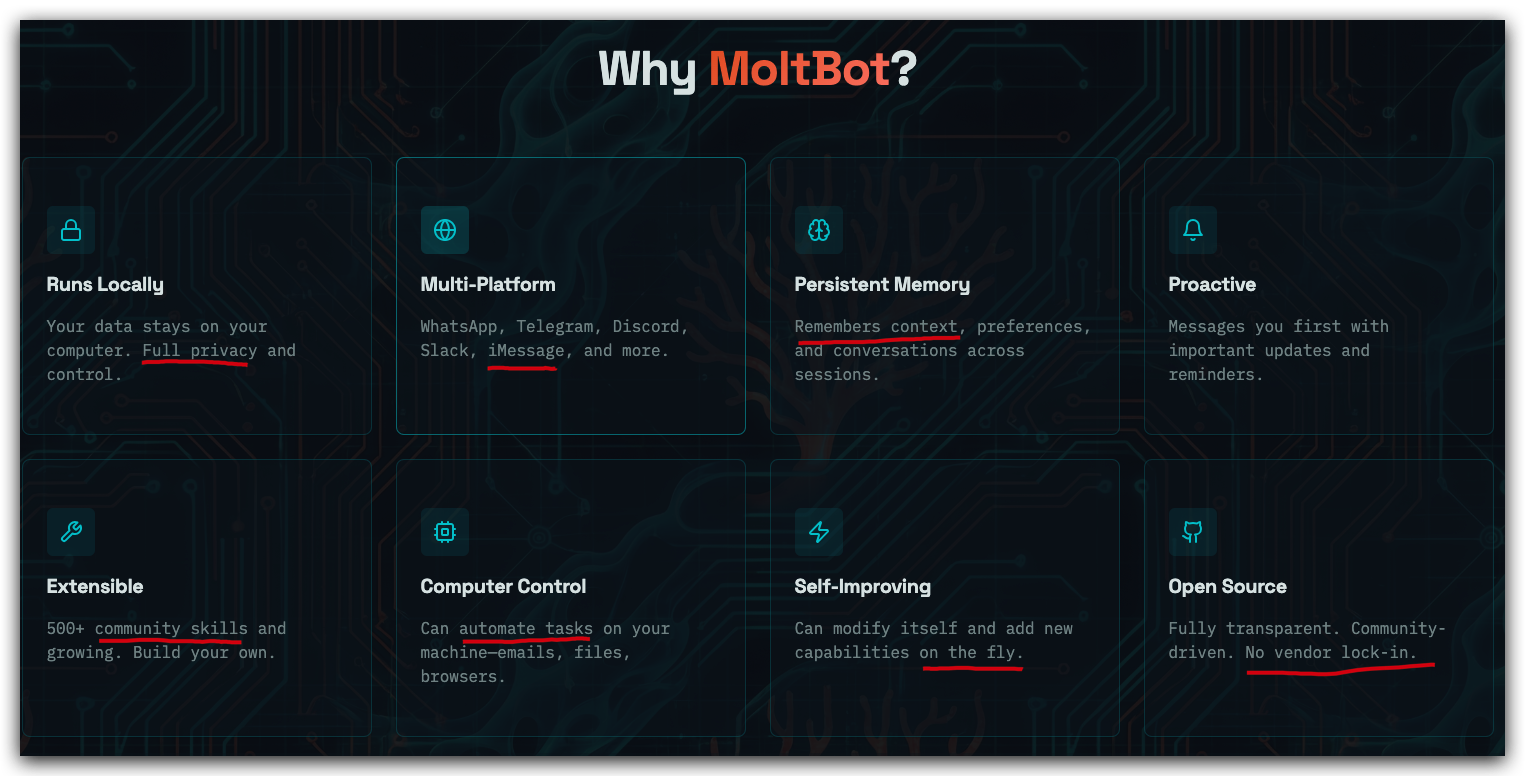
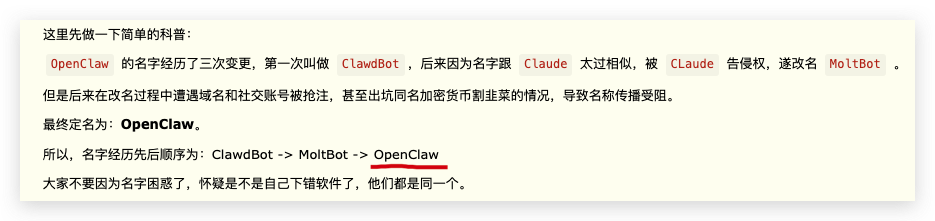
demos
OpenClaw 工作原理, 主要流程图
User => GateWay => AI Agents => Skills + Memory

https://www.youtube.com/watch?v=SaWSPZoPX34
$ openclaw gateway status

OpenClaw CLI
$ openclaw gateway --help

🦞 OpenClaw 2026.3.12 (6472949) — I don't judge, but your missing API keys are absolutely judging you.

Usage: openclaw gateway [options] [command]

Run, inspect, and query the WebSocket Gateway

Options:
  --allow-unconfigured       Allow gateway start without gateway.mode=local in config (default: false)
  --auth <mode>              Gateway auth mode ("none"|"token"|"password"|"trusted-proxy")
  --bind <mode>              Bind mode ("loopback"|"lan"|"tailnet"|"auto"|"custom"). Defaults to config gateway.bind (or
                             loopback).
  --claude-cli-logs          Only show claude-cli logs in the console (includes stdout/stderr) (default: false)
  --compact                  Alias for "--ws-log compact" (default: false)
  --dev                      Create a dev config + workspace if missing (no BOOTSTRAP.md) (default: false)
  --force                    Kill any existing listener on the target port before starting (default: false)
  -h, --help                 Display help for command
  --password <password>      Password for auth mode=password
  --password-file <path>     Read gateway password from file
  --port <port>              Port for the gateway WebSocket
  --raw-stream               Log raw model stream events to jsonl (default: false)
  --raw-stream-path <path>   Raw stream jsonl path
  --reset                    Reset dev config + credentials + sessions + workspace (requires --dev) (default: false)
  --tailscale <mode>         Tailscale exposure mode ("off"|"serve"|"funnel")
  --tailscale-reset-on-exit  Reset Tailscale serve/funnel configuration on shutdown (default: false)
  --token <token>            Shared token required in connect.params.auth.token (default: OPENCLAW_GATEWAY_TOKEN env if
                             set)
  --verbose                  Verbose logging to stdout/stderr (default: false)
  --ws-log <style>           WebSocket log style ("auto"|"full"|"compact") (default: "auto")

Commands:
  call                       Call a Gateway method
  discover                   Discover gateways via Bonjour (local + wide-area if configured)
  health                     Fetch Gateway health
  install                    Install the Gateway service (launchd/systemd/schtasks)
  probe                      Show gateway reachability + discovery + health + status summary (local + remote)
  restart                    Restart the Gateway service (launchd/systemd/schtasks)
  run                        Run the WebSocket Gateway (foreground)
  start                      Start the Gateway service (launchd/systemd/schtasks)
  status                     Show gateway service status + probe the Gateway
  stop                       Stop the Gateway service (launchd/systemd/schtasks)
  uninstall                  Uninstall the Gateway service (launchd/systemd/schtasks)
  usage-cost                 Fetch usage cost summary from session logs

Examples:
  openclaw gateway run
    Run the gateway in the foreground.
  openclaw gateway status
    Show service status and probe reachability.
  openclaw gateway discover
    Find local and wide-area gateway beacons.
  openclaw gateway call health
    Call a gateway RPC method directly.

Docs: docs.openclaw.ai/cli/gateway
https://docs.openclaw.ai/cli/gateway
$ openclaw --help

🦞 OpenClaw 2026.3.12 (6472949) — I don't sleep, I just enter low-power mode and dream of clean diffs.

Usage: openclaw [options] [command]

Options:
  --dev                Dev profile: isolate state under ~/.openclaw-dev, default gateway port 19001, and shift derived
                       ports (browser/canvas)
  -h, --help           Display help for command
  --log-level <level>  Global log level override for file + console (silent|fatal|error|warn|info|debug|trace)
  --no-color           Disable ANSI colors
  --profile <name>     Use a named profile (isolates OPENCLAW_STATE_DIR/OPENCLAW_CONFIG_PATH under ~/.openclaw-<name>)
  -V, --version        output the version number

Commands:
  Hint: commands suffixed with * have subcommands. Run <command> --help for details.
  acp *                Agent Control Protocol tools
  agent                Run one agent turn via the Gateway
  agents *             Manage isolated agents (workspaces, auth, routing)
  approvals *          Manage exec approvals (gateway or node host)
  backup *             Create and verify local backup archives for OpenClaw state
  browser *            Manage OpenClaw's dedicated browser (Chrome/Chromium)
  channels *           Manage connected chat channels (TG, Discord, etc.)
  clawbot *            Legacy clawbot command aliases
  completion           Generate shell completion script
  config *             Non-interactive config helpers (get/set/unset/file/validate). Default: starts setup wizard.
  configure            Interactive setup wizard for credentials, channels, gateway, and agent defaults
  cron *               Manage cron jobs via the Gateway scheduler
  daemon *             Gateway service (legacy alias)
  dashboard            Open the Control UI with your current token
  devices *            Device pairing + token management
  directory *          Lookup contact and group IDs (self, peers, groups) for supported chat channels
  dns *                DNS helpers for wide-area discovery (Tailscale + CoreDNS)
  docs                 Search the live OpenClaw docs
  doctor               Health checks + quick fixes for the gateway and channels
  gateway *            Run, inspect, and query the WebSocket Gateway
  health               Fetch health from the running gateway
  help                 Display help for command
  hooks *              Manage internal agent hooks
  logs                 Tail gateway file logs via RPC
  memory *             Search and reindex memory files
  message *            Send, read, and manage messages
  models *             Discover, scan, and configure models
  node *               Run and manage the headless node host service
  nodes *              Manage gateway-owned node pairing and node commands
  onboard              Interactive onboarding wizard for gateway, workspace, and skills
  pairing *            Secure DM pairing (approve inbound requests)
  plugins *            Manage OpenClaw plugins and extensions
  qr                   Generate iOS pairing QR/setup code
  reset                Reset local config/state (keeps the CLI installed)
  sandbox *            Manage sandbox containers for agent isolation
  secrets *            Secrets runtime reload controls
  security *           Security tools and local config audits
  sessions *           List stored conversation sessions
  setup                Initialize local config and agent workspace
  skills *             List and inspect available skills
  status               Show channel health and recent session recipients
  system *             System events, heartbeat, and presence
  tui                  Open a terminal UI connected to the Gateway
  uninstall            Uninstall the gateway service + local data (CLI remains)
  update *             Update OpenClaw and inspect update channel status
  webhooks *           Webhook helpers and integrations

Examples:
  openclaw models --help
    Show detailed help for the models command.
  openclaw channels login --verbose
    Link personal WhatsApp Web and show QR + connection logs.
  openclaw message send --target +15555550123 --message "Hi" --json
    Send via your web session and print JSON result.
  openclaw gateway --port 18789
    Run the WebSocket Gateway locally.
  openclaw --dev gateway
    Run a dev Gateway (isolated state/config) on ws://127.0.0.1:19001.
  openclaw gateway --force
    Kill anything bound to the default gateway port, then start it.
  openclaw gateway ...
    Gateway control via WebSocket.
  openclaw agent --to +15555550123 --message "Run summary" --deliver
    Talk directly to the agent using the Gateway; optionally send the WhatsApp reply.
  openclaw message send --channel TG --target @mychat --message "Hi"
    Send via your TG bot.

Docs: docs.openclaw.ai/cli

23:42:04 [plugins] plugins.allow is empty; discovered non-bundled plugins may auto-load: feishu (/home/xgqfms/.nvm/versions/node/v24.14.0/lib/node_modules/openclaw/extensions/feishu/index.ts). Set plugins.allow to explicit trusted ids.
23:42:10 [plugins] feishu_doc: Registered feishu_doc, feishu_app_scopes
23:42:10 [plugins] feishu_chat: Registered feishu_chat tool
23:42:10 [plugins] feishu_wiki: Registered feishu_wiki tool
23:42:10 [plugins] feishu_drive: Registered feishu_drive tool
23:42:10 [plugins] feishu_bitable: Registered bitable tools
23:42:11 [plugins] plugins.allow is empty; discovered non-bundled plugins may auto-load: feishu (/home/xgqfms/.nvm/versions/node/v24.14.0/lib/node_modules/openclaw/extensions/feishu/index.ts). Set plugins.allow to explicit trusted ids.
23:42:11 [plugins] feishu_doc: Registered feishu_doc, feishu_app_scopes
23:42:11 [plugins] feishu_chat: Registered feishu_chat tool
23:42:11 [plugins] feishu_wiki: Registered feishu_wiki tool
23:42:11 [plugins] feishu_drive: Registered feishu_drive tool
23:42:11 [plugins] feishu_bitable: Registered bitable tools
23:42:11 [plugins] plugins.allow is empty; discovered non-bundled plugins may auto-load: feishu (/home/xgqfms/.nvm/versions/node/v24.14.0/lib/node_modules/openclaw/extensions/feishu/index.ts). Set plugins.allow to explicit trusted ids.
23:42:11 [plugins] feishu_doc: Registered feishu_doc, feishu_app_scopes
23:42:11 [plugins] feishu_chat: Registered feishu_chat tool
23:42:11 [plugins] feishu_wiki: Registered feishu_wiki tool
23:42:11 [plugins] feishu_drive: Registered feishu_drive tool
23:42:11 [plugins] feishu_bitable: Registered bitable tools
23:42:13 [plugins] plugins.allow is empty; discovered non-bundled plugins may auto-load: feishu (/home/xgqfms/.nvm/versions/node/v24.14.0/lib/node_modules/openclaw/extensions/feishu/index.ts). Set plugins.allow to explicit trusted ids.
23:42:13 [plugins] feishu_doc: Registered feishu_doc, feishu_app_scopes
23:42:13 [plugins] feishu_chat: Registered feishu_chat tool
23:42:13 [plugins] feishu_wiki: Registered feishu_wiki tool
23:42:13 [plugins] feishu_drive: Registered feishu_drive tool
23:42:13 [plugins] feishu_bitable: Registered bitable tools
23:42:13 [plugins] plugins.allow is empty; discovered non-bundled plugins may auto-load: feishu (/home/xgqfms/.nvm/versions/node/v24.14.0/lib/node_modules/openclaw/extensions/feishu/index.ts). Set plugins.allow to explicit trusted ids.
23:42:13 [plugins] feishu_doc: Registered feishu_doc, feishu_app_scopes
23:42:13 [plugins] feishu_chat: Registered feishu_chat tool
23:42:13 [plugins] feishu_wiki: Registered feishu_wiki tool
23:42:13 [plugins] feishu_drive: Registered feishu_drive tool
23:42:13 [plugins] feishu_bitable: Registered bitable tools
(🐞 反爬虫测试!打击盗版⚠️)如果你看到这个信息, 说明这是一篇剽窃的文章,请访问 https://www.cnblogs.com/xgqfrms/ 查看原创文章!
ClawHub
Agent Skills
https://docs.openclaw.ai/tools/clawhub
https://docs.openclaw.ai/tools/skills#clawhub-install-%2B-sync
🦞 OpenClaw — Personal AI Assistant
https://github.com/openclaw/openclaw/tree/main/skills
https://openclaw.ai/blog/introducing-openclaw
refs
©xgqfrms 2012-2021
www.cnblogs.com/xgqfrms 发布文章使用:只允许注册用户才可以访问!
原创文章,版权所有©️xgqfrms, 禁止转载 🈲️,侵权必究⚠️!
本文首发于博客园,作者:xgqfrms,原文链接:https://www.cnblogs.com/xgqfrms/p/19557897
未经授权禁止转载,违者必究!

 浙公网安备 33010602011771号