
How to Customize Command Line Prompt Colors in Linux Using zsh All In One
How to Customize Command Line Prompt Colors in Linux Using zsh All In One
在
Linux中如何使用zsh自定义命令行提示符的颜色
API docs
%n === $USERNAME
%m === The hostname up to the first ‘.’.
https://zsh.sourceforge.io/Doc/Release/Prompt-Expansion.html
demos
Oh My Zsh 自定义命令行提示符
# user@host
$ echo $PS1
%(?:%{%}➜ :%{%}➜ ) %{$fg[cyan]%}%c%{$reset_color%} $(git_prompt_info)$


$ vim ~/.zshrc
# 自定义命令行提示符
$ source ~/.zshrc
# 自定义命令行提示符
setopt PROMPT_SUBST
PROMPT=' %(?:%{%}➜ :%{%}➜ ) %{$fg[cyan]%}%c%{$reset_color%} $(git_prompt_info)$ ' ✅
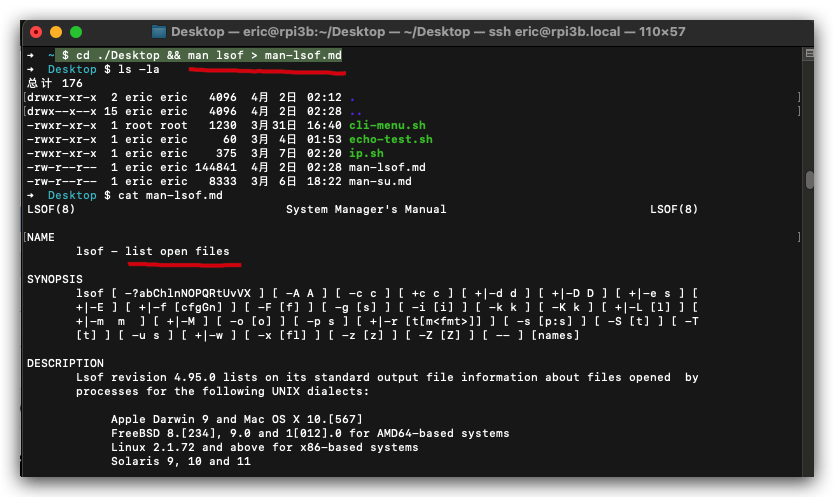
# 自定义命令行提示符
setopt PROMPT_SUBST

# bash 命令行提示符 ⚠️
# PROMPT='\u@\h %(?:%{%}➜ :%{%}➜ ) %{$fg[cyan]%}%c%{$reset_color%} $(git_prompt_info)$ ' ❌
# PROMPT='\[\033[01;32m\]\u@\h\[\033[00m\] %(?:%{%}➜ :%{%}➜ ) %{$fg[cyan]%}%c%{$reset_color%} $(git_prompt_info)$ ' ❌

# bash <用户名>@<本地机的主机名> <当前工作目录名> 显示一个"$"字符,除非你拥有超级用户权限, 它会显示一个"#"字符
# $ PS1=”\u@\h \w$ ”
# bash 绿色提示符
# $ PS1="\[\033[01;32m\]\u@\W\$\[\033[00m\] "

# zsh 命令行提示符 ✅
# %n === $USERNAME ✅
# %m === The hostname up to the first ‘.’. ✅
# PROMPT='%n@%m %(?:%{%}➜ :%{%}➜ ) %{$fg[cyan]%}%c%{$reset_color%} $(git_prompt_info)$ ' ✅

# API https://zsh.sourceforge.io/Doc/Release/Prompt-Expansion.html

# 绿色提示符 %F{green} <string>%f ✅
# eric@rpi3b ➜  Desktop $ 🚀
# PROMPT='%F{green}%n@%m%f %(?:%{%}➜ :%{%}➜ ) %{$fg[cyan]%}%c%{$reset_color%} $(git_prompt_info)$ '
# PROMPT='%F{green}%n@%m%f: ➜ %{$fg[cyan]%}%c%{$reset_color%} $(git_prompt_info)$ '
# %F{purple}$%f❌
# PROMPT='%F{green}%n@%m%f: %{$fg[cyan]%}~%{$reset_color%} $(git_prompt_info) %F{purple}$%f '
# %{$fg[purple]%}$%{$reset_color%} ❌
PROMPT='%F{green}%n@%m%f: %{$fg[cyan]%}~%{$reset_color%} $(git_prompt_info) %{$fg[purple]%}$%{$reset_color%} '
# %{$fg[cyan]%}$%{$reset_color%} ✅
PROMPT='%F{green}%n@%m%f: %{$fg[cyan]%}~%{$reset_color%} $(git_prompt_info) %{$fg[cyan]%}$%{$reset_color%} '
PROMPT='%F{green}%n@%m%f: %{$fg[cyan]%}~%{$reset_color%} $(git_prompt_info) %{$fg[blue]%}$%{$reset_color%} '

PROMPT='%F{green}%n@%m%f: %{$fg[cyan]%}~ %c%{$reset_color%} %{$fg[green]%}$%{$reset_color%} $(git_prompt_info)'
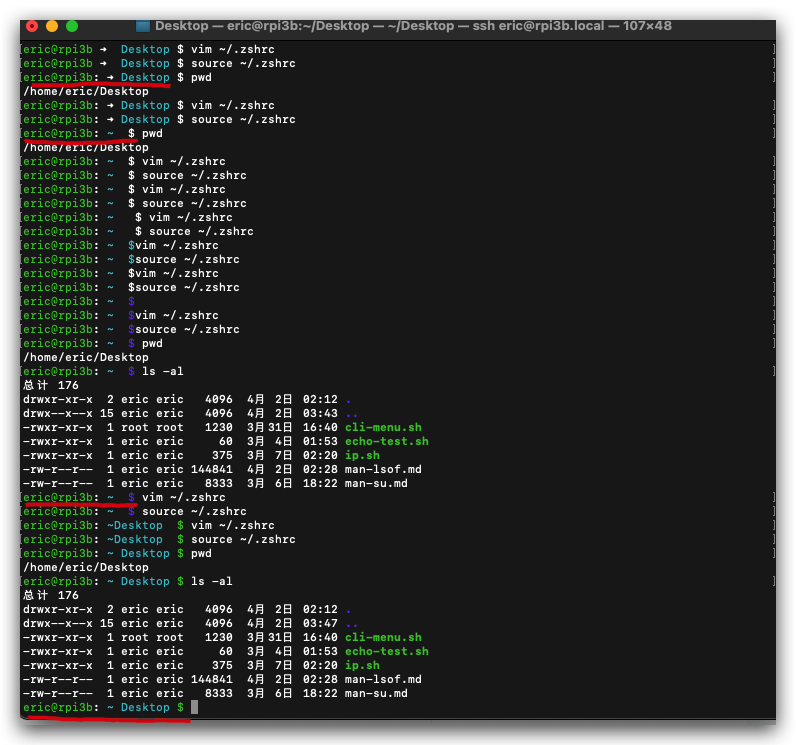
bash
➜  ~ $ echo $PS1
%(?:%{%}➜ :%{%}➜ ) %{$fg[cyan]%}%c%{$reset_color%} $(git_prompt_info)$
(🐞 反爬虫测试!打击盗版⚠️)如果你看到这个信息, 说明这是一篇剽窃的文章,请访问 https://www.cnblogs.com/xgqfrms/ 查看原创文章!
Web Safe Color names
Color Names Supported by All Browsers
All modern browsers support the following 140 color names
https://www.w3schools.com/tags/ref_colornames.asp
Color name & RGB hex string
red FF0000
green 00FF00
blue 0000FF

cyan 00FFFF

Violet #EE82EE 紫色, 紫罗兰色

Purple #800080 紫色的

https://www.w3schools.com/colors/colors_mixer.asp?colorbottom=00FFFF&colortop=FFFFFF
https://www.w3schools.com/colors/colors_picker.asp?colorhex=00FFFF
refs
https://dev.to/cassidoo/customizing-my-zsh-prompt-3417
https://stackoverflow.com/questions/30199068/zsh-prompt-and-hostname
https://askubuntu.com/questions/483797/enable-zsh-prompt-username
https://zwbetz.com/how-to-change-your-zsh-shell-prompt/
https://www.cnblogs.com/lienhua34/p/5018119.html
©xgqfrms 2012-2021
www.cnblogs.com/xgqfrms 发布文章使用:只允许注册用户才可以访问!
原创文章,版权所有©️xgqfrms, 禁止转载 🈲️,侵权必究⚠️!
本文首发于博客园,作者:xgqfrms,原文链接:https://www.cnblogs.com/xgqfrms/p/18805596
未经授权禁止转载,违者必究!

 浙公网安备 33010602011771号