
Linux bash shell "${1}" All In One
Linux bash shell "${1}" All In One
#!/usr/bin/env bash

# 什么鬼,看不懂呀
APPNAME=${2:-$(basename "${1}" '.sh')};

echo $APPNAME
# echo ${APPNAME}
Linux shell docs & refs ✅
$1
https://bash.cyberciti.biz/guide/$1
https://stackoverflow.com/questions/5163144/what-are-the-special-dollar-sign-shell-variables
https://www.gnu.org/software/bash/manual/html_node/Special-Parameters.html
Linux bash ${} vs $()
https://superuser.com/questions/935374/difference-between-and-in-a-shell-script
Linux bash 2>&1
https://stackoverflow.com/questions/818255/what-does-21-mean/818284#818284
echo
#!/usr/bin/env bash

# echo \\n
echo -e '\n'

echo '$0'=$0
echo '$1'=$1

# echo -e '\n'
printf '\n'

# linux block comments / linux multi-lines comments

# ❌
echo <<EOF
Linux Here Documents
这个多行注释 1
这个多行注释 2
这个多行注释 3
EOF

# ✅
# cat <<EOF
# Linux Here Documents
# 这个多行注释 1
# 这个多行注释 2
# 这个多行注释 3
# EOF


# write 覆盖 >
echo 'hello world 1' > single_output.txt
echo 'hello world 2' > single_output.txt
# write 追加 >>
echo 'hello world 3' >> single_output.txt
echo -e '\n'


# write 覆盖 >
echo "hello world 1" > double_output.txt
echo "hello world 2" > double_output.txt
# write 追加 >>
echo "hello world 3" >> double_output.txt
echo -e '\n'

# clear
# rm -rf single_output.txt
# rm -rf double_output.txt

# var
echo 🅿️ "The path variable is $PATH"
echo -e '\n'

# *
echo 👻 *
echo 👻 *.sh
echo -e '\n'

# path
echo 🚀 ~
echo -e '\n'

# range
echo {1..7}
echo -e '\n'

# "" vs ''
echo ✅ "$(ls -al)"

echo ❌ '$(ls -al)'

echo 👎 $(ls -al)
echo -e '\n'
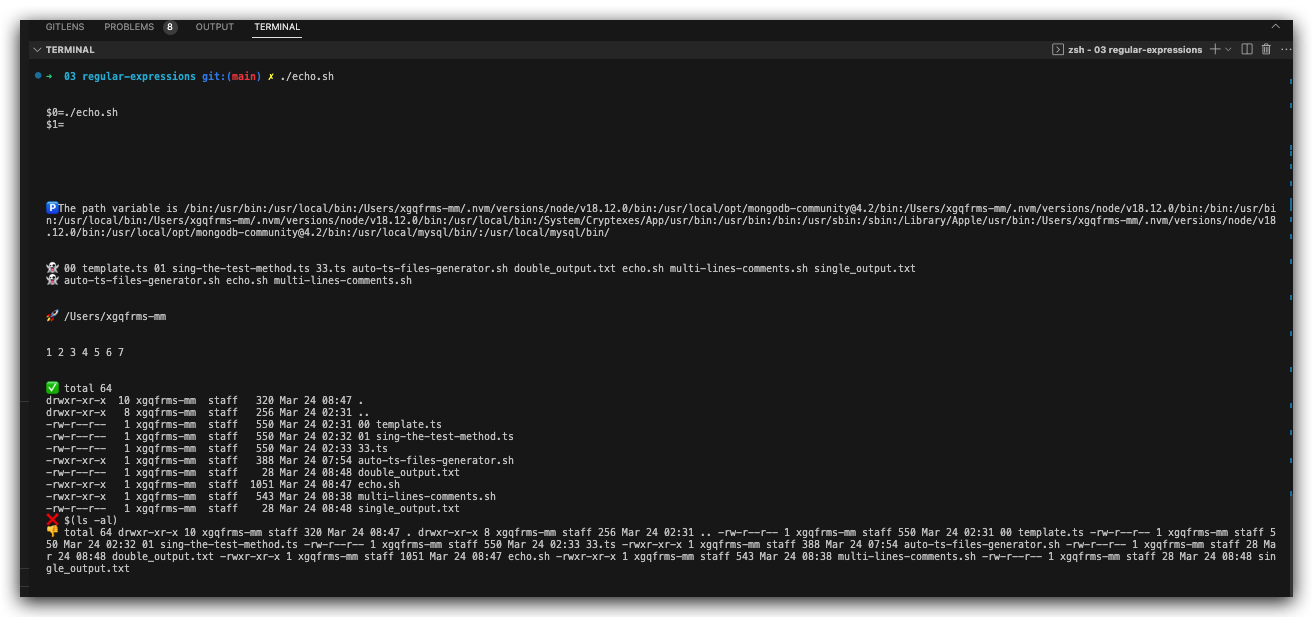
demos
# !/bin/bash bash
# !/usr/bin/env bash

echo "\$basename = $basename"

# 什么鬼,看不懂呀 ❓ https://techtalkbook.com/create-mac-app-from-a-shell-script/
# 多个参数取值逻辑,先取最后面的参数;如果后面的不存在,再取前面的参数 ✅
# $1 读取的字符串会截取掉 `.sh`, abc.sh => abc
# :- 三元运算符
# ${} 运算符
# $() 运算符
APPNAME=${2:-$(basename "${1}" '.sh')};

# "" 双引号, '' 单引号


# echo $APPNAME
# echo ${APPNAME}

echo "\$APPNAME = $APPNAME"
# echo "\${APPNAME} = ${APPNAME}"

# appify your-shell-script.sh "Your App Name"
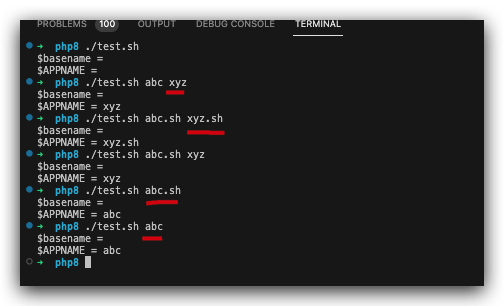
$ ./test.sh abc.sh
$basename =
$APPNAME = abc
$ ./test.sh abc
$basename =
$APPNAME = abc
$ ./test.sh
# $basename =
# $APPNAME =
$ ./test.sh abc xyz
# $basename =
# $APPNAME = xyz
$ ./test.sh abc.sh xyz.sh
# $basename =
# $APPNAME = xyz.sh
$ ./test.sh abc.sh xyz
# $basename =
# $APPNAME = xyz

$ ./test.sh abc.sh
# $basename =
# $APPNAME = abc
$ ./test.sh abc
# $basename =
# $APPNAME = abc
(🐞 反爬虫测试!打击盗版⚠️)如果你看到这个信息, 说明这是一篇剽窃的文章,请访问 https://www.cnblogs.com/xgqfrms/ 查看原创文章!
refs
https://github.com/xgqfrms/linux/issues/24
https://www.cnblogs.com/xgqfrms/p/17004676.html#5136177
#!/usr/bin/env bash

APPNAME=${2:-$(basename "${1}" '.sh')};
DIR="${APPNAME}.app/Contents/MacOS";

if [ -a "${APPNAME}.app" ]; then
  echo "${PWD}/${APPNAME}.app already exists. Provide some unique name if you want to create it anyway. ";
  exit 1;
fi;

mkdir -p "${DIR}";
cp "${1}" "${DIR}/${APPNAME}";
chmod +x "${DIR}/${APPNAME}";

echo "${PWD}/$APPNAME.app";
©xgqfrms 2012-2020
www.cnblogs.com/xgqfrms 发布文章使用:只允许注册用户才可以访问!
原创文章,版权所有©️xgqfrms, 禁止转载 🈲️,侵权必究⚠️!
本文首发于博客园,作者:xgqfrms,原文链接:https://www.cnblogs.com/xgqfrms/p/17007665.html
未经授权禁止转载,违者必究!

 浙公网安备 33010602011771号