
React useContext Hook All In One
React useContext Hook All In One
React 带有两个内置的 Hooks 来管理本地状态:useState 和 useReducer;
如果需要全局状态管理,可以选择加入 React 内置的 useContext Hook 来将 props 从顶层组件传递到底层组件,从而避免 props 多层透传的问题;
这三个 Hooks 足以实现一个强大的状态管理系统
如果过于频繁地使用 React 的 Context 来处理共享/全局状态, Redux 是现在最流行的状态管理库之一;
它允许你管理应用程序的全局状态,任何连接到其全局存储的 React 组件都可以读取和修改这些状态。
const themes = {
  light: {
    foreground: "#000000",
    background: "#eeeeee"
  },
  dark: {
    foreground: "#ffffff",
    background: "#222222"
  }
};

const ThemeContext = React.createContext(themes.light);

function App() {
  return (
    <ThemeContext.Provider value={themes.dark}>
      <Toolbar />
    </ThemeContext.Provider>
  );
}

function Toolbar(props) {
  return (
    <div>
      <ThemedButton />
    </div>
  );
}

function ThemedButton() {
  // 如果你在接触 Hook 前已经对 context API 比较熟悉,那应该可以理解
  // useContext(MyContext) 相当于 class 组件中的 static contextType = MyContext 或者 <MyContext.Consumer>。
  const theme = useContext(ThemeContext);
  return (
    <button style={{ background: theme.background, color: theme.foreground }}>
      I am styled by theme context!
    </button>
  );
}
https://reactjs.org/docs/hooks-reference.html#usecontext
https://zh-hans.reactjs.org/docs/hooks-reference.html#usecontext
Context
Context 提供了一个无需为每层组件手动添加 props,就能在组件树间进行数据传递的方法。
// Context 可以让我们无须明确地传遍每一个组件,就能将值深入传递进组件树。
// 为当前的 theme 创建一个 context(“light”为默认值)。
const ThemeContext = React.createContext('light');
class App extends React.Component {
  render() {
    // 使用一个 Provider 来将当前的 theme 传递给以下的组件树。
    // 无论多深,任何组件都能读取这个值。
    // 在这个例子中,我们将 “dark” 作为当前的值传递下去。
    return (
      <ThemeContext.Provider value="dark">
        <Toolbar />
      </ThemeContext.Provider>
    );
  }
}

// 中间的组件再也不必指明往下传递 theme 了。
function Toolbar() {
  return (
    <div>
      <ThemedButton />
    </div>
  );
}

class ThemedButton extends React.Component {
  // 指定 contextType 读取当前的 theme context。
  // React 会往上找到最近的 theme Provider,然后使用它的值。
  // 在这个例子中,当前的 theme 值为 “dark”。
  static contextType = ThemeContext;
  render() {
    return <Button theme={this.context} />;
  }
}
https://zh-hans.reactjs.org/docs/context.html
https://github.com/facebook/react/issues/15156#issuecomment-474590693
React useContext Hook render twice bug ❌
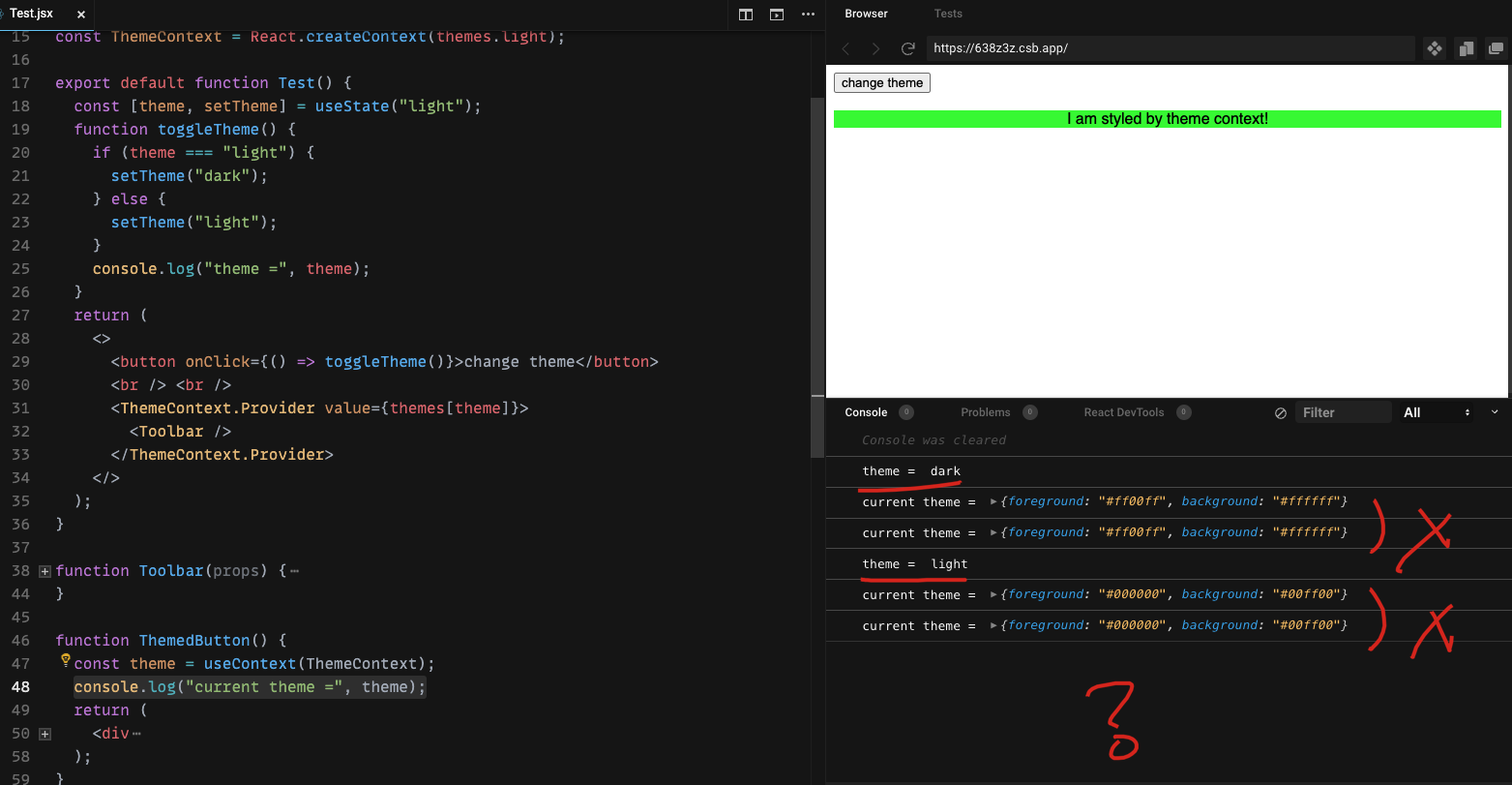
import React, { useContext, useState, useMemo } from "react";
import "./styles.css";

const themes = {
  light: {
    foreground: "#ffffff",
    background: "#ff00ff"
  },
  dark: {
    foreground: "#000000",
    background: "#00ff00"
  }
};

const ThemeContext = React.createContext(themes.light);

export default function Test() {
  const [theme, setTheme] = useState("light");
  function toggleTheme() {
    if (theme === "light") {
      setTheme("dark");
    } else {
      setTheme("light");
    }
    console.clear();
    // console.log("theme = ", theme);
    const style = `
      background: ${themes[theme].background};
      color: ${themes[theme].foreground};
      font-size: 23px;
    `;
    console.log(`%ctheme = ${theme}`, style);
  }
  return (
    <>
      <button onClick={() => toggleTheme()}>change theme</button>
      <br /> <br />
      <ThemeContext.Provider value={themes[theme]}>
        <Toolbar />
      </ThemeContext.Provider>
    </>
  );
}

function Toolbar() {
  return (
    <div className="App">
      <ThemedButton />
    </div>
  );
}

function ThemedButton() {
  const theme = useContext(ThemeContext);
  console.log("❌current theme =", theme);
  return useMemo(() => {
    // The rest of your rendering logic
    // console.log("useMemo ?");
    return (
      <div
        style={{
          background: theme.background,
          color: theme.foreground
        }}
      >
        I am styled by theme context!
      </div>
    );
  }, [theme])
  // return (
  //   <div
  //     style={{
  //       background: theme.background,
  //       color: theme.foreground
  //     }}
  //   >
  //     I am styled by theme context!
  //   </div>
  // );
}
https://github.com/facebook/react/issues/15156
// memo, useMemo

import React, { createContext, useState, useContext, memo, useMemo } from "react";
import ReactDOM from "react-dom";
refs
©xgqfrms 2012-2020
www.cnblogs.com/xgqfrms 发布文章使用:只允许注册用户才可以访问!
原创文章,版权所有©️xgqfrms, 禁止转载 🈲️,侵权必究⚠️!
本文首发于博客园,作者:xgqfrms,原文链接:https://www.cnblogs.com/xgqfrms/p/16313775.html
未经授权禁止转载,违者必究!

 浙公网安备 33010602011771号