
【性能测试】性能监控-python编写(CPU | 内存 | 磁盘io)占比监控脚本
一、主要通过Python脚本实现对linux环境(CPU | 内存 | 磁盘io)监控
脚本示例:
import time
import subprocess

# 获取 CPU 使用率
def get_cpu_usage():
    #系统 CPU 占比 = 系统态占比 + 空闲态占比 = 3.2% + 36.5% = 39.7%
    cpu_usage = subprocess.check_output("top -bn1 | grep 'Cpu(s)' | awk '{print $2 + $4}'", shell=True)
    cpu_usage = cpu_usage.decode().strip()
    print(f"CPU 使用率:{cpu_usage}%")

# 获取内存占用
def get_memory_usage():
    memory_output = subprocess.check_output("free -m | awk 'NR==2{printf \"%s/%sMB (%.2f%%)\", $3,$2,$3*100/$2 }'", shell=True)
    memory_output = memory_output.decode().strip()
    print(f"内存占用:{memory_output}")

# 获取磁盘 I/O
def get_disk_io():
    disk_io = subprocess.check_output("iostat -d -k | awk 'NR==4 {print $3, $4}'", shell=True)
    disk_io = disk_io.decode().strip().split()
    if len(disk_io) >= 2:
        disk_read_bytes = float(disk_io[0]) / 1024
        disk_write_bytes = float(disk_io[1]) / 1024
        print(f"磁盘读取:{disk_read_bytes:.2f} MB/s")
        print(f"磁盘写入:{disk_write_bytes:.2f} MB/s")
    else:
        print("无法获取磁盘 I/O 信息")


# 主函数,定时监控
def main():
    while True:
        get_cpu_usage()
        get_memory_usage()
        get_disk_io()
        print("----------------------")
        # 设置监控间隔,单位为秒
        time.sleep(5)

if __name__ == '__main__':
    main()
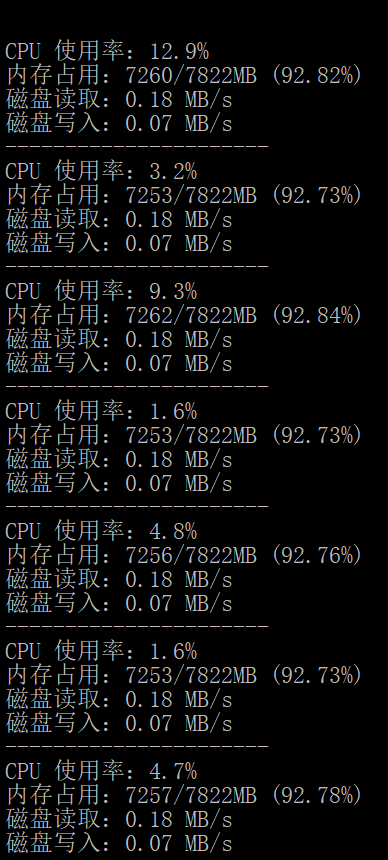
返回结果:
备注:
脚本需要进入指定linux目录执行:
python3 cpu_memory_disk_io.py
本文来自博客园,作者:橘橙AI全栈测试笔记,转载请注明原文链接:https://www.cnblogs.com/xfbk/p/17541823.html

 浙公网安备 33010602011771号