opwtest
首先新建一个项目
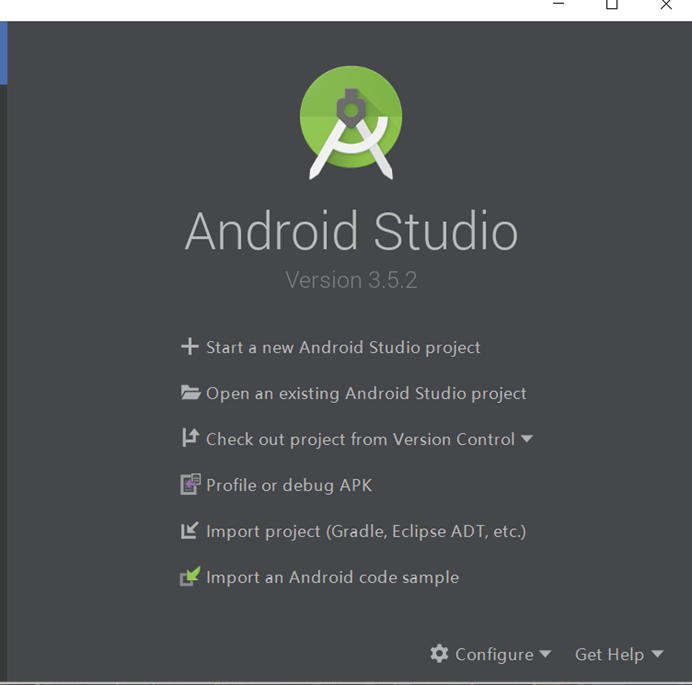
选择empty Activity next
命名随意,我这里命名为qqlogin,然后Finish
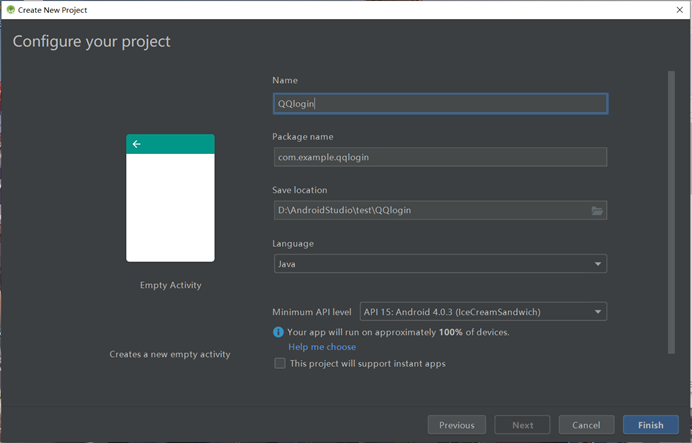
同步完成之后将视图切换成Project
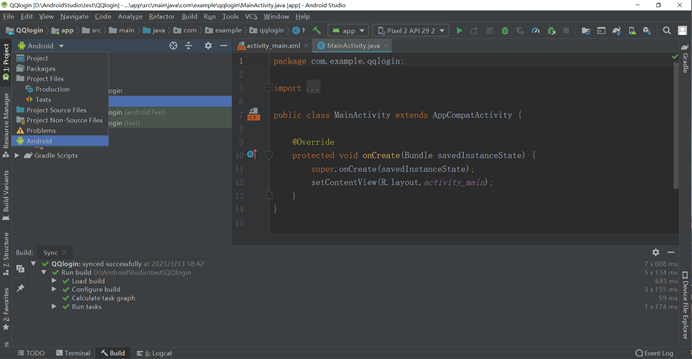
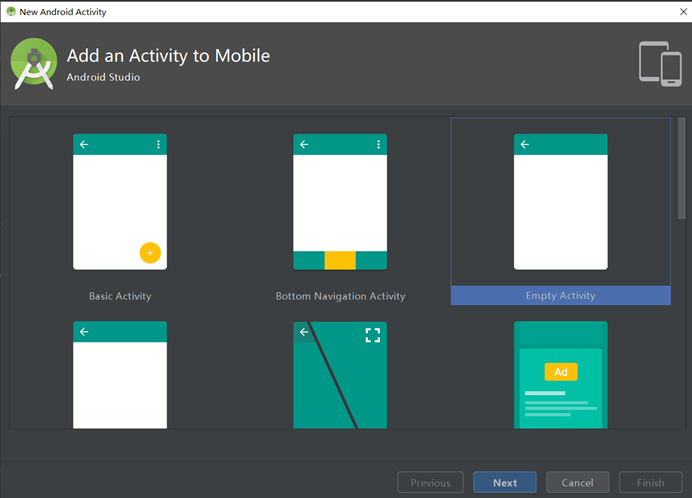
新建另一个活动,作为登录成功后的显示页面
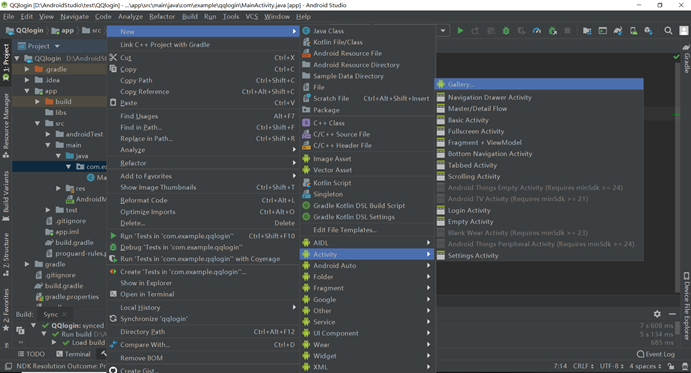
依然是empty Activity next
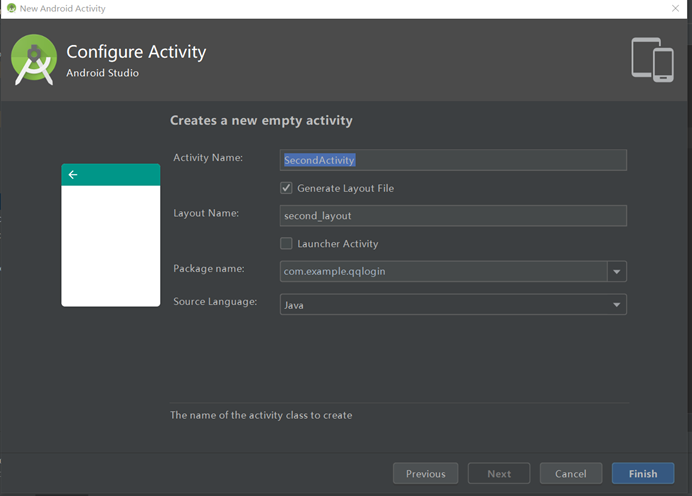
这里我将活动名字命名为SecondActivity布局文件名字命名为second_layout,命名可随意
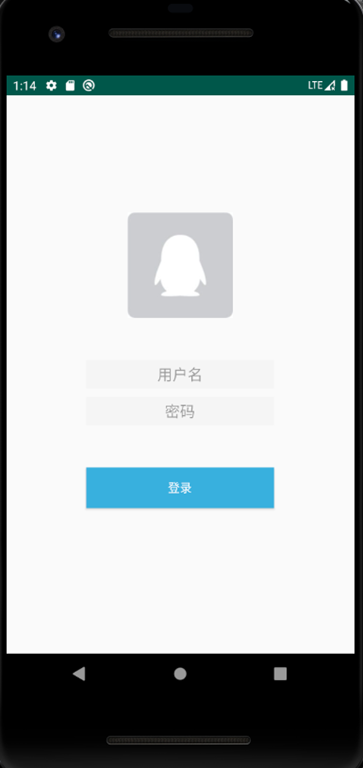
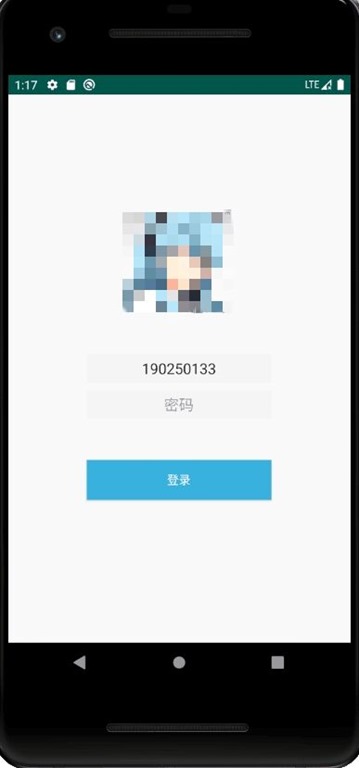
实现后的界面差不多是两个包括登录界面以及登录后的界面(这里添加了一个监听输入用户名返回对应用户头像的功能,后面会解释)
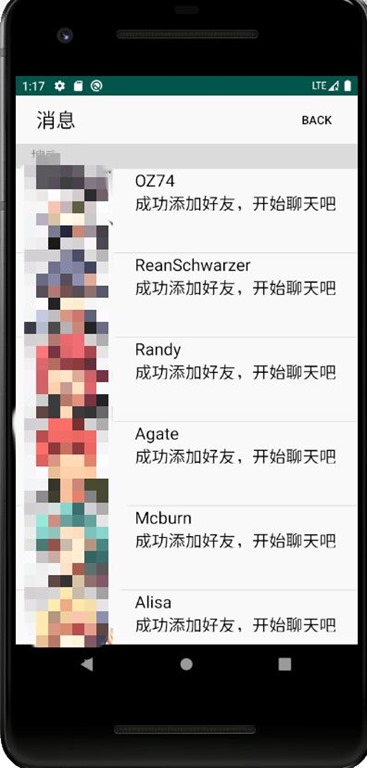
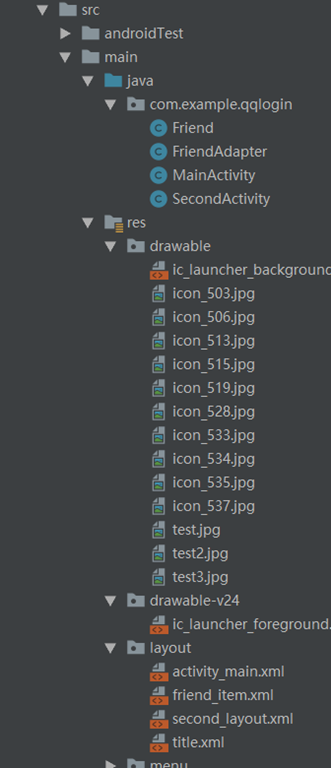
目录结构
第一个登录界面的活动以及布局
MainActivity.java内容
package com.example.qqlogin;

import androidx.appcompat.app.ActionBar;
import androidx.appcompat.app.AppCompatActivity;

import android.content.Intent;
import android.os.Bundle;
import android.text.Editable;
import android.text.TextWatcher;
import android.util.Log;
import android.view.View;
import android.widget.Button;
import android.widget.EditText;
import android.widget.ImageView;
import android.widget.ProgressBar;
import android.widget.Toast;

public class MainActivity extends AppCompatActivity {
    private EditText editText1;  //用户名输入
    private EditText editText2;  //密码输入
    private String name="190250133";  //对应的用户名以及密码
    private String password="qwertyuiop";
    private ImageView imageView;   //显示头像的图片
    @Override
    protected void onCreate(Bundle savedInstanceState) {
        super.onCreate(savedInstanceState);
        setContentView(R.layout.activity_main);
        Button button = (Button) findViewById(R.id.button1);
        editText1 = (EditText) findViewById(R.id.input_name);//分别得到 editText1 editText2 button imageView实例
        editText2 = (EditText) findViewById(R.id.input_password);
        imageView = (ImageView) findViewById(R.id.image_view);
        button.setOnClickListener(new View.OnClickListener() {   //为button,也就是登录按钮注册监听器监听点击事件
            @Override
            public void onClick(View v) {
                String inputName = editText1.getText().toString();   //从文本输入框得到用户名以及密码
                String inputPassword = editText2.getText().toString();
                if (inputName.equals(name) && inputPassword.equals(password)) {
                    Intent intent = new Intent(MainActivity.this, SecondActivity.class); //显示intent
                    startActivity(intent);
                } else {
                    Toast.makeText(MainActivity.this, "登录失败( ゚∀。)", Toast.LENGTH_SHORT).show();
                }   //将用户名以及密码与已有的用户名和密码配对,如果匹配成功则通过显示intent跳转到登录成功的页面
                    //若登录失败,则通过Toast返回登录失败的提示,直到登录成功为止
            }
        });
        editText1.addTextChangedListener(new TextWatcher() {  //为editText1注册监听事件,监听文本输入
            @Override
            public void beforeTextChanged(CharSequence s, int start, int count, int after) {

            }

            @Override
            public void onTextChanged(CharSequence s, int start, int before, int count) {

            }

            @Override
            public void afterTextChanged(Editable s) {
                //获取到已有的用户名,如果已有用户名和输入用户名相同时,则会在用户名输入完成后返回用户头像
                String inputName = editText1.getText().toString();
                if (inputName.equals(name)){
                   imageView.setImageResource(R.drawable.test3);}
            }
        });
        //隐藏系统自带的标题栏
        ActionBar actionbar = getSupportActionBar();
        if (actionbar != null) {
            actionbar.hide();
        }
    }
}
Activity_main.xml
对应的是MainActivity.java
<?xml version="1.0" encoding="utf-8"?>
<RelativeLayout xmlns:android="http://schemas.android.com/apk/res/android"
    android:layout_width="match_parent"
    android:layout_height="match_parent">
    <EditText
        android:id="@+id/input_name"
        android:layout_width="100pt"
        android:layout_height="15pt"
        android:hint="用户名"
        android:gravity="center"
        android:layout_centerInParent="true"
        android:background="#F5F5F5"
        />

    <ImageView
        android:id="@+id/image_view"
        android:layout_width="125dp"
        android:layout_height="125dp"
        android:layout_above="@id/input_name"
        android:layout_centerVertical="true"
        android:layout_marginBottom="50dp"
        android:src="@drawable/test"
        android:layout_centerHorizontal="true"
        />
    <EditText
        android:id="@+id/input_password"
        android:layout_width="100pt"
        android:layout_height="15pt"
        android:hint="密码"
        android:gravity="center"
        android:layout_below="@id/input_name"
        android:layout_centerHorizontal="true"
        android:background="#F5F5F5"
        android:layout_marginTop="10dp"
        android:inputType="textPassword"
        />

    <Button
        android:id="@+id/button1"
        android:layout_width="100pt"
        android:layout_height="wrap_content"
        android:text="登录"
        android:layout_below="@id/input_password"
        android:layout_centerHorizontal="true"
        android:background="#38B0DE"
        android:textColor="#FFFF"
        android:layout_marginTop="50dp"
        />

</RelativeLayout>

Second_layout.xml
对应的是SecondActivity.java
<?xml version="1.0" encoding="utf-8"?>
<LinearLayout xmlns:android="http://schemas.android.com/apk/res/android"
    android:orientation="vertical"
    android:layout_width="match_parent"
    android:layout_height="match_parent">

    <include
        layout="@layout/title"
        android:layout_width="match_parent"
        android:layout_height="88dp" />
    <ListView
        android:id="@+id/list_view"
        android:layout_width="match_parent"
        android:layout_height="match_parent"
        />
</LinearLayout>


Friend_item.xml
对应SecondActivity中的滑动栏
<?xml version="1.0" encoding="utf-8"?>
<LinearLayout xmlns:android="http://schemas.android.com/apk/res/android"
    android:orientation="horizontal"
    android:layout_width="match_parent"
    android:layout_height="wrap_content">
    <ImageView
        android:id="@+id/friend_image"
        android:layout_width="0dp"
        android:layout_height="100dp"
        android:layout_weight="1" />
    <TextView
        android:id="@+id/friend_name"
        android:layout_width="0dp"
        android:layout_height="50dp"
        android:layout_weight="2"
        android:layout_gravity="top"
        android:textSize="20sp"
        android:textColor="#000"
        android:layout_marginLeft="10dp"
        android:singleLine="false"
        />
</LinearLayout>
第二个登录界面的活动以及布局
SecondActivity.java内容
package com.example.qqlogin;

import androidx.appcompat.app.ActionBar;
import androidx.appcompat.app.AppCompatActivity;

import android.os.Bundle;
import android.view.View;
import android.widget.Button;
import android.widget.ListView;

import java.util.ArrayList;
import java.util.List;

public class SecondActivity extends AppCompatActivity {
    private List<Friend> friendList = new ArrayList<>();  //定义一个泛型数组
    @Override
    protected void onCreate(Bundle savedInstanceState) {
        super.onCreate(savedInstanceState);
        setContentView(R.layout.second_layout);
        Button button = (Button) findViewById(R.id.title_edit); //得到button实例
        initFriend();  //初始化好友数据
        //FriendAdapter作为适配器将获取到的好友头像以及文本传给ListView
        FriendAdapter adapter = new FriendAdapter(SecondActivity.this,R.layout.friend_item,friendList);
        ListView listView =(ListView) findViewById(R.id.list_view);//得到ListView实例
        //调用 ListView 的 setAdapter()方法,将构建好的适配器对象传递进去,
        listView.setAdapter(adapter);
        //隐藏系统自带的标题栏
        ActionBar actionbar = getSupportActionBar();
        if (actionbar != null) {
            actionbar.hide();
        }
        //为左上角的button注册一个监听事件,用于退出用户登录
        button.setOnClickListener(new View.OnClickListener() {
            @Override
            public void onClick(View v) {
                finish();
            }
        });

    }
    //初始化的好友数据,通过friendList.add添加到定义的数组中
    private void initFriend(){
        Friend Oz74 = new Friend("OZ74\n成功添加好友,开始聊天吧",R.drawable.icon_506);
        friendList.add(Oz74);
        Friend ReanSchwarzer = new Friend("ReanSchwarzer\n成功添加好友,开始聊天吧",R.drawable.icon_503);
        friendList.add(ReanSchwarzer);
        Friend  Randy= new Friend("Randy\n成功添加好友,开始聊天吧",R.drawable.icon_515);
        friendList.add(Randy);
        Friend  Agate= new Friend("Agate\n成功添加好友,开始聊天吧",R.drawable.icon_513);
        friendList.add(Agate);
        Friend  Mcburn= new Friend("Mcburn\n成功添加好友,开始聊天吧",R.drawable.icon_519);
        friendList.add(Mcburn);
        Friend  Alisa= new Friend("Alisa\n成功添加好友,开始聊天吧",R.drawable.icon_528);
        friendList.add(Alisa);
        Friend  FieClaussell= new Friend("FieClaussell\n成功添加好友,开始聊天吧",R.drawable.icon_533);
        friendList.add(FieClaussell);
        Friend  Emma= new Friend("Emma\n成功添加好友,开始聊天吧",R.drawable.icon_534);
        friendList.add(Emma);


    }
}

FriendAdapter适配器内容
package com.example.qqlogin;

import android.content.Context;
import android.view.LayoutInflater;
import android.view.View;
import android.view.ViewGroup;
import android.widget.ArrayAdapter;
import android.widget.ImageView;
import android.widget.TextView;

import java.util.List;
//这里是作为ListView传入数据的适配器,主要功能是获取到相应的用户头像以及文本信息
//具体的各种参数我也说的不太清楚,后面应该会讲,感兴趣的可以参考下面的这篇文章
//主要是Adapter以及getView()方法的理解
//https://blog.csdn.net/l799069596/article/details/47301711
public class FriendAdapter extends ArrayAdapter<Friend> {
    private int resourceId;
    public FriendAdapter(Context context, int textViewResourceId,
                         List<Friend> objects) {
        super(context, textViewResourceId, objects);
        resourceId = textViewResourceId;
    }
    @Override
    public View getView(int position, View convertView, ViewGroup parent) {
        Friend friend = getItem(position); // 获取当前项的 Fruit 实例
        View view = LayoutInflater.from(getContext()).inflate(resourceId, parent,
                false);
        //下面四行就是创建实例以及获取用户头像以及对应的文本
        ImageView frinedImage = (ImageView) view.findViewById(R.id.friend_image);
        TextView frinedName = (TextView) view.findViewById(R.id.friend_name);
        frinedImage.setImageResource(friend.getImageId());
        frinedName.setText(friend.getName());
        return view;
    }
}


Friend.java
//作为 ListView 适配器的适配类型
package com.example.qqlogin;
public class Friend {
    private String name;
    private int imageId;

    public Friend(String name, int imageId) {
        this.name = name;
        this.imageId = imageId;
    }

    public String getName() {
        return name;
    }

    public int getImageId() {
        return imageId;
    }
}
Second_layout.xml
对应的是SecondActivity.java
<?xml version="1.0" encoding="utf-8"?>
<LinearLayout xmlns:android="http://schemas.android.com/apk/res/android"
    android:orientation="vertical"
    android:layout_width="match_parent"
    android:layout_height="match_parent">

    <include
        layout="@layout/title"
        android:layout_width="match_parent"
        android:layout_height="88dp" />
    <ListView
        android:id="@+id/list_view"
        android:layout_width="match_parent"
        android:layout_height="match_parent"
        />
</LinearLayout>


Friend_item.xml
对应SecondActivity中的滑动栏
<?xml version="1.0" encoding="utf-8"?>
<LinearLayout xmlns:android="http://schemas.android.com/apk/res/android"
    android:orientation="horizontal"
    android:layout_width="match_parent"
    android:layout_height="wrap_content">
    <ImageView
        android:id="@+id/friend_image"
        android:layout_width="0dp"
        android:layout_height="100dp"
        android:layout_weight="1" />
    <TextView
        android:id="@+id/friend_name"
        android:layout_width="0dp"
        android:layout_height="50dp"
        android:layout_weight="2"
        android:layout_gravity="top"
        android:textSize="20sp"
        android:textColor="#000"
        android:layout_marginLeft="10dp"
        android:singleLine="false"
        />
</LinearLayout>


Title.xml
对应secondActivity的标题栏
<?xml version="1.0" encoding="utf-8"?>
<RelativeLayout xmlns:android="http://schemas.android.com/apk/res/android"
    android:layout_width="match_parent"
    android:layout_height="match_parent">

<!--    <TextView-->
<!--        android:id="@+id/title_text"-->
<!--        android:layout_width="wrap_content"-->
<!--        android:layout_height="wrap_content"-->
<!--        android:layout_alignParentLeft="true"-->
<!--        android:text="      消息"-->
<!--        android:textt-->
<!--        android:textColor="#000"-->
<!--        android:textSize="24sp" />-->
    <Button
        android:id="@+id/title"
        android:layout_width="wrap_content"
        android:layout_height="wrap_content"
        android:layout_alignParentLeft="true"
        android:layout_margin="5dp"
        android:text="消息"
        android:textSize="24sp"
        android:textColor="#000"
        android:background="@null"/>

    <Button
        android:id="@+id/title_edit"
        android:layout_width="wrap_content"
        android:layout_height="wrap_content"
        android:layout_alignParentRight="true"
        android:layout_margin="5dp"
        android:text="back"
        android:textColor="#000"
        android:background="@null"/>

    <EditText
        android:layout_width="match_parent"
        android:layout_height="15pt"
        android:hint="    搜索"
        android:gravity="left|center"
        android:layout_centerInParent="true"
        android:layout_below="@id/title"
        android:background="#DCDCDC"
        />

</RelativeLayout>

 浙公网安备 33010602011771号