
C# WinFormPDF和Word转换工具
C# WinFormPDF和Word转换工具
using System;
using System.IO;
using System.Windows.Forms;
using iTextSharp.text;
using iTextSharp.text.pdf;
using iTextSharp.text.pdf.draw;
using DocumentFormat.OpenXml;
using DocumentFormat.OpenXml.Packaging;
using DocumentFormat.OpenXml.Wordprocessing;
using A = DocumentFormat.OpenXml.Drawing;
using DW = DocumentFormat.OpenXml.Drawing.Wordprocessing;
using PIC = DocumentFormat.OpenXml.Drawing.Pictures;
using static System.Net.Mime.MediaTypeNames;
using static System.Windows.Forms.VisualStyles.VisualStyleElement.ProgressBar;
using static System.Windows.Forms.VisualStyles.VisualStyleElement.Tab;
using System.Drawing.Printing;
using System.Drawing;
using System.Xml.Linq;
namespace PdfWordConverter
{
public partial class MainForm : Form
{
// 添加对以下NuGet包的引用:
// 1. iTextSharp (5.5.13.3)
// 2. DocumentFormat.OpenXml (2.20.0)
// 3. System.Drawing.Common (6.0.0)
private Label lblTitle;
private GroupBox groupBoxPdfToWord;
private GroupBox groupBoxWordToPdf;
private TextBox txtPdfPath;
private TextBox txtWordPath;
private Button btnBrowsePdf;
private Button btnBrowseWord;
private Button btnPdfToWord;
private Button btnWordToPdf;
private ProgressBar progressBar;
private Label lblStatus;
private RichTextBox txtPreview;
public MainForm()
{
this.Text = "PDF ↔ Word 转换器";
this.Size = new System.Drawing.Size(900, 600);
this.StartPosition = FormStartPosition.CenterScreen;
this.BackColor = System.Drawing.Color.FromArgb(240, 240, 240);
InitializeComponents();
}
private void InitializeComponents()
{
// 标题
lblTitle = new Label
{
Text = "📄 PDF ↔ Word 文档转换器",
Font = new System.Drawing.Font("微软雅黑", 20, System.Drawing.FontStyle.Bold),
ForeColor = System.Drawing.Color.FromArgb(0, 120, 215),
AutoSize = true,
Location = new System.Drawing.Point(280, 20)
};
this.Controls.Add(lblTitle);
// PDF转Word区域
groupBoxPdfToWord = new GroupBox
{
Text = " PDF 转 Word ",
Font = new System.Drawing.Font("微软雅黑", 12, System.Drawing.FontStyle.Bold),
ForeColor = System.Drawing.Color.FromArgb(0, 100, 200),
Location = new System.Drawing.Point(30, 70),
Size = new System.Drawing.Size(400, 200),
BackColor = System.Drawing.Color.White
};
txtPdfPath = new TextBox
{
Location = new System.Drawing.Point(20, 40),
Size = new System.Drawing.Size(280, 25),
Font = new System.Drawing.Font("微软雅黑", 10),
ReadOnly = true,
BackColor = System.Drawing.Color.FromArgb(245, 245, 245)
};
btnBrowsePdf = new Button
{
Text = "浏览...",
Location = new System.Drawing.Point(310, 38),
Size = new System.Drawing.Size(70, 28),
Font = new System.Drawing.Font("微软雅黑", 9),
BackColor = System.Drawing.Color.FromArgb(0, 120, 215),
ForeColor = System.Drawing.Color.White,
FlatStyle = FlatStyle.Flat
};
btnBrowsePdf.Click += BtnBrowsePdf_Click;
btnPdfToWord = new Button
{
Text = "开始转换 → Word",
Location = new System.Drawing.Point(20, 90),
Size = new System.Drawing.Size(360, 50),
Font = new System.Drawing.Font("微软雅黑", 12, System.Drawing.FontStyle.Bold),
BackColor = System.Drawing.Color.FromArgb(76, 175, 80),
ForeColor = System.Drawing.Color.White,
FlatStyle = FlatStyle.Flat,
Cursor = Cursors.Hand
};
btnPdfToWord.Click += BtnPdfToWord_Click;
groupBoxPdfToWord.Controls.AddRange(new System.Windows.Forms.Control[] { txtPdfPath, btnBrowsePdf, btnPdfToWord });
this.Controls.Add(groupBoxPdfToWord);
// Word转PDF区域
groupBoxWordToPdf = new GroupBox
{
Text = " Word 转 PDF ",
Font = new System.Drawing.Font("微软雅黑", 12, System.Drawing.FontStyle.Bold),
ForeColor = System.Drawing.Color.FromArgb(200, 80, 0),
Location = new System.Drawing.Point(460, 70),
Size = new System.Drawing.Size(400, 200),
BackColor = System.Drawing.Color.White
};
txtWordPath = new TextBox
{
Location = new System.Drawing.Point(20, 40),
Size = new System.Drawing.Size(280, 25),
Font = new System.Drawing.Font("微软雅黑", 10),
ReadOnly = true,
BackColor = System.Drawing.Color.FromArgb(245, 245, 245)
};
btnBrowseWord = new Button
{
Text = "浏览...",
Location = new System.Drawing.Point(310, 38),
Size = new System.Drawing.Size(70, 28),
Font = new System.Drawing.Font("微软雅黑", 9),
BackColor = System.Drawing.Color.FromArgb(0, 120, 215),
ForeColor = System.Drawing.Color.White,
FlatStyle = FlatStyle.Flat
};
btnBrowseWord.Click += BtnBrowseWord_Click;
btnWordToPdf = new Button
{
Text = "开始转换 → PDF",
Location = new System.Drawing.Point(20, 90),
Size = new System.Drawing.Size(360, 50),
Font = new System.Drawing.Font("微软雅黑", 12, System.Drawing.FontStyle.Bold),
BackColor = System.Drawing.Color.FromArgb(244, 67, 54),
ForeColor = System.Drawing.Color.White,
FlatStyle = FlatStyle.Flat,
Cursor = Cursors.Hand
};
btnWordToPdf.Click += BtnWordToPdf_Click;
groupBoxWordToPdf.Controls.AddRange(new System.Windows.Forms.Control[] { txtWordPath, btnBrowseWord, btnWordToPdf });
this.Controls.Add(groupBoxWordToPdf);
// 进度条
progressBar = new ProgressBar
{
Location = new System.Drawing.Point(30, 290),
Size = new System.Drawing.Size(830, 25),
Style = ProgressBarStyle.Continuous,
ForeColor = System.Drawing.Color.FromArgb(0, 150, 255)
};
this.Controls.Add(progressBar);
// 状态标签
lblStatus = new Label
{
Text = "就绪",
Location = new System.Drawing.Point(30, 320),
Size = new System.Drawing.Size(830, 25),
Font = new System.Drawing.Font("微软雅黑", 10),
ForeColor = System.Drawing.Color.Gray
};
this.Controls.Add(lblStatus);
// 预览区域
var lblPreview = new Label
{
Text = "📋 内容预览:",
Location = new System.Drawing.Point(30, 350),
Size = new System.Drawing.Size(200, 25),
Font = new System.Drawing.Font("微软雅黑", 11, System.Drawing.FontStyle.Bold)
};
this.Controls.Add(lblPreview);
txtPreview = new RichTextBox
{
Location = new System.Drawing.Point(30, 380),
Size = new System.Drawing.Size(830, 160),
Font = new System.Drawing.Font("Consolas", 10),
BackColor = System.Drawing.Color.FromArgb(250, 250, 250),
BorderStyle = BorderStyle.FixedSingle,
ReadOnly = true
};
this.Controls.Add(txtPreview);
}
// PDF转Word功能
private void BtnPdfToWord_Click(object sender, EventArgs e)
{
if (string.IsNullOrEmpty(txtPdfPath.Text) || !File.Exists(txtPdfPath.Text))
{
MessageBox.Show("请先选择有效的PDF文件!", "提示", MessageBoxButtons.OK, MessageBoxIcon.Warning);
return;
}
SaveFileDialog saveDialog = new SaveFileDialog
{
Filter = "Word文档|*.docx",
FileName = Path.GetFileNameWithoutExtension(txtPdfPath.Text) + "_converted.docx",
Title = "保存Word文档"
};
if (saveDialog.ShowDialog() == DialogResult.OK)
{
try
{
SetStatus("正在转换 PDF 到 Word...", true);
ConvertPdfToWord(txtPdfPath.Text, saveDialog.FileName);
SetStatus($"转换完成!已保存到: {saveDialog.FileName}", false);
MessageBox.Show("PDF转Word转换成功!", "成功", MessageBoxButtons.OK, MessageBoxIcon.Information);
}
catch (Exception ex)
{
SetStatus("转换失败", false);
MessageBox.Show($"转换失败:{ex.Message}", "错误", MessageBoxButtons.OK, MessageBoxIcon.Error);
}
}
}
private void ConvertPdfToWord(string pdfPath, string wordPath)
{
progressBar.Value = 10;
// 提取PDF文本
string text = ExtractTextFromPdf(pdfPath);
progressBar.Value = 50;
// 创建Word文档
using (WordprocessingDocument doc = WordprocessingDocument.Create(wordPath, WordprocessingDocumentType.Document))
{
MainDocumentPart mainPart = doc.AddMainDocumentPart();
mainPart.Document = new DocumentFormat.OpenXml.Wordprocessing.Document();
DocumentFormat.OpenXml.Wordprocessing.Body body = new DocumentFormat.OpenXml.Wordprocessing.Body();
// 添加标题
DocumentFormat.OpenXml.Wordprocessing.Paragraph titlePara = new DocumentFormat.OpenXml.Wordprocessing.Paragraph(
new Run
(
new DocumentFormat.OpenXml.Wordprocessing.Text("转换自: " + Path.GetFileName(pdfPath))
{
Space = SpaceProcessingModeValues.Preserve
}
)
);
titlePara.ParagraphProperties = new ParagraphProperties(
new ParagraphStyleId { Val = "Title" },
new Justification { Val = JustificationValues.Center }
);
body.Append(titlePara);
// 添加分隔线
body.Append(new DocumentFormat.OpenXml.Wordprocessing.Paragraph(new Run(new Break { Type = BreakValues.Page })));
// 处理文本内容
string[] lines = text.Split(new[] { '\r', '\n' }, StringSplitOptions.RemoveEmptyEntries);
progressBar.Value = 70;
foreach (string line in lines)
{
if (!string.IsNullOrWhiteSpace(line))
{
DocumentFormat.OpenXml.Wordprocessing.Paragraph para = new DocumentFormat.OpenXml.Wordprocessing.Paragraph();
Run run = new Run();
// 处理可能的标题(短行且没有标点)
if (line.Length < 50 && !line.Contains(".") && !line.Contains("。"))
{
run.Append(new RunProperties(
new Bold(),
new FontSize { Val = "28" },
new DocumentFormat.OpenXml.Wordprocessing.Color { Val = "2E74B5" }
));
}
run.Append(new DocumentFormat.OpenXml.Wordprocessing.Text(line) { Space = SpaceProcessingModeValues.Preserve });
para.Append(run);
body.Append(para);
}
}
// 添加页面设置
SectionProperties sectionProps = new SectionProperties(
new DocumentFormat.OpenXml.Wordprocessing.PageSize { Width = 12240, Height = 15840 }, // Letter size
new PageMargin { Top = 1440, Right = 1440, Bottom = 1440, Left = 1440 }
);
body.Append(sectionProps);
mainPart.Document.Append(body);
mainPart.Document.Save();
}
progressBar.Value = 100;
// 显示预览
txtPreview.Text = text.Length > 2000 ? text.Substring(0, 2000) + "...\n\n[内容已截断,完整内容请查看生成的Word文件]" : text;
}
private string ExtractTextFromPdf(string pdfPath)
{
StringWriter output = new StringWriter();
PdfReader reader = new PdfReader(pdfPath);
for (int i = 1; i <= reader.NumberOfPages; i++)
{
//string text = PdfTextExtractor.GetTextFromPage(reader, i);
//output.WriteLine(text);
//output.WriteLine();
}
return output.ToString();
}
// Word转PDF功能
private void BtnWordToPdf_Click(object sender, EventArgs e)
{
if (string.IsNullOrEmpty(txtWordPath.Text) || !File.Exists(txtWordPath.Text))
{
MessageBox.Show("请先选择有效的Word文件!", "提示", MessageBoxButtons.OK, MessageBoxIcon.Warning);
return;
}
SaveFileDialog saveDialog = new SaveFileDialog
{
Filter = "PDF文档|*.pdf",
FileName = Path.GetFileNameWithoutExtension(txtWordPath.Text) + "_converted.pdf",
Title = "保存PDF文档"
};
if (saveDialog.ShowDialog() == DialogResult.OK)
{
try
{
SetStatus("正在转换 Word 到 PDF...", true);
ConvertWordToPdf(txtWordPath.Text, saveDialog.FileName);
SetStatus($"转换完成!已保存到: {saveDialog.FileName}", false);
MessageBox.Show("Word转PDF转换成功!", "成功", MessageBoxButtons.OK, MessageBoxIcon.Information);
}
catch (Exception ex)
{
SetStatus("转换失败", false);
MessageBox.Show($"转换失败:{ex.Message}", "错误", MessageBoxButtons.OK, MessageBoxIcon.Error);
}
}
}
private void ConvertWordToPdf(string wordPath, string pdfPath)
{
progressBar.Value = 20;
// 读取Word内容
string documentText = "";
using (WordprocessingDocument doc = WordprocessingDocument.Open(wordPath, false))
{
DocumentFormat.OpenXml.Wordprocessing.Body body = doc.MainDocumentPart.Document.Body;
documentText = body.InnerText;
// 创建PDF
using (FileStream fs = new FileStream(pdfPath, FileMode.Create, FileAccess.Write, FileShare.None))
{
iTextSharp.text.Document pdfDoc = new iTextSharp.text.Document(iTextSharp.text.PageSize.A4, 50, 50, 50, 50);
PdfWriter writer = PdfWriter.GetInstance(pdfDoc, fs);
pdfDoc.Open();
progressBar.Value = 50;
// 添加中文字体支持
BaseFont baseFont = BaseFont.CreateFont("c:\\windows\\fonts\\simhei.ttf", BaseFont.IDENTITY_H, BaseFont.NOT_EMBEDDED);
iTextSharp.text.Font chineseFont = new iTextSharp.text.Font(baseFont, 12);
iTextSharp.text.Font titleFont = new iTextSharp.text.Font(baseFont, 18, iTextSharp.text.Font.BOLD);
// 添加标题
iTextSharp.text.Paragraph title = new iTextSharp.text.Paragraph("转换自: " + Path.GetFileName(wordPath), titleFont);
title.Alignment = Element.ALIGN_CENTER;
title.SpacingAfter = 20;
pdfDoc.Add(title);
// 添加分隔线
pdfDoc.Add(new iTextSharp.text.Chunk(new LineSeparator()));
pdfDoc.Add(new iTextSharp.text.Paragraph(" "));
progressBar.Value = 70;
// 处理段落
foreach (var para in body.Elements<DocumentFormat.OpenXml.Wordprocessing.Paragraph>())
{
string text = para.InnerText.Trim();
if (!string.IsNullOrEmpty(text))
{
// 检查是否是标题样式
bool isTitle = false;
var pPr = para.ParagraphProperties;
if (pPr?.ParagraphStyleId != null)
{
string styleId = pPr.ParagraphStyleId.Val;
isTitle = styleId != null && (styleId.Contains("Title") || styleId.Contains("Heading"));
}
iTextSharp.text.Font font = isTitle ?
new iTextSharp.text.Font(baseFont, 14, iTextSharp.text.Font.BOLD) : chineseFont;
iTextSharp.text.Paragraph pdfPara = new iTextSharp.text.Paragraph(text, font);
// 处理对齐方式
if (pPr?.Justification != null)
{
string justVal = pPr.Justification.Val;
if (justVal == "center")
pdfPara.Alignment = Element.ALIGN_CENTER;
else if (justVal == "right")
pdfPara.Alignment = Element.ALIGN_RIGHT;
}
pdfPara.SpacingAfter = 10;
pdfDoc.Add(pdfPara);
}
}
pdfDoc.Close();
}
}
progressBar.Value = 100;
// 显示预览
txtPreview.Text = documentText.Length > 2000 ?
documentText.Substring(0, 2000) + "...\n\n[内容已截断,完整内容请查看生成的PDF文件]" : documentText;
}
// 浏览按钮事件
private void BtnBrowsePdf_Click(object sender, EventArgs e)
{
OpenFileDialog openDialog = new OpenFileDialog
{
Filter = "PDF文件|*.pdf",
Title = "选择PDF文件",
CheckFileExists = true
};
if (openDialog.ShowDialog() == DialogResult.OK)
{
txtPdfPath.Text = openDialog.FileName;
lblStatus.Text = $"已选择PDF文件: {Path.GetFileName(openDialog.FileName)}";
// 预览PDF内容
try
{
string preview = ExtractTextFromPdf(openDialog.FileName);
txtPreview.Text = preview.Length > 1500 ? preview.Substring(0, 1500) + "..." : preview;
}
catch { }
}
}
private void BtnBrowseWord_Click(object sender, EventArgs e)
{
OpenFileDialog openDialog = new OpenFileDialog
{
Filter = "Word文档|*.docx|Word 97-2003|*.doc",
Title = "选择Word文件",
CheckFileExists = true
};
if (openDialog.ShowDialog() == DialogResult.OK)
{
txtWordPath.Text = openDialog.FileName;
lblStatus.Text = $"已选择Word文件: {Path.GetFileName(openDialog.FileName)}";
// 预览Word内容
try
{
using (WordprocessingDocument doc = WordprocessingDocument.Open(openDialog.FileName, false))
{
string text = doc.MainDocumentPart.Document.Body.InnerText;
txtPreview.Text = text.Length > 1500 ? text.Substring(0, 1500) + "..." : text;
}
}
catch { }
}
}
private void SetStatus(string message, bool isProcessing)
{
lblStatus.Text = message;
lblStatus.ForeColor = isProcessing ? System.Drawing.Color.Blue : System.Drawing.Color.Green;
if (!isProcessing) progressBar.Value = 0;
System.Windows.Forms.Application.DoEvents();
}
}
}
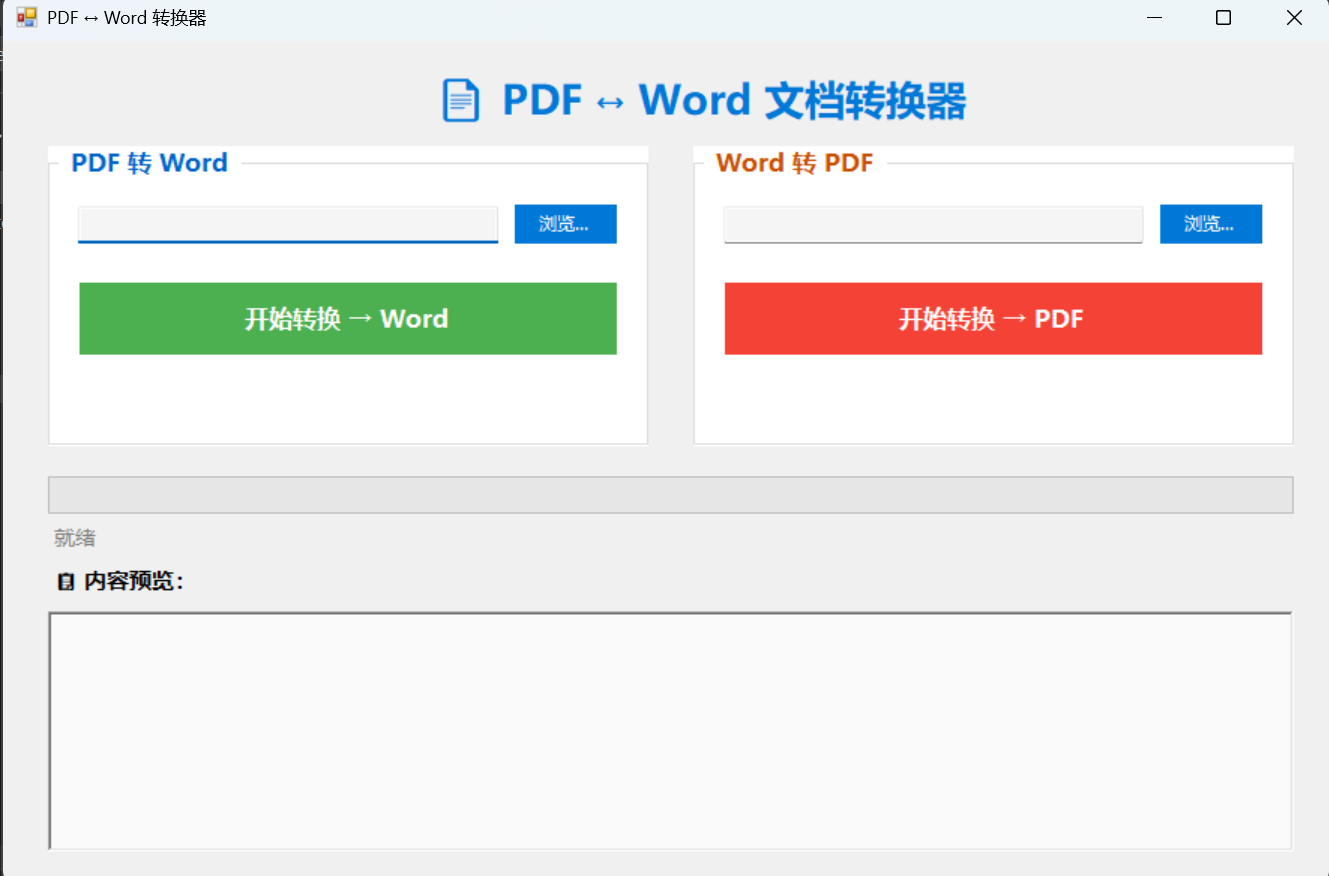
代码运行效果:
源代码地址:Gitee

 浙公网安备 33010602011771号