
解决NLTK包下载出错问题及NLP环境测试
转自:https://www.jianshu.com/p/9c48e8edc7aa
很感谢原文作者方法,简单高效,通用性强.
安装Python
安装NLTK
anaconda,Pycharm自带NLTK包,如果没有,请在cmd窗口输入命令:pip install nltk,下的应该蛮快的。
安装NLTK-Data
你可以作死的尝试:
>>>import nltk
>>>nltk.download()
先点击Refresh,刷新下,之后选中all-corpora点击左下角下载就好,至于路径
要么在C盘中,要么在Python的根目录下!C盘根目录最靠谱!
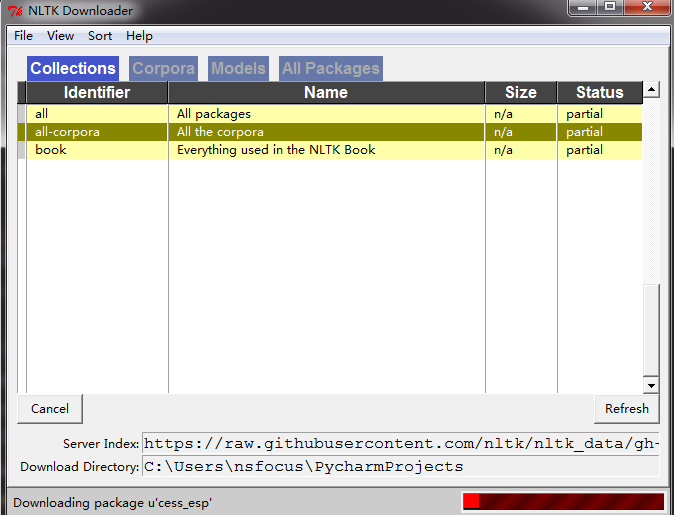
这是官方正统下载方式,但是肯定会出错的!不仅下的慢,而且下一半就出错!老纸试了三次!
这里才是正确的下载方式:最好的方法是用使用@V_can打包好的的包网盘下载下载地址1:云盘密码znx7,下来的包nltk_data.zip 解压到C盘根目录下,这样是最保险的,防止找不到包。下载地址2:云盘密码4cp3
NLTK测试
测试环境是否安装好请按照下列步骤(全部在python console中完成,就是输入一行输出一行的那种IDE):
In[4]:from nltk.book import *
# 只输入import nltk 会出错的,但却有很多博客上都这么写,我也母鸡
之后会出现如下显示:
*** Introductory Examples for the NLTK Book ***
Loading text1, ..., text9 and sent1, ..., sent9
Type the name of the text or sentence to view it.
Type: 'texts()' or 'sents()' to list the materials.
text1: Moby Dick by Herman Melville 1851
text2: Sense and Sensibility by Jane Austen 1811
text3: The Book of Genesis
text4: Inaugural Address Corpus
text5: Chat Corpus
text6: Monty Python and the Holy Grail
text7: Wall Street Journal
text8: Personals Corpus
text9: The Man Who Was Thursday by G . K . Chesterton 1908
继续测试输入:
In[5]:text1
会输出:
Out[5]:
<Text: Moby Dick by Herman Melville 1851>
再测试输入:
In[6]: text1.concordance("monstrous")
输出:
In[6]: text1.concordance("monstrous")
输出:
Displaying 11 of 11 matches:
ong the former , one was of a most monstrous size . ...
ok,这里就演示那么多,到此,NLP的环境就装好了,调试完毕,可以用于自己的实验了。

 浙公网安备 33010602011771号