
MySQL添加新用户、创建数据库、为新用户分配权限
1.登录Mysql
- [root@xufeng Desktop]# mysql -u root -p
- Enter password:
- Welcome to the MySQL monitor. Commands end with ; or \g.
- Your MySQL connection id is 6
2.添加新的用户
允许本地 IP访问localhost的Mysql数据库
- mysql> create user 'editest'@'localhost' identified by 'editest123456';
- Query OK, 0 rows affected (0.06 sec)
允许外网IP访问数据库editest,本命令包含上面的命令,是所有的IP都可以访问该数据库
- mysql> create user 'editest'@'%' identified by 'editest123456';
- Query OK, 0 rows affected (0.00 sec)
用户创建完成后,刷新授权
- mysql> flush privileges;
- Query OK, 0 rows affected (0.00 sec)
3.创建一个新的数据库,并使用show databases命令查看数据库是否创建OK
- mysql> create database editestdb DEFAULT CHARSET utf8 COLLATE utf8_general_ci;
- Query OK, 1 row affected (0.01 sec)
-
- mysql> show databases;
- +--------------------+
- | Database |
- +--------------------+
- | information_schema |
- | confluence |
- | editestdb |
- | mysql |
- | performance_schema |
- | sys |
- +--------------------+
- 6 rows in set (0.00 sec)
4.将改用户editest赋权给数据库editestdb,并刷新授权
- mysql> grant all privileges on `editestdb`.* to 'editest'@'localhost' identified by 'editest123456' with grant option;
- Query OK, 0 rows affected, 1 warning (0.00 sec)
-
- mysql> grant all privileges on `editestdb`.* to 'editest'@'%' identified by 'editest123456' with grant option;
- Query OK, 0 rows affected, 1 warning (0.01 sec)
-
- mysql> flush privileges;
- Query OK, 0 rows affected (0.00 sec)
5.退出 root 重新登录,使用editest登录检查本地登录是否正常,输入密码后,正常登录,并使用show databases命令查看数据库赋权是否正常。
- [root@xufeng Desktop]# mysql -u editest -p
- Enter password:
- Welcome to the MySQL monitor. Commands end with ; or \g.
- Your MySQL connection id is 7
- Server version: 5.7.22 MySQL Community Server (GPL)
-
- Copyright (c) 2000, 2018, Oracle and/or its affiliates. All rights reserved.
-
- Oracle is a registered trademark of Oracle Corporation and/or its
- affiliates. Other names may be trademarks of their respective
- owners.
-
- Type 'help;' or '\h' for help. Type '\c' to clear the current input statement.
-
- mysql> show databases;
- +--------------------+
- | Database |
- +--------------------+
- | information_schema |
- | editestdb |
- +--------------------+
- 2 rows in set (0.00 sec)
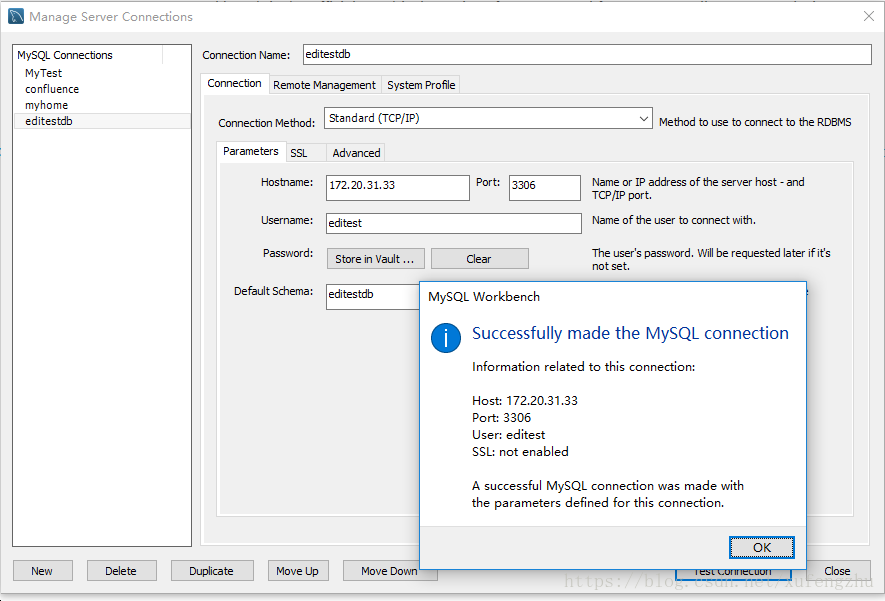
6.验证远程IP地址登录是否正常,使用MySQL Workbench配置数据库并进行验证OK

 浙公网安备 33010602011771号