
day19 防火墙及系统优化
脚本注意事项
可压缩资源(写脚本时取一段时间内平均值)
cpu
不可压缩资源(写脚本时取瞬时值即可)
内存 硬盘
名为test.txt的文件,内容为name,age,gender,提取其中的age字段
cut -d ',' -f 2 test.txt
或者用管道符号
| cut -d . -f 2
netfilter
centos 6和centos 7,防火墙底层都是基于内核的netfilter
firewalld
可以修改单条规则。
iptables
安装
yum install iptables-services -y
systemctl start iptables
启动时从/etc/sysconfig/iptables 配置文件加载防火墙规则,直接修改内核的netfilter规则
service iptables stop 不影响 iptables
语法
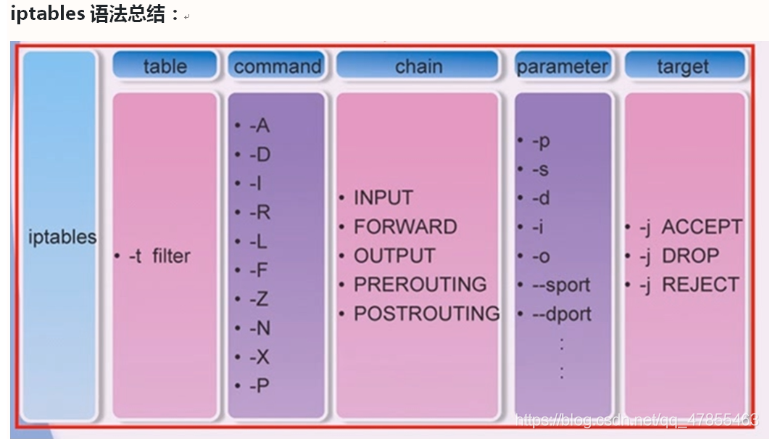
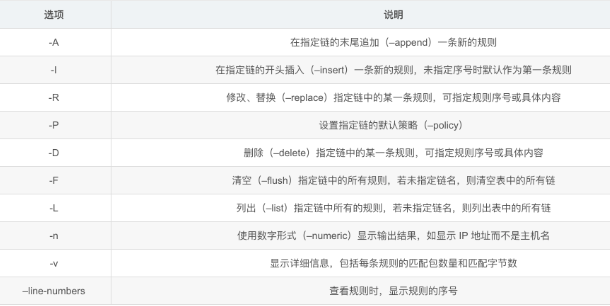
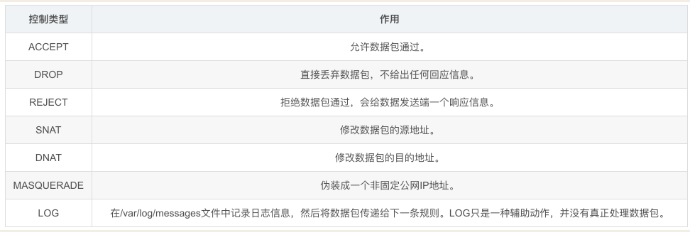
iptables -t nat filter -L
iptables 五链四表设计
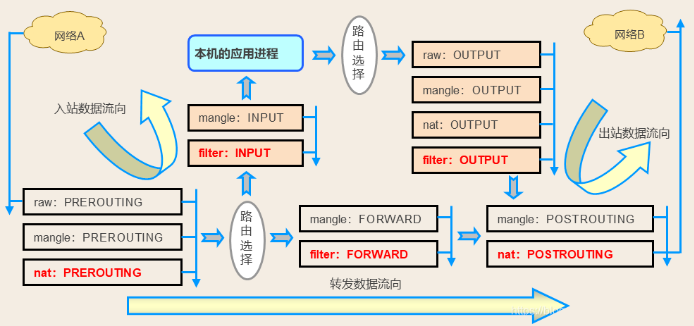
五链
防火墙规则都是添加到链上的
↓prerouting 路由判决
→input 进入到本机
↓forward 转发
←output 本机新产生数据包
↓postrouting 数据流出
四表
对链上的规则进行了分类
raw :代表阻止追踪,包含了/工作在PREROUTING、OUTPUT
mangle :代表修改或做记号,包含了/工作在5个链都有了
nat :代表做源ip或目标ip转换,包含了/工作在PREROUTING、INPUT、OUTPUT、POSTROUTING
filter :代表过滤,包含了/工作在INPUT、FORWARD、OUTPUT
iptable 规则示例
# 在机器192.168.71.207上设置防火墙规则,放行某个ip访问22端口
先清空之前所有,排除干扰
iptables -t raw -F
iptables -t mangle -F
iptables -t nat -F
iptables -t filter -F

# 1、先把INPUT整体禁用
iptables -t filter -P INPUT DROP  # 不指定-t,默认就是filter表
# iptables -t filter -P INPUT ACCEPT  # 重新放开

# 2、然后再单独放行
iptables -t filter -A INPUT -p tcp --source 192.168.71.18 --dport 22 -j ACCEPT
iptables -t filter -A INPUT -p tcp --source 192.168.71.206 --dport 22 -j ACCEPT
# 3、查看
iptables -t filter -L -n  # -L-n可以简写为-nL,但注意-n必须在前面

# 4、然后你可以在 192.168.71.206机器上测试,发现ping不同目标主机,但是可以ssh登录
ssh root@192.168.71.207 # 会慢一些,但是等等,可以链上。从侧面可以反馈出使用iptables会带来的一些问题

# 5、清空表中所有规则
iptables -t filter -F

# 6、删除某一条
iptables -t filter -nL --line-numbers # 先查看到规则号
iptables -t filter -D INPUT 2

 浙公网安备 33010602011771号