
JSON 的常用方法与初识跨域
JSON 的常用方法
JSON.parse()
console.log(JSON.parse(xhr.responseText));
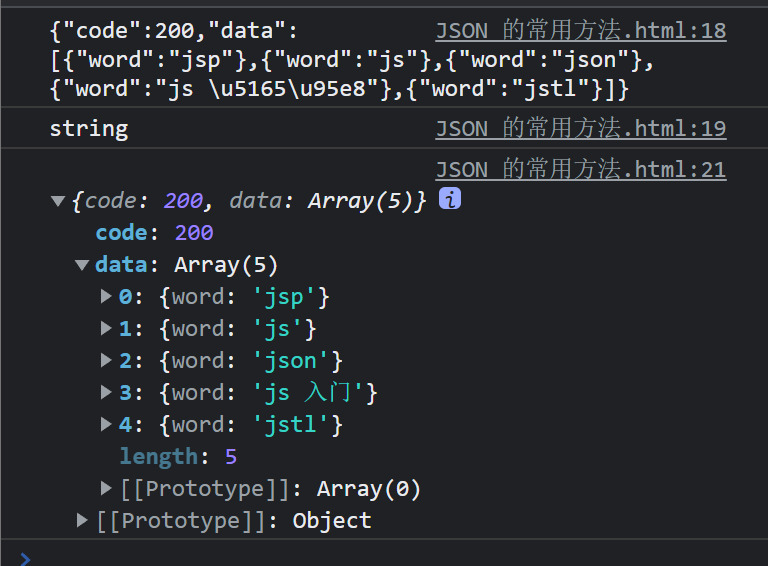
console.log(JSON.parse(xhr.responseText).data);

<!DOCTYPE html>
<html>
    <head>
        <meta charset="utf-8">
        <title>JSON 的常用方法</title>
    </head>
    <body>
        <script>
                //1.JSON.parse()
                //JSON.parse()可以将JSON格式的字符串解析成js中的对应值
                //一定要是合法的JSON字符串,否则会报错
            const xhr =new XMLHttpRequest();

                xhr.onreadystatechange = () =>{
                    if(xhr.readyState!== 4) return;

                    if(xhr.status>= 200&&xhr.status < 300 ||xhr.status===304){
                        console.log(xhr.responseText);
                        console.log(typeof xhr.responseText)

                        console.log(JSON.parse(xhr.responseText));

                        /* console.log(JSON.parse(xhr.responseText).data); */
                    }
                };

                //xhr.open('GET','./json/plain.json',true);
                xhr.open('GET','./json/arr.json',true);
                /* xhr.open('GET','https://www.imooc.com/api/http/search/suggest?words=js',true); */
                xhr.send(null);
        </script>
    </body>
</html>
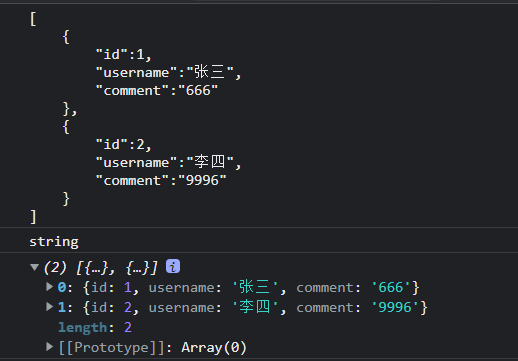
JSON.stringify()

使用JSON.parse()和JSON.stringify()封装localStorage
<!DOCTYPE html>
<html>
    <head>
        <meta charset="utf-8">
        <title>JSON 的常用方法</title>
    </head>
    <body>
        <script type="module">
                //1.JSON.parse()
                //JSON.parse()可以将JSON格式的字符串解析成js中的对应值
                //一定要是合法的JSON字符串,否则会报错
            // const xhr =new XMLHttpRequest();

            //     xhr.onreadystatechange = () =>{
            //         if(xhr.readyState!== 4) return;

            //         if(xhr.status>= 200&&xhr.status < 300 ||xhr.status===304){
            //             console.log(xhr.responseText);
            //             console.log(typeof xhr.responseText)

            //             console.log(JSON.parse(xhr.responseText));

            //             /* console.log(JSON.parse(xhr.responseText).data); */
            //         }
            //     };

            //     //xhr.open('GET','./json/plain.json',true);
            //     xhr.open('GET','./json/arr.json',true);
            //     /* xhr.open('GET','https://www.imooc.com/api/http/search/suggest?words=js',true); */
            //     xhr.send(null);


            //2.JSON.stringify()
            //JSON.JSON.stringify()可以JS的基本数据类型、对象或者数组
            //转换成JSON格式的字符串
                /* console.log(JSON.stringify({
                    uusername:'alex',
                    age:18,
                })
                ); */

            /*     const xhr = new XMLHttpRequest();


                xhr.open('post','https://www.imooc.com/api/http/search/suggest?words=js',true);

                xhr.send(
                    JSON.stringify({
                            username:'alex',
                            age:18,
                    })
                ); */

            //3.使用JSON.parse()和JSON.stringify() 封装
                localStorage
                import{get,set,remove,clear} from './js/storage.js';

                set('username','nmb');
                console.log(get('username'));


                set('nmb2.0',{
                    name:'那么棒',
                    age:18
                });
                console.log(get('nmb2.0'));

                remove('username');

                clear();

        </script>
    </body>
</html>


初识跨域
跨域是什么
<!DOCTYPE html>
<html>
    <head>
        <meta charset="utf-8">
        <title>初始跨域</title>
    </head>
    <body>
        <script>
            //1.跨域是什么


            //同域,不是跨域
            //const url = './index.html';
            // const url = 'https://www.baidu.com';//不同域
            // const xhr = new XMLHttpRequest();

                /* Access to XMLHttpRequest at 'https://www.baidu.com/' from origin 'http://127.0.0.
                1:8848' has been blocked by CORS policy: No 'Access-Control-Allow-Origin' header is
                present on the requested resource.
                     */

                //想一个域发送请求,如果请求的域和当前与是不同域,就要跨域
                //不同域之间的请求,就是跨域请求

              //    xhr.onreadystatechange = () => {
              //       if (xhr.readyState != 4) return;
              //       if ((xhr.status >= 200 && xhr.status < 300) || xhr.status === 304) {
              //         console.log(xhr.responseText);
              //       }
              //     };
              //     xhr.open('GET', url, true);
              //     xhr.send(null);


        </script>
    </body>
</html>

2.什么事不同域,什么是同域
https(协议)://www.imooc.com(域名):443(端口号)/course/list(路径)
协议、域名、端口号、任何一不一样无所谓
不同域
https://www.imooc.com:443/course/list
https://www.imooc.com:80/course/list
http://www.imooc.com:80/course/list
http://m.imcco.com:80/course/list
http:/imcco.com:80/course/list
同域
htpp://imooc.com:80
htpp://imooc.com:80/course/list
跨域请求为什么会被阻止
阻止跨域请求,其实是浏览器本的一种安全策略--同源策略
其他客户端或者服务器都不存在跨域被阻止的问题
跨域解决方案
CORS跨域资源共享
优先使用CORS跨域资源共享,如果浏览器不支持CORS的话,再使用JSONP

 浙公网安备 33010602011771号