
WordCount结队项目
项目说明
合作者
201631062218,201631062318
代码地址
https://gitee.com/x2yx/wordCount2.0
合作者博客
https://www.cnblogs.com/yzynbone/p/9805396.html
本次作业的链接地址
https://edu.cnblogs.com/campus/xnsy/2018Systemanalysisanddesign/homework/2188
项目效果展示
图形化界面
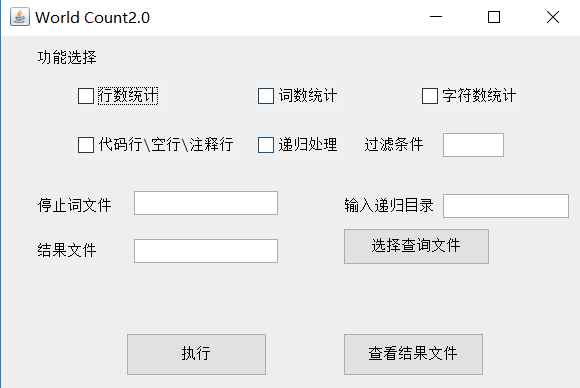
功能测试截图
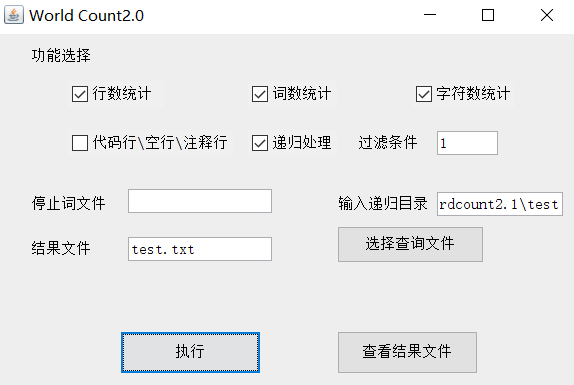

直接选择文件测试截图
不输入结果文件默认为result.txt
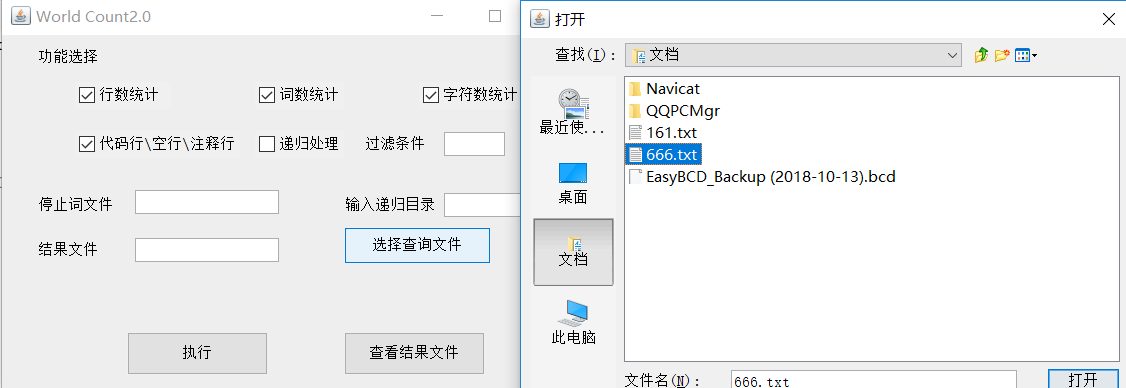

正文
结对的PSP表格
| PSP2.1 | PSP阶段 | 预估耗时(分钟) | 实际耗时(分钟) |
|---|---|---|---|
| · Planning | · 计划 | 30 | 20 |
| · Estimate | · 估计这个任务需要多少时间 | 20 | 10 |
| · Development | · 开发 | 900 | 1200 |
| · Analysis | · 需求分析 (包括学习新技术) | 50 | 180 |
| · Design Spec | · 生成设计文档 | 0 | 0 |
| · Design Review | · 设计复审 (和同事审核设计文档) | 0 | 0 |
| · Coding | · 代码规范 (为目前的开发制定合适的规范) | 10 | 15 |
| · Code Review | · 具体设计 | 10 | 20 |
| · Test | · 具体编码 | 900 | 720 |
| · Reporting | · 代码复审 | 120 | 360 |
| · Test Report | · 报告 | 120 | 90 |
| · Size Measurement | · 测试报告 | 30 | 80 |
| · Postmortem & Process | · 计算工作量 | 10 | 5 |
| · Improvement Plan | · 事后总结, 并提出过程改进计划 | 20 | 60 |
| · 合计 | 2220 | 2760 |
互审代码情况
X2y:yzy同学的代码注释极少,看的我头皮发麻,很多地方都要直接问他然后再理解。有点脑壳疼,但是在理解过后发现他的代码还是相当的符合规范的,虽然有的地方显的多余,但是感觉很有结构性,看着很舒服。
设计过程
此处不再累述设计过程,详细见下面博客。
https://www.cnblogs.com/yzynbone/p/9805396.html
代码说明
此处列出桌面设计代码
import javax.swing.JButton;
import javax.swing.JFrame;
import javax.swing.JLabel;
import javax.swing.JPanel;
import javax.swing.JTextField;
import javax.swing.UnsupportedLookAndFeelException;
import javax.swing.JCheckBox;
import javax.swing.JFileChooser;
import java.io.File;
import java.io.IOException;
import java.awt.event.ActionListener;
import java.util.ArrayList;
import java.util.List;
import java.awt.event.ActionEvent;
public class Main {

    private static List<String> strs=new ArrayList<String>();
    private static String filepath = null;
    private static JTextField stopword;
    private static JTextField resultfile;
    private static JTextField digui;
    private static JTextField diguimulu;

    public static void main(String[] args) throws Exception {


        // 创建 JFrame 实例
        JFrame frame = new JFrame("World Count2.0");
        // Setting the width and height of frame
        frame.setSize(600, 400);
        frame.setDefaultCloseOperation(JFrame.EXIT_ON_CLOSE);

        /* 创建面板,这个类似于 HTML 的 div 标签
         * 我们可以创建多个面板并在 JFrame 中指定位置
         * 面板中我们可以添加文本字段,按钮及其他组件。
         */
        JPanel panel = new JPanel();
        // 添加面板
        frame.getContentPane().add(panel);
        /*
         * 调用用户定义的方法并添加组件到面板
         */
        placeComponents(panel);

        // 设置界面可见
        frame.setVisible(true);

    }


    private static void placeComponents(JPanel panel) {

        try {
            javax.swing.UIManager.setLookAndFeel("com.sun.java.swing.plaf.windows.WindowsLookAndFeel");
        }catch (Exception e) {
            // TODO: handle exception
            e.printStackTrace();
        }
        //这边设置布局为 null
        panel.setLayout(null);
        JCheckBox CheckBox = new JCheckBox("行数统计");
        CheckBox.setBounds(73, 47, 96, 27);
        panel.add(CheckBox);

        JCheckBox CheckBox2 = new JCheckBox("词数统计");
        CheckBox2.setBounds(253, 47, 89, 27);
        panel.add(CheckBox2);

        JCheckBox CheckBox3 = new JCheckBox("字符数统计");
        CheckBox3.setBounds(417, 47, 103, 27);
        panel.add(CheckBox3);


        JCheckBox CheckBox4 = new JCheckBox("代码行\\空行\\注释行");
        CheckBox4.setBounds(73, 96, 165, 27);
        panel.add(CheckBox4);

        JCheckBox CheckBox5 = new JCheckBox("递归处理");
        CheckBox5.setBounds(253, 96, 89, 27);
        panel.add(CheckBox5);


        JLabel lblNewLabel = new JLabel("功能选择");
        lblNewLabel.setBounds(36, 13, 72, 18);
        panel.add(lblNewLabel);

        JLabel label = new JLabel("输入递归目录");
        label.setBounds(343, 161, 112, 18);
        panel.add(label);

        JLabel label_1 = new JLabel("停止词文件");
        label_1.setBounds(36, 161, 83, 18);
        panel.add(label_1);

        stopword = new JTextField();
        stopword.setBounds(133, 155, 144, 24);
        panel.add(stopword);
        stopword.setColumns(10);

        JLabel label_2 = new JLabel("结果文件");
        label_2.setBounds(36, 206, 72, 18);
        panel.add(label_2);

        JLabel label2 = new JLabel("过滤条件");
        label2.setBounds(363, 100, 72, 18);
        panel.add(label2);

        resultfile = new JTextField();
        resultfile.setBounds(133, 203, 144, 24);
        panel.add(resultfile);
        resultfile.setColumns(10);

        digui = new JTextField();
        digui.setBounds(442, 97, 61, 24);
        panel.add(digui);
        digui.setColumns(10);

        diguimulu = new JTextField();
        diguimulu.setBounds(442, 158, 126, 24);
        panel.add(diguimulu);
        diguimulu.setColumns(10);

        JButton buttonSelect = new JButton("选择查询文件");
        buttonSelect.addActionListener(new ActionListener() {
            public void actionPerformed(ActionEvent arg0) {
                JFileChooser chooser = new JFileChooser();             //设置选择器
                 chooser.setMultiSelectionEnabled(true);             //设为多选
                int returnVal = chooser.showOpenDialog(buttonSelect);        //是否打开文件选择框
                //System.out.println("returnVal="+returnVal);

                if (returnVal == JFileChooser.APPROVE_OPTION) {          //如果符合文件类型

                filepath = chooser.getSelectedFile().getAbsolutePath();      //获取绝对路径

                System.out.println(filepath);
                System.out.println("666666");

               //System.out.println("You chose to open this file: "+ chooser.getSelectedFile().getName());  //输出相对路径

                }
            }
        });
        buttonSelect.setBounds(342, 192, 147, 37);
        panel.add(buttonSelect);

        JButton btnNewButton = new JButton("执行");
        btnNewButton.setBounds(125, 297, 141, 43);
        btnNewButton.addActionListener(new ActionListener() {
            @Override
            public void actionPerformed(ActionEvent e) {
                // TODO 自动生成的方法存根

                //创建菜单
                try {

                    if(CheckBox.isSelected()) {
                        strs.add("-l");
                    }
                    if(CheckBox2.isSelected()) {
                        strs.add("-w");
                    }
                    if(CheckBox3.isSelected()) {
                        strs.add("-c");
                    }
                    if(CheckBox4.isSelected()) {
                        strs.add("-a");
                    }
                    if (CheckBox5.isSelected()) {
                        strs.add("-s");
                        strs.add(digui.getText());
                        strs.add(diguimulu.getText());

                        //停止词输入框不为0时
                        if(stopword.getText().length()!=0) {

                            strs.add("-e");
                            strs.add(stopword.getText());
                        }
                    }else {


                        strs.add(filepath);//加入文件绝对路径
                    }

                    if(resultfile.getText().length()!=0) {

                        strs.add("-o");
                        strs.add(resultfile.getText());
                    }

                    for(int i=0;i<strs.size();i++) {

                        System.out.println(strs.get(i));
                    }

                    Menu menu = new Menu(strs);
                } catch (Exception e1) {
                    // TODO 自动生成的 catch 块
                    e1.printStackTrace();
                }
            }
        });
        panel.add(btnNewButton);

        JButton lookButton = new JButton("查看结果文件");
        lookButton.addActionListener(new ActionListener() {

            public void actionPerformed(ActionEvent arg0) {
                try {
                    //System.out.println(System.getProperty("user.dir"));
                    java.awt.Desktop.getDesktop().open(new File(System.getProperty("user.dir")));
                } catch (IOException e) {
                    // TODO 自动生成的 catch 块
                    e.printStackTrace();
                }
            }
        });
        lookButton.setBounds(342, 297, 141, 43);
        panel.add(lookButton);

    }

}
其余模块实现
https://www.cnblogs.com/yzynbone/p/9805396.html
总结
有时候 1+1 < 2,有时候 1+1 > 2。但是仔细想来还是大于的时候比较多。
遇到bug的时候,两个人讨论并且解决比较有效率。当然也有只顾自己的实现而坑了队友的情况,但这次编程中这种情况比较少。

 浙公网安备 33010602011771号