

Linux限制root用户远程登录和修改SSH端口
1、引言
root用户通常拥有系统的最高权限,可以对系统进行任何操作,禁用root用户远程登录的一个主要原因是为了防止黑客利用常见的安全漏洞来入侵系统。如果root用户启用了远程登录功能,那么黑客只需要破解root用户的密码,就可以轻易进入系统,从而对系统造成巨大的危害,因此,出于安全考虑,禁用root用户远程登录可以有效提高系统的安全性,降低系统被攻击的风险。
2、系统环境
系统环境:Redhat 8.0
主要配置文件:/etc/ssh/sshd_config
3、编辑配置文件
执行命令: vim /etc/ssh/sshd_config ,将配置文件中的 PermitRootLogin 参数设置为 no,若该参数前面有“#”注释符号,则删除“#”注释符号;然后找到 Port 22 参数(默认情况下,是被注释掉的,即前面有“#”符号),取消注释并修改端口号为你选择的新端口(例如:2222),如下:
 1 [root@RedHat8 ~]# cat /etc/ssh/sshd_config
 2 #       $OpenBSD: sshd_config,v 1.103 2018/04/09 20:41:22 tj Exp $
 3
 4 # This is the sshd server system-wide configuration file.  See
 5 # sshd_config(5) for more information.
 6
 7 # This sshd was compiled with PATH=/usr/local/bin:/usr/bin:/usr/local/sbin:/usr/sbin
 8
 9 # The strategy used for options in the default sshd_config shipped with
10 # OpenSSH is to specify options with their default value where
11 # possible, but leave them commented.  Uncommented options override the
12 # default value.
13
14 # If you want to change the port on a SELinux system, you have to tell
15 # SELinux about this change.
16 # semanage port -a -t ssh_port_t -p tcp #PORTNUMBER
17 #
18 Port 2222            #取消注释,并修改端口号为2222
19 #AddressFamily any
20 #ListenAddress 0.0.0.0
21 #ListenAddress ::
22
23 HostKey /etc/ssh/ssh_host_rsa_key
24 HostKey /etc/ssh/ssh_host_ecdsa_key
25 HostKey /etc/ssh/ssh_host_ed25519_key
26
27 # Ciphers and keying
28 #RekeyLimit default none
29
30 # System-wide Crypto policy:
31 # This system is following system-wide crypto policy. The changes to
32 # Ciphers, MACs, KexAlgoritms and GSSAPIKexAlgorithsm will not have any
33 # effect here. They will be overridden by command-line options passed on
34 # the server start up.
35 # To opt out, uncomment a line with redefinition of  CRYPTO_POLICY=
36 # variable in  /etc/sysconfig/sshd  to overwrite the policy.
37 # For more information, see manual page for update-crypto-policies(8).
38
39 # Logging
40 #SyslogFacility AUTH
41 SyslogFacility AUTHPRIV
42 #LogLevel INFO
43
44 # Authentication:
45
46 #LoginGraceTime 2m
47 PermitRootLogin no      #禁止root用户远程登录
48 #StrictModes yes
49 #MaxAuthTries 6
50 #MaxSessions 10
修改完成后,重启ssh服务,执行命令: systemctl restart sshd.service
重启ssh服务时,如出现以下报错

解决方法:临时禁用SELinux策略,然后再重启ssh服务。
执行命令: setenforce 0 ,0为关闭,1为开启。

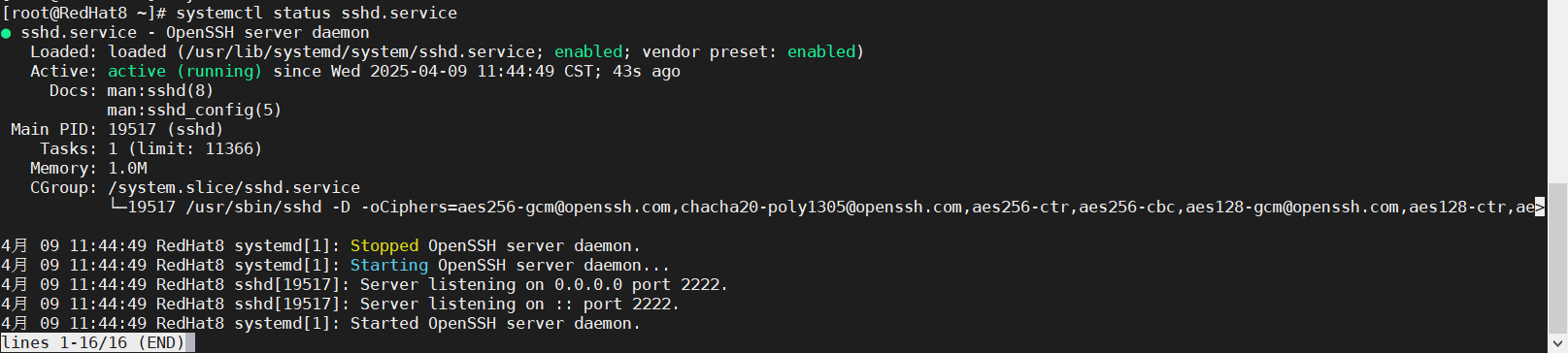
再次查看ssh服务状态,此时ssh服务状态正常:
4、测试
新创建一个测试账户cs,测试截图:

测试结论:root用户远程时,即使输入正确的密码也无法登录,使用测试用户cs进行远程登录时,输入正确密码,即可正常登录。
技术让生活更美好。

 浙公网安备 33010602011771号