

Linux用户登录超时设置
1、引言
在Linux系统中,用户登录超时设置通常用于增强系统的安全性,防止未经授权的长时间访问。合理的超时设置不仅可以提高系统的安全性,还可以优化用户体验。本文将探讨如何设置Linux用户登录超时,并提出一些优化策略,以确保系统资源得到有效利用,同时降低潜在的安全风险。
2、基础概念
Linux用户登录超时指的是在终端会话中,如果用户在指定的时间内没有任何操作(如按键、输入命令等),系统将自动断开该用户会话。
3、系统环境
系统环境:RedHat 8.0
主要配置文件:/etc/profile、~/.bashrc和/etc/ssh/sshd_config
4、超时类型
会话超时:用户在一定时间内没有任何操作,系统自动注销会话。
SSH超时:通过SSH登录时,如果在一定时间内没有活动,连接将被关闭。
屏幕超时:用户在一定时间内没有任何操作,屏幕会自动锁屏。
5、Linux用户登录超时设置
5.1、针对所有用户
执行命令: vi /etc/profile ,在文件末尾新增内容 export TMOUT=300 ,设置闲置时间为300秒,设置完成后使用命令: source /etc/profile ,使其配置生效。
 1 [root@RedHat8 ~]# vi /etc/profile
 2 # /etc/profile
 3
 4 # System wide environment and startup programs, for login setup
 5 # Functions and aliases go in /etc/bashrc
 6
 7 # It's NOT a good idea to change this file unless you know what you
 8 # are doing. It's much better to create a custom.sh shell script in
 9 # /etc/profile.d/ to make custom changes to your environment, as this
10 # will prevent the need for merging in future updates.
11
12 pathmunge () {
13     case ":${PATH}:" in
14         *:"$1":*)
15             ;;
16         *)
17             if [ "$2" = "after" ] ; then
18                 PATH=$PATH:$1
19             else
20                 PATH=$1:$PATH
21             fi
22     esac
23 }
24
25
26 if [ -x /usr/bin/id ]; then
27     if [ -z "$EUID" ]; then
28         # ksh workaround
29         EUID=`id -u`
30         UID=`id -ru`
31     fi
32     USER="`id -un`"
33     LOGNAME=$USER
34     MAIL="/var/spool/mail/$USER"
35 fi
36
37 # Path manipulation
38 if [ "$EUID" = "0" ]; then
39     pathmunge /usr/sbin
40     pathmunge /usr/local/sbin
41 else
42     pathmunge /usr/local/sbin after
43     pathmunge /usr/sbin after
44 fi
45
46 HOSTNAME=`/usr/bin/hostname 2>/dev/null`
47 HISTSIZE=1000
48 if [ "$HISTCONTROL" = "ignorespace" ] ; then
49     export HISTCONTROL=ignoreboth
50 else
51     export HISTCONTROL=ignoredups
52 fi
53
54 export PATH USER LOGNAME MAIL HOSTNAME HISTSIZE HISTCONTROL
55
56 # By default, we want umask to get set. This sets it for login shell
57 # Current threshold for system reserved uid/gids is 200
58 # You could check uidgid reservation validity in
59 # /usr/share/doc/setup-*/uidgid file
60 if [ $UID -gt 199 ] && [ "`id -gn`" = "`id -un`" ]; then
61     umask 002
62 else
63     umask 022
64 fi
65
66 for i in /etc/profile.d/*.sh /etc/profile.d/sh.local ; do
67     if [ -r "$i" ]; then
68         if [ "${-#*i}" != "$-" ]; then
69             . "$i"
70         else
71             . "$i" >/dev/null
72         fi
73     fi
74 done
75
76 unset i
77 unset -f pathmunge
78
79 if [ -n "${BASH_VERSION-}" ] ; then
80         if [ -f /etc/bashrc ] ; then
81                 # Bash login shells run only /etc/profile
82                 # Bash non-login shells run only /etc/bashrc
83                 # Check for double sourcing is done in /etc/bashrc.
84                 . /etc/bashrc
85        fi
86 fi
87 export TMOUT=300  # 设置闲置时间为5分钟,单位为秒;如果没有此行则直接添加进去
5.2、针对特定用户
执行命令: vi /home/test/.bashrc , 在文件末尾新增内容export TMOUT=60 ,设置test用户闲置时间为60秒,设置完成后使用命令: source /home/test/.bashrc ,使其配置生效。
 1 [root@RedHat8 ~]# vi /home/test/.bashrc
 2 # .bashrc
 3
 4 # Source global definitions
 5 if [ -f /etc/bashrc ]; then
 6         . /etc/bashrc
 7 fi
 8
 9 # User specific environment
10 PATH="$HOME/.local/bin:$HOME/bin:$PATH"
11 export PATH
12
13 # Uncomment the following line if you don't like systemctl's auto-paging feature:
14 # export SYSTEMD_PAGER=
15
16 # User specific aliases and functions
17
18 export TMOUT=60  # 设置闲置时间为1分钟,单位为秒;如果没有此行则直接添加进去
5.3、SSH超时设置
执行命令: vi /etc/ssh/sshd_config
找到以下参数,删除前面的“#”,并修改参数值
ClientAliveInterval 服务器向客户端发送空闲数据包的时间间隔
ClientAliveCountMax 在没有收到客户端响应的情况下,服务器发送空闲数据包的最大次数
设置完成后,使用命令: systemctl restart sshd.service ,重启服务使其配置生效。
  1 [root@RedHat8 ~]# vi /etc/ssh/sshd_config
  2 #       $OpenBSD: sshd_config,v 1.103 2018/04/09 20:41:22 tj Exp $
  3
  4 # This is the sshd server system-wide configuration file.  See
  5 # sshd_config(5) for more information.
  6
  7 # This sshd was compiled with PATH=/usr/local/bin:/usr/bin:/usr/local/sbin:/usr/sbin
  8
  9 # The strategy used for options in the default sshd_config shipped with
 10 # OpenSSH is to specify options with their default value where
 11 # possible, but leave them commented.  Uncommented options override the
 12 # default value.
 13
 14 # If you want to change the port on a SELinux system, you have to tell
 15 # SELinux about this change.
 16 # semanage port -a -t ssh_port_t -p tcp #PORTNUMBER
 17 #
 18 #Port 22
 19 #AddressFamily any
 20 #ListenAddress 0.0.0.0
 21 #ListenAddress ::
 22
 23 HostKey /etc/ssh/ssh_host_rsa_key
 24 HostKey /etc/ssh/ssh_host_ecdsa_key
 25 HostKey /etc/ssh/ssh_host_ed25519_key
 26
 27 # Ciphers and keying
 28 #RekeyLimit default none
 29
 30 # System-wide Crypto policy:
 31 # This system is following system-wide crypto policy. The changes to
 32 # Ciphers, MACs, KexAlgoritms and GSSAPIKexAlgorithsm will not have any
 33 # effect here. They will be overridden by command-line options passed on
 34 # the server start up.
 35 # To opt out, uncomment a line with redefinition of  CRYPTO_POLICY=
 36 # variable in  /etc/sysconfig/sshd  to overwrite the policy.
 37 # For more information, see manual page for update-crypto-policies(8).
 38
 39 # Logging
 40 #SyslogFacility AUTH
 41 SyslogFacility AUTHPRIV
 42 #LogLevel INFO
 43
 44 # Authentication:
 45
 46 #LoginGraceTime 2m
 47 PermitRootLogin yes
 48 #StrictModes yes
 49 #MaxAuthTries 6
 50 #MaxSessions 10
 51
 52 #PubkeyAuthentication yes
 53
 54 # The default is to check both .ssh/authorized_keys and .ssh/authorized_keys2
 55 # but this is overridden so installations will only check .ssh/authorized_keys
 56 AuthorizedKeysFile      .ssh/authorized_keys
 57
 58 #AuthorizedPrincipalsFile none
 59
 60 #AuthorizedKeysCommand none
 61 #AuthorizedKeysCommandUser nobody
 62
 63 # For this to work you will also need host keys in /etc/ssh/ssh_known_hosts
 64 #HostbasedAuthentication no
 65 # Change to yes if you don't trust ~/.ssh/known_hosts for
 66 # HostbasedAuthentication
 67 #IgnoreUserKnownHosts no
 68 # Don't read the user's ~/.rhosts and ~/.shosts files
 69 #IgnoreRhosts yes
 70
 71 # To disable tunneled clear text passwords, change to no here!
 72 #PasswordAuthentication yes
 73 #PermitEmptyPasswords no
 74 PasswordAuthentication yes
 75
 76 # Change to no to disable s/key passwords
 77 #ChallengeResponseAuthentication yes
 78 ChallengeResponseAuthentication no
 79
 80 # Kerberos options
 81 #KerberosAuthentication no
 82 #KerberosOrLocalPasswd yes
 83 #KerberosTicketCleanup yes
 84 #KerberosGetAFSToken no
 85 #KerberosUseKuserok yes
 86
 87 # GSSAPI options
 88 GSSAPIAuthentication yes
 89 GSSAPICleanupCredentials no
 90 #GSSAPIStrictAcceptorCheck yes
 91 #GSSAPIKeyExchange no
 92 #GSSAPIEnablek5users no
 93
 94 # Set this to 'yes' to enable PAM authentication, account processing,
 95 # and session processing. If this is enabled, PAM authentication will
 96 # be allowed through the ChallengeResponseAuthentication and
 97 # PasswordAuthentication.  Depending on your PAM configuration,
 98 # PAM authentication via ChallengeResponseAuthentication may bypass
 99 # the setting of "PermitRootLogin without-password".
100 # If you just want the PAM account and session checks to run without
101 # PAM authentication, then enable this but set PasswordAuthentication
102 # and ChallengeResponseAuthentication to 'no'.
103 # WARNING: 'UsePAM no' is not supported in Fedora and may cause several
104 # problems.
105 UsePAM yes
106
107 #AllowAgentForwarding yes
108 #AllowTcpForwarding yes
109 #GatewayPorts no
110 X11Forwarding yes
111 #X11DisplayOffset 10
112 #X11UseLocalhost yes
113 #PermitTTY yes
114
115 # It is recommended to use pam_motd in /etc/pam.d/sshd instead of PrintMotd,
116 # as it is more configurable and versatile than the built-in version.
117 PrintMotd no
118
119 #PrintLastLog yes
120 #TCPKeepAlive yes
121 #PermitUserEnvironment no
122 #Compression delayed
123 ClientAliveInterval 60  #每60秒发送一次保持活动信号
124 ClientAliveCountMax 3   #如果连续3次没有收到响应,则断开连接
125 #ShowPatchLevel no
126 #UseDNS no
127 #PidFile /var/run/sshd.pid
128 #MaxStartups 10:30:100
129 #PermitTunnel no
130 #ChrootDirectory none
131 #VersionAddendum none
132
133 # no default banner path
134 #Banner none
135
136 # Accept locale-related environment variables
137 AcceptEnv LANG LC_CTYPE LC_NUMERIC LC_TIME LC_COLLATE LC_MONETARY LC_MESSAGES
138 AcceptEnv LC_PAPER LC_NAME LC_ADDRESS LC_TELEPHONE LC_MEASUREMENT
139 AcceptEnv LC_IDENTIFICATION LC_ALL LANGUAGE
140 AcceptEnv XMODIFIERS
141
142 # override default of no subsystems
143 Subsystem       sftp    /usr/libexec/openssh/sftp-server
144
145 # Example of overriding settings on a per-user basis
146 #Match User anoncvs
147 #       X11Forwarding no
148 #       AllowTcpForwarding no
149 #       PermitTTY no
150 #       ForceCommand cvs server
5.4、屏幕超时设置
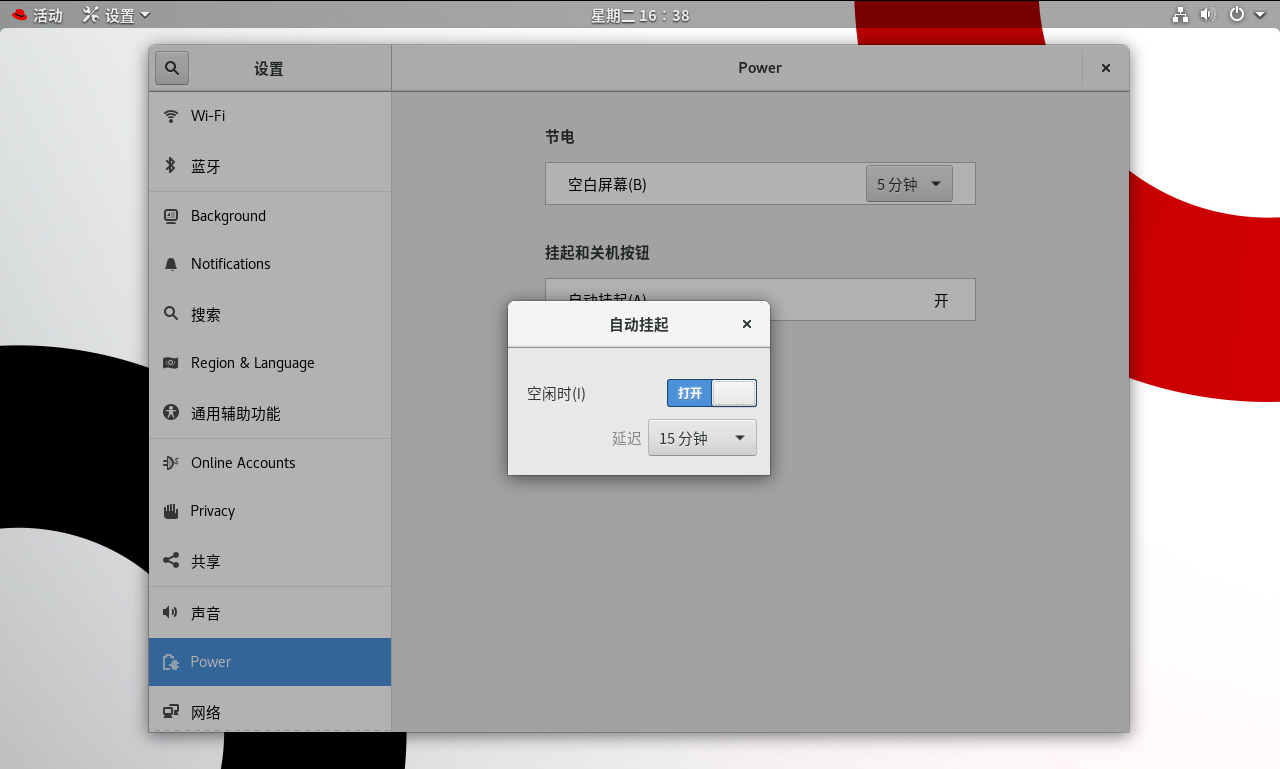
进入图形化界面,右击桌面空白处,选择“设置”,在左侧导航栏中选择“电源”,然后在右侧窗口中点击“挂起和关机按钮”下的“自动挂起”,开启“空闲时”开关,设置延迟时间为15分钟。
 6、测试
6、测试
6.1、所有用户超时测试截图

6.2、特定用户超时测试截图
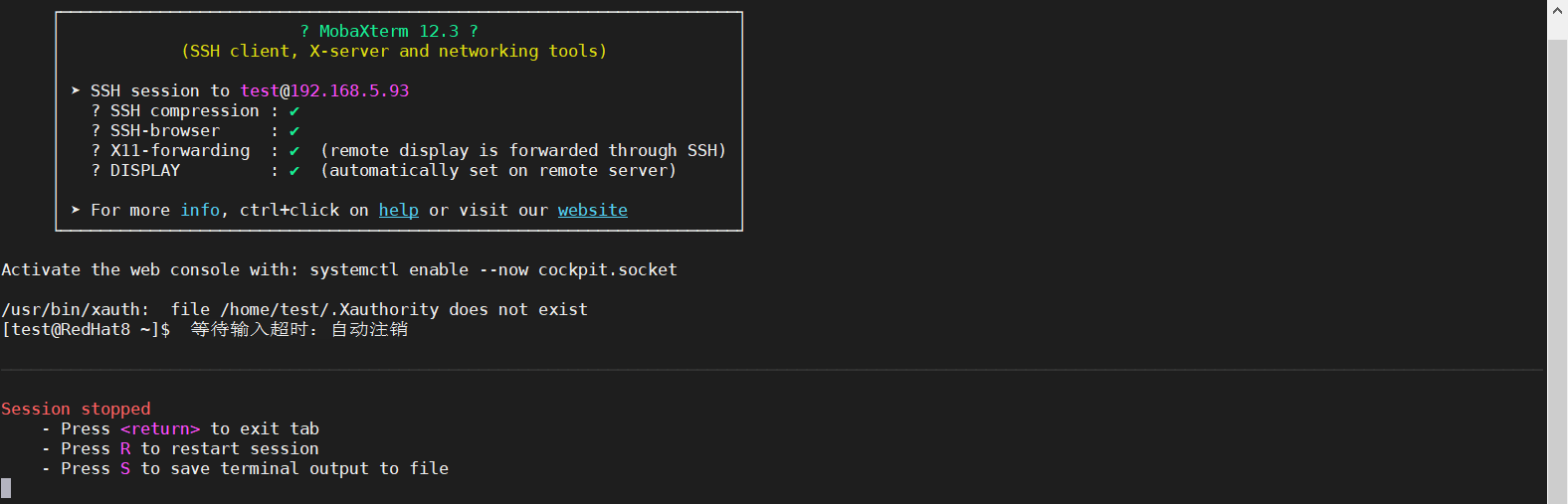
前面设置的test用户超时退出为60秒,60秒未操作,会话自动注销。
6.3、SSH超时测试截图
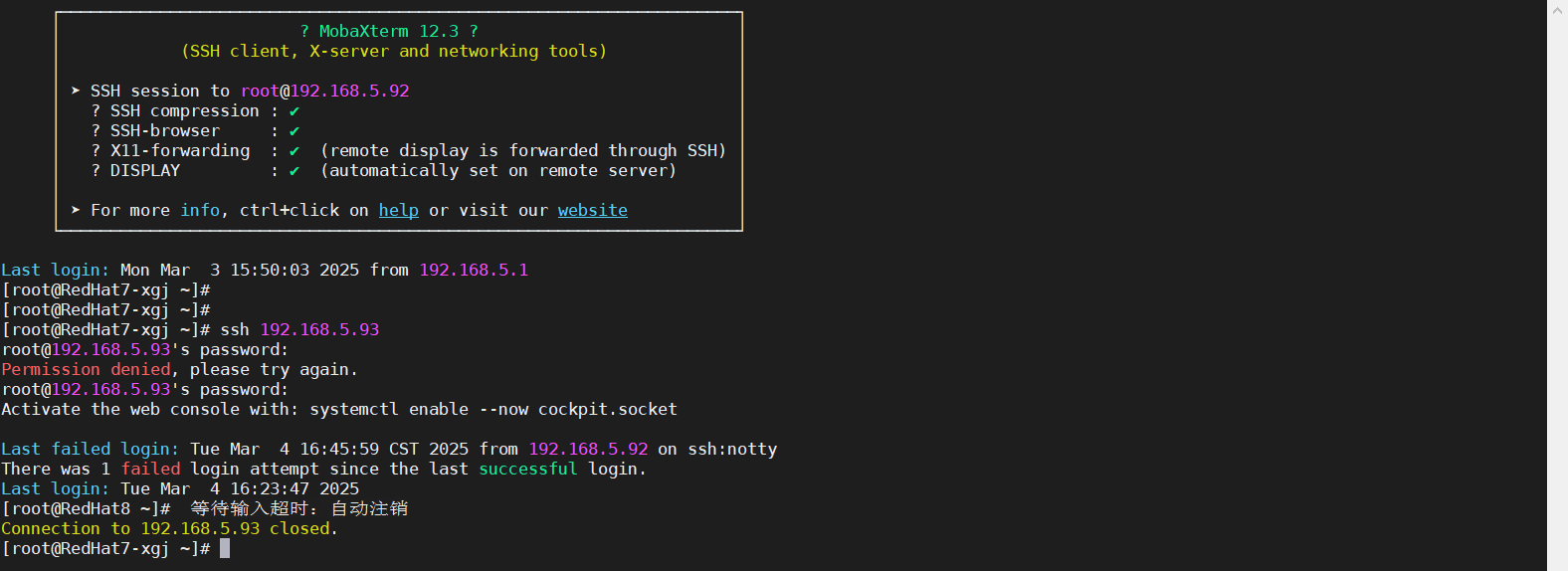
前面设置SSH参数,ClientAliveInterval 60 每60秒发送一次保持活动信号,ClientAliveCountMax 3 连续3次没有收到响应,则断开连接,也就是说3分钟过后自动超时,并注销其会话。
 6.4、屏幕超时测试截图
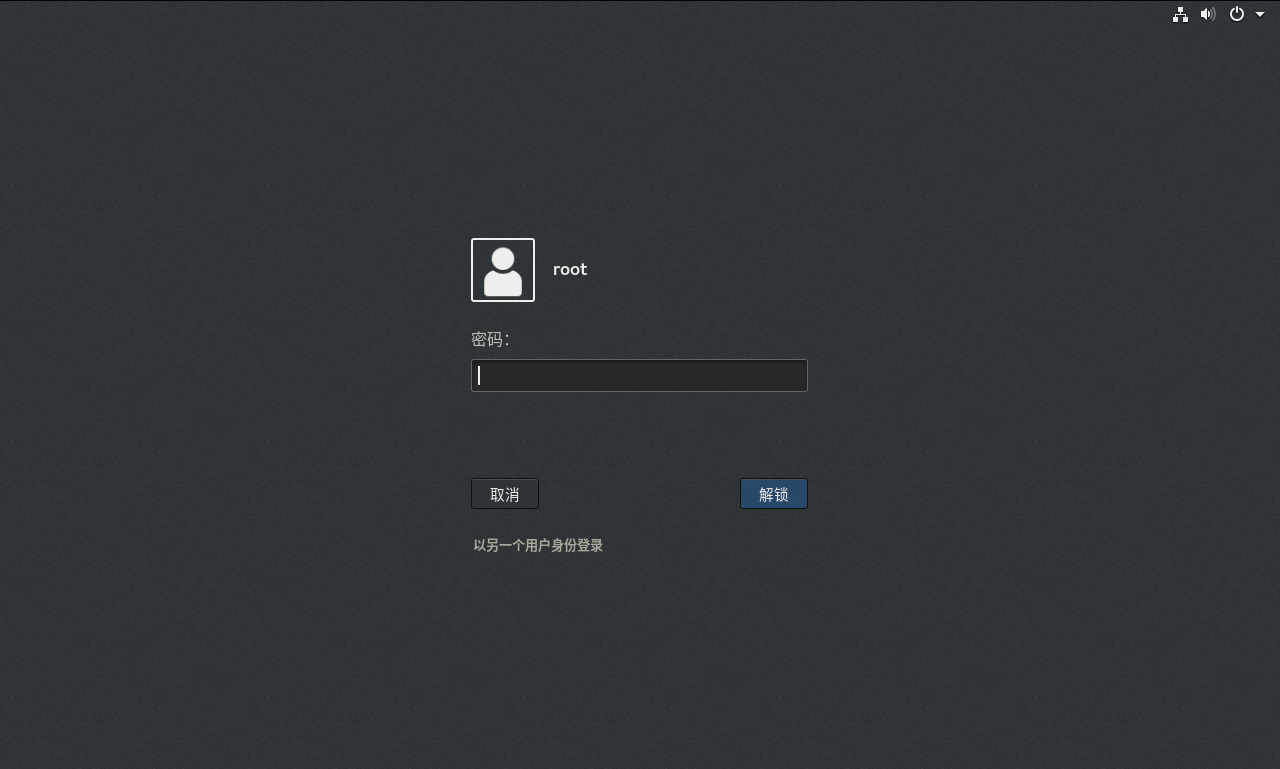
15分钟内未进行任何操作,屏幕自动超时并锁定。

 浙公网安备 33010602011771号