
Miniconda的安装和使用
Miniconda是轻量版Anaconda(只有python和conda)的包管理器
官网
可下载指定Python版本的miniconda
注意:
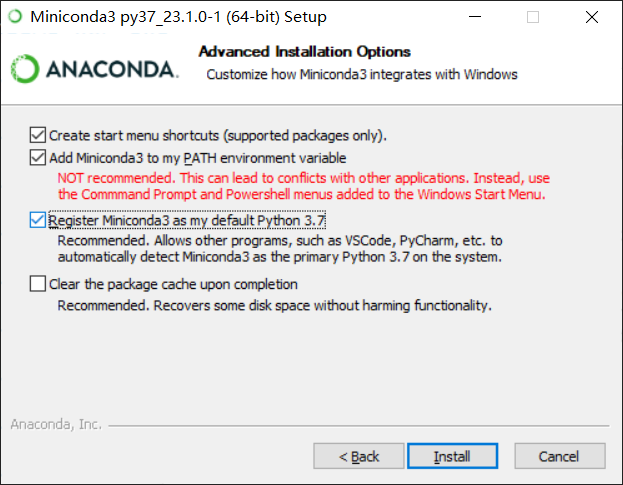
第一个是自动添加到环境变量、第二个是将自带的Python当作系统默认版本
其他正常安装
检查是否安装
打开cmd窗口,输入conda info,出现如下信息说明安装成功
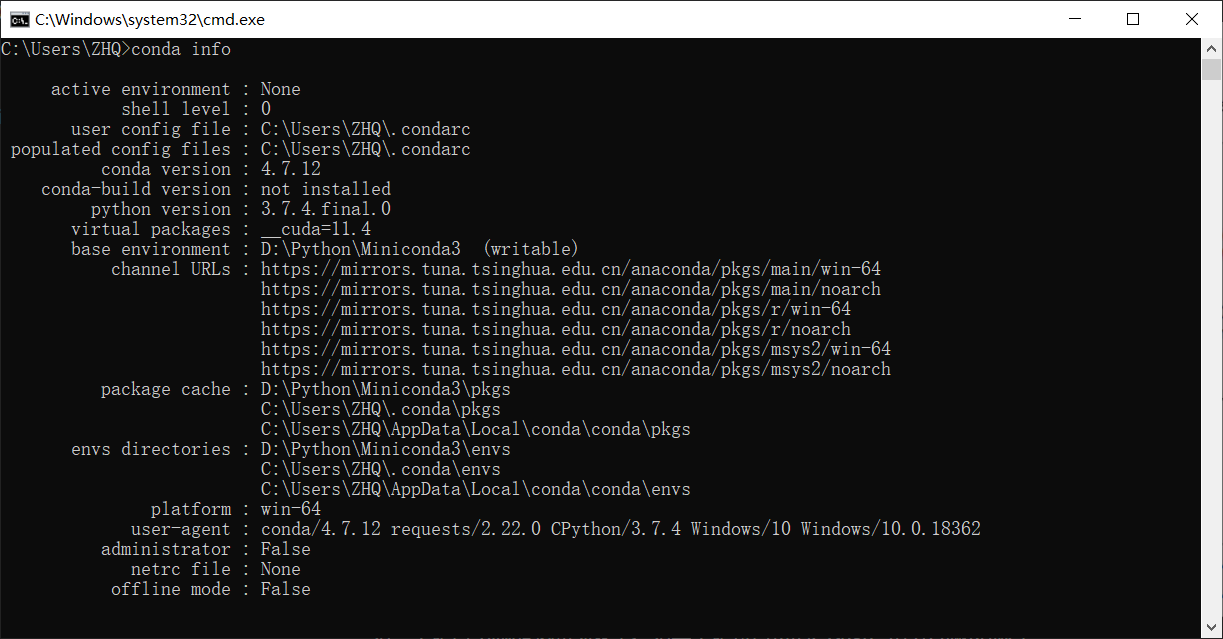
user config file代表miniconda的配置文件位置,初始是不存在的,只有添加或修改配置才会出现在所提示的位置package cache代表缓存位置envs directories代表虚拟环境的位置
添加清华源
-
Windows 用户无法直接创建名为
.condarc的文件,可先执行conda config --set show_channel_urls yes生成该文件之后再修改 -
添加下载源(镜像),前面3行标准库,后面4行附加库,复制下面代码到
cmd内粘贴并回车conda config --add channels https://mirrors.tuna.tsinghua.edu.cn/anaconda/pkgs/main/ conda config --add channels https://mirrors.tuna.tsinghua.edu.cn/anaconda/pkgs/free/ conda config --add channels https://mirrors.tuna.tsinghua.edu.cn/anaconda/cloud/conda-forge/ conda config --add channels https://mirrors.tuna.tsinghua.edu.cn/anaconda/cloud/msys2/ conda config --add channels https://mirrors.tuna.tsinghua.edu.cn/anaconda/cloud/bioconda/ conda config --add channels https://mirrors.tuna.tsinghua.edu.cn/anaconda/cloud/menpo/ conda config --add channels https://mirrors.tuna.tsinghua.edu.cn/anaconda/cloud/pytorch/ -
使用命令
conda info查看channel URLs -
查看
user config file的地址,找到.condarc文件,用记事本打开查看
关闭自动进入base环境
conda config --set auto_activate_base no
命令
- 创建名为py36、python版本为3.6的虚拟环境:
conda create -n py36 python=3.6 - 激活创建的py36虚拟环境:
conda activate py36 - 关闭当前虚拟环境:
conda deactivate - 删除创建的py36虚拟环境:
conda remove -n py36 --all - 更新conda:
conda update conda - 更新python:
conda update python - 更新所有包:
conda update --all - 清理无用的安装包:
conda clean -p - 清理tar包:
conda clean -t - 清理所有安装包及cache:
conda clean -y --all - 查看所有的虚拟环境*表示当前环境位置:
conda env list
安装包
conda activate py36先进入环境pip install xxx再安装包

 浙公网安备 33010602011771号