


Windows系统安装MySQL Connector 利用C++ VS2022连接MySQL
1. 官网及版本
1.1. 网址
官方文档 - 安装编译构建:
https://dev.mysql.com/doc/connector-cpp/9.3/en/
官方文档 - 使用案例:
https://dev.mysql.com/doc/dev/connector-cpp/latest/
1.2. 版本变化(个人总结)
目前有3个大版本,1.x、8.x、9.x,1.x基本不再使用,一般至少会选择 8.x+。
Connector C++的早期版本依赖Boost库,从1.x开始,到8.x减少使用,再到9.x完全移除。
其中,8.x版本比较乱,从1.x~8.0.22,需要安装Boost库;从8.0.23开始,不需要安装Boost库。
其中,从8.1.0开始,不再提供32位版本,需要的话,自行编译。
其中,从9.x版本开始,附加依赖项区别于8.x的(mysqlcppconn.dll和mysqlcppconn8.dll),而是改为(mysqlcppconn.dll和mysqlcppconnx.dll)。
2. 下载
2.1. 打开下载地址,选择版本
Connector C++安装包种类说明:
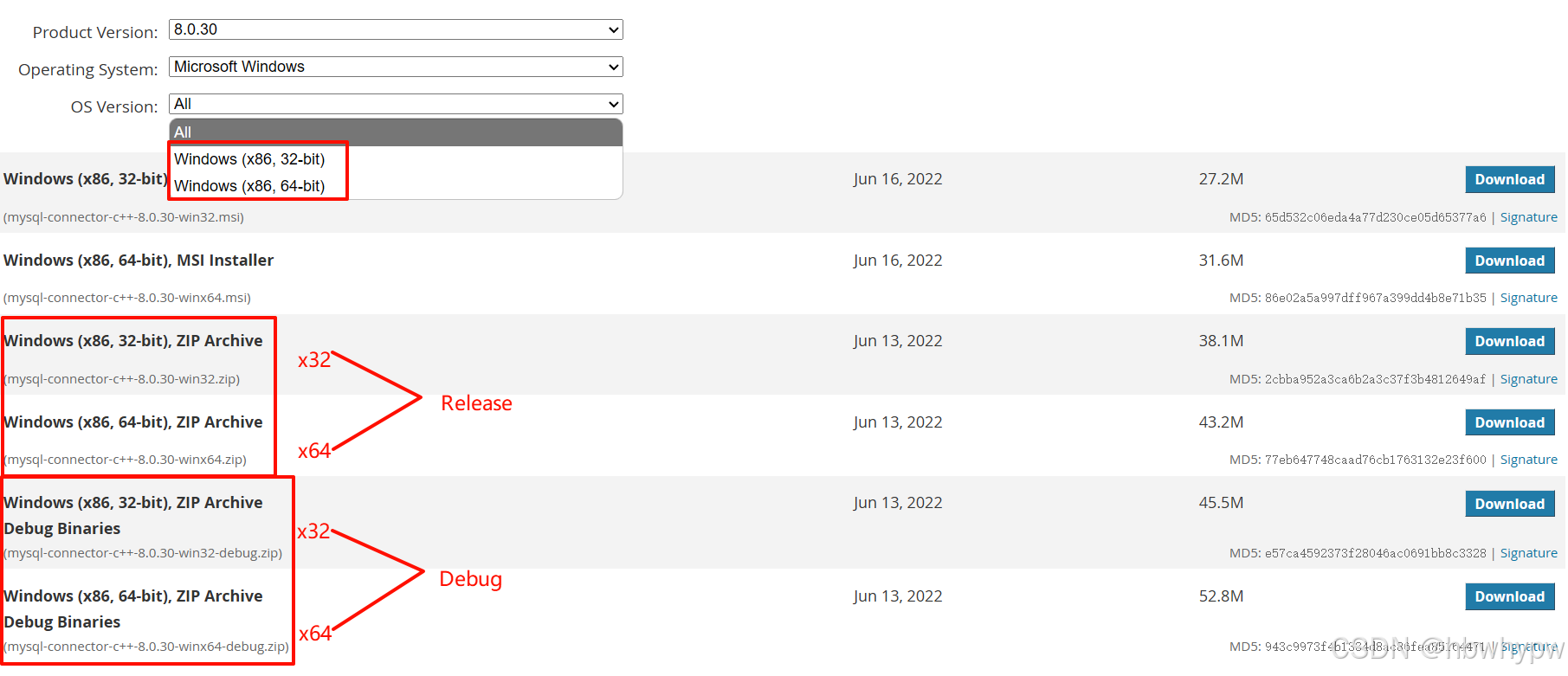
根据需要下载对应的版本,推荐把四种全部下载,后面还要配置通用多平台。
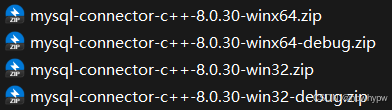
2.2. 避坑说明
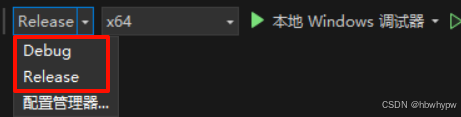
有坑:Connector C++的Debug、Release需要与Visual Studio的Debug、Release 一一对应,官网没有特别说明,初学者容易入坑。
3. 安装
3.1. 单平台模式安装(winx64+Release)
3.1.1. 解压
先把mysql-connector-c++-8.0.30-winx64.zip解压到D:\software\MySQL\mysql-connector-c++-8.0.30.winx64,再重命名为mysql-connector-c++-8.0.30.single。
3.1.2. 配置VS2022
- 先将原本的Debug改为Release
- 点击项目,右键属性,进入属性页
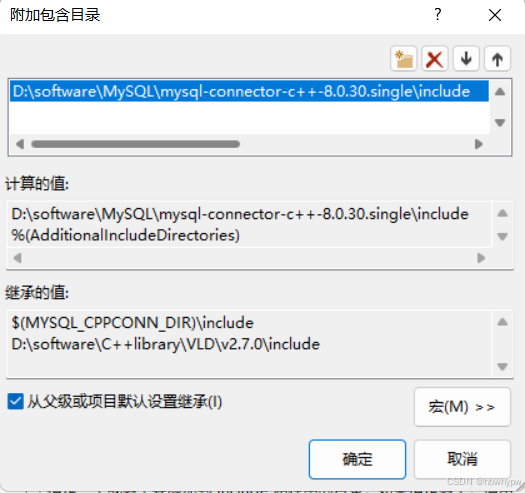
- C/C++ → 附加包含目录
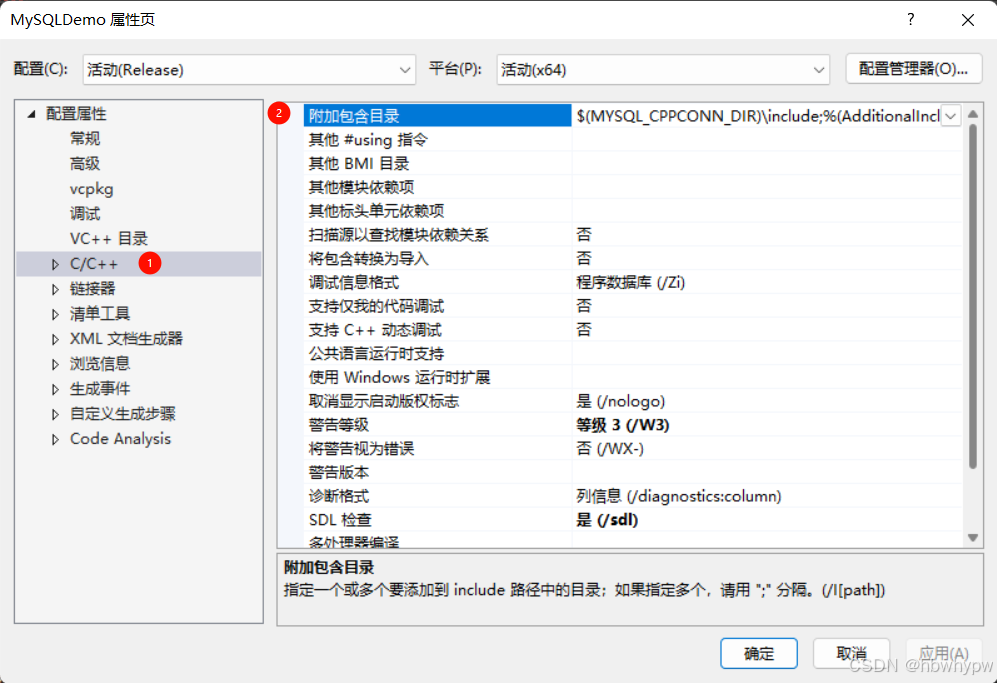
- 将 D:\software\MySQL\mysql-connector-c++-8.0.30.single\include 加到附加包含目录
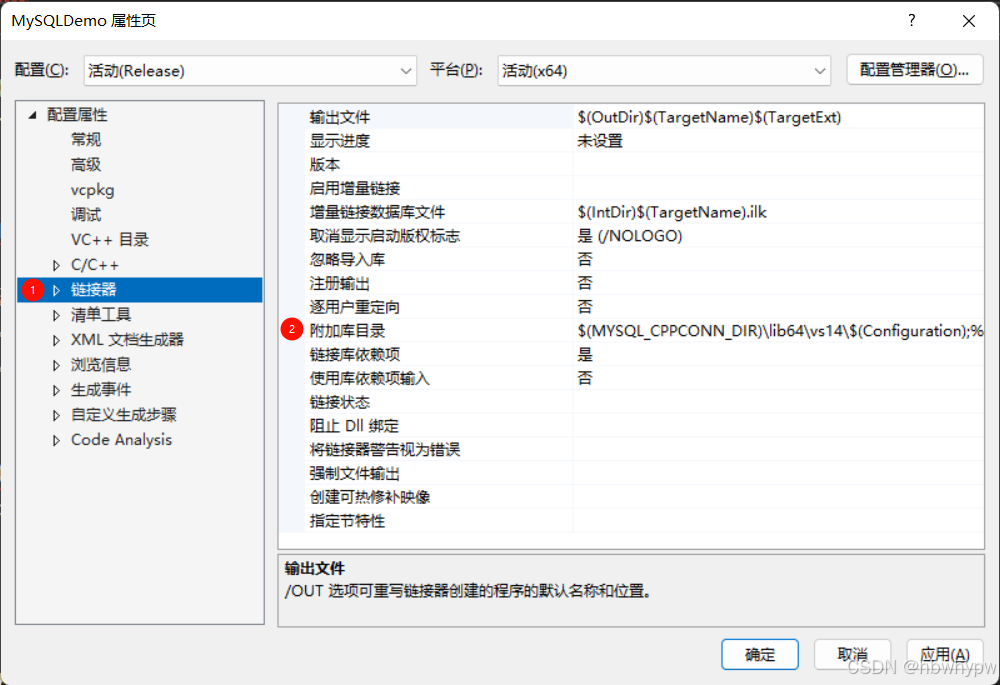
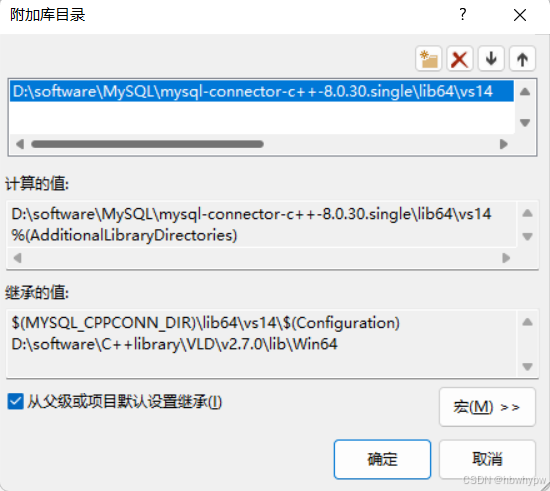
- 链接器→附加库目录
- 将 D:\software\MySQL\mysql-connector-c++-8.0.30.single\lib64\vs14 加到附加库目录
- 链接器→输入→附加依赖项
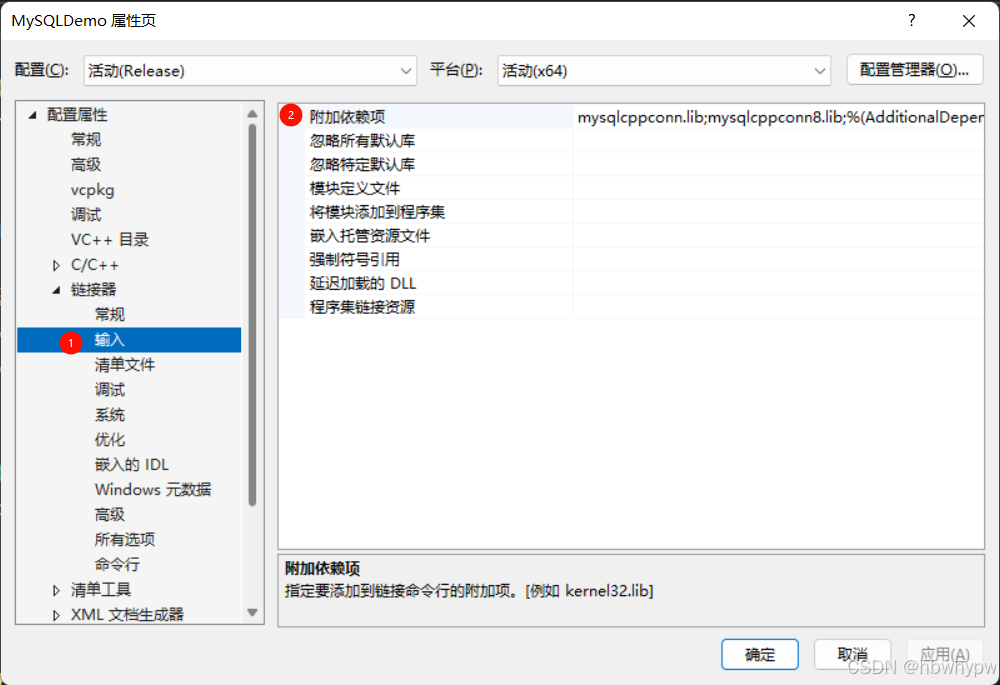
- 将 mysqlcppconn.lib;mysqlcppconn
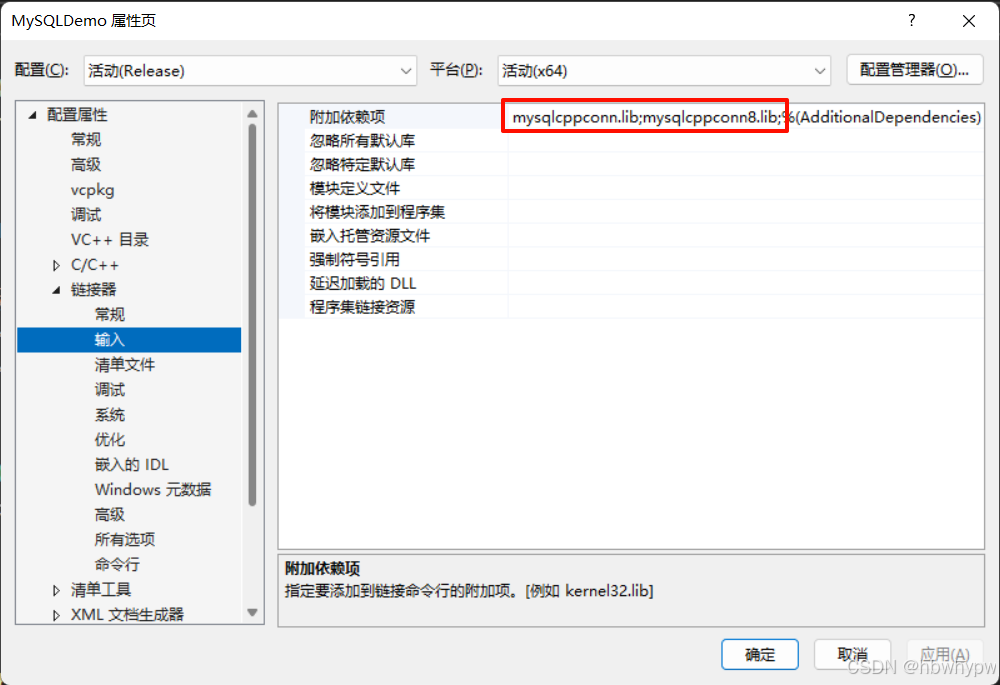
- 应用、确定
- 完成!
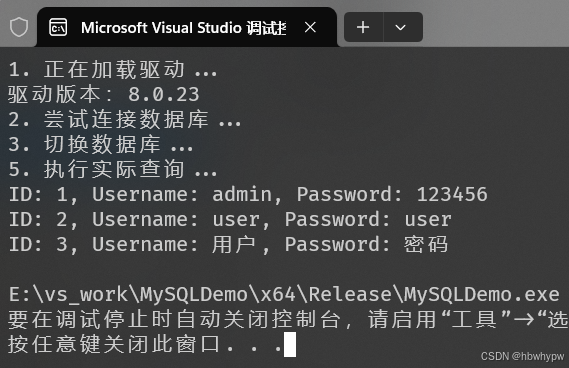
3.2. 多平台模式安装
3.2.1. 准备工作
- 先把之前下载的4个包都解压;
- 新建一个文件夹mysql-connector-c++-8.0.30.all,用于存放4个合并包的位置;
- 2个Release包按照debug包,调整目录结构;
- 2个debug包中文件夹名由debug改为Debug;
- 4个包合并到mysql-connector-c++-8.0.30.all。
3.2.2. 创建VS项目属性表文件
D:\software\MySQL\mysql-connector-c++-8.0.30.all $(SolutionDir)\$(Platform)\$(Configuration)\ $(MYSQL_CPPCONN_DIR)\include;%(AdditionalIncludeDirectories) /utf-8 %(AdditionalOptions) $(MYSQL_CPPCONN_DIR)\lib\vs14\$(Configuration);%(AdditionalLibraryDirectories) $(MYSQL_CPPCONN_DIR)\lib64\vs14\$(Configuration);%(AdditionalLibraryDirectories) mysqlcppconn.lib;mysqlcppconn8.lib;%(AdditionalDependencies) if "$(Platform)" == "Win32" ( xcopy /y /i "$(MYSQL_CPPCONN_DIR)\lib\*.dll" "$(TargetDir)" xcopy /y /i "$(MYSQL_CPPCONN_DIR)\lib\$(Configuration)\*.dll" "$(TargetDir)") else ( xcopy /y /i "$(MYSQL_CPPCONN_DIR)\lib64\*.dll" "$(TargetDir)" xcopy /y /i "$(MYSQL_CPPCONN_DIR)\lib64\$(Configuration)\*.dll" "$(TargetDir)")3.2.3. 运行效果
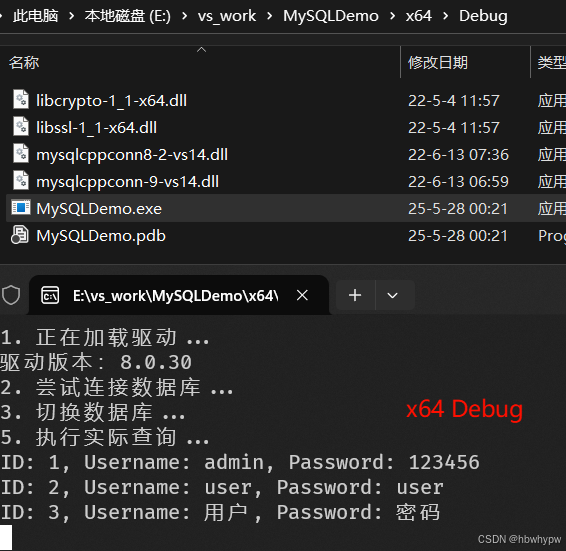
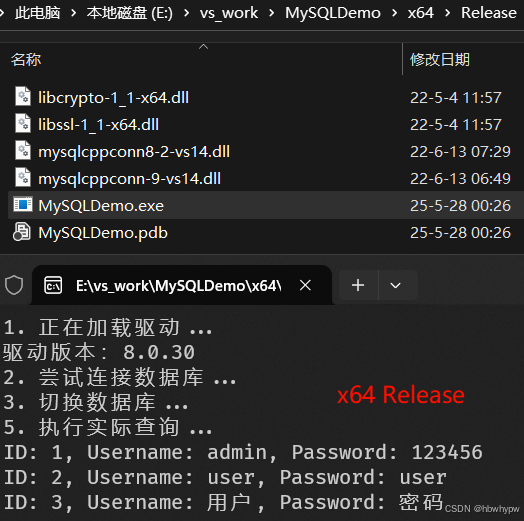
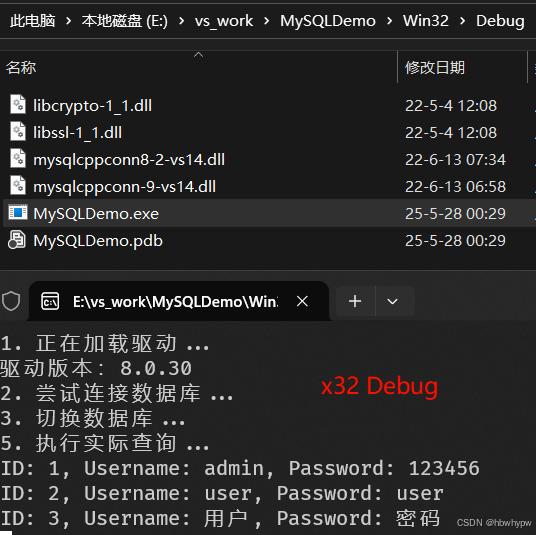
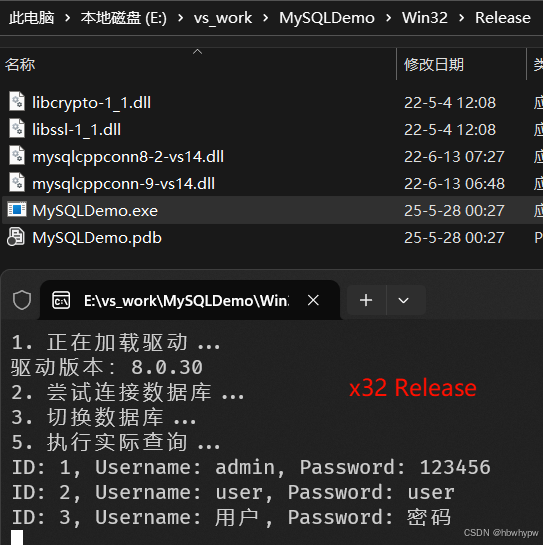
4. 测试代码
#include #include #include #include using namespace std;using namespace sql;using namespace mysql; int main() { SetConsoleCP(65001); SetConsoleOutputCP(65001); try { cout getMajorVersion() getMinorVersion() getPatchVersion() conn{ driver->connect("tcp://127.0.0.1:3306","root","root") }; cout setSchema("test"); cout stmt{ conn->createStatement() }; unique_ptr rs{ stmt->executeQuery("SELECT * FROM users;") }; while (rs->next()) { int id = rs->getInt("id"); string name = rs->getString("username"); string pwd = rs->getString("password"); cout << "ID: " << id << ", Username: " << name << ", Password: " << pwd << endl; } } catch (SQLException& e) { cerr << "\n!!! SQL异常 !!!\n" << "错误信息: " << e.what() << "\n" << "错误代码: " << e.getErrorCode() << endl; return EXIT_FAILURE; } catch (std::exception& e) { cerr << "标准异常: " << e.what() << endl; return EXIT_FAILURE; } catch (...) { cerr << "未知异常!" << endl; return EXIT_FAILURE; } getchar(); return EXIT_SUCCESS;}5. 错误总结
5.1. Unable to connect to localhost 1367760
代码
cerr << "\n!!! SQL异常 !!!\n" << "错误信息: " << e.what() << "\n" << "错误代码: " << e.getErrorCode() << endl;return EXIT_FAILURE;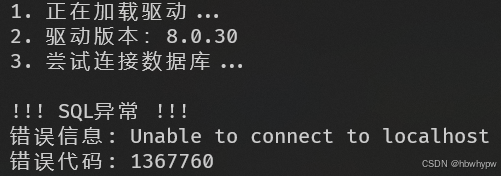
原因:在VS2022 Debug模式下,引用Release MySQL connector包,导致连接失败。
5.2. 0x00007FFD96D42070 (ucrtbased.dll)处(位于 xxx.exe 中)引发的异常: 0xC0000005: 读取位置 0x00007F0045444F4D 时发生访问冲突。
代码
cerr << "\n!!! SQL异常 !!!\n" << "错误信息: " << e.what() << "\n" << "错误代码: " << e.getErrorCode() << "\n" << "SQL状态: " << e.getSQLState() << endl;return EXIT_FAILURE;原因:也是在VS2022 Debug模式下,引用Release MySQL connector包,同时,还增加了getSQLState()的调用导致的。
5.3. 无法打开包括文件: “boost/shared_ptr.hpp”: No such file or directory

原因:使用的是低版本的MySQL connector包(<8.0.23),需要额外配置Boost库
6. 另外乱码问题
6.1. 编译选项
/utf-8 %(AdditionalOptions)6.2. 代码中设置控制台编码
// 设置控制台编码格式为UTF-8 SetConsoleCP(65001); SetConsoleOutputCP(65001);6.3. VS2022中文件编码
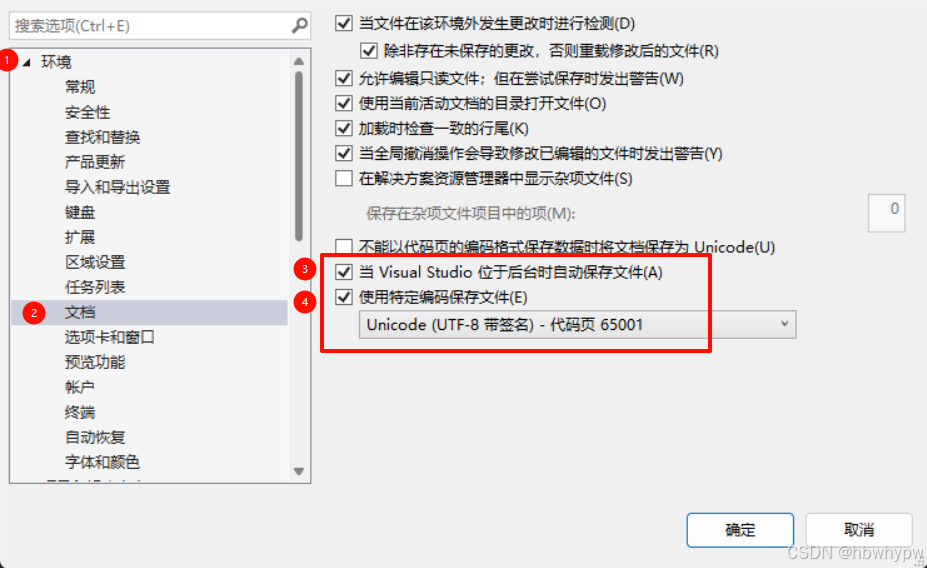

 浙公网安备 33010602011771号