


深入解析:Postgresql源码(146)二进制文件格式分析
速查
# 查看elf头
readelf -h bin/postgres
# 查看Section
readelf -S bin/postgres
(gdb) info file
(gdb) maint info sections
# 查看代码段汇编
disassemble 0x48e980 , 0x48e9b0
disassemble main
# 查看代码段某个地址属于拿个函数
info line *0x7b7d90
# 执行视角查看segments
readelf -l bin/postgres
可执行文件格式
常见的可执行文件格式:
- Windows:PE(Portable Executable)
- Unix:ELF(Executable and Linkable Format)
- MacOS IOS:Mach-O
postgres在linux平台编译后,生成可执行文件为ELF文件格式。
$ file bin/postgres
bin/postgres: ELF 64-bit LSB executable,
x86-64,
version 1 (SYSV),
dynamically linked,
interpreter /lib64/ld-linux-x86-64.so.2,
for GNU/Linux 3.2.0,
BuildID[sha1]=c7ab1c85b211f05bbc06a69566f82b05233782f5,
with debug_info,
not stripped,
too many notes (256
)
libpq.a 静态库
$ file lib/libpq.a
lib/libpq.a: current ar archive
libpq.so动态库
$ file lib/libpq.so.5.16
lib/libpq.so.5.16: ELF 64-bit LSB shared object,
x86-64, version 1 (SYSV),
dynamically linked,
BuildID[sha1]=7bd87aa5ae3f13463c4ddd66f8d7f6cf1beab3fa,
with debug_info,
not stripped
ELF文件两种视角
- 静态视角:Linking View
- 执行视角:Execution View
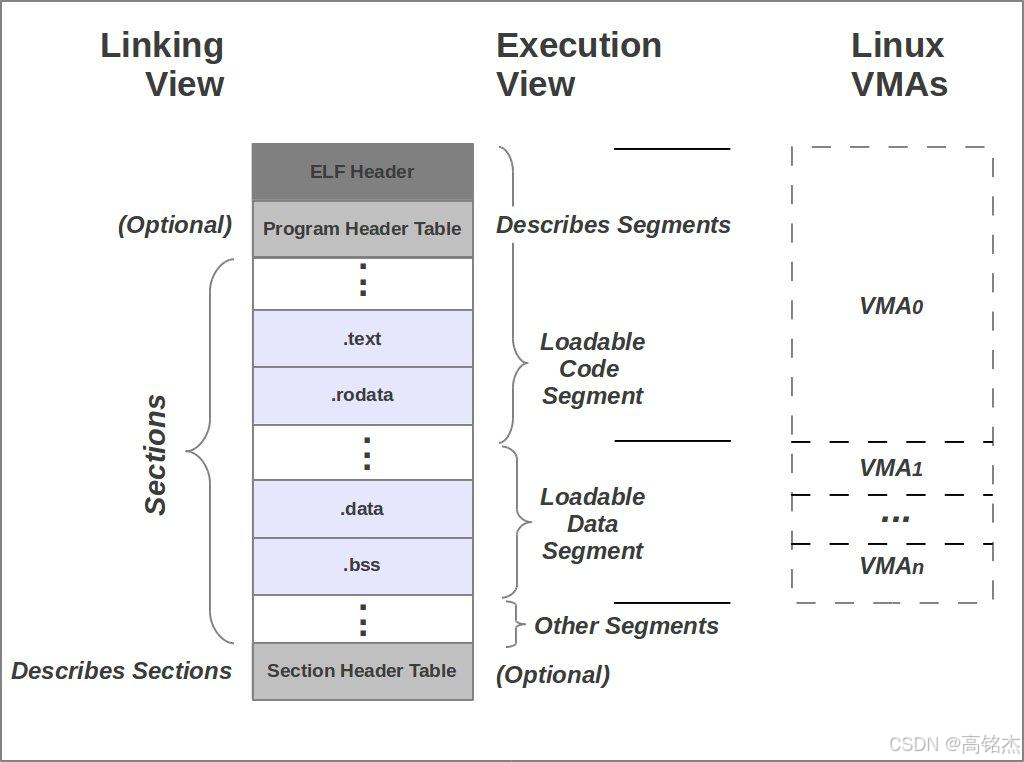
动态视角 vs 静态视角:
- 静态视角:由Section组成,描述链接时的代码/数据分区(如 .text、.rodata)。
- 动态视角:由Segment组成,描述运行时内存如何组织。一个Segment可能包含多个Section
- Section组成的静态视图,Segment组成了动态视图。Segment实际运行时如何在进程虚拟地址空间内组织数据(Virtual Address Space)。
Segment在 ELF 文件中的意义:
- ELF 文件的 Program Header(程序头) 中的 Segment(段) 描述了程序加载到内存时的布局。每个 Segment 指定了以下信息:
- 需要加载到进程 VAS 的哪些虚拟地址范围(如代码段 .text、数据段 .data)。
- 访问权限(可读、可写、可执行)。
- 文件偏移量和内存大小(p_offset、p_filesz、p_memsz)。
静态视角使用GDB分析ELF文件
postgres文件
$ readelf -h bin/postgres
ELF Header:
Magic: 7f 45 4c 46 02 01 01 00 00 00 00 00 00 00 00 00
Class: ELF64
Data: 2's complement, little endian
Version: 1 (current)
OS/ABI: UNIX - System V
ABI Version: 0
Type: EXEC (Executable file
)
Machine: Advanced Micro Devices X86-64
Version: 0x1
Entry point address: 0x48e980
Start of program headers: 64 (bytes into file
)
Start of section headers: 41318232 (bytes into file
)
Flags: 0x0
Size of this header: 64 (bytes)
Size of program headers: 56 (bytes)
Number of program headers: 9
Size of section headers: 64 (bytes)
Number of section headers: 38
Section header string table index: 37- Magic字段可以宽度判断是否为ELF文件。45 4c 46 对应 E L F的ASCII码。
- ELF类型:EXEC (Executable file)
- 程序运行时将会执行的第一条指令的位置:0x48e980
gdb确认0x48e980地址再text段(所有程序代码都会在text段)
(gdb) info file
Symbols from "/data/mingjie/pgroot99/pghome/bin/postgres".
Local exec file:
`/data/mingjie/pgroot99/pghome/bin/postgres', file type elf64-x86-64.
Entry point: 0x48e980
0x0000000000400238 - 0x0000000000400254 is .interp # 动态链接器路径
0x0000000000400254 - 0x0000000000400274 is .note.ABI-tag # 编译环境元数据
0x0000000000400274 - 0x0000000000400298 is .note.gnu.build-id
0x0000000000400298 - 0x0000000000414748 is .gnu.hash # 动态符号表的哈希表,加速符号查找
0x0000000000414748 - 0x0000000000454300 is .dynsym # 动态链接符号表(函数/变量名)及其字符串表
0x0000000000454300 - 0x0000000000485903 is .dynstr # 动态链接符号表(函数/变量名)及其字符串表
0x0000000000485904 - 0x000000000048adfe is .gnu.version
0x000000000048ae00 - 0x000000000048afa0 is .gnu.version_r
0x000000000048afa0 - 0x000000000048b138 is .rela.dyn
0x000000000048b138 - 0x000000000048d2e0 is .rela.plt
0x000000000048d2e0 - 0x000000000048d2fb is .init
0x000000000048d300 - 0x000000000048e980 is .plt # 动态跳转表(.plt)及全局偏移表(.got.plt),用于延迟绑定动态库函数
0x000000000048e980 - 0x0000000000bf4e04 is .text # 所有可执行代码 <<<<<<< 0x48e980
0x0000000000bf4e04 - 0x0000000000bf4e11 is .fini
0x0000000000bf5000 - 0x0000000000e662e0 is .rodata # 只读数据(字符串常量、全局常量等)
0x0000000000e662e0 - 0x0000000000e95a5c is .eh_frame_hdr
0x0000000000e95a60 - 0x0000000000f55668 is .eh_frame # 异常处理信息
0x0000000001155cd0 - 0x0000000001155cd8 is .init_array # 构造函数指针列表
0x0000000001155cd8 - 0x0000000001155ce0 is .fini_array # 析构函数指针列表
0x0000000001155ce0 - 0x0000000001155d68 is .data.rel.ro
0x0000000001155d68 - 0x0000000001155fc8 is .dynamic
0x0000000001155fc8 - 0x0000000001155fe8 is .got
0x0000000001156000 - 0x0000000001156b50 is .got.plt
0x0000000001156b60 - 0x000000000116e9b8 is .data # 已初始化的全局变量/静态变量(非零值)
0x000000000116e9c0 - 0x00000000011a4a60 is .bss # 未初始化或零初始化的全局/静态变量(运行时自动清零)maint也可以查询
(gdb) maint info sections
Exec file:
`/data/mingjie/pgroot99/pghome/bin/postgres', file type elf64-x86-64.
[0] 0x00400238->0x00400254 at 0x00000238: .interp ALLOC LOAD READONLY DATA HAS_CONTENTS
[1] 0x00400254->0x00400274 at 0x00000254: .note.ABI-tag ALLOC LOAD READONLY DATA HAS_CONTENTS
[2] 0x00400274->0x00400298 at 0x00000274: .note.gnu.build-id ALLOC LOAD READONLY DATA HAS_CONTENTS
[3] 0x00400298->0x00414748 at 0x00000298: .gnu.hash ALLOC LOAD READONLY DATA HAS_CONTENTS
[4] 0x00414748->0x00454300 at 0x00014748: .dynsym ALLOC LOAD READONLY DATA HAS_CONTENTS
[5] 0x00454300->0x00485903 at 0x00054300: .dynstr ALLOC LOAD READONLY DATA HAS_CONTENTS
[6] 0x00485904->0x0048adfe at 0x00085904: .gnu.version ALLOC LOAD READONLY DATA HAS_CONTENTS
[7] 0x0048ae00->0x0048afa0 at 0x0008ae00: .gnu.version_r ALLOC LOAD READONLY DATA HAS_CONTENTS
[8] 0x0048afa0->0x0048b138 at 0x0008afa0: .rela.dyn ALLOC LOAD READONLY DATA HAS_CONTENTS
[9] 0x0048b138->0x0048d2e0 at 0x0008b138: .rela.plt ALLOC LOAD READONLY DATA HAS_CONTENTS
[10] 0x0048d2e0->0x0048d2fb at 0x0008d2e0: .init ALLOC LOAD READONLY CODE HAS_CONTENTS
[11] 0x0048d300->0x0048e980 at 0x0008d300: .plt ALLOC LOAD READONLY CODE HAS_CONTENTS
[12] 0x0048e980->0x00bf4e04 at 0x0008e980: .text ALLOC LOAD READONLY CODE HAS_CONTENTS
[13] 0x00bf4e04->0x00bf4e11 at 0x007f4e04: .fini ALLOC LOAD READONLY CODE HAS_CONTENTS
[14] 0x00bf5000->0x00e662e0 at 0x007f5000: .rodata ALLOC LOAD READONLY DATA HAS_CONTENTS
[15] 0x00e662e0->0x00e95a5c at 0x00a662e0: .eh_frame_hdr ALLOC LOAD READONLY DATA HAS_CONTENTS
[16] 0x00e95a60->0x00f55668 at 0x00a95a60: .eh_frame ALLOC LOAD READONLY DATA HAS_CONTENTS
[17] 0x01155cd0->0x01155cd8 at 0x00b55cd0: .init_array ALLOC LOAD DATA HAS_CONTENTS
[18] 0x01155cd8->0x01155ce0 at 0x00b55cd8: .fini_array ALLOC LOAD DATA HAS_CONTENTS
[19] 0x01155ce0->0x01155d68 at 0x00b55ce0: .data.rel.ro ALLOC LOAD DATA HAS_CONTENTS
[20] 0x01155d68->0x01155fc8 at 0x00b55d68: .dynamic ALLOC LOAD DATA HAS_CONTENTS
[21] 0x01155fc8->0x01155fe8 at 0x00b55fc8: .got ALLOC LOAD DATA HAS_CONTENTS
[22] 0x01156000->0x01156b50 at 0x00b56000: .got.plt ALLOC LOAD DATA HAS_CONTENTS
[23] 0x01156b60->0x0116e9b8 at 0x00b56b60: .data ALLOC LOAD DATA HAS_CONTENTS
[24] 0x0116e9c0->0x011a4a60 at 0x00b6e9b8: .bss ALLOC
[25] 0x00000000->0x0000005a at 0x00b6e9b8: .comment READONLY HAS_CONTENTS
[26] 0x015a4a60->0x015a8ef4 at 0x00b6ea14: .gnu.build.attributes READONLY HAS_CONTENTS
[27] 0x00000000->0x00009770 at 0x00b72ea8: .debug_aranges READONLY HAS_CONTENTS
[28] 0x00000000->0x011476f4 at 0x00b7c618: .debug_info READONLY HAS_CONTENTS
[29] 0x00000000->0x000bd016 at 0x01cc3d0c: .debug_abbrev READONLY HAS_CONTENTS
[30] 0x00000000->0x004fdf94 at 0x01d80d22: .debug_line READONLY HAS_CONTENTS
[31] 0x00000000->0x00181834 at 0x0227ecb6: .debug_str READONLY HAS_CONTENTS
[32] 0x00000000->0x0000b990 at 0x024004ea: .debug_ranges READONLY HAS_CONTENTS
[33] 0x00000000->0x0022b286 at 0x0240be7a: .debug_macro READONLY HAS_CONTENTS
.text段
用x打印text段的地址,gdb会自动加上函数名,非常方便。
(gdb) x/32 0x48e980
0x48e980 <_start>: 0xfa1e0ff3 0x8949ed31 0x89485ed1 0xe48348e2
  0x48e990 <_start+16>: 0x495450f0 0x4d80c0c7 0xc74800bf 0xbf4d10c1
    0x48e9a0 <_start+32>: 0xc7c74800 0x007b7d7d 0x762a15ff 0x90f400cc
      0x48e9b0 <_dl_relocate_static_pie>: 0xfa1e0ff3 0x0f2e66c3 0x0000841f 0x90000000
        0x48e9c0 <deregister_tm_clones>: 0xf13d8d48 0x4800cdff 0xffea058d 0x394800cd
          0x48e9d0 <deregister_tm_clones+16>: 0x481574f8 0x75ee058b 0x854800cc 0xff0974c0
            0x48e9e0 <deregister_tm_clones+32>: 0x801f0fe0 0x00000000 0x801f0fc3 0x00000000
              0x48e9f0 <register_tm_clones>: 0xc13d8d48 0x4800cdff 0xffba358d 0x294800cd
                (gdb) x/32 main
                0x7b7d7d <main>: 0xe5894855 0x20ec8348 0x48ec7d89 0xc6e07589
                  0x7b7d8d <main+16>: 0xc601ff45 0x9ba44905 0x8b480100 0x8b48e045
                    0x7b7d9d <main+32>: 0xc7894800 0x43770ce8 0x05894800 0x009e6c33
                      0x7b7dad <main+48>: 0x2c058b48 0x48009e6c 0xc8e8c789 0x48000002
_start的作用是调用函数入口main函数,main函数的入口地址是0x7b7d7d,_start是怎么调用进来的?用disassemble看下汇编:
(gdb) disassemble 0x48e980 , 0x48e9b0
Dump of assembler code from 0x48e980 to 0x48e9b0:
0x000000000048e980 <_start+0>: endbr64
  0x000000000048e984 <_start+4>: xor %ebp,%ebp
    0x000000000048e986 <_start+6>: mov %rdx,%r9
      0x000000000048e989 <_start+9>: pop %rsi
        0x000000000048e98a <_start+10>: mov %rsp,%rdx
          0x000000000048e98d <_start+13>: and $0xfffffffffffffff0,%rsp
            0x000000000048e991 <_start+17>: push %rax
              0x000000000048e992 <_start+18>: push %rsp
                0x000000000048e993 <_start+19>: mov $0xbf4d80,%r8
                  0x000000000048e99a <_start+26>: mov $0xbf4d10,%rcx
                    0x000000000048e9a1 <_start+33>: mov $0x7b7d7d,%rdi
                      0x000000000048e9a8 <_start+40>: callq *0xcc762a(%rip) # 0x1155fd8
                        0x000000000048e9ae <_start+46>: hlt
                          0x000000000048e9af <.annobin_static_reloc.c_end+0>: nop
mov $0x7b7d7d,%rdi将main地址存入rip,callq调用riq即完成main函数的调用。
如果想要插件某个函数的汇编代码,disassemble后面可以接地址也可以接函数名:
(gdb) disassemble main
Dump of assembler code for
function main:
0x00000000007b7d7d <+0>: push %rbp
  0x00000000007b7d7e <+1>: mov %rsp,%rbp
    0x00000000007b7d81 <+4>: sub $0x20,%rsp
      0x00000000007b7d85 <+8>: mov %edi,-0x14(%rbp)
        0x00000000007b7d88 <+11>: mov %rsi,-0x20(%rbp)
          0x00000000007b7d8c <+15>: movb $0x1,-0x1(%rbp)
            0x00000000007b7d90 <+19>: movb $0x1,0x9ba449(%rip) # 0x11721e0 <reached_main>
              0x00000000007b7d97 <+26>: mov -0x20(%rbp),%rax
                0x00000000007b7d9b <+30>: mov (%rax),%rax
                  0x00000000007b7d9e <+33>: mov %rax,%rdi
                    0x00000000007b7da1 <+36>: callq 0xbef4b2 <get_progname>
                      0x00000000007b7da6 <+41>: mov %rax,0x9e6c33(%rip) # 0x119e9e0 <progname>
                        0x00000000007b7dad <+48>: mov 0x9e6c2c(%rip),%rax # 0x119e9e0 <progname>
                          ...
...拿到一个地址想知道对应哪个函数,起止地址是什么?例如上面main函数中的一行0x7b7d90
(gdb) info line *0x7b7d90
Line 64 of "main.c" starts at address 0x7b7d90  and ends at 0x7b7d97 .
.rodata
rodata段适用gdb打印不太方便,用objdump输出比较直观:
$ objdump -s bin/postgres --section=.rodata | more
bin/postgres:     file format elf64-x86-64
Contents of section .rodata:
  bf5000 01000200 00000000 00000000 00000000  ................
  bf5010 00000000 00000000 00000000 00000000  ................
  bf5020 2e2e2f2e 2e2f2e2e 2f2e2e2f 7372632f  ../../../../src/
  bf5030 696e636c 7564652f 73746f72 6167652f  include/storage/
  bf5040 6974656d 7074722e 68004974 656d506f  itemptr.h.ItemPo
  bf5050 696e7465 72497356 616c6964 28706f69  interIsValid(poi
  bf5060 6e746572 29000000 2e2e2f2e 2e2f2e2e  nter)...../../..
  bf5070 2f2e2e2f 7372632f 696e636c 7564652f  /../src/include/
  bf5080 73746f72 6167652f 6275666d 67722e68  storage/bufmgr.h
  bf5090 00627566 6e756d20 3c3d204e 42756666  .bufnum = -N
  bf50b0 4c6f6342 75666665 72004275 66666572  LocBuffer.Buffer
  bf50c0 49735661 6c696428 62756666 65722900  IsValid(buffer).
  bf50d0 6272696e 2e630000 69647852 656c2d3e  brin.c..idxRel->
  bf50e0 72645f72 656c2d3e 72656c6b 696e6420  rd_rel->relkind
  bf50f0 3d3d2052 454c4b49 4e445f49 4e444558  == RELKIND_INDEX
  bf5100 20262620 69647852 656c2d3e 72645f72   && idxRel->rd_r
  bf5110 656c2d3e 72656c61 6d203d3d 20425249  el->relam == BRI
  bf5120 4e5f414d 5f4f4944 00000000 00000000  N_AM_OID........
  bf5130 72657175 65737420 666f7220 4252494e  request for BRIN
  bf5140 2072616e 67652073 756d6d61 72697a61   range summariza
  bf5150 74696f6e 20666f72 20696e64 65782022  tion for index "
  bf5160 25732220 70616765 20257520 77617320  %s" page %u was
  bf5170 6e6f7420 7265636f 72646564 00627269  not recorded.bri
  bf5180 6e696e73 65727420 63787400 746d7020  ninsert cxt.tmp
  bf5190 2b206c65 6e203d3d 20707472 00000000  + len == ptr....
  bf51a0 286b6579 2d3e736b 5f666c61 67732026  (key->sk_flags &
  bf51b0 20534b5f 49534e55 4c4c2920 7c7c2028   SK_ISNULL) || (
    bf51c0 6b65792d 3e736b5f 636f6c6c 6174696f  key->sk_collatio
    bf51d0 6e203d3d 20547570 6c654465 73634174  n == TupleDescAt
    bf51e0 74722862 64657363 2d3e6264 5f747570  tr(bdesc->bd_tup
    bf51f0 64657363 2c206b65 79617474 6e6f202d  desc, keyattno -
    bf5200 2031292d 3e617474 636f6c6c 6174696f   1)->attcollatio
    bf5210 6e29006e 6b657973 5b6b6579 6174746e  n).nkeys[keyattn
    bf5220 6f202d20 315d203d 3d203000 6e6e756c  o - 1] == 0.nnul
    bf5230 6c6b6579 735b6b65 79617474 6e6f202d  lkeys[keyattno -
    bf5240 20315d20 3d3d2030 00627269 6e676574   1] == 0.bringet
    bf5250 6269746d 61702063 78740000 00000000  bitmap cxt......
    bf5260 286e6b65 79735b61 74746e6f 202d2031  (nkeys[attno - 1
    bf5270 5d203e20 30292026 2620286e 6b657973  ] > 0) && (nkeys
    ...
    ...
    ...
    ...
地址从0xbf5000起始,和gdb查出来的也能对应上。
0x0000000000bf5000 - 0x0000000000e662e0 is .rodata # 只读数据(字符串常量、全局常量等)执行视角分析ELF文件
$ readelf -l bin/postgres
Elf file type is EXEC (Executable file)
Entry point 0x48e980
There are 9 program headers, starting at offset 64
Program Headers:
  Type           Offset             VirtAddr           PhysAddr
  FileSiz            MemSiz              Flags  Align
  PHDR           0x0000000000000040 0x0000000000400040 0x0000000000400040
  0x00000000000001f8 0x00000000000001f8  R      0x8
  INTERP         0x0000000000000238 0x0000000000400238 0x0000000000400238
  0x000000000000001c 0x000000000000001c  R      0x1
  [Requesting program interpreter: /lib64/ld-linux-x86-64.so.2]
  LOAD           0x0000000000000000 0x0000000000400000 0x0000000000400000
  0x0000000000b55668 0x0000000000b55668  R E    0x200000
  LOAD           0x0000000000b55cd0 0x0000000001155cd0 0x0000000001155cd0
  0x0000000000018ce8 0x000000000004ed90  RW     0x200000
  DYNAMIC        0x0000000000b55d68 0x0000000001155d68 0x0000000001155d68
  0x0000000000000260 0x0000000000000260  RW     0x8
  NOTE           0x0000000000000254 0x0000000000400254 0x0000000000400254
  0x0000000000000044 0x0000000000000044  R      0x4
  GNU_EH_FRAME   0x0000000000a662e0 0x0000000000e662e0 0x0000000000e662e0
  0x000000000002f77c 0x000000000002f77c  R      0x4
  GNU_STACK      0x0000000000000000 0x0000000000000000 0x0000000000000000
  0x0000000000000000 0x0000000000000000  RW     0x10
  GNU_RELRO      0x0000000000b55cd0 0x0000000001155cd0 0x0000000001155cd0
  0x0000000000000330 0x0000000000000330  R      0x1
  Section to Segment mapping:
    Segment Sections...
    00
    01     .interp
    02     .interp .note.ABI-tag .note.gnu.build-id .gnu.hash .dynsym .dynstr .gnu.version .gnu.version_r .rela.dyn .rela.plt .init .plt .text .fini .rodata .eh_frame_hdr .eh_frame
    03     .init_array .fini_array .data.rel.ro .dynamic .got .got.plt .data .bss
    04     .dynamic
    05     .note.ABI-tag .note.gnu.build-id
    06     .eh_frame_hdr
    07
08 .init_array .fini_array .data.rel.ro .dynamic .got- Program Headers:每个Segment的情况。
- Section to Segment mapping: Section和Segment的对应关系。
LOAD类型的Segment会在程序运行时被加载到VAS,而其余Segment主要用于辅助程序的正常运行。
第一个LOAD范围:0x0000000000000000 - 0x0000000000b55668
权限是RE对应
02 .interp .note.ABI-tag .note.gnu.build-id .gnu.hash .dynsym .dynstr .gnu.version .gnu.version_r .rela.dyn .rela.plt .init .plt .text .fini .rodata .eh_frame_hdr .eh_frame第二个LOAD范围:0x0000000000b55cd0 - 0x0000000000018ce8
权限是RW对应
03 .init_array .fini_array .data.rel.ro .dynamic .got .got.plt .data .bss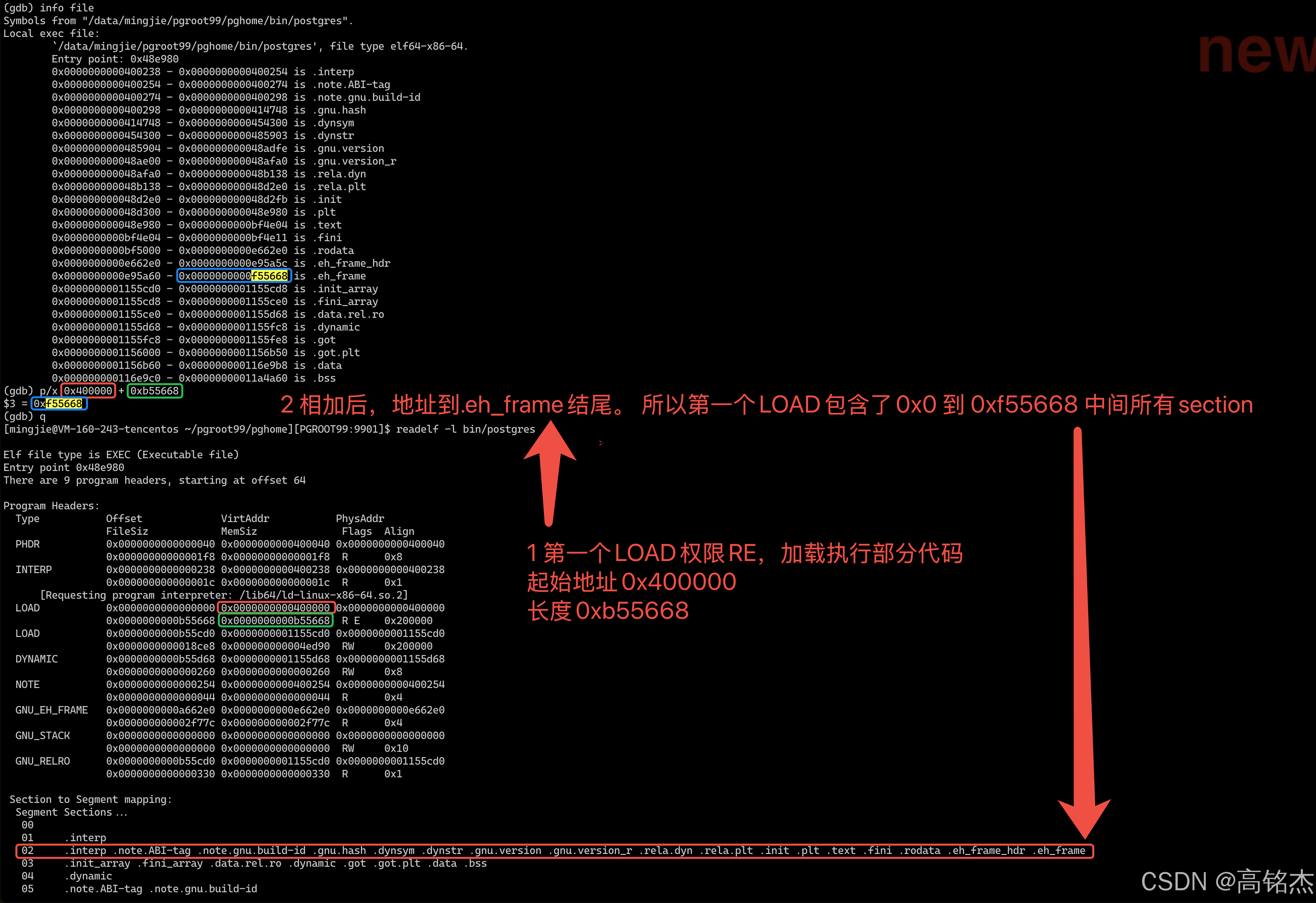

 浙公网安备 33010602011771号