
Qt颜色下拉框
上周为了用Qt写一个类似颜色下拉框的东西,查阅了网上的多数相关资料,依然没有我想要的。终于在周四的时候下定决心重写QCombobox类来实现功能,现在把它贴出来,望看到的人,批评指正。废话不多说,先上图:
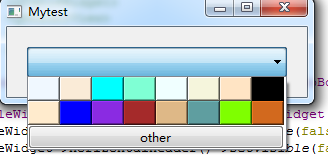
图片1-1
点击下拉之后,出现的是下拉表格,里面都是button,我用了最简单的setstylesheet直接设置背景,点击颜色按钮之后,我展示的效果是在编辑框位置有颜色label。因为没有创建这些按钮的索引,所以我是直接简单粗暴的用的按钮的cliced()信号,颜色的话我是重写了QPushButton类,发送的是clicked(QString),将颜色直接传过去的。other按钮是可以弹出QColorDialog,Qt自带的就不多说了。效果如图:
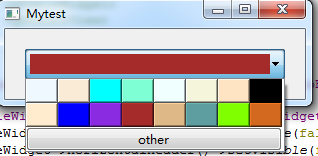
图片1-2
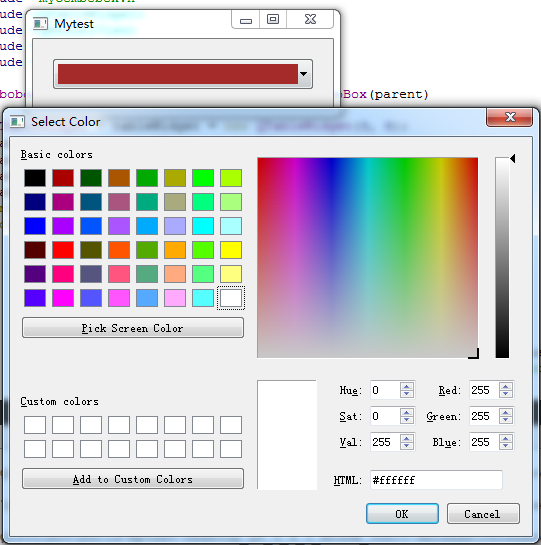
图片1-3
关键代码如下:
 1 MyCombobox::MyCombobox(QWidget *parent) : QComboBox(parent)
 2 {
 3     QTableWidget * tableWidget = new QTableWidget(3, 8);
 4     tableWidget->verticalHeader()->setVisible(false);
 5     tableWidget->horizontalHeader()->setVisible(false);
 6     tableWidget->setShowGrid(false);
 7     tableWidget->setSpan(2,0,1,8);
 8     int k = 0;
 9     for (int i = 0; i < 3; ++i)
10     {
11         if(i==0||i==1){
12             for (int j = 0; j < 8; ++j)
13                 {
14                     tableWidget->setColumnWidth(j, 32);
15                     tableWidget->setRowHeight(j, 24);
16                     QStringList colorList = QColor::colorNames();\
17                     MyPushButton * itemWidget = new MyPushButton(colorList[k],this);
18                     itemWidget->setStyleSheet("QPushButton {">";}");
19                     k++;
20                     tableWidget->setCellWidget(i, j, itemWidget);
21                     connect(itemWidget,SIGNAL(clicked(QString)),this,SLOT(change(QString)));
22             }
23         }else{
24             other =new QPushButton(this);
25             other->setText("other");
26             tableWidget->setCellWidget(2, 0, other);
27         }
28      }
29     connect(other,SIGNAL(clicked()),this,SLOT(otherColor()));
30     this->setModel(tableWidget->model());
31     this->setView(tableWidget);
32 }
33 void MyCombobox::change(QString colorname)
34 {
35     QLabel *showColor = new QLabel(this);
36     showColor->setStyleSheet("QLabel {">";}");
37     showColor->setGeometry(5,5,240,20);
38     showColor->setVisible(true);
39 }
40 void MyCombobox::otherColor()
41 {
42    QColor mycolor = QColorDialog::getColor(Qt::white, this);
43    this->change(mycolor.name());
44 }
刚接触Qt,写的不好,如果各位有好的想法,我们可以多多沟通,比心

 浙公网安备 33010602011771号