VictoriaLogs快速入门
部署
二进制文件
curl -L -O https://github.com/VictoriaMetrics/VictoriaMetrics/releases/download/v0.5.2-victorialogs/victoria-logs-linux-amd64-v0.5.2-victorialogs.tar.gz
tar xzf victoria-logs-linux-amd64-v0.5.2-victorialogs.tar.gz
./victoria-logs-prod
Docker
docker run --rm -it -p 9428:9428 -v ./victoria-logs-data:/victoria-logs-data \
  docker.io/victoriametrics/victoria-logs:v0.5.2-victorialogs
ui界面
服务部署完成以后,访问9428端口,然后点击select/vmui进行数据查询
日志收集
http方式
echo '{ "log": { "level": "info", "message": "hello world" }, "date": "0", "stream": "stream1" }
{ "log": { "level": "error", "message": "oh no!" }, "date": "0", "stream": "stream1" }
{ "log": { "level": "info", "message": "hello world" }, "date": "0", "stream": "stream2" }
' | curl -X POST -H 'Content-Type: application/stream+json' --data-binary @- \
 'http://localhost:9428/insert/jsonline?_stream_fields=stream&_time_field=date&_msg_field=log.message'
如果时间戳字段设置为"0"则每个摄取的日志行都会使用VictoriaLogs端的当前时间戳。否则,时间戳字段必须为ISO8601格式。例如,2023-06-20T15:32:10Z。可选的秒小数部分可以在点-2023-06-20T15:32:10.123Z后指定。时区可以指定,而不是Z后缀-2023-06-20T15:32:10+02:00。
以下命令通过查询来验证数据是否已成功摄取到VictoriaLogs中:
curl http://localhost:9428/select/logsql/query -d 'query=log.level:*'
该命令应返回以下响应:
{"_msg":"hello world","_stream":"{stream=\"stream2\"}","_time":"2023-06-20T13:35:11.56789Z","log.level":"info"}
{"_msg":"hello world","_stream":"{stream=\"stream1\"}","_time":"2023-06-20T15:31:23Z","log.level":"info"}
{"_msg":"oh no!","_stream":"{stream=\"stream1\"}","_time":"2023-06-20T15:32:10.567Z","log.level":"error"}
Filebeat
在filebeat.yml中指定output.elasicsearch部分,以便将收集的日志发送到VictoriaLogs:
output.elasticsearch:
  hosts: ["http://localhost:9428/insert/elasticsearch/"]
  parameters:
    _msg_field: "message"
    _time_field: "@timestamp"
    _stream_fields: "host.hostname,log.file.path"
用VictoriaLogs的真实TCP地址替换hosts部分内的localhost:9428地址。
如果在数据摄取期间必须跳过一些日志字段,那么它们可以放入ignore_fields参数中。例如,以下配置指示VictoriaLogs忽略摄取日志中的log.offset和event.original字段:
output.elasticsearch:
  hosts: ["http://localhost:9428/insert/elasticsearch/"]
  parameters:
    _msg_field: "message"
    _time_field: "@timestamp"
    _stream_fields: "host.name,log.file.path"
    ignore_fields: "log.offset,event.original"
当Filebeat以高速率将日志摄取到VictoriaLogs时,则可能需要调整worker和bulk_max_size选项。例如,以下配置针对高于通常的摄取率进行了优化:
output.elasticsearch:
  hosts: ["http://localhost:9428/insert/elasticsearch/"]
  parameters:
    _msg_field: "message"
    _time_field: "@timestamp"
    _stream_fields: "host.name,log.file.path"
  worker: 8
  bulk_max_size: 1000
如果Filebeat将日志发送到另一个数据中心的VictoriaLogs,那么通过 compression_level选项启用数据压缩可能是有用的。这通常允许节省高达5倍的网络带宽和成本:
output.elasticsearch:
  hosts: ["http://localhost:9428/insert/elasticsearch/"]
  parameters:
    _msg_field: "message"
    _time_field: "@timestamp"
    _stream_fields: "host.name,log.file.path"
  compression_level: 1
Filebeat在启动时检查ElasticSearch版本,如果版本不兼容,则拒绝开始发送日志。为了绕过此检查,请将allow_older_versions: true添加到output.elasticsearch部分:
output.elasticsearch:
  hosts: [ "http://localhost:9428/insert/elasticsearch/" ]
  parameters:
    _msg_field: "message"
    _time_field: "@timestamp"
    _stream_fields: "host.name,log.file.path"
  allow_older_versions: true
复杂查询
此处操作是在ui界面完成
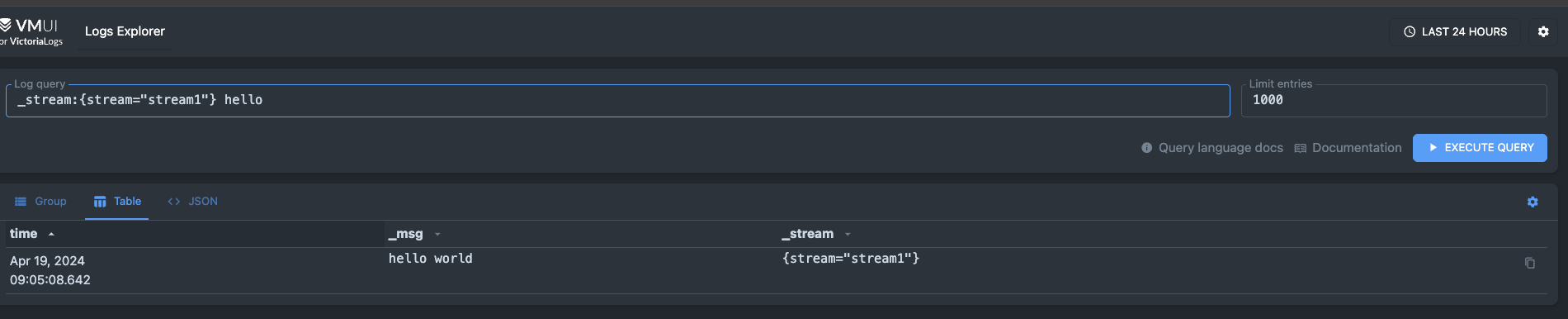
查询stream=stream1的数据(ps:此处的stream不是固定的,看写入的时候指定的数据)
_stream:{stream="stream1"}


echo '{ "log": { "level": "info", "message": "hello app" }, "date": "0", "app": "app1" }
{ "log": { "level": "error", "message": "aaaa" }, "date": "0", "app": "app1" }
{ "log": { "level": "info", "message": "bbb" }, "date": "0", "app": "app2" }
' | curl -X POST -H 'Content-Type: application/stream+json' --data-binary @-   'http://localhost:9428/insert/jsonline?_stream_fields=app&_time_field=date&_msg_field=log.message'
查询特定字段
默认情况下,VictoriaLogs查询响应包含_msg、_stream和_time字段。
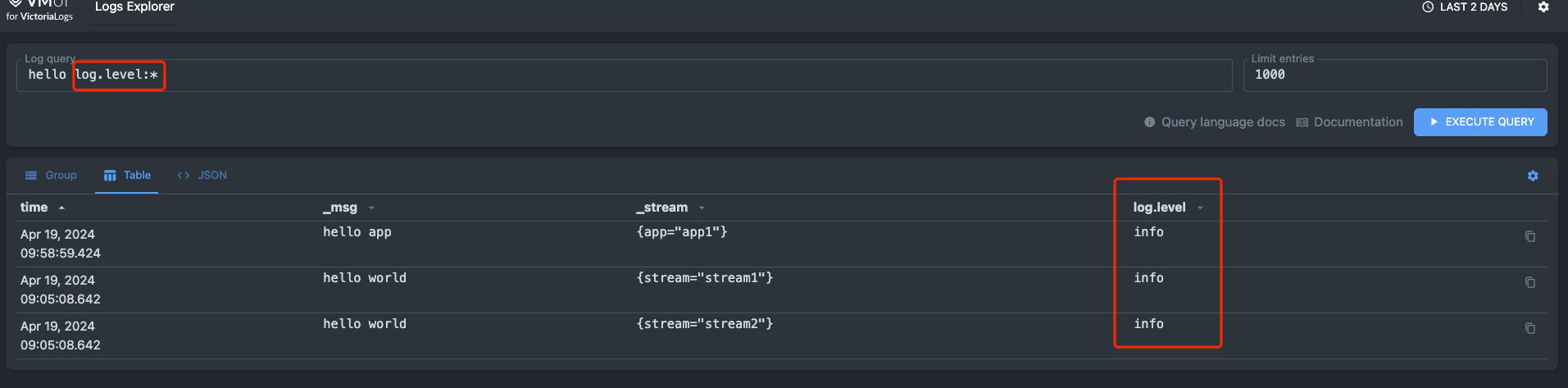
如果您想从摄取的结构化日志中选择其他字段,则必须在查询过滤器中提及它们。例如,如果您想选择log.level字段,并且该字段尚未在查询中提及,请在查询末尾添加log.level:过滤器过滤器。Thefieldfield_name:过滤器不会返回空或缺少field_name的日志条目。如果您想返回带或不带给定字段的日志条目,则可以使用(field_name:* OR field_name:"")过滤器。

 浙公网安备 33010602011771号