
day08 模块和面向对象
day08 模块和面向对象
今日概要:
- 模块
- 自定义模块(已讲)
- 内置模块
- shutil
- re(正则表达式)
- 第三方模块
- requests 模块
- bs4 模块
- 面向对象,看懂别人的代码(我们编程用函数式)。
1. 模块
1.1 自定义模块
- py文件或文件夹
- from 、import
- sys.path【你运行的当前脚本 + 系统内置目录】
- 自己的模块名不要和内置模块名重名。
补充:主文件
def run():
    print(123)


# 当你在运行当前脚本时,__name__ 是Python内部会创建一个变量 __name__ = "__main__"
# 如果当前的脚本,是被别人导入执行的,Python在这个脚本的内部会创建 __name__ = "app"
if __name__ == '__main__':
    run()
注意:标志;防止别人导入就执行程序,只有主动执行才可以。
1.2 内置模块
os/random/hashlib/json/time/datetime
1.2.1 shutil
-
删除文件夹
import shutil shutil.rmtree("xx/xxx/xxx/xxx") -
拷贝文件夹
shutil.copytree("原文件夹","目标文件夹路径") -
拷贝文件
# 拷贝源文件到文件夹(保证文件夹存在) shutil.copy("原文件夹","目标文件夹路径/") -
重命名
import shutil

# 文件重命名
# shutil.move("x10", 'x10.txt')

# 文件件重命名
# shutil.move("x1", 'x100')
import os import shutil if os.path.exists("x10"): shutil.move("x10", 'x10.txt') if os.path.exists("x1"): shutil.move("x1", 'x100') -
压缩和解压缩
import shutil

# base_name,压缩包的文件名
# format,后缀名
# root_dir,压缩的文件夹的路径
# shutil.make_archive(base_name='1116', format='zip', root_dir="ppp")


# filename,压缩包的文件名
# extract_dir,要解压的目录
# format,后缀名
# shutil.unpack_archive(filename="1116.zip", extract_dir="1117", format='zip')
练习题:
day01
	01 fullstack s7 day01 xxxxxx.mp4
	02 fullstack s7 day01 xxxxxx.mp4
	03 fullstack s7 day01 xxxxxx.mp4
	04 fullstack s7 day01 xxxxxx.mp4
	xxxx.md
寻找day01目录下的所有mp4为后缀的文件,给重命名:
01 fullstack s7 day01 xxxxxx.mp4 -> 01 xxxxxx.mp4
import os
import shutil

folder_path = "/Users/wupeiqi/PycharmProjects/gx_day08/day01"

for name in os.listdir(folder_path):
    ext = name.rsplit(".", maxsplit=1)[-1]
    if ext != "mp4":
        continue

    new_name = name.replace("fullstack s7 day01 ", "")

    old_file_path = os.path.join(folder_path, name)
    new_file_path = os.path.join(folder_path, new_name)
    # 重命名
    shutil.move(old_file_path, new_file_path)
1.2.2 re
- 正则表达式【与语言无关】
- Python中的re模块
正则表达式是干啥的?
text = "楼主太牛逼了,在线想要 442662578@qq.com 和 xxxxx@live.com谢谢楼主,手机号也可15131255789,搞起来呀"

需求:将字符串中的邮箱提取出来 / 手机号。
	手机号特征:1[3|5|8|9]\d{9}     -> 正则语法规定
text = "楼主太牛逼了,在线想要 442662578@qq.com和xxxxx@live.com谢谢楼主,手机号也可15131255789,搞起来呀"

import re

data_list = re.findall("1[3|5|8|9]\d{9}", text)
print(data_list)
import re

text = "楼主太牛逼了,在线想要 442662578@qq.com和xxxxx@live.com谢谢楼主,手机号也可15131255789,搞起来呀"
email_list = re.findall("\w+@\w+\.\w+", text, re.ASCII)
print(email_list)  # ['442662578@qq.com', 'xxxxx@live.com']
1.字符相关
-
固定文本
import re text = "你好wupeiqi,阿斯顿发wupeiqasd 阿士大夫能接受的wupeiqiff" data_list = re.findall("wupeiqi", text) print(data_list) # ["wupeiqi", "wupeiqi"] -
匹配字符
import re

text = "你2b好wupeiqi,阿斯顿发awupeiqasd 阿士大夫a能接受的wffbbupqaceiqiff"
data_list = re.findall("[abc]", text)
print(data_list) # ['b', 'a', 'a', 'a', 'b', 'b', 'c']
import re text = "你2b好wupeiqi,阿斯顿发awupeiqasd 阿士大夫a能接受的wffbbupqcceiqiff" data_list = re.findall("q[abc]", text) print(data_list) # ['qa', 'qc'] -
字符范围 a-z 0-9
import re

text = "alexrootrootadmin"
data_list = re.findall("t[a-z]", text)
print(data_list)  # ['tr', 'ta']
import re text = "alexrootrootadmin" data_list = re.findall("t[0-9]", text) print(data_list) # [] -
\d代表1个数字import re text = "root-ad32min-add3-admd1in" data_list = re.findall("d\d", text) print(data_list) # ['d3', 'd3', 'd1']import re text = "root-ad32min-add33322-admd1in" data_list = re.findall("d\d+", text) # +,1个或n个 print(data_list) # ['d32', 'd33322', 'd1']import re text = "rodot-ad32min-add33322-admd1in" data_list = re.findall("d\d*", text) # *,0个或n个 print(data_list) # ['d', 'd32', 'd', 'd33322', 'd', 'd1']import re text = "rodot-ad32min-add33322-admd1in" data_list = re.findall("d\d?", text) # ?,0个或1个 print(data_list) # ['d', 'd3', 'd', 'd3', 'd', 'd1']import re text = "rodot-ad32min-add33322-admd1in" data_list = re.findall("d\d{2}", text) # {n},固定n个 print(data_list) # ["d32","d33"]import re text = "rodot-ad32min-add33322-admd1in" data_list = re.findall("d\d{2,}", text) # {n,},固定n+个 print(data_list) # ['d32', 'd33322']import re text = "rodot-ad32min-add33322-admd1in" data_list = re.findall("d\d{2,4}", text) # {n,m},固定 n<=个数 <=m print(data_list) # ['d32', 'd3332'] -
\w字母、数字、下划线(汉字)import re text = "北京武沛alex齐北 京武沛alex齐" data_list = re.findall("武\w+x", text) print(data_list) # ['武沛alex', '武沛alex']import re text = "北京武沛alex齐北京武沛alex齐" data_list = re.findall("武\w+x", text) # 贪婪匹配(默认)(尽可能多的去匹配) # print(data_list) # ['武沛alex齐北京武沛alex'] data_list = re.findall("武\w+?x", text) # 非贪婪匹配(找到第一个匹配,就不要再继续了) print(data_list) # ['武沛alex', '武沛alex']问题:正则默认是贪婪匹配,如何改成非贪婪匹配:在正则中添加一个 ? 。
-
.除换行符以外的任意字符import re text = "alexraotrootadmin" data_list = re.findall("r.o", text) print(data_list) # ['rao', 'roo']import re text = "alexraotrootadmin" data_list = re.findall("r.+o", text) # 贪婪匹配 print(data_list) # ['raotroo']import re text = "alexraotrootadmin" data_list = re.findall("r.+?o", text) # 贪婪匹配 print(data_list) # ['rao', 'roo'] -
\s代表任意空白符。import re text = "root admin fdd dmin" data_list = re.findall("a\w+\s\w+", text) print(data_list) # ['admin fdd']
2.数量
- *,0或n
- +,1或n
- ?,0或1
- {n},固定n个
- {n,},n+个
- {n,m},n~m个
注意:默认贪婪匹配,非贪婪匹配 数量+? 。
3.分组
-
提取数据区域
import re

text = "楼主太牛逼了,在线想要 442662578@qq.com和xxxxx@live.com谢谢楼主,手机号也可15131255799,搞起15131255789来呀"
data_list = re.findall("151312\d{5}", text)
print(data_list)  # ['15131255799', '15131255789']
import re text = "楼主太牛逼了,在线想要 442662578@qq.com和xxxxx@live.com谢谢楼主,手机号也可15131255799,搞起15131255789来呀" data_list = re.findall("15131(2\d{5})", text) print(data_list) # ['255799', '255789']import re text = "楼主太牛逼了,在线想要 442662578@qq.com和xxxxx@live.com谢谢楼主,手机号也可15131255799,搞起15131255789来呀" data_list = re.findall("(1\d{2})31(2\d{5})", text) print(data_list) # [('151', '255799'), ('151', '255789')] -
提取数据区域 + 或
import re

text = "楼主15131root太牛15131alex逼了,在线想要 442662578@qq.com和xxxxx@live.com谢谢楼主,手机号也可15131255789,搞起来呀"

# 15131(2\d{5})
# 15131(r\w+太)
data_list = re.findall("15131(2\d{5}|r\w+太)", text)
print(data_list)  # ['root太', '255789']
练习题
-
正则QQ号
[1-9]\d{4,} [1-9]\d{4,12} -
身份证号码
130449199912038879
13044919991203887X

\d{17}[\dX]
import re text = "我的身份证130449197912038879,郭智的身份之是13044919991203887X阿斯顿发士大夫" res = re.findall('\d{17}[\dX]', text) print(res)import re text = "我的身份证130449197912038879,郭智的身份之是13044919991203887X阿斯顿发士大夫" # res = re.findall('\d{17}[\dX]', text) res = re.findall('\d{6}(\d{4})\d{7}[\dX]', text) print(res)import re text = "我的身份证130449197912038879,郭智的身份之是13044919991203887X阿斯顿发士大夫" # res = re.findall('\d{17}[\dX]', text) res = re.findall('(\d{6}(\d{4})\d{7}[\dX])', text) print(res) -
手机号
1[3-9]\d{9} -
邮箱地址
xxxx@xxx.com

\w+@\w+.    此时 . 代表的任意字符串

\w+@\w+\.\w+   此时 . 就是代表 .
import re text = "楼主太牛逼了,在线想要 442662578@qq.com和xxxxx@live.com谢谢楼主,手机号也可15131255789,搞起来呀" email_list = re.findall("\w+@\w+\.\w+", text) print(email_list) # ['442662578@qq.com和xxxxx']import re text = "楼主太牛逼了,在线想要 442662578@qq.com和xxxxx@live.com谢谢楼主,手机号也可15131255789,搞起来呀" # \w就不包含中文 email_list = re.findall("\w+@\w+\.\w+", text, re.ASCII) print(email_list) # ['442662578@qq.com', 'xxxxx@live.com']import re text = "楼主太牛逼了,在线想要 442662578@qq.com和xxxxx@live.com谢谢楼主,手机号也可15131255789,搞起来呀" email_list = re.findall("[a-zA-Z0-9_-]+@[a-zA-Z0-9_-]+\.[a-zA-Z0-9_-]+", text) print(email_list) # ['442662578@qq.com', 'xxxxx@live.com']
4.re模块
-
re.findall,获取匹配成功的所有结果。
-
re.match,从开始进行匹配,开头没匹配成功就不再继续向后看;返回第一个对象。
import re

text = "水电费逗2B最逗3B欢乐"

v1 = re.findall("逗\dB", text)
print(v1)  # ['逗2B', '逗3B']

v2 = re.match("逗\dB", text)
print(v2)  # None  /  <re.Match object; span=(0, 3), match='逗2B'>
if v2:
    content = v2.group()
    print(content)
# 对用户输入的数据进行格式的校验。 import re mobile = input("请输入手机号:") mobile = mobile.strip() # 1.校验手机号是否正确 result = re.match("^1[3-9]\d{9}$", mobile) # 限制字符串只能与正则一模一样。 if result: print("格式正确") else: print("格式错误") -
re.search,浏览器正则字符串去匹配,返回第一个对象。
import re text = "水电费逗2B最逗3B欢乐" v2 = re.search("逗\dB", text) if v2: data = v2.group() print(data) -
split
text = "adafsdafasdfa.mp4"
text.split(".")
import re text = "逗2B最逗3B欢乐" data_list = re.split("\dB",text) print(data_list) # ['逗', '最逗', '欢乐']import re text = "1+2-8+10-9" data_list = re.split("[+-]", text) print(data_list) # ['1', '2', '8', '10', '9']
小结
以上就是常见内置模块大家需要了解的内容。
1.3 第三方模块
在咱们python中安装第三方模块:
- pip
- 源码
- wheel包
安装成后的第三方模块,都会保存在 site-packages。
导入模块时:(sys.path)
import 模块
1.3.1 requests模块
requests模块,让我们可以通过代码想某些地址发送网络请求,然后我们就可以获取到结果。
pip install requests
import requests

requests.功能
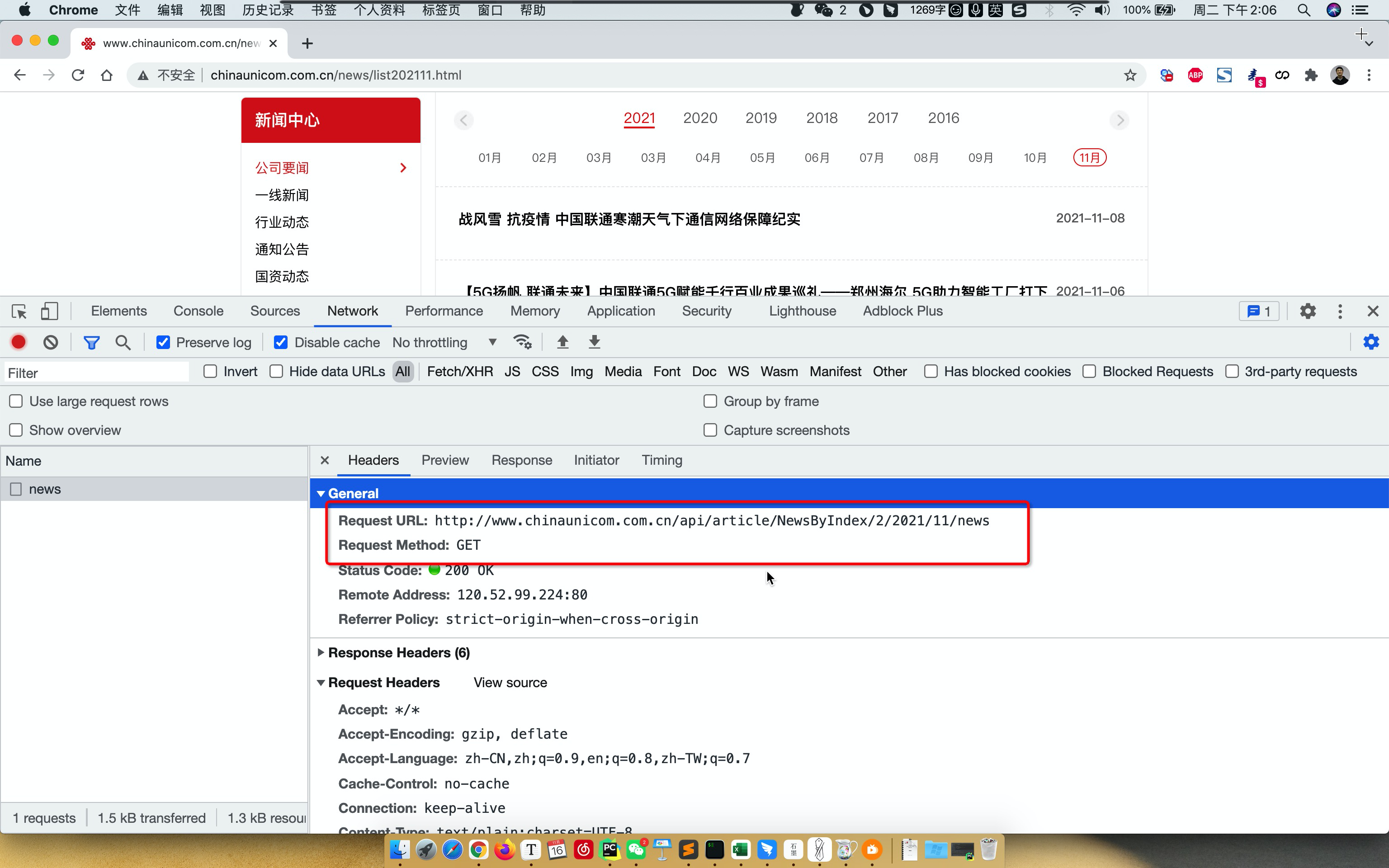
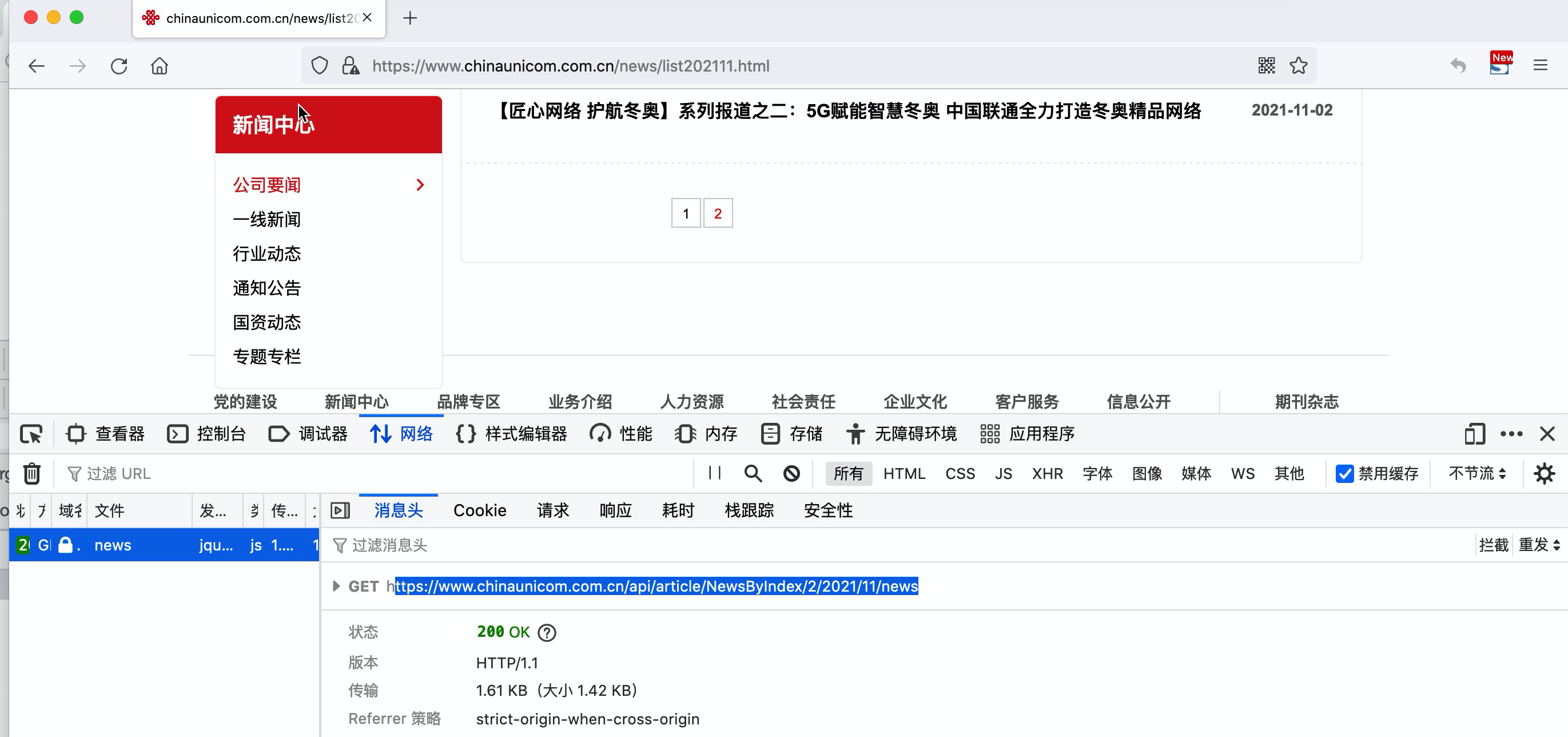
1.抓包
查看他的网络请求:
- 地址
- 请求的方式
- 传递的数据

2.requests代码浏览器
import json
import requests

# 返回的所有数据(响应头、响应体)
# 代码去想豆瓣发请求并获取数据(窃取数据)
#   - 防范:你是浏览器,给你返回;  不是浏览器,不给你返回内容。
#   - IP限制:1天/1000次(代理)
#   - 底层算法:JS写算法(逆向算法)。
res = requests.get(
    url="https://movie.douban.com/j/search_subjects?type=movie&tag=%E7%83%AD%E9%97%A8&sort=recommend&page_limit=20&page_start=20",
    headers={
        "User-Agent": "Mozilla/5.0 (Macintosh; Intel Mac OS X 10_15_7) AppleWebKit/537.36 (KHTML, like Gecko) Chrome/95.0.4638.69 Safari/537.36"
    }
)

# 原始响应体(例如:utf-8编码) - 字节
# res.content

# 字符串内容(例如:unicode编码) - 字符串
# print(res.text)

# 对JSON格式进行发序列化
data_dict = json.loads(res.text)

# print(data_dict)

# 获取影片信息
for item in data_dict['subjects']:
    title = item['title']
    rate = item['rate']
    msg = "影片:{},评分:{}".format(title, rate)
    print(msg)
import json
import requests

# https://movie.douban.com/j/search_subjects?type=movie&tag=%E7%83%AD%E9%97%A8&sort=recommend&page_limit=20&page_start=20
# https://movie.douban.com/j/search_subjects?type=movie&tag=%E7%83%AD%E9%97%A8&sort=recommend&page_limit=20&page_start=40

for page_start in range(20, 101, 20):
    url = "https://movie.douban.com/j/search_subjects?type=movie&tag=%E7%83%AD%E9%97%A8&sort=recommend&page_limit=20&page_start={}".format(
        page_start)
    res = requests.get(
        url=url,
        headers={
            "User-Agent": "Mozilla/5.0 (Macintosh; Intel Mac OS X 10_15_7) AppleWebKit/537.36 (KHTML, like Gecko) Chrome/95.0.4638.69 Safari/537.36"
        }
    )

    data_dict = json.loads(res.text)

    # 获取影片信息
    for item in data_dict['subjects']:
        title = item['title']
        rate = item['rate']
        msg = "影片:{},评分:{}".format(title, rate)
        print(msg)
案例:联通资讯
import requests

# 返回值
res = requests.get(
	url="地址",
	headers={
            "User-Agent": "Mozilla/5.0 (Macintosh; Intel Mac OS X 10_15_7) AppleWebKit/537.36 (KHTML, like Gecko) Chrome/95.0.4638.69 Safari/537.36"
    }
)

# 字符串类型
print(res.text)
import json
import requests


def get_news(year, month):
    page_count = 1
    while True:
        url = "http://www.chinaunicom.com.cn/api/article/NewsByIndex/{}/{}/{}/news".format(page_count, year, month)
        res = requests.get(
            url=url
        )
        page_count += 1

        if not res.text.strip():
            break

        data_list = json.loads(res.text)
        for item in data_list:
            print(item['news_title'])


def run():
    while True:
        print("---自动获取资讯信息---")
        year = input("年份:")
        month = input("月份:")
        get_news(year, month)


if __name__ == '__main__':
    run()
案例:靓号搜索
"""
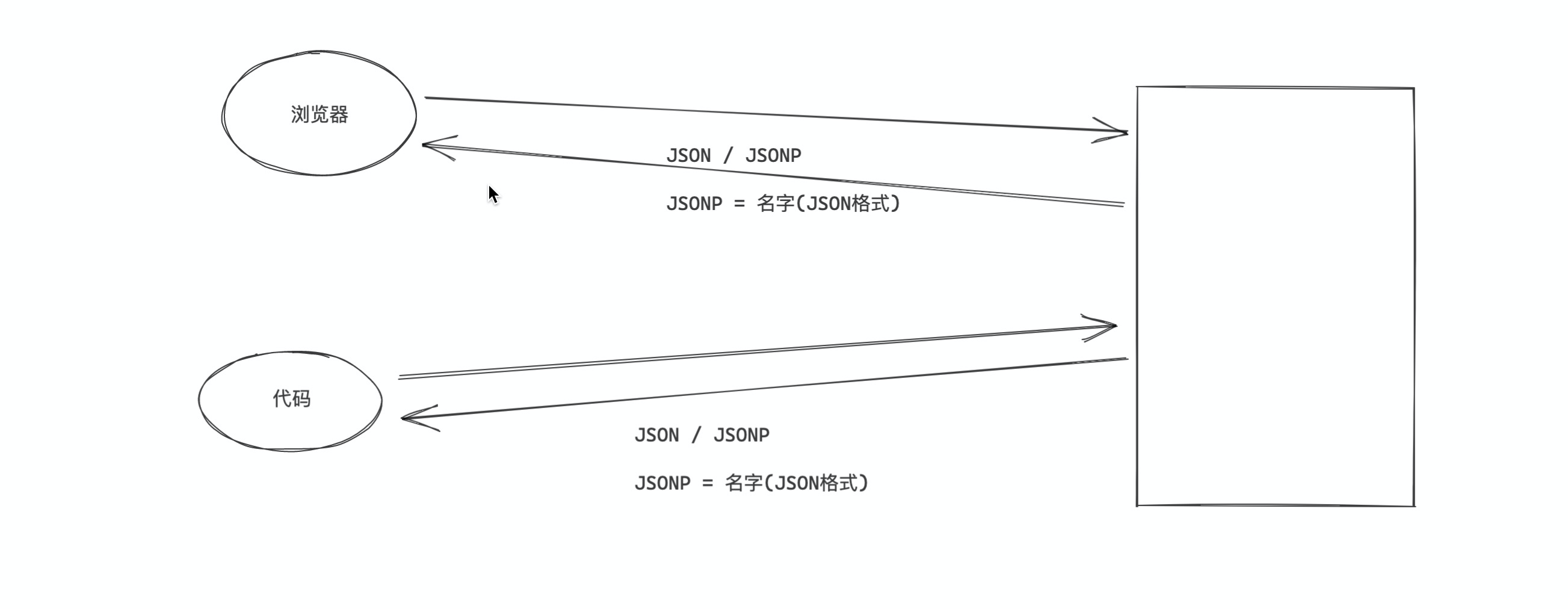
JSONP格式:名字(值)
    - 方式1:字符串的切片自动切出来数据
"""
import json
import requests

res = requests.get(
    url="http://num.10010.com/NumApp/NumberCenter/qryNum?callback=jsonp_queryMoreNums&provinceCode=11&cityCode=110&advancePayLower=0&sortType=1&goodsNet=4&searchCategory=3&qryType=02&channel=B2C&numNet=186&groupKey=53271060&judgeType=1"
)

content = res.text[20:-1]
data_dict = json.loads(content)
for num in data_dict['numArray']:
    if num > 1:
        print(num)
"""
JSONP格式:名字(值)
    - 方式1:字符串的切片自动切出来数据
    - 方式2:认为是执行函数。
"""
import json
import requests


def jsonp_queryMoreNums(data_dict):
    for num in data_dict['numArray']:
        if num > 1:
            print(num)


res = requests.get(
    url="http://num.10010.com/NumApp/NumberCenter/qryNum?callback=jsonp_queryMoreNums&provinceCode=11&cityCode=110&advancePayLower=0&sortType=1&goodsNet=4&searchCategory=3&qryType=02&channel=B2C&numNet=186&groupKey=53271060&judgeType=1"
)

eval(res.text)
案例:发送请求,返回的数据混合在了很多标签中(HTML标签)。
"<div>123</div>"
"""<div>
	<h1>123</h1>
	<h1>asdfasdfasdf</h1>
	<p>asdfasdf</p>
</div>"""
"""<div>
	<h1>123</h1>
	<h1>asdfasdfasdf</h1>
	<p>asdfasdf</p>
	<img src="xxxxxx" />
</div>"""
"""
<div>
	<h1 id="hello">123</h1>
	<h1>asdfasdfasdf</h1>
	<p>asdfasdf</p>
	<div>
		<h2>fff</h2>
		<h2>fff</h2>
		<ul><li>标题1</li></ul>
		<ul><li>标题1</li></ul>
		<ul><li>标题1</li></ul>
	</div>
	<div id="comment">
		<ul><li>标题1</li></ul>
		<ul><li>标题1</li></ul>
		<ul><li>标题1</li></ul>
		<ul><li>标题1</li></ul>
		<ul><li>标题1</li></ul>
	</div>
	<img src="xxxxxx" />
</div>"""

# 1.在整个HTML标签的字符串中id是唯一的,以后咱们可以根据ID=去寻找整个标签。
# 2.存在父子关系
# 3.寻找时
#	- 寻找id=comment 的 div 标签(只能找到1个)
#   - 在上一个的基础上找他下面的所有的 ul 标签。(找到多个)
#     for 标签 in ul标签列表:
# 			标签.标题 ..
案例:汽车之家的新闻资讯
- 帮助他们获取新闻资讯。
- 在我自己的app中显示。

import requests
from bs4 import BeautifulSoup

# ########################## 第一步:发送请求并获取数据 ##########################
# gb2312 -> gbk编码压缩的数据
res = requests.get(url="https://www.autohome.com.cn/news/")

# requests内部帮我们做编码处理
# res.encoding = 'gbk'
# print(res.text)

# 原始内容
data = res.content.decode('gbk')
# print(data)

# ########################## 第二步:根据特征去获取局部数据 ##########################
"""
如果你想要在一个HTML格式的字符串中寻找自己想要的数据,你需要安装一个第三方的模块(专门帮助我们对HTML格式数据进行处理)
    pip install BeautifulSoup4
"""
# 整个HTML字符串
soup_object = BeautifulSoup(data, "html.parser")

# 1.寻找id=auto-channel-lazyload-article的div标签,近一步去缩小区域(1个)
new_area_object = soup_object.find(name='div', attrs={"id": "auto-channel-lazyload-article"})
# print(new_area_object)

# 2.在一步的基础上,寻找他里面所有的li标签(多个)
li_area_object_list = new_area_object.find_all(name='li')

# 3.循环每一个li标签,去获取他里面p标签的内容。
for li_object in li_area_object_list:
    # li标签中寻找p标签:没找到就是None
    p_object = li_object.find(name="p")
    # 如果没找到p标签,就是让他continue
    if not p_object:
        continue
    # 获取p标签内部的字符串内容
    print(p_object.text)
    print('==============')
1.3.2 BeautifulSoup4模块
pip install BeautifulSoup4
专门用于帮助我们在一个HTML格式的字符串中提取我们想要的数据。
text = """
<div>
	<h1 id="hello">123</h1>
	<h1>asdfasdfasdf</h1>
	<p>asdfasdf</p>
	<ul>  <li>标题1</li>   </ul>
	<div>
		<h2>fff</h2>
		<h2>fff</h2>
		<ul>  <li class='x1'>标题1</li>   </ul>
		<ul>  <li class='x1'>标题1</li>   </ul>
		<ul>  <li class='x1'>标题1</li>   </ul>
	</div>
	<div id="comment">
		<ul><li>标题1</li></ul>
		<ul><li>标题1</li></ul>
		<ul><li>标题1</li></ul>
		<ul><li>标题1</li></ul>
		<ul><li>标题1</li></ul>
	</div>
	<img src="xxxxxx" />
</div>"""

from bs4 import BeautifulSoup

soup_object = BeautifulSoup(text,"html.parser")

# 寻找第一个
v1 = soup_object.find(name="div",attrs={"id":"comment"}) # 标签,
v2 = v1.find_all(name="li") # [标签,标签,标签,标签,]

# 寻找所有
v3 = soup_object.find_all(name="li",attrs={"class":"x1"}) # [标签,标签,]

# 获取到某个标签 <h1 id="hello" src="xx" name="wupeiqi"> 123 </h1>
v4 = soup_object.find(name="h1",attrs={"id":"hello"}) # 标签
print( v4.text )
print( v4.attrs["src"] )
print( v4.attrs["name"] )
案例:找到编辑的姓名

import requests
from bs4 import BeautifulSoup

res = requests.get(url="https://www.autohome.com.cn/news/")
res.encoding = 'gbk'

soup_object = BeautifulSoup(res.text, 'html.parser')

tag_object = soup_object.find(name='ul', attrs={'id': 'tagInfo'})

li_object_list = tag_object.find_all(name='li')
for li_object in li_object_list:
    tag = li_object.find_all(name='a')[-1]
    print(tag.text)
案例:联通商城商品信息
http://s.10010.com/hebei/mobilelist-0-0-0-0-0-0-0-0-177-0-0-p2/

import requests
from bs4 import BeautifulSoup

res = requests.get(url="http://s.10010.com/hebei/mobilelist-0-0-0-0-0-0-0-0-177-0-0-p2/")

soup_object = BeautifulSoup(res.text, 'html.parser')

goods_object_list = soup_object.find_all(name='li', attrs={"class": "goodsLi"})

for goods in goods_object_list:
    title = goods.find(name='p', attrs={"class": "mobileGoodsName"}).find(name='a').text
    price = goods.find(name="label", attrs={'class': "priceD"}).text
    comment = goods.find(name="p", attrs={'class': "evalNum"}).text
    image_url = goods.find(name='img').attrs['data-original']

    print(title, price, comment, image_url)
提取商品的价格、评论个数。
import re
import requests
from bs4 import BeautifulSoup

res = requests.get(url="http://s.10010.com/hebei/mobilelist-0-0-0-0-0-0-0-0-177-0-0-p2/")

soup_object = BeautifulSoup(res.text, 'html.parser')

goods_object_list = soup_object.find_all(name='li', attrs={"class": "goodsLi"})

for goods in goods_object_list:
    title = goods.find(name='p', attrs={"class": "mobileGoodsName"}).find(name='a').text
    price = goods.find(name="label", attrs={'class': "priceD"}).text
    price_number = int(re.findall("¥(\d+)", price)[0])
    comment = goods.find(name="p", attrs={'class': "evalNum"}).text
    comment_number = int(re.findall("已有(\d+)人评价", comment)[0])
    image_url = goods.find(name='img').attrs['data-original']

    print(title, price_number, comment_number, image_url)
将商品图片下载下来。
import re
import os
import requests
from bs4 import BeautifulSoup

FILE_PATH = "files"


def download_image(url):
    res = requests.get(
        url=url
    )
    # 判断file文件夹是否存在,如果不存在,则创建files文件夹
    if not os.path.exists(FILE_PATH):
        os.makedirs(FILE_PATH)
    file_name = url.rsplit("/", maxsplit=1)[-1]
    file_path = os.path.join(FILE_PATH, file_name)

    with open(file_path, mode='wb') as f:
        f.write(res.content)


def run():
    res = requests.get(url="http://s.10010.com/hebei/mobilelist-0-0-0-0-0-0-0-0-177-0-0-p2/")

    soup_object = BeautifulSoup(res.text, 'html.parser')

    goods_object_list = soup_object.find_all(name='li', attrs={"class": "goodsLi"})

    for goods in goods_object_list:
        title = goods.find(name='p', attrs={"class": "mobileGoodsName"}).find(name='a').text
        price = goods.find(name="label", attrs={'class': "priceD"}).text
        price_number = int(re.findall("¥(\d+)", price)[0])
        comment = goods.find(name="p", attrs={'class': "evalNum"}).text
        comment_number = int(re.findall("已有(\d+)人评价", comment)[0])
        image_url = goods.find(name='img').attrs['data-original']
        download_image(image_url)

        print(title, price_number, comment_number, image_url)


if __name__ == '__main__':
    run()
import re
import os
import shutil
import requests
from bs4 import BeautifulSoup

FILE_PATH = "files"


def download_image(url):
    res = requests.get(
        url=url
    )
    # 判断file文件夹是否存在,如果不存在,则创建files文件夹
    if not os.path.exists(FILE_PATH):
        os.makedirs(FILE_PATH)
    file_name = url.rsplit("/", maxsplit=1)[-1]
    file_path = os.path.join(FILE_PATH, file_name)

    with open(file_path, mode='wb') as f:
        f.write(res.content)


def run():
    if os.path.exists(FILE_PATH):
        # 在执行之前删除文件
        shutil.rmtree(FILE_PATH)

    res = requests.get(url="http://s.10010.com/hebei/mobilelist-0-0-0-0-0-0-0-0-177-0-0-p2/")
    soup_object = BeautifulSoup(res.text, 'html.parser')
    goods_object_list = soup_object.find_all(name='li', attrs={"class": "goodsLi"})

    file_object = open("db.txt", mode='a', encoding='utf-8')

    for goods in goods_object_list:
        title = goods.find(name='p', attrs={"class": "mobileGoodsName"}).find(name='a').text
        price = goods.find(name="label", attrs={'class': "priceD"}).text
        price_number = int(re.findall("¥(\d+)", price)[0])
        comment = goods.find(name="p", attrs={'class': "evalNum"}).text
        comment_number = int(re.findall("已有(\d+)人评价", comment)[0])
        image_url = goods.find(name='img').attrs['data-original']
        download_image(image_url)

        line = "{}|{}|{}|{}\n".format(title, price_number, comment_number, image_url)
        file_object.write(line)

    file_object.close()


if __name__ == '__main__':
    run()
import re
import os
import shutil
import requests
from bs4 import BeautifulSoup

FILE_PATH = "files"


def download_image(file_path, url):
    res = requests.get(
        url=url
    )
    # 判断file文件夹是否存在,如果不存在,则创建files文件夹
    if not os.path.exists(FILE_PATH):
        os.makedirs(FILE_PATH)

    with open(file_path, mode='wb') as f:
        f.write(res.content)


def run():
    if os.path.exists(FILE_PATH):
        # 在执行之前删除文件
        shutil.rmtree(FILE_PATH)

    res = requests.get(url="http://s.10010.com/hebei/mobilelist-0-0-0-0-0-0-0-0-177-0-0-p2/")
    soup_object = BeautifulSoup(res.text, 'html.parser')
    goods_object_list = soup_object.find_all(name='li', attrs={"class": "goodsLi"})

    file_object = open("db.txt", mode='a', encoding='utf-8')

    for goods in goods_object_list:
        title = goods.find(name='p', attrs={"class": "mobileGoodsName"}).find(name='a').text
        price = goods.find(name="label", attrs={'class': "priceD"}).text
        price_number = int(re.findall("¥(\d+)", price)[0])
        comment = goods.find(name="p", attrs={'class': "evalNum"}).text
        comment_number = int(re.findall("已有(\d+)人评价", comment)[0])
        image_url = goods.find(name='img').attrs['data-original']

        file_name = image_url.rsplit("/", maxsplit=1)[-1]
        file_path = os.path.join(FILE_PATH, file_name)

        # 下载
        download_image(file_path, image_url)

        line = "{}|{}|{}|{}|{}\n".format(title, price_number, comment_number, file_path, image_url)
        file_object.write(line)

    file_object.close()


if __name__ == '__main__':
    run()

 浙公网安备 33010602011771号