
Java学习第四十八天<创建文件><获取文件信息><目录操作><IO流体系><InputStream><OutputStream><文件拷贝><Reader><Writer><节点流和处理流>
创建文件
package chapter21;
import org.junit.jupiter.api.Test;
import java.io.File;
import java.io.IOException;
//演示创建文件
public class FileCreate {
public static void main(String[] args) {
}
//方式1 new File(String pathname)
@Test
public void create01(){
String filePath="f:\\news1.txt";//创建路径
File file = new File(filePath);
try {
file.createNewFile();//从内存创建到硬盘上
System.out.println("文件创建成功");
} catch (IOException e) {
e.printStackTrace();
}
}
//方式2 new File(File parent,String child)
//e:\\news2.txt
@Test
public void create02(){
File parentFile=new File("f:\\");
String name="news2.txt";
File file = new File(parentFile, name);
try {
file.createNewFile();
System.out.println("创建成功");
} catch (IOException e) {
e.printStackTrace();
}
}
//方式3 new File(String parent,String child)
@Test
public void create03(){
String parentPath="f:\\";
String fileName="news3.txt";
File file = new File(parentPath, fileName);
try {
file.createNewFile();
System.out.println("创建了");
} catch (IOException e) {
e.printStackTrace();
}
}
}
获取文件信息
package chapter21;
import org.junit.jupiter.api.Test;
import java.io.File;
public class FileInformation {
public static void main(String[] args) {
}
@Test
public void info(){//获取文件信息
File file = new File("f:\\news1.txt");
//调用相应方法得到对应信息
System.out.println("文件名="+file.getName());
System.out.println("文件绝对路径="+file.getAbsolutePath());
System.out.println("文件父级目录="+file.getParent());
System.out.println("文件大小="+file.length());
System.out.println("文件是否存在="+file.exists());//T
System.out.println("是不是一个文件="+file.isFile());//T
System.out.println("是不是一个目录件="+file.isDirectory());//F
}
}
目录操作
package chapter21;
import org.junit.jupiter.api.Test;
import java.io.File;
public class Directory_ {
public static void main(String[] args) {
}
@Test
public void m1(){
String filePath="f:\\news1.txt";
File file = new File(filePath);
if (file.exists()){
if (file.delete()){
System.out.println(filePath+"删除成功");
}else {
System.out.println(filePath+"删除失败");
}
}else {
System.out.println("该文件不存在...");
}
}
@Test
public void m2(){//在java中,目录也被当作文件
String filePath="d:\\news";
File file = new File(filePath);
if (file.exists()){
if (file.delete()){
System.out.println(filePath+"删除成功");
}else {
System.out.println(filePath+"删除失败");
}
}else {
System.out.println("该目录不存在...");
}
}
@Test
public void m3(){
String directoryPath="f:\\news\\a\\b\\c";
File file = new File(directoryPath);
if (file.exists()){
System.out.println("该目录存在...");
}else {//不存在则创建
if (file.mkdirs()){//mkdir不适用创建多级目录,只能创建一级目录 f:\\news
System.out.println(directoryPath+"创建成功...");
}else {
System.out.println("创建失败...");
}
}
}
}
IO流体系图
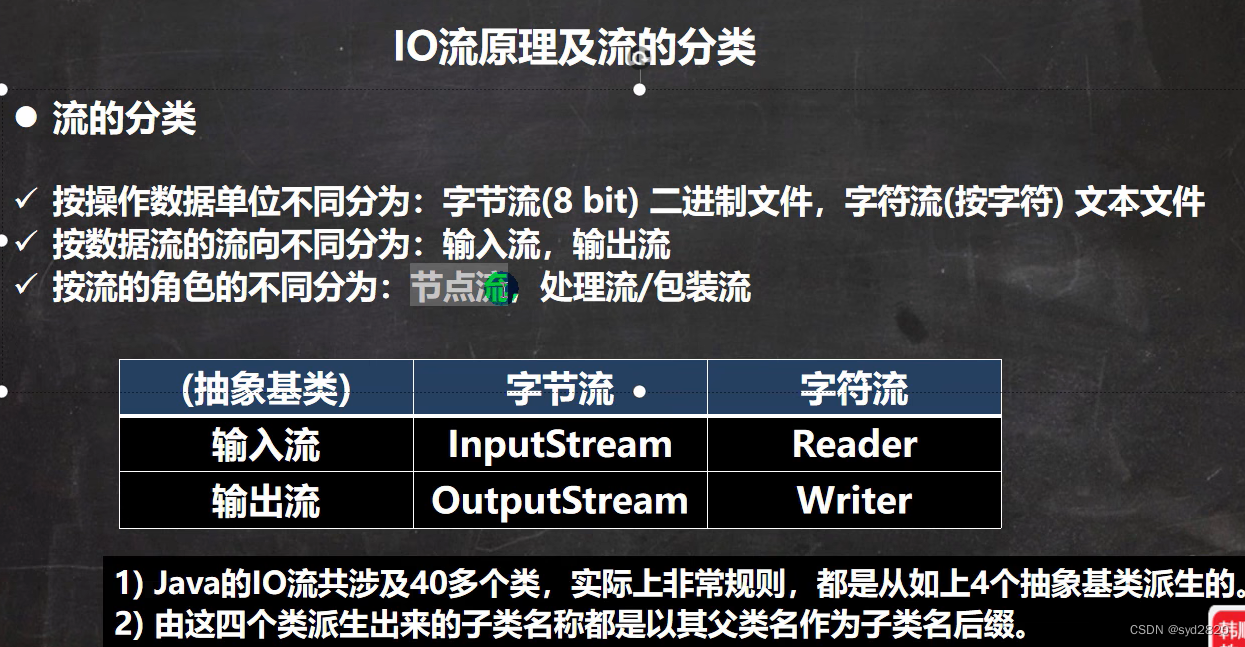

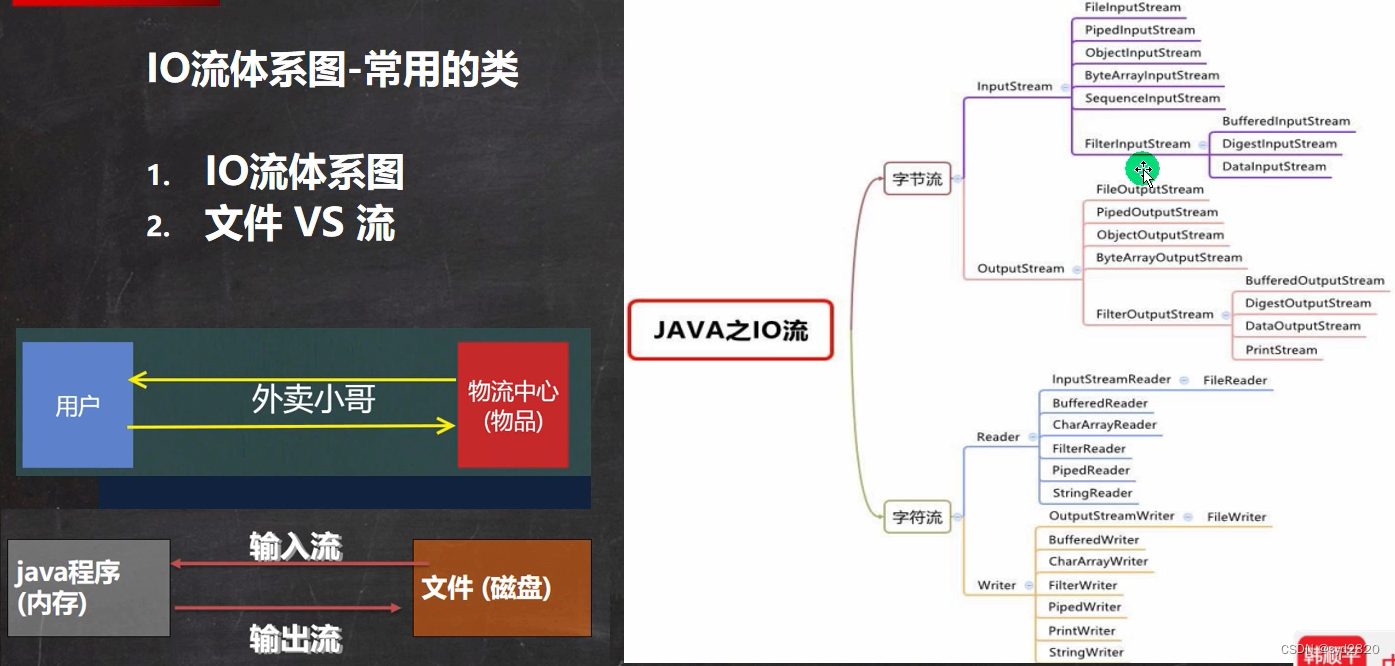
FileInputStream
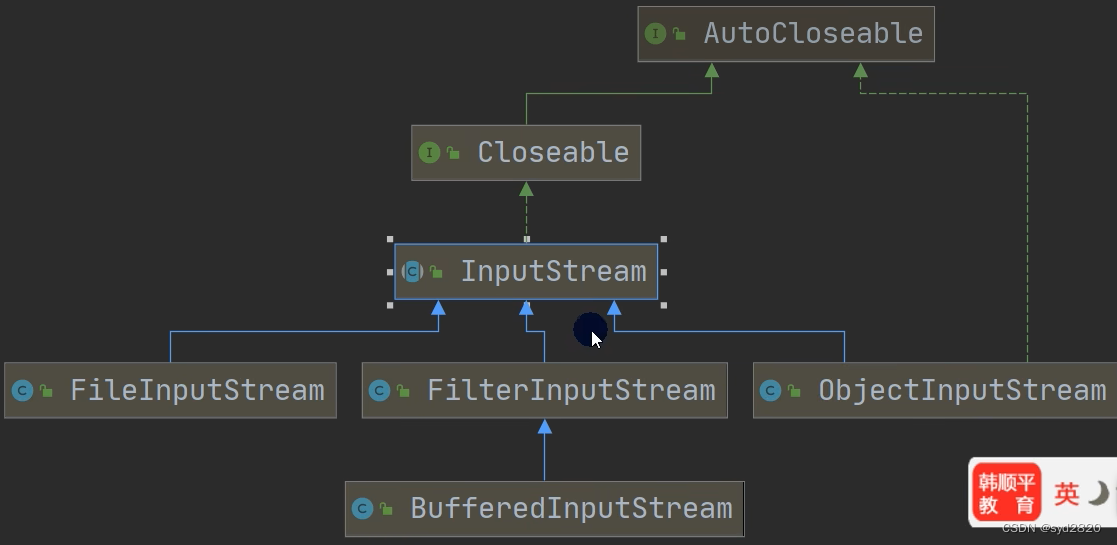
package chapter21.InputStream;
import org.junit.jupiter.api.Test;
import java.io.FileInputStream;
import java.io.FileNotFoundException;
import java.io.IOException;
//字节输入流 文件>>程序
public class FileInputStream_ {
public static void main(String[] args) {
}
@Test
public void readFile01(){//单个字节读取,效率低
String filePath="f:\\hello.txt";
int readData=0;
FileInputStream fileInputStream=null;//扩大作用域,不局限于try
try {
fileInputStream = new FileInputStream(filePath);//读取文件 完成后返回-1(跳出循环);
while ((readData= fileInputStream.read())!=-1){
System.out.print((char)readData);//汉字占三个字节,一个字节地读取会乱码(文本文件最好用字符流)
}
} catch (IOException e) {
e.printStackTrace();
}finally{
//关闭文件流,释放资源
try {
fileInputStream.close();
} catch (IOException e) {
e.printStackTrace();
}
}
}
@Test
public void readFile02(){
String filePath="f:\\hello.txt";
int readLen=0;
byte[] buf = new byte[8];//字符数组
FileInputStream fileInputStream=null;//扩大作用域,不局限于try
try {
fileInputStream = new FileInputStream(filePath);//读取文件 完成后返回读取个数,最后-1跳出循环;
while ((readLen=fileInputStream.read(buf))!=-1){//字符存到buf
System.out.println(readLen);
System.out.print(new String(buf,0,readLen));//0-readLen构建字符串
}
} catch (IOException e) {
e.printStackTrace();
}finally{
//关闭文件流,释放资源
try {
fileInputStream.close();
} catch (IOException e) {
e.printStackTrace();
}
}
}
}
FileOutputStream
package chapter21.OutputStream;
import org.junit.jupiter.api.Test;
import java.io.FileOutputStream;
import java.io.IOException;
//数据>文件
public class FileOutputStream01 {
public static void main(String[] args) {
}
@Test
public void writeFile(){
//创建FileOutputString对象
String filePath="f:\\a.txt";
FileOutputStream fileOutputStream=null;
try {
fileOutputStream = new FileOutputStream(filePath);//写入内容时会覆盖原来的
//FileOutputStream(filePath,true)变追加
//写入一个字节
fileOutputStream.write('H');
//写入字符串
String str="hello,world";
fileOutputStream.write(str.getBytes());//str.getBytes() 字符串>字节数组
fileOutputStream.write(str.getBytes(),0,str.length());
} catch (IOException e) {
e.printStackTrace();
}finally {
try {
fileOutputStream.close();
} catch (IOException e) {
e.printStackTrace();
}
}
}
}
文件拷贝
package chapter21.OutputStream;
import java.io.FileInputStream;
import java.io.FileNotFoundException;
import java.io.FileOutputStream;
import java.io.IOException;
public class FileCopy_ {
public static void main(String[] args) {
//完成文件拷贝 将f:\\hello.txt 拷贝到d:\\
//1.创建文件输入流,将文件读入到程序 2.创建文件输出流,将文件数据写入指定文件夹
String srcFilePath="f:\\hello.txt";
String desFilePath="c:\\Hello.text";
FileInputStream fileInputStream=null;
FileOutputStream fileOutputStream=null;
try {
fileInputStream = new FileInputStream(srcFilePath);
fileOutputStream = new FileOutputStream(desFilePath);
byte[] buf = new byte[1024];
int readLen=0;
while ((readLen=fileInputStream.read(buf))!=-1){
fileOutputStream.write(buf,0,readLen);//保证不失真
}
System.out.println("拷贝成功!");
} catch (IOException e) {
e.printStackTrace();
}finally {
try {//关闭输出输入流
if (fileInputStream!=null){
fileInputStream.close();
}
if (fileOutputStream!=null){
fileOutputStream.close();
}
} catch (IOException e) {
e.printStackTrace();
}
}
}
}
FileReader
package chapter21.Reader;
import org.junit.jupiter.api.Test;
import java.io.FileReader;
import java.io.IOException;
public class FileReader_ {
public static void main(String[] args) {
}
@Test//单个字符读取文件
public void readFile01(){
String filePath="f:\\story.txt";
FileReader fileReader=null;
int data=' ';
try {
fileReader= new FileReader(filePath);
while ((data=fileReader.read())!=-1){
System.out.print((char) data);
}
} catch (IOException e) {
e.printStackTrace();
}finally {
if (fileReader!=null){
try {
fileReader.close();
} catch (IOException e) {
e.printStackTrace();
}
}
}
}
@Test//字符数组读取文件
public void readFile02(){
String filePath="f:\\story.txt";
FileReader fileReader=null;
int readLen=0;
char[] buf = new char[8];
try {
fileReader= new FileReader(filePath);
while ((readLen=fileReader.read(buf))!=-1){
System.out.print(new String(buf,0,readLen));
}
} catch (IOException e) {
e.printStackTrace();
}finally {
if (fileReader!=null){
try {
fileReader.close();
} catch (IOException e) {
e.printStackTrace();
}
}
}
}
}
FileWriter
package chapter21.Writer;
import java.io.File;
import java.io.FileWriter;
import java.io.IOException;
public class FileWriter_ {
public static void main(String[] args) {
String filePath="f:\\note.txt";
//创建FileWriter对象
FileWriter fileWriter=null;
char[] chars={'a','b','c'};
try {
fileWriter = new FileWriter(filePath);
fileWriter.write('H');
fileWriter.write(chars);
fileWriter.write("积极向上".toCharArray(),0,3);
fileWriter.write(" 你好北京~");
fileWriter.write("上海天津",0,2);
} catch (IOException e) {
e.printStackTrace();
}finally {
//FileWriter一定要关闭流,或者flush才能真正地把数据写入文件
try {
fileWriter.close();
} catch (IOException e) {
e.printStackTrace();
}
}
System.out.println("程序结束...");
}
}
节点流和处理流
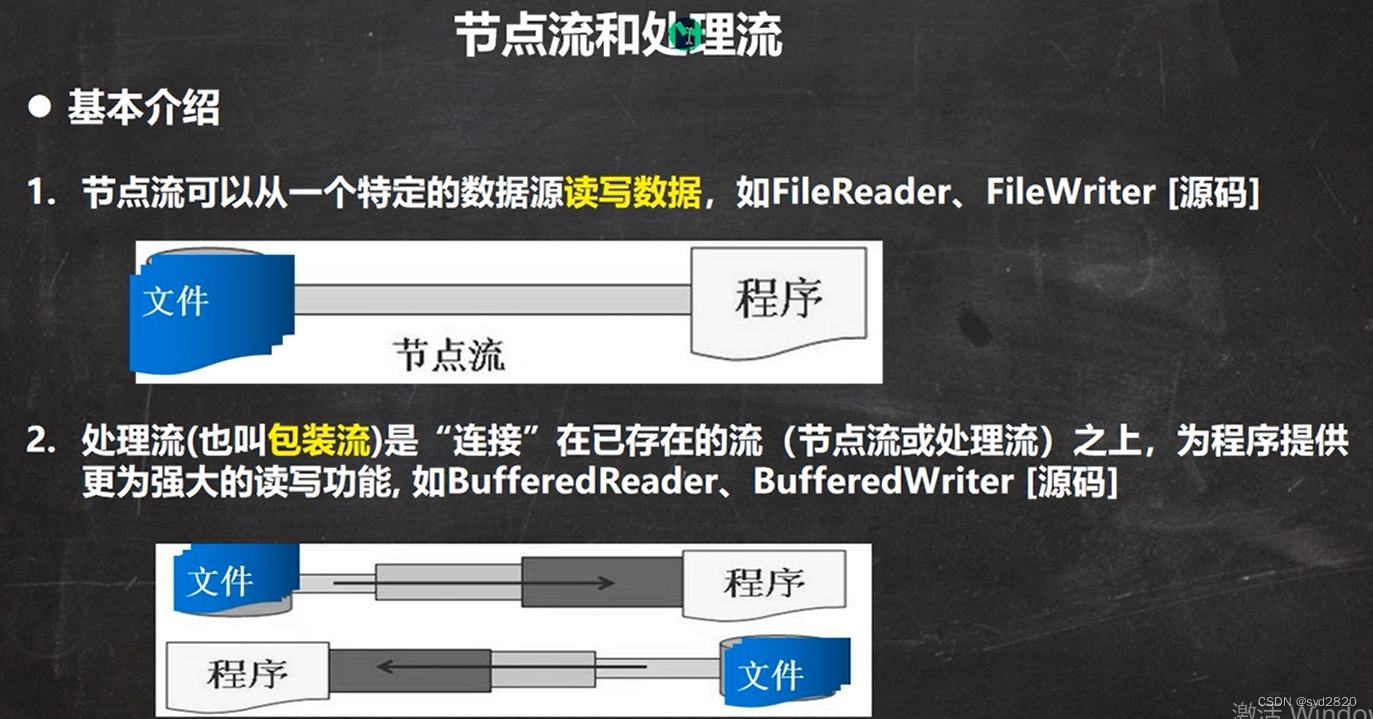
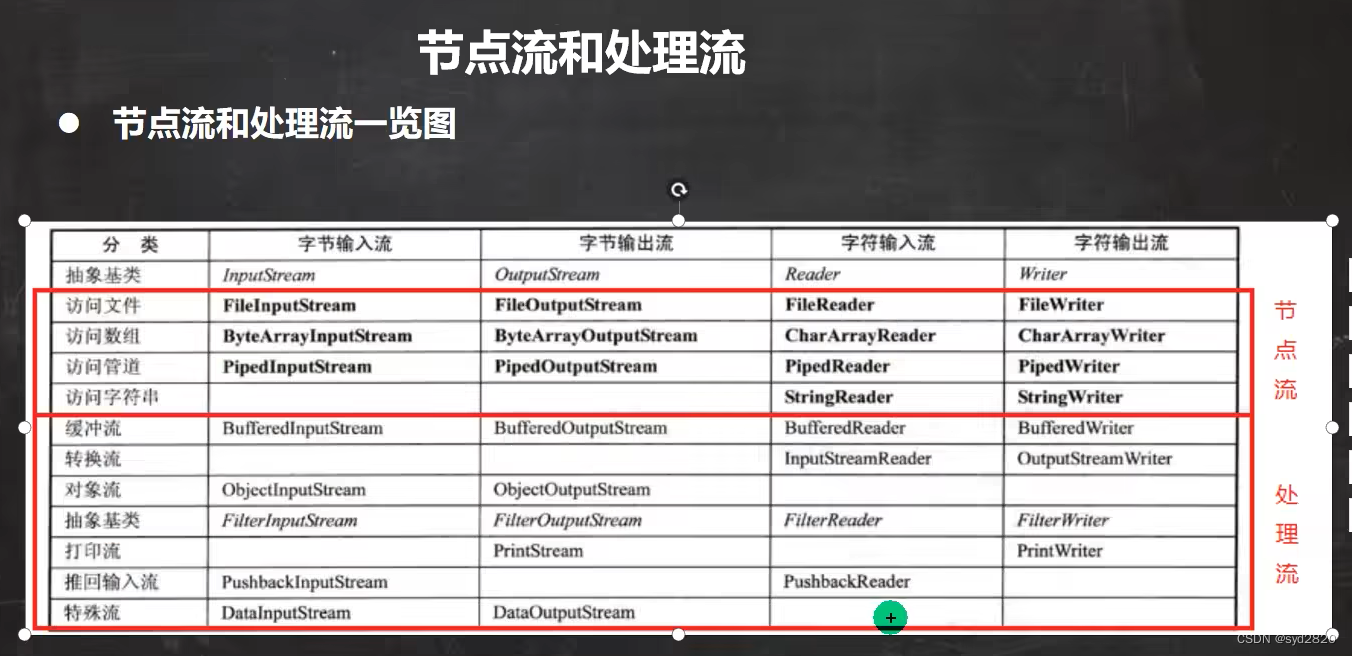
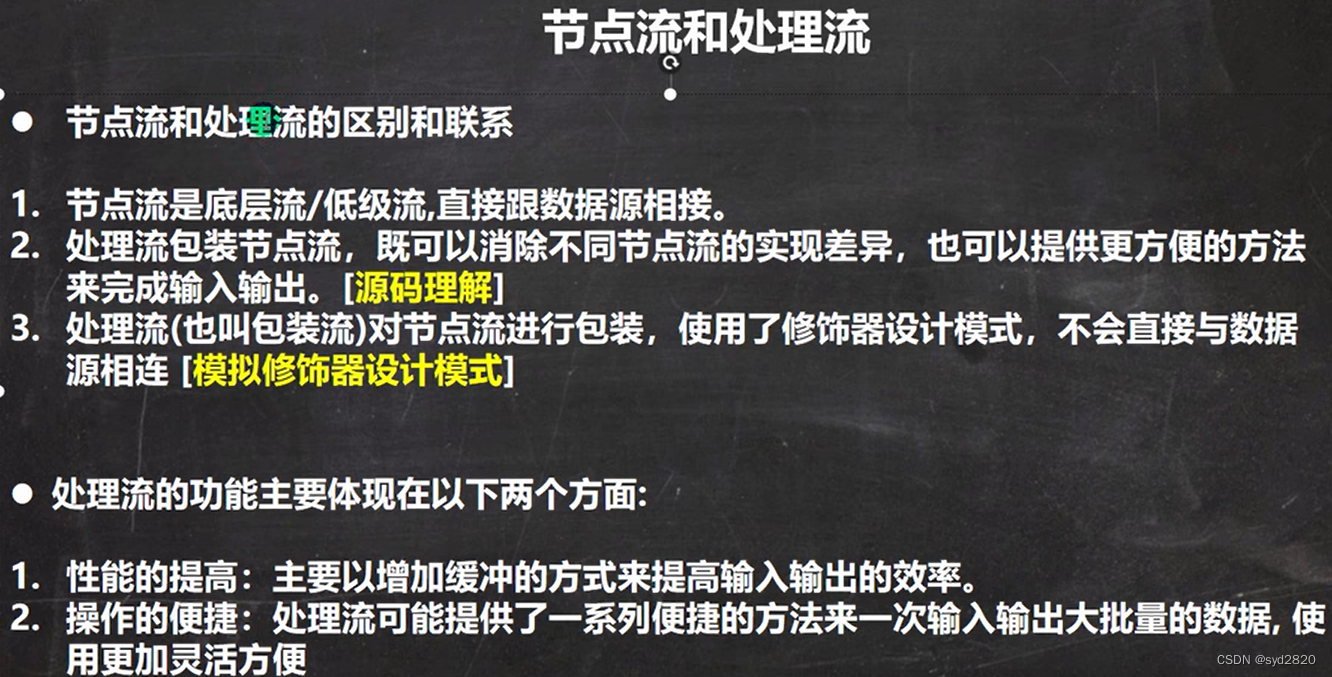
处理流设计模式
package chapter21.ProcessFlow;
public abstract class Reader_ {
public void readFile(){
System.out.println("父类读取");
};
public void readString(){};
}
package chapter21.ProcessFlow;
public class FileReader_ extends Reader_{//节点流
public void readFile(){
System.out.println("对文件进行读取...");
}
}
package chapter21.ProcessFlow;
public class StringReader_ extends Reader_{//节点流
public void readString(){
System.out.println("读取字符串");
}
}
package chapter21.ProcessFlow;
public class BufferedReader_ extends Reader_{//处理流
private Reader_ reader_;
public BufferedReader_(Reader_ reader_) {
this.reader_ = reader_;
}
public void readFiles(int num){//方法更灵活,多次读文件
for (int i = 0; i <num; i++) {
reader_.readFile();
}
}
public void readStrings(int num){
for (int i = 0; i <num ; i++) {
reader_.readString();
}
}
}
package chapter21.ProcessFlow;
public class Test_{
public static void main(String[] args) {
BufferedReader_ bufferedReader_ = new BufferedReader_(new FileReader_());
bufferedReader_.readFiles(10);
bufferedReader_.readFile();
BufferedReader_ bufferedReader_1 = new BufferedReader_(new StringReader_());
bufferedReader_1.readStrings(5);
}
}

 浙公网安备 33010602011771号