
学习心得
简单的做一个java里面要连接网页和数据库实现注册,主要是代码,建议先写好工具类,这样之后写东西的时候直接就可以用了,比如新学的密码加密的盐的工具类,之前的JDBC工具类,还有今天加了一个Message工具类,都可以使代码简化
心情
今天遇到的问题大多数就是关于字符集的,字符集一般使用utf-8的,在mysql数据库也有一些需要记住的,比如说jdk8和jdk5.7用到的字符集就有区别,8里要用utf-8md4,还是不行就要写一个关于字符集的过滤器。
掌握情况:一般
学习总结
新增工具类:
这个工具类是为让返回的东西都可以用真假去判断
package com.jsoft.mvc.util;

// 后台向前台返回结果的统一的格式的工具类
public class MessageUtil {

    private int code;
    private String message;

    public MessageUtil(int code, String message) {
        this.code = code;
        this.message = message;
    }

    public int getCode() {
        return code;
    }

    public void setCode(int code) {
        this.code = code;
    }

    public String getMessage() {
        return message;
    }

    public void setMessage(String message) {
        this.message = message;
    }
}
字符集过滤器:
import javax.servlet.*;
import javax.servlet.annotation.WebFilter;
import java.io.IOException;

@WebFilter("/admin/*")
public class EncodingFilter implements Filter {

    @Override
    public void doFilter(ServletRequest servletRequest, ServletResponse servletResponse, FilterChain filterChain) throws IOException, ServletException {

        servletRequest.setCharacterEncoding("utf-8");
        servletResponse.setCharacterEncoding("utf-8");

//      这里是可以设置返回的json串的字符集的
        servletResponse.setContentType("text/javascript;charset=utf-8");

        filterChain.doFilter(servletRequest,servletResponse);
    }
}
html页面仅仅实现功能:
<!DOCTYPE html>
<html lang="en">
<head>
    <meta charset="UTF-8">
    <title>Title</title>
</head>
<body>
<div id="register">
    <!-- 为什么不用form表单了 ???   -->
    <form>
        <p>
            账号:<input type="text" name="username" v-model="user.username" @blur="verifyUsername" placeholder="用户名在6-12位">
            <span>{{msg}}</span>
        </p>
        <p>
            密码:<input type="password" name="password" v-model="user.password">
        </p>
        <p>
            姓名:<input type="text" name="name" v-model="user.name">
        </p>
        <p>
            性别:<input type="radio" value="男" name="gender" v-model="user.gender"> 男
            <input type="radio" value="女" name="gender" v-model="user.gender"> 女
        </p>
        <p>
            头像:<input type="file" name="profile" ref="profile">
        </p>
        <p>
            <input type="button" value="提交" @click="registerData">
        </p>
    </form>
</div>
<script src="static/js/vue.js"></script>
<script src="static/js/axios.min.js"></script>
<script>
    const register = new Vue({
        el:"#register",
        data:{
            msg:"",
            user:{
                gender:'男'
            }
        },
        methods:{
            async verifyUsername() {
                if(this.user.username.length < 6 || this.user.username.length > 12){
                    this.msg = "用户名必须在6-12位";
                    return false;
                }
                //    定义一个标记
                let flag = false;
                //    在这个函数中,验证用户名
                //    发ajax请求到后台,验证用户名
                //    ajax是异步请求,ajax会单独开辟一个线程来自己走,和我们的主JS程序不在同一个线程内
                //    我们需要让我们的ajax和我们的主JS在同一个线程内
                //    通过async 和 await修饰符就把ajax改成了同步请求
                await axios.get("admin/checkUser.do?username=" + this.user.username).then(response=>{
                    // console.log(response.data);
                    this.msg = response.data.message;
                    if(response.data.code == '0'){
                        flag = false;
                    }
                    if(response.data.code == '1'){
                        flag = true;
                    }
                });
                // 返回值是一个Promise对象。是一个特殊的对象。3个属性
                return flag;
            },
            registerData(){
                // 这个result就是上面函数返回的Promise对象
                let result = this.verifyUsername();
                // ES6语法的“解构”,把上面函数的返回值拿到
                result.then(r => {
                    // 带有文件上传的数据提交
                    if(r) {
                        //    要求,如果上传的数据中包含了二进制数据(文件),需要使用formData,来封装数据
                        let formData = new FormData();
                        formData.append("username",this.user.username);
                        formData.append("password",this.user.password);
                        formData.append("name",this.user.name);
                        formData.append("gender",this.user.gender);
                        //    头像,文件怎么拼?
                        //    this.$refs.profile.files[0],获取对应的文件的二进制形式
                        //    $refs:代表设置了ref属性的表单元素
                        //    profile:找到ref属性为profile的表单元素
                        //    files[0]:找到ref属性为profile的第一个表单元素
                        formData.append("profile",this.$refs.profile.files[0]);
                        //    发请求
                        //    axios的完整写法
                        axios({
                            method:"post",
                            url:"admin/addVip.do",
                            data:formData,
                            // 请求头
                            /*
                            * 'content-Type':'multipart/form-data'
                            * 代表我要传输的数据以多部分的格式来传输。
                            * HTML要求提交文件:multipart/form-data
                            * 提交普通的数据:application/x-www-form-urlencoded
                            * */
                            headers:{
                                'content-Type':'multipart/form-data'
                            }
                        }).then(response => {
                            let data = response.data;
                            alert(data.message);
                            if(data.code == '1'){
                                location.href = "login.html";
                            }
                        })
                    }
                    // if(r) {
                    //     axios.post("admin/addVip.do",this.user).then(response=> {
                    //         let data = response.data;
                    //         alert(data.message);
                    //         if(data.code == '1'){
                    //             location.href = "login.html";
                    //         }
                    //     });
                    // }else {
                    //     alert("用户名已存在");
                    // }
                });
            }
        }
    });
</script>

</body>
</html>
<!DOCTYPE html>
<html lang="en">
<head>
    <meta charset="UTF-8">
    <title>Title</title>
</head>
<body>
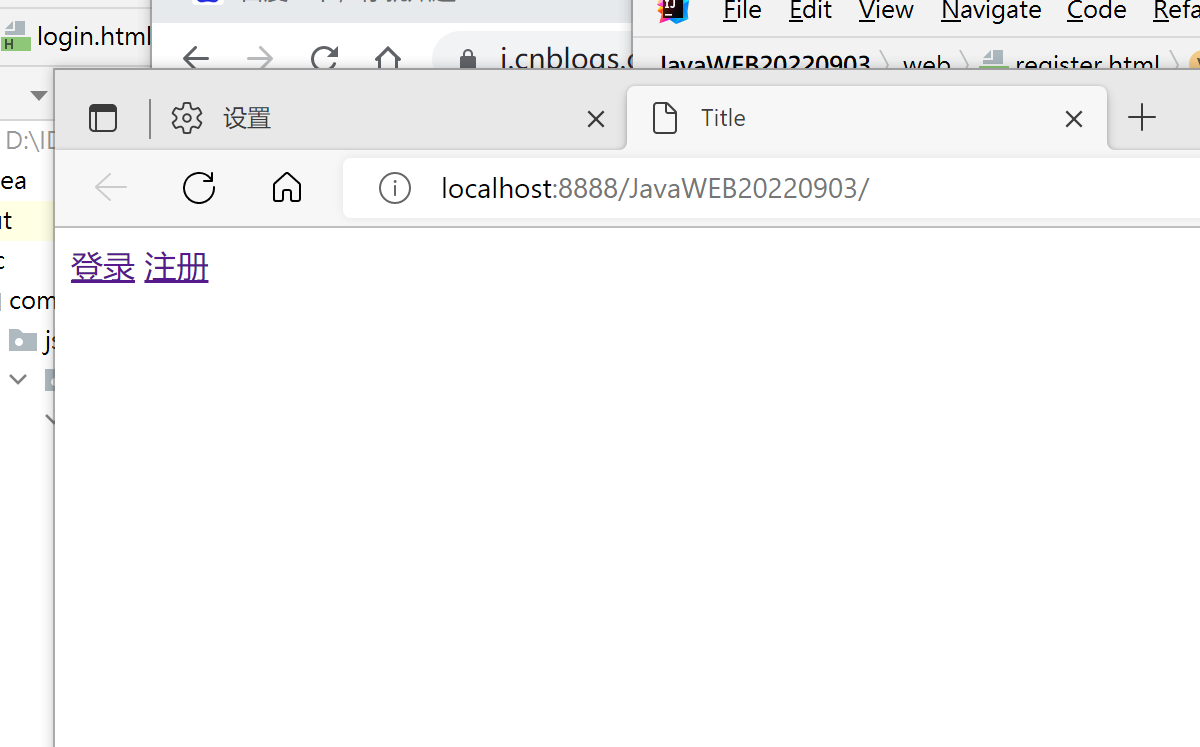
<a href="login.html">登录</a>
<a href="register.html">注册</a>
</body>
</html>
controller里面:
import com.alibaba.fastjson.JSON;
import com.jsoft.mvc.entity.Vip;
import com.jsoft.mvc.service.VipService;
import com.jsoft.mvc.service.impl.VipServiceImpl;
import com.jsoft.mvc.util.MessageUtil;

import javax.servlet.ServletException;
import javax.servlet.annotation.MultipartConfig;
import javax.servlet.annotation.WebServlet;
import javax.servlet.http.HttpServlet;
import javax.servlet.http.HttpServletRequest;
import javax.servlet.http.HttpServletResponse;
import javax.servlet.http.Part;
import java.io.*;
import java.lang.reflect.InvocationTargetException;
import java.lang.reflect.Method;
import java.time.LocalDate;
import java.util.UUID;

@WebServlet("*.do")
@MultipartConfig // 用来标记当前的servlet要接收多部分的数据格式,当前的servlet可以接收文件
public class VipController extends HttpServlet {

    //    Controller调用service
    private VipService vipService = new VipServiceImpl();

    @Override
    protected void doGet(HttpServletRequest req, HttpServletResponse resp) throws ServletException, IOException {

        //  /admin/addVip.do
        String servletPath = req.getServletPath();
//      我现在可以拿到一个servlet的请求路径,在我这个类中,有一个addVip方法
        // 1.去掉第一个/     admin/addVip.do
        String methodName = servletPath.substring(1);
        // 2.截取成addVip
        methodName = methodName.substring(methodName.lastIndexOf("/") + 1,methodName.length() - 3);
        // 3.利用反射执行addVip方法
        try {
            // a.拿到当前类的要执行的方法对象
            Method method = getClass().getDeclaredMethod(methodName, HttpServletRequest.class, HttpServletResponse.class);
            // b.让方法执行
            method.invoke(this,req,resp);
        } catch (NoSuchMethodException e) {
            throw new RuntimeException(e);
        } catch (InvocationTargetException e) {
            throw new RuntimeException(e);
        } catch (IllegalAccessException e) {
            throw new RuntimeException(e);
        }
    }

    private void addVip(HttpServletRequest req, HttpServletResponse resp) throws ServletException, IOException {

//        BufferedReader reader = req.getReader();
//        String json = reader.readLine();
//        Vip vip = JSON.parseObject(json, Vip.class);

        PrintWriter out = resp.getWriter();

        String username = req.getParameter("username");
        String password = req.getParameter("password");
        String name = req.getParameter("name");
        String gender = req.getParameter("gender");
        Vip vip = new Vip(username,password,gender,name);

        // 处理文件上传
        Part part = req.getPart("profile");
//        原来的文件名
        String fileName = part.getSubmittedFileName();
//        这个字节流就是上传的文件所对应的字节流
        InputStream inputStream = part.getInputStream();

//        处理文件名,一定要注意不要破坏图片的后缀名
//        UUID是精确到毫秒的不重复的16进制的字符串
        fileName = UUID.randomUUID() + fileName;

//        保存文件,以xx形式保存?????
//        根据日期来创建文件夹
//        获取系统当前的日期 2022-09-05
        LocalDate localDate = LocalDate.now();
        String prePath = "/" + localDate.getYear() + "/" + localDate.getMonthValue() + "/";
//        要存放的是E:/upload/2022/9
        File file = new File("D:/upload" + prePath);
//        创建目录
//        如果这个目录不存在,就创建,如果存在,就不创建
        if(!file.exists()){
//            创建多级目录
            file.mkdirs();
        }
//        2022/9/5/ruizi.jpg
        fileName = prePath + fileName;

        OutputStream outputStream = new FileOutputStream("D:/upload/" + fileName);
        byte [] b = new byte[1024];
        int len;
        while((len = inputStream.read(b))!= -1){
            outputStream.write(b,0,len);
        }

//        在数据库中同步保存文件的路径,只保存文件名
        vip.setProfile(fileName);

        int i = vipService.register(vip);
        if(i > 0) {
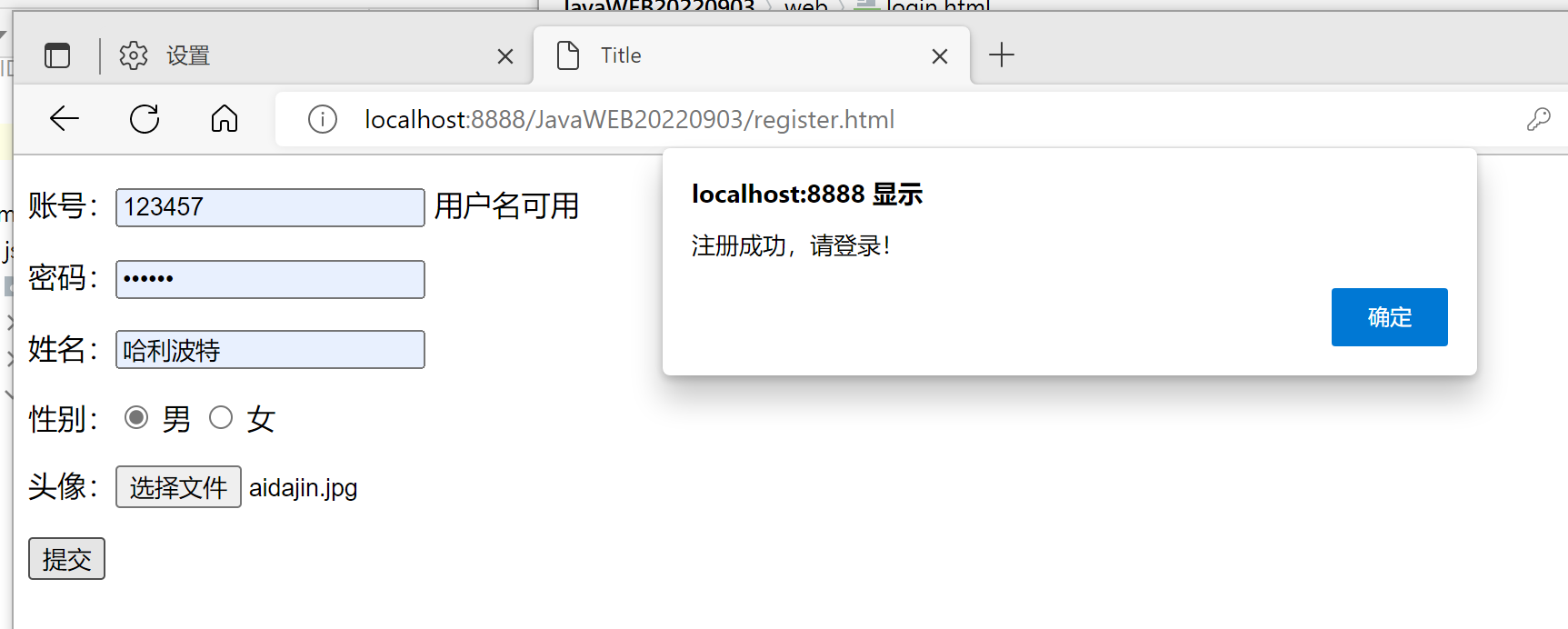
            out.write(JSON.toJSONString(new MessageUtil(1,"注册成功,请登录!")));
        } else {
            out.write(JSON.toJSONString(new MessageUtil(0,"注册失败,请重新填写!")));
        }

//        PrintWriter out = resp.getWriter();
//        if(username.length() < 6 || username.length() > 12){
//            // 向前台返回数据,如果格式不合法,就不需要查询数据库
//            out.write(JSON.toJSONString(new MessageUtil(0,"用户名只能是6-12位")));
//        }
//
//        int i = vipService.register(vip);
//        if(i > 0) {
//            out.write(JSON.toJSONString(new MessageUtil(1,"注册成功,请登录!")));
//        } else {
//            out.write(JSON.toJSONString(new MessageUtil(0,"注册失败,请重新填写!")));
//        }
    }

    private void checkUser(HttpServletRequest req, HttpServletResponse resp) throws ServletException, IOException{
        String username = req.getParameter("username");
        PrintWriter out = resp.getWriter();

        boolean b = vipService.checkUserIsExists(username);

        /*
         *   ajax发请求,后台一定不能跳页面。想跳页面,在前台的JS中去跳
         * */
//       后台返回的数据是统一的格式
        if(b) {
            out.write(JSON.toJSONString(new MessageUtil(1,"用户名可用")));
        }else {
            out.write(JSON.toJSONString(new MessageUtil(0,"用户名已存在")));
        }

        out.flush();
        out.close();
    }

private void getProfile(HttpServletRequest req, HttpServletResponse resp) throws ServletException, IOException {
        String username = req.getParameter("username");
//        根据用户名去数据库中查询数据,包含了profile的信息,在后台把这个profile的信息返回给前台
    }

    @Override
    protected void doPost(HttpServletRequest req, HttpServletResponse resp) throws ServletException, IOException {
        doGet(req, resp);
    }
}
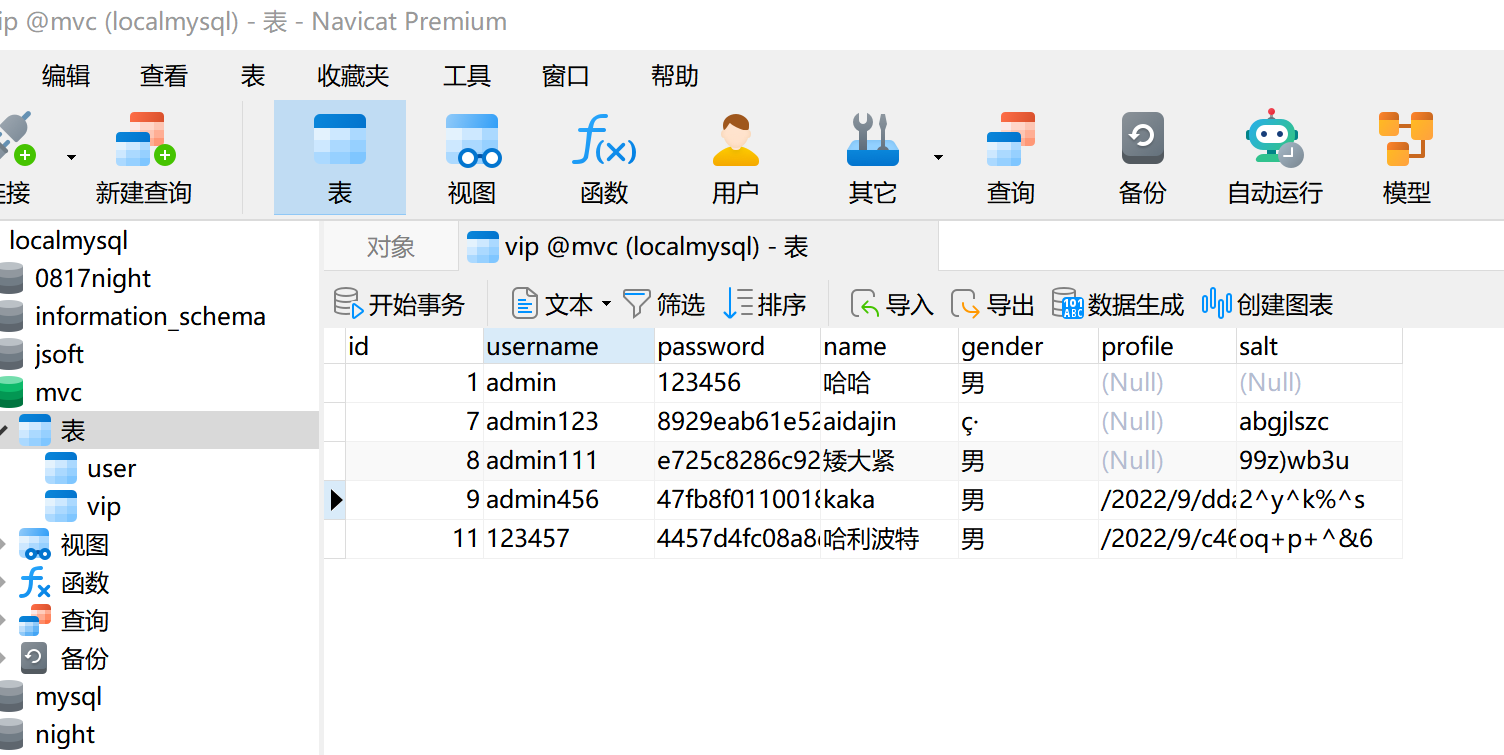
数据库中添加成功:
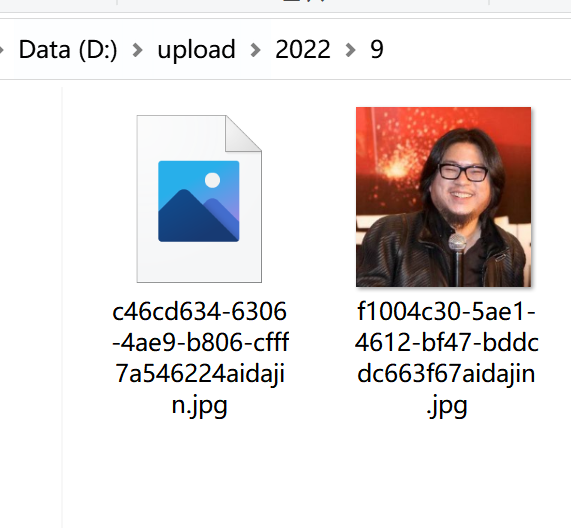
图片就算名字一样也会建分层目录,保证图片不覆盖

 浙公网安备 33010602011771号
 你点我就回上面去了ヾ(≧O≦)〃嗷~