  1 #!/bin/bash
  2
  3 #  配置管理IP
  4 #vi /etc/sysconfig/network-scripts/ifcfg-ens192
  5
  6 #  配置pxe IP    192.168.0.1/24    不能更换成其他IP
  7 #vi /etc/sysconfig/network-scripts/ifcfg-ens224
  8
  9 #  配置主机名    pxe-server
 10 hostname pxe-server
 11 echo pxe-server > /etc/hostname
 12
 13 #  创建存放iso的目录    /mnt/iso
 14 mkdir -p /mnt/iso
 15
 16 #  下载最新版 CentOS6 和 CentOS7 iso文件(随着版本的更新,镜像网站将停止老版本的下载支持,需要自己搞定iso下载)
 17 #wget -P /mnt/iso ftp://10.12.28.8/ops/Linux-ISO/CentOS-6.10-x86_64-bin-DVD1.iso
 18 #wget -P /mnt/iso ftp://10.12.28.8/ops/Linux-ISO/CentOS-6.10-x86_64-bin-DVD2.iso
 19 #wget -P /mnt/iso ftp://10.12.28.8/ops/Linux-ISO/CentOS-7-x86_64-Everything-1908.iso
 20
 21 ####    自动化配置基础环境
 22
 23 #  配置阿里云YUM源
 24 curl -o /etc/yum.repos.d/CentOS-Base.repo http://mirrors.aliyun.com/repo/Centos-7.repo
 25
 26 #  安装EPEL
 27 yum install -y epel-release
 28
 29 #  配置阿里云EPEL源
 30 curl -o /etc/yum.repos.d/epel.repo http://mirrors.aliyun.com/repo/epel-7.repo
 31
 32 #  安装常用软件
 33 yum install -y vim wget lftp net-tools bash-completion jq git sysstat lrzsz
 34
 35 #  禁用防火墙
 36 systemctl  stop  firewalld && systemctl  disable  firewalld
 37
 38 #  关闭SELinux
 39 setenforce  0  &&  getenforce
 40 sed -i 's/SELINUX=enforcing/SELINUX=disabled/' /etc/selinux/config
 41
 42 #  优化SSH访问速度
 43 echo 'UseDNS no' >> /etc/ssh/sshd_config
 44 systemctl restart sshd.service
 45 echo 'StrictHostKeyChecking no' >> /etc/ssh/ssh_config
 46
 47 #  为 rc.local文件添加执行权限,该文件在CentOS7中默认没有执行权限
 48 chmod +x /etc/rc.d/rc.local
 49
 50 ####    自动化部署 DHCP 服务
 51
 52 #  安装 DHCP 服务
 53 yum install -y dhcp
 54
 55 #  配置 DHCP 服务
 56 echo '
 57 subnet 192.168.0.0 netmask 255.255.255.0 {
 58     range 192.168.0.100 192.168.0.200 ;
 59     next-server 192.168.0.1 ;
 60     filename "pxelinux.0" ;
 61 }
 62 ' > /etc/dhcp/dhcpd.conf
 63
 64 #  启动 DHCP 服务,并设置开机自启动
 65 systemctl restart dhcpd
 66 systemctl enable dhcpd
 67
 68 ####    自动化部署 TFTP 服务
 69
 70 #  安装 TFTP 服务
 71 yum install -y tftp-server xinetd
 72
 73 #  配置 TFTP 服务
 74 sed -i '14s/yes/no/' /etc/xinetd.d/tftp
 75
 76 #  启动 TFTP 服务,并设置开机自启动
 77 systemctl restart xinetd
 78 systemctl enable xinetd
 79
 80 ####    自动化部署 FTP 服务
 81
 82 #  安装 FTP 服务
 83 yum install -y vsftpd
 84
 85 #  配置 FTP 默认目录位置到 /mnt/ftp
 86 mkdir -p /mnt/ftp
 87 echo 'anon_root=/mnt/ftp' >> /etc/vsftpd/vsftpd.conf
 88
 89 #  启动 FTP 服务,并设置开机自启动
 90 systemctl restart vsftpd
 91 systemctl enable vsftpd
 92
 93 ####    自动化配置 PXE 核心配置部分
 94
 95 #  安装 syslinux
 96 yum install -y syslinux
 97
 98 #  拷贝 pxelinux.0 到 TFTP 目录下
 99 cp /usr/share/syslinux/pxelinux.0 /var/lib/tftpboot/
100
101 #  挂载 CentOS6.10 iso到 /mnt/ftp/centos/centos610,并设置开机自动挂载
102 mkdir -p /mnt/ftp/centos/centos610
103 mount /mnt/iso/CentOS-6.10-x86_64-bin-DVD1.iso /mnt/ftp/centos/centos610
104 echo 'mount /mnt/iso/CentOS-6.10-x86_64-bin-DVD1.iso /mnt/ftp/centos/centos610' >> /etc/rc.d/rc.local
105
106 #  挂载 CentOS7.7 iso到 /mnt/ftp/centos/centos77,并设置开机自动挂载
107 mkdir -p /mnt/ftp/centos/centos77
108 mount /mnt/iso/CentOS-7-x86_64-Everything-1908.iso /mnt/ftp/centos/centos77
109 echo 'mount /mnt/iso/CentOS-7-x86_64-Everything-1908.iso /mnt/ftp/centos/centos77' >> /etc/rc.d/rc.local
110
111 #  拷贝 CentOS7.7 光盘中 isolinux 目录下所有文件到 TFTP目录
112 cp /mnt/ftp/centos/centos77/isolinux/* /var/lib/tftpboot/
113
114 #  拷贝 CentOS6.10 光盘中引导文件到 TFTP目录,因为与默认CentOS7的重名,需要改下名字
115 cp /mnt/ftp/centos/centos610/isolinux/initrd.img /var/lib/tftpboot/initrd6.img
116 cp /mnt/ftp/centos/centos610/isolinux/vmlinuz /var/lib/tftpboot/vmlinuz6
117
118 #  创建PXE核心配置文件
119 mkdir -p  /var/lib/tftpboot/pxelinux.cfg
120 cp /var/lib/tftpboot/isolinux.cfg /var/lib/tftpboot/pxelinux.cfg/default
121
122 #  设置PXE工具标题:CentOS PXE Install Tools
123 sed -i 's/menu title CentOS.*/menu title CentOS PXE Install Tools/' /var/lib/tftpboot/pxelinux.cfg/default
124
125 #  删掉默认光盘启动菜单内容
126 sed -i '61,200d' /var/lib/tftpboot/pxelinux.cfg/default
127
128 #  全新启动菜单:
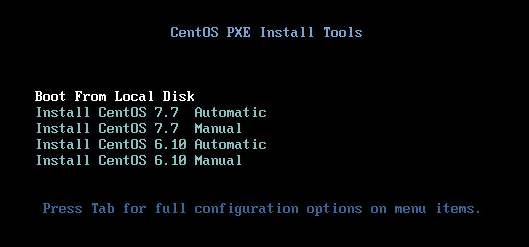
129 #    Boot From Local Disk        默认值,从本地磁盘启动,防止误装机
130 #    Install CentOS 7.7  Automatic    自动执行 CentOS7.7 最小化安装
131 #    Install CentOS 7.7  Manual    手动安装 CentOS7.7
132 #    Install CentOS 6.10 Automatic    自动执行 CentOS6.10 最小化安装
133 #    Install CentOS 6.10 Manual    手动安装 CentOS6.10
134 echo '
135 label boot from local
136   menu label Boot From Local Disk
137   menu default
138   localboot 0xffff
139
140 label linux
141   menu label Install CentOS 7.7  Automatic
142   kernel vmlinuz
143   append initrd=initrd.img ks=ftp://192.168.0.1/ks/centos7.cfg
144
145 label linux
146   menu label Install CentOS 7.7  Manual
147   kernel vmlinuz
148   append initrd=initrd.img method=ftp://192.168.0.1/centos/centos77
149
150 label linux
151   menu label Install CentOS 6.10 Automatic
152   kernel vmlinuz6
153   append initrd=initrd6.img ks=ftp://192.168.0.1/ks/centos6.cfg
154
155 label linux
156   menu label Install CentOS 6.10 Manual
157   kernel vmlinuz6
158   append initrd=initrd6.img method=ftp://192.168.0.1/centos/centos610
159
160 menu separator # insert an empty line
161
162 ' >> /var/lib/tftpboot/pxelinux.cfg/default
163
164 #  创建 Kickstart.cfg 文件ftp目录
165 mkdir -p /mnt/ftp/ks
166
167 #  生成 CentOS7.7 Kickstart.cfg 文件
168 echo '
169 #platform=x86, AMD64, or Intel EM64T
170 #version=DEVEL
171 # Install OS instead of upgrade
172 install
173 # System keyboard
174 keyboard us
175 # System language
176 lang en_US
177 # Root password
178 rootpw --plaintext cnblogs.C0M
179 # System authorization information
180 auth  --useshadow  --passalgo=sha512
181 # Use graphical install
182 graphical
183 firstboot --disable
184 # SELinux configuration
185 selinux --disabled
186 # Firewall configuration
187 firewall --disabled
188 # Reboot after installation
189 reboot
190 # System timezone
191 timezone Asia/Shanghai
192 # System bootloader configuration
193 bootloader --location=mbr
194 # Clear the Master Boot Record
195 zerombr
196 # Partition clearing information
197 clearpart --all
198
199 # Use network installation
200 url --url="ftp://192.168.0.1/centos/centos77"
201 # Disk partitioning information
202 part /boot --fstype="xfs" --size=1024
203 part swap --fstype="swap" --size=2048
204 part / --fstype="xfs" --grow --size=1
205
206 %packages
207 @base
208 %end
209 ' > /mnt/ftp/ks/centos7.cfg
210
211 #  生成 CentOS6.10 Kickstart.cfg 文件
212 echo '
213 #platform=x86, AMD64, or Intel EM64T
214 #version=DEVEL
215 # Install OS instead of upgrade
216 install
217 # System keyboard
218 keyboard us
219 # System language
220 lang en_US
221 # Root password
222 rootpw --plaintext cnblogs.C0M
223 # System authorization information
224 auth  --useshadow  --passalgo=sha512
225 # Use graphical install
226 graphical
227 firstboot --disable
228 # SELinux configuration
229 selinux --disabled
230 # Firewall configuration
231 firewall --disabled
232 # Reboot after installation
233 reboot
234 # System timezone
235 timezone Asia/Shanghai
236 # System bootloader configuration
237 bootloader --location=mbr
238 # Clear the Master Boot Record
239 zerombr
240 # Partition clearing information
241 clearpart --all
242
243 # Use network installation
244 url --url="ftp://192.168.0.1/centos/centos610"
245 # Disk partitioning information
246 part /boot --fstype="ext4" --size=1024
247 part swap --fstype="swap" --size=2048
248 part / --fstype="ext4" --grow --size=1
249
250 %packages
251 @base
252 %end
253 ' > /mnt/ftp/ks/centos6.cfg



 浙公网安备 33010602011771号