
swing设置一个有颜色的JLabel
1、swing设置一个有颜色的JLabel
2、代码
public class ColorLabel {
	public static void main(String[] args) {
		JFrame jFrame = new JFrame();
        jFrame.setTitle("");
        jFrame.setSize(600, 300);
        Container cPane = jFrame.getContentPane();
        JLabel blueLabel = new JLabel("A");
		blueLabel.setOpaque(true);
		//blueLabel.setPreferredSize(new Dimension(60, 20));
		blueLabel.setBackground(new Color(193,210,240));
		JLabel greenLabel = new JLabel("B");
		greenLabel.setBackground(Color.GREEN);
		greenLabel.setOpaque(true);
		//greenLabel.setPreferredSize(new Dimension(60, 20));
		JLabel brownLabel = new JLabel("C");
		brownLabel.setBackground(new Color(255,192,0));
		brownLabel.setOpaque(true);
		//brownLabel.setPreferredSize(new Dimension(60, 40));
		JPanel labelPanel = new JPanel();
		FlowLayout flowLayout = new FlowLayout(FlowLayout.LEFT);
		labelPanel.setLayout(flowLayout);
		labelPanel.add(blueLabel);
		labelPanel.add(greenLabel);
		labelPanel.add(brownLabel);
        cPane.add(labelPanel);
        jFrame.setVisible(true);
	}
}
3、效果
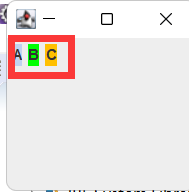
注意:JLabel只有设置setOpaque为true,颜色效果才会生效

 浙公网安备 33010602011771号