
spring security如何添加无需鉴权的接口?
网上很多去掉鉴权,说的方法都是这种,但是我试了没有效果,可能是因为我配置鉴权的配置项,才导致的这个问题
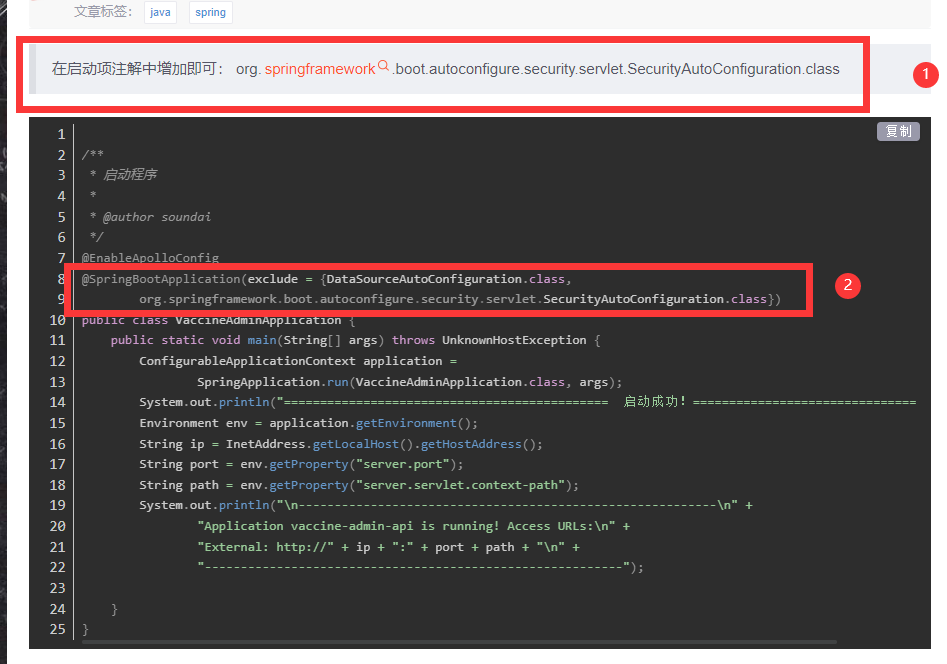
这种方法可以:
1、在项目中找到spring security的配置文件
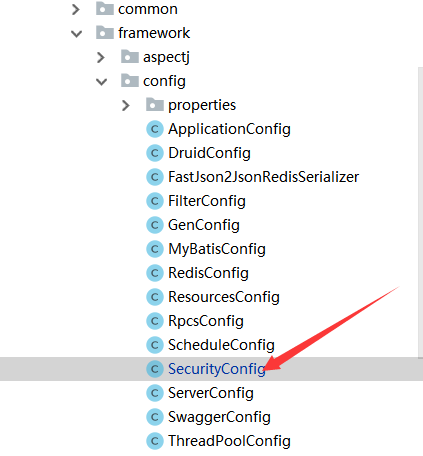
2、修改配置文件
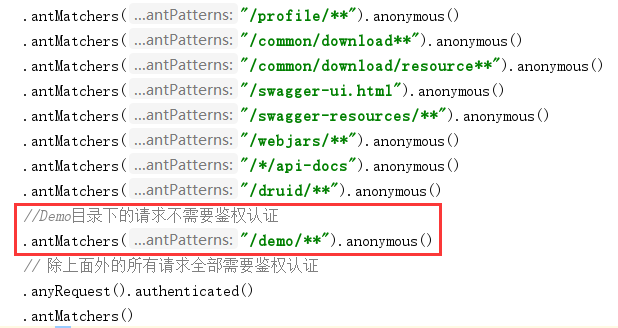
找到configure()方法,添加不需要鉴权的接口请求:
.antMatchers("/demo/**").anonymous()
package com.ryi.rpcs.framework.config;

import com.ryi.rpcs.framework.security.filter.JwtAuthenticationTokenFilter;
import com.ryi.rpcs.framework.security.handle.AuthenticationEntryPointImpl;
import com.ryi.rpcs.framework.security.handle.LogoutSuccessHandlerImpl;
import org.springframework.beans.factory.annotation.Autowired;
import org.springframework.context.annotation.Bean;
import org.springframework.http.HttpMethod;
import org.springframework.security.authentication.AuthenticationManager;
import org.springframework.security.config.annotation.authentication.builders.AuthenticationManagerBuilder;
import org.springframework.security.config.annotation.method.configuration.EnableGlobalMethodSecurity;
import org.springframework.security.config.annotation.web.builders.HttpSecurity;
import org.springframework.security.config.annotation.web.configuration.WebSecurityConfigurerAdapter;
import org.springframework.security.config.http.SessionCreationPolicy;
import org.springframework.security.core.userdetails.UserDetailsService;
import org.springframework.security.crypto.bcrypt.BCryptPasswordEncoder;
import org.springframework.security.web.authentication.UsernamePasswordAuthenticationFilter;

/**
 * spring security配置
 *
 * @author 架构师小跟班 www.jiagou1216.com
 */
@EnableGlobalMethodSecurity(prePostEnabled = true, securedEnabled = true)
public class SecurityConfig extends WebSecurityConfigurerAdapter
{
    /**
     * 自定义用户认证逻辑
     */
    @Autowired
    private UserDetailsService userDetailsService;

    /**
     * 认证失败处理类
     */
    @Autowired
    private AuthenticationEntryPointImpl unauthorizedHandler;

    /**
     * 退出处理类
     */
    @Autowired
    private LogoutSuccessHandlerImpl logoutSuccessHandler;

    /**
     * token认证过滤器
     */
    @Autowired
    private JwtAuthenticationTokenFilter authenticationTokenFilter;

    /**
     * 解决 无法直接注入 AuthenticationManager
     *
     * @return
     * @throws Exception
     */
    @Bean
    @Override
    public AuthenticationManager authenticationManagerBean() throws Exception
    {
        return super.authenticationManagerBean();
    }

    /**
     * anyRequest          |   匹配所有请求路径
     * access              |   SpringEl表达式结果为true时可以访问
     * anonymous           |   匿名可以访问
     * denyAll             |   用户不能访问
     * fullyAuthenticated  |   用户完全认证可以访问(非remember-me下自动登录)
     * hasAnyAuthority     |   如果有参数,参数表示权限,则其中任何一个权限可以访问
     * hasAnyRole          |   如果有参数,参数表示角色,则其中任何一个角色可以访问
     * hasAuthority        |   如果有参数,参数表示权限,则其权限可以访问
     * hasIpAddress        |   如果有参数,参数表示IP地址,如果用户IP和参数匹配,则可以访问
     * hasRole             |   如果有参数,参数表示角色,则其角色可以访问
     * permitAll           |   用户可以任意访问
     * rememberMe          |   允许通过remember-me登录的用户访问
     * authenticated       |   用户登录后可访问
     */
    @Override
    protected void configure(HttpSecurity httpSecurity) throws Exception
    {
        httpSecurity
                // CRSF禁用,因为不使用session
                .csrf().disable()
                // 认证失败处理类
                .exceptionHandling().authenticationEntryPoint(unauthorizedHandler).and()
                // 基于token,所以不需要session
                .sessionManagement().sessionCreationPolicy(SessionCreationPolicy.STATELESS).and()
                // 过滤请求
                .authorizeRequests()
                // 对于登录login 验证码captchaImage 允许匿名访问
                .antMatchers("/login", "/captchaImage").anonymous()
                .antMatchers(
                        HttpMethod.GET,
                        "/*.html",
                        "/**/*.html",
                        "/**/*.css",
                        "/**/*.js"
                ).permitAll()
                .antMatchers("/profile/**").anonymous()
                .antMatchers("/common/download**").anonymous()
                .antMatchers("/common/download/resource**").anonymous()
                .antMatchers("/swagger-ui.html").anonymous()
                .antMatchers("/swagger-resources/**").anonymous()
                .antMatchers("/webjars/**").anonymous()
                .antMatchers("/*/api-docs").anonymous()
                .antMatchers("/druid/**").anonymous()
                //Demo目录下的请求不需要鉴权认证
                .antMatchers("/demo/**").anonymous()
                // 除上面外的所有请求全部需要鉴权认证
                .anyRequest().authenticated()
                .and()
                .headers().frameOptions().disable();
        httpSecurity.logout().logoutUrl("/logout").logoutSuccessHandler(logoutSuccessHandler);
        // 添加JWT filter
        httpSecurity.addFilterBefore(authenticationTokenFilter, UsernamePasswordAuthenticationFilter.class);
    }


    /**
     * 强散列哈希加密实现
     */
    @Bean
    public BCryptPasswordEncoder bCryptPasswordEncoder()
    {
        return new BCryptPasswordEncoder();
    }

    /**
     * 身份认证接口
     */
    @Override
    protected void configure(AuthenticationManagerBuilder auth) throws Exception
    {
        auth.userDetailsService(userDetailsService).passwordEncoder(bCryptPasswordEncoder());
    }
}
————————————————
版权声明:本文为CSDN博主「codernavcom」的原创文章,遵循CC 4.0 BY-SA版权协议,转载请附上原文出处链接及本声明。
原文链接:https://blog.csdn.net/wangxy_job/article/details/106669817

 浙公网安备 33010602011771号