Java || 导入导出excel(POI)循序渐进版
1、打印excel数据(不关联数据库 直接输出)简易输出版
package com.estar.azcn.test;

import org.apache.poi.hssf.usermodel.HSSFWorkbook;
import org.apache.poi.ss.usermodel.Cell;
import org.apache.poi.ss.usermodel.Row;
import org.apache.poi.ss.usermodel.Sheet;
import org.apache.poi.ss.usermodel.Workbook;
import org.apache.poi.xssf.usermodel.XSSFWorkbook;
import org.junit.Test;

import java.io.File;
import java.io.FileInputStream;
import java.io.FileNotFoundException;
import java.io.IOException;

public class TestExcel {

    @Test
    public void test() {
        String filePath = "D:"+ File.separator + "123.xlsx";
        if (!filePath.endsWith(".xls")&&!filePath.endsWith(".xlsx")){
            System.out.println("文件不是excel类型");
        }
        FileInputStream fis = null;
        Workbook workbook = null;
        try {
            fis = new FileInputStream(filePath);//获取一个绝对地址的流
        } catch (Exception e) {
            e.printStackTrace();
        }
        try {
            workbook = new HSSFWorkbook(fis);//2003版本的excel 用.xls结尾
        } catch (Exception ex) {
            //ex.printStackTrace();
            try {
                //需要重新获取流对象 因为前面得异常导致了流关闭
                fis = new FileInputStream(filePath);
                workbook = new XSSFWorkbook(fis);//2007版本的excel 用.xlsx结尾
            } catch (IOException e) {
                e.printStackTrace();
            }
        }
        //得到一个工作表
        Sheet sheet = workbook.getSheetAt(0);
        //获取表头
        Row rowHead = sheet.getRow(0);
        //判断表头是否正确
        System.out.println(rowHead.getPhysicalNumberOfCells());
        if (rowHead.getPhysicalNumberOfCells()>2){
            System.out.println("表头的数量不对");
        }
        //获取数据的总行数
        int totalRowNum = sheet.getLastRowNum();
        //要获得属性
        String name ="";
        int lasttude = 0;
        for (int i = 1; i < totalRowNum; i++) {//去掉表头
            //获得第i行对象
            Row row = sheet.getRow(i);
            //获得第i行第0列得string类型对象
            Cell cell = row.getCell(0);
            name = cell.getStringCellValue().toString();
            //获得一个数字类型得数据
            cell = row.getCell(1);
            lasttude = (int)cell.getNumericCellValue();
            System.out.println("名字" + name + " , 经纬度" +lasttude);
        }
    }
}
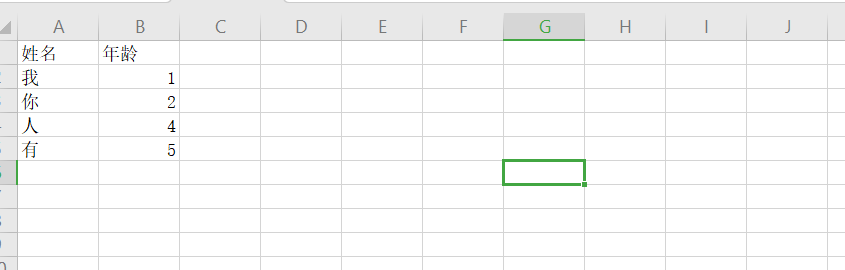
excel文档
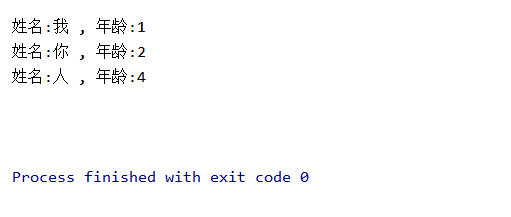
输出:
参考博客:https://www.jb51.net/article/119071.htm
2、读取多个sheet页面
循环读取,添加了 : for (int i = 0; i < workbook.getNumberOfSheets(); i++) {} 这部分代码
参考如下:
        //多个sheet页依次读取
        for (int i = 0; i < workbook.getNumberOfSheets(); i++) {
            //得到一个工作表
            Sheet sheet = workbook.getSheetAt(i);
            //获取表头
            Row rowHead = sheet.getRow(0);
            //判断表头是否正确
            /*if (rowHead.getPhysicalNumberOfCells()>2){
                System.out.println("表头的数量不对");
            }*/
            //获取数据的总行数
            int totalRowNum = sheet.getLastRowNum();
            //要获得属性
            String name ="";
            int lasttude = 0;
            for (int j = 1; j < totalRowNum; j++) {//去掉表头
                //获得第i行对象
                Row row = sheet.getRow(j);
                //获得第i行第0列得string类型对象
                Cell cell = row.getCell(0);
                name = cell.getStringCellValue().toString();
                //获得一个数字类型得数据
                cell = row.getCell(1);
                lasttude = (int)cell.getNumericCellValue();
                System.out.println("姓名:" + name + " , 年龄:" +lasttude);
            }
        }
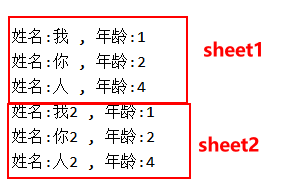
输出:
参考博客:https://blog.csdn.net/yxw678/article/details/104015602
加强版:

 浙公网安备 33010602011771号