
Excel VBA 自定义排序
现有数据如下:
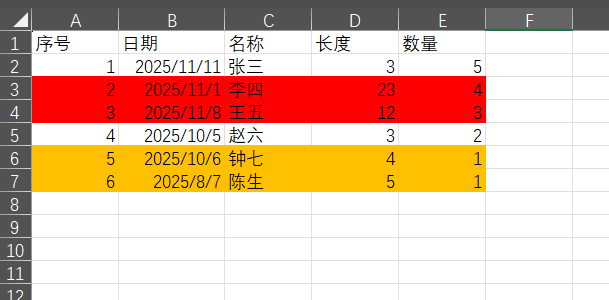
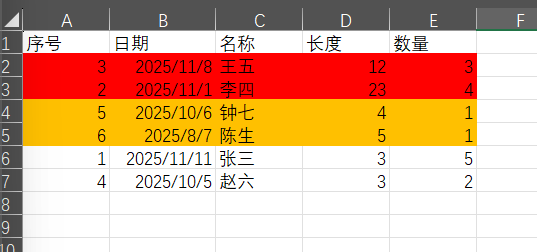
此时,如果需要根据单元格底色来排序,红色在上,其次是黄色,最后是白色(其实是无底色)。那么代码如下:
Sub te()

    Dim wbk As Workbook
    Dim sht As Worksheet
    Dim last_row As Integer
    Dim iCounter As Integer
    Dim n As Integer

    Set wbk = Application.ThisWorkbook
    Set sht = wbk.ActiveSheet

    last_row = sht.Range("A1").End(xlDown).Row

    For iCounter = 2 To last_row
        sht.Cells(iCounter, 6) = sht.Cells(iCounter, 1).Interior.ColorIndex
    Next iCounter

    Application.AddCustomList Array("3", "44", "-4142")
    n = Application.CustomListCount

    sht.Columns("A:F").Sort key1:=sht.Range("F2"), Header:=xlYes, ordercustom:=n + 1, order1:=xlAscending, key2:=sht.Range("b2"), order2:=xlDescending
    sht.Columns("F:F").Clear

End Sub
上述代码其实是添加了一个辅助列,放在了 E 列。通过一个循环,将 A 列每个单元格的底色的值取出来,结果放在 E 列,再根据 E 列的值(也就是底色的值)来排序。
自定义顺序的部分是使用了 Application.AddCustomList,然后在排序 Sort 的时候使用 ordercustom 属性,值是自定义列表的序号,通过 Application.CustomListCount 得到
最后再清空辅助列的内容。
代码中还指定了第二个字段用于排序,即 B 列,排序方式是倒序。所以结果如下
(本文完)
--------------------------------------------------------------------------------------------------------------------------
致虚极,守静笃
使用我的阿里云幸运券,购买阿里云ECS有优惠:阿里云幸运券
>>>>> 腾讯云新用户优惠 <<<<<
--------------------------------------------------------------------------------------------------------------------------
致虚极,守静笃
使用我的阿里云幸运券,购买阿里云ECS有优惠:阿里云幸运券
>>>>> 腾讯云新用户优惠 <<<<<

 浙公网安备 33010602011771号