
7.商品服务-品牌管理
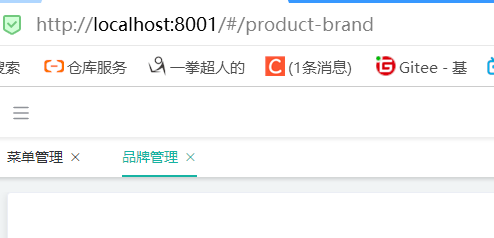
1.新增品牌管理菜单-上级菜单选择商品管理
2.拿到代码生成器生成的两个文件放到如下位置

npm run dev运行起来
进入品牌系统发现已经有基本的页面了
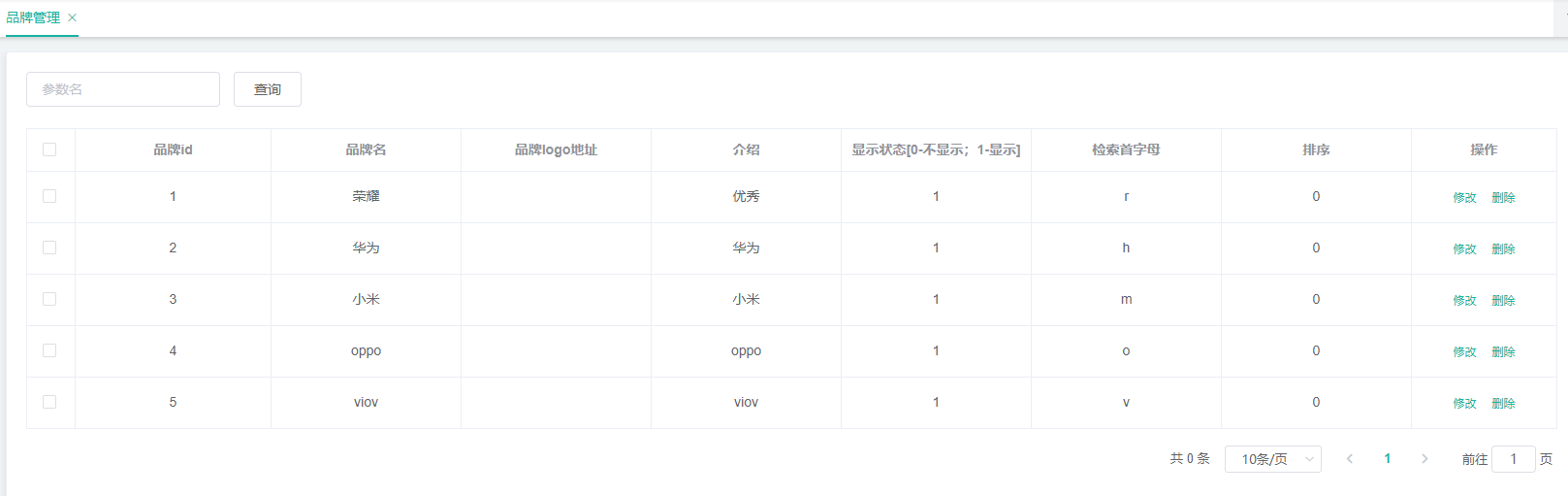
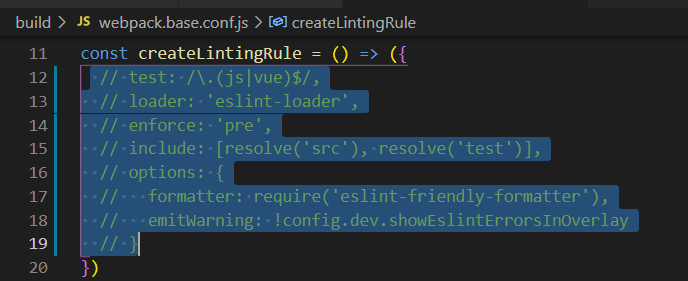
解决控制台报错问题
更改权限,让新增和删除按钮一直显示

给出前端brand.vue的代码
<template>
  <div class="mod-config">
    <el-form :inline="true" :model="dataForm" @keyup.enter.native="getDataList()">
      <el-form-item>
        <el-input v-model="dataForm.key" placeholder="参数名" clearable></el-input>
      </el-form-item>
      <el-form-item>
        <el-button @click="getDataList()">查询</el-button>
        <el-button
          v-if="isAuth('product:brand:save')"
          type="primary"
          @click="addOrUpdateHandle()"
        >新增
        </el-button>
        <el-button
          v-if="isAuth('product:brand:delete')"
          type="danger"
          @click="deleteHandle()"
          :disabled="dataListSelections.length <= 0"
        >批量删除
        </el-button>
      </el-form-item>
    </el-form>
    <el-table
      :data="dataList"
      border
      v-loading="dataListLoading"
      @selection-change="selectionChangeHandle"
      style="width: 100%;"
    >
      <el-table-column type="selection" header-align="center" align="center" width="50"></el-table-column>
      <el-table-column prop="brandId" header-align="center" align="center" label="品牌id"></el-table-column>
      <el-table-column prop="name" header-align="center" align="center" label="品牌名"></el-table-column>
      <el-table-column prop="logo" header-align="center" align="center" label="品牌logo地址">
        <template slot-scope="scope">
          <!-- <el-image
              style="width: 100px; height: 80px"
              :src="scope.row.logo"
          fit="fill"></el-image>-->
          <img :src="scope.row.logo" style="width: 100px; height: 80px"/>
        </template>
      </el-table-column>
      <el-table-column prop="descript" header-align="center" align="center" label="介绍"></el-table-column>
      <el-table-column prop="showStatus" header-align="center" align="center" label="显示状态">
        <template slot-scope="scope">
          <el-switch
            v-model="scope.row.showStatus"
            active-color="#13ce66"
            inactive-color="#ff4949"
            :active-value="1"
            :inactive-value="0"
            @change="updateBrandStatus(scope.row)"
          ></el-switch>
        </template>
      </el-table-column>
      <el-table-column prop="firstLetter" header-align="center" align="center" label="检索首字母"></el-table-column>
      <el-table-column prop="sort" header-align="center" align="center" label="排序"></el-table-column>
      <el-table-column fixed="right" header-align="center" align="center" width="250" label="操作">
        <template slot-scope="scope">
          <el-button type="text" size="small" @click="updateCatelogHandle(scope.row.brandId)">关联分类</el-button>
          <el-button type="text" size="small" @click="addOrUpdateHandle(scope.row.brandId)">修改</el-button>
          <el-button type="text" size="small" @click="deleteHandle(scope.row.brandId)">删除</el-button>
        </template>
      </el-table-column>
    </el-table>
    <el-pagination
      @size-change="sizeChangeHandle"
      @current-change="currentChangeHandle"
      :current-page="pageIndex"
      :page-sizes="[10, 20, 50, 100]"
      :page-size="pageSize"
      :total="totalPage"
      layout="total, sizes, prev, pager, next, jumper"
    ></el-pagination>
    <!-- 弹窗, 新增 / 修改 -->
    <add-or-update v-if="addOrUpdateVisible" ref="addOrUpdate" @refreshDataList="getDataList"></add-or-update>

    <el-dialog title="关联分类" :visible.sync="cateRelationDialogVisible" width="30%">
      <el-popover placement="right-end" v-model="popCatelogSelectVisible">
        <category-cascader :catelogPath.sync="catelogPath"></category-cascader>
        <div style="text-align: right; margin: 0">
          <el-button size="mini" type="text" @click="popCatelogSelectVisible = false">取消</el-button>
          <el-button type="primary" size="mini" @click="addCatelogSelect">确定</el-button>
        </div>
        <el-button slot="reference">新增关联</el-button>
      </el-popover>
      <el-table :data="cateRelationTableData" style="width: 100%">
        <el-table-column prop="id" label="#"></el-table-column>
        <el-table-column prop="brandName" label="品牌名"></el-table-column>
        <el-table-column prop="catelogName" label="分类名"></el-table-column>
        <el-table-column fixed="right" header-align="center" align="center" label="操作">
          <template slot-scope="scope">
            <el-button
              type="text"
              size="small"
              @click="deleteCateRelationHandle(scope.row.id,scope.row.brandId)"
            >移除
            </el-button>
          </template>
        </el-table-column>
      </el-table>
      <span slot="footer" class="dialog-footer">
        <el-button @click="cateRelationDialogVisible = false">取 消</el-button>
        <el-button type="primary" @click="cateRelationDialogVisible = false">确 定</el-button>
      </span>
    </el-dialog>
  </div>
</template>

<script>
import AddOrUpdate from "./brand-add-or-update";
// import CategoryCascader from "../common/category-cascader";
export default {
  data() {
    return {
      dataForm: {
        key: ""
      },
      brandId: 0,
      catelogPath: [],
      dataList: [],
      cateRelationTableData: [],
      pageIndex: 1,
      pageSize: 10,
      totalPage: 0,
      dataListLoading: false,
      dataListSelections: [],
      addOrUpdateVisible: false,
      cateRelationDialogVisible: false,
      popCatelogSelectVisible: false
    };
  },
  components: {
    AddOrUpdate,
    // CategoryCascader
  },
  activated() {
    this.getDataList();
  },
  methods: {
    addCatelogSelect() {
      //{"brandId":1,"catelogId":2}
      this.popCatelogSelectVisible = false;
      this.$http({
        url: this.$http.adornUrl("/product/categorybrandrelation/save"),
        method: "post",
        data: this.$http.adornData({
          brandId: this.brandId,
          catelogId: this.catelogPath[this.catelogPath.length - 1]
        }, false)
      }).then(({data}) => {
        this.getCateRelation();
      });
    },
    deleteCateRelationHandle(id, brandId) {
      this.$http({
        url: this.$http.adornUrl("/product/categorybrandrelation/delete"),
        method: "post",
        data: this.$http.adornData([id], false)
      }).then(({data}) => {
        this.getCateRelation();
      });
    },
    updateCatelogHandle(brandId) {
      this.cateRelationDialogVisible = true;
      this.brandId = brandId;
      this.getCateRelation();
    },
    getCateRelation() {
      this.$http({
        url: this.$http.adornUrl("/product/categorybrandrelation/catelog/list"),
        method: "get",
        params: this.$http.adornParams({
          brandId: this.brandId
        })
      }).then(({data}) => {
        this.cateRelationTableData = data.data;
      });
    },
    // 获取数据列表
    getDataList() {
      this.dataListLoading = true;
      this.$http({
        url: this.$http.adornUrl("/product/brand/list"),
        method: "get",
        params: this.$http.adornParams({
          page: this.pageIndex,
          limit: this.pageSize,
          key: this.dataForm.key
        })
      }).then(({data}) => {
        if (data && data.code === 0) {
          this.dataList = data.page.list;
          this.totalPage = data.page.totalCount;
        } else {
          this.dataList = [];
          this.totalPage = 0;
        }
        this.dataListLoading = false;
      });
    },
    updateBrandStatus(data) {
      console.log("最新信息", data);
      let {brandId, showStatus} = data;
      //发送请求修改状态
      this.$http({
        url: this.$http.adornUrl("/product/brand/update/status"),
        method: "post",
        data: this.$http.adornData({brandId, showStatus}, false)
      }).then(({data}) => {
        this.$message({
          type: "success",
          message: "状态更新成功"
        });
      });
    },
    // 每页数
    sizeChangeHandle(val) {
      this.pageSize = val;
      this.pageIndex = 1;
      this.getDataList();
    },
    // 当前页
    currentChangeHandle(val) {
      this.pageIndex = val;
      this.getDataList();
    },
    // 多选
    selectionChangeHandle(val) {
      this.dataListSelections = val;
    },
    // 新增 / 修改
    addOrUpdateHandle(id) {
      this.addOrUpdateVisible = true;
      this.$nextTick(() => {
        this.$refs.addOrUpdate.init(id);
      });
    },
    // 删除
    deleteHandle(id) {
      var ids = id
        ? [id]
        : this.dataListSelections.map(item => {
          return item.brandId;
        });
      this.$confirm(
        `确定对[id=${ids.join(",")}]进行[${id ? "删除" : "批量删除"}]操作?`,
        "提示",
        {
          confirmButtonText: "确定",
          cancelButtonText: "取消",
          type: "warning"
        }
      ).then(() => {
        this.$http({
          url: this.$http.adornUrl("/product/brand/delete"),
          method: "post",
          data: this.$http.adornData(ids, false)
        }).then(({data}) => {
          if (data && data.code === 0) {
            this.$message({
              message: "操作成功",
              type: "success",
              duration: 1500,
              onClose: () => {
                this.getDataList();
              }
            });
          } else {
            this.$message.error(data.msg);
          }
        });
      });
    }
  }
};
</script>
<style scoped>
</style>
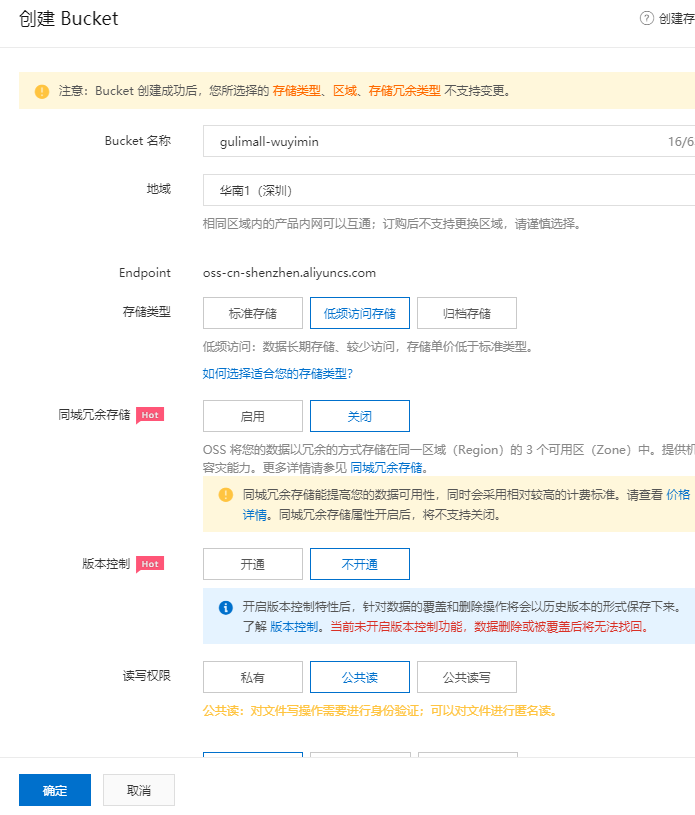
3.OSS云端准备
准备详见商城项目
服务端签名后直传--》安全,不要经过自己的服务器也就是前端直传,服务器只提供相应的签名数据
4.创建子模块mall-third-party 整合阿里云OSS等第三方模块
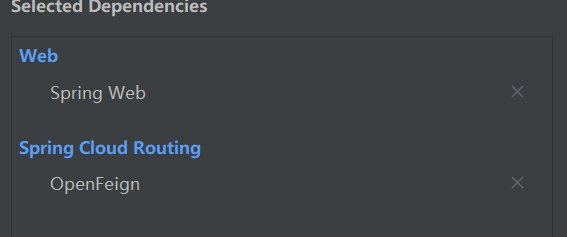
添加pom依赖
 <dependency>
            <groupId>com.alibaba.cloud</groupId>
            <artifactId>spring-cloud-starter-alicloud-oss</artifactId>
            <version>2.2.0.RELEASE</version>
        </dependency>
        <dependency>
            <groupId>com.wuyimin.gulimall</groupId>
            <artifactId>gulimall-common</artifactId>
            <version>0.0.1-SNAPSHOT</version>
        </dependency>
添加注册中心配置中心的文件,新增命名空间third-party.增加配置oss.yml,专门用来处理oss的内容

配置第三方模块
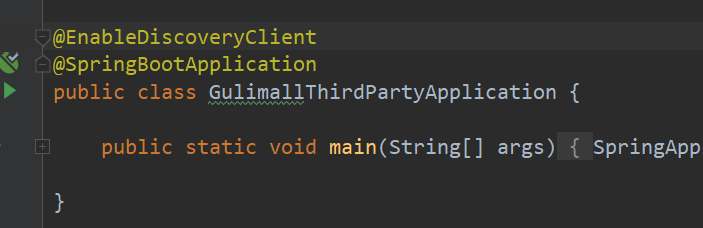
application.yml
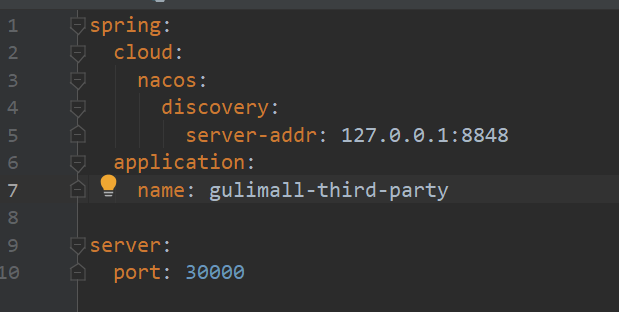
bootstrap.properties
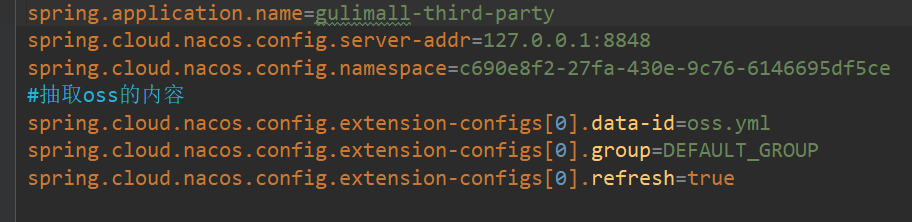
测试上传
@SpringBootTest
class GulimallThirdPartyApplicationTests {
    @Autowired
    OSSClient ossClient;

    @Test
    void contextLoads() throws FileNotFoundException {
        // 上传文件流。
        InputStream inputStream = new FileInputStream("C:\\Users\\56548\\Desktop\\1.jpg");
        // 上传
        ossClient.putObject("gulimall-wuyimin", "1.jpg", inputStream);

        // 关闭OSSClient。
        ossClient.shutdown();
        System.out.println("上传成功.");
    }
}
5.oss服务端直传

/**
 * @author wuyimin
 * @create 2021-08-06 14:34
 * @description 签名信息
 */
@RestController
public class OssController {
    @Autowired
    OSS ossClient;

    @Value("${spring.cloud.alicloud.oss.endpoint}")
    private String endpoint;

    private String bucket="gulimall-wuyimin";
    @Value("${spring.cloud.alicloud.access-key}")
    private String accessId;
    @RequestMapping("/oss/policy")
    public R policy(){
        // https://gulimall-hello.oss-cn-beijing.aliyuncs.com/hahaha.jpg  host的格式为 bucketname.endpoint
        String host = "https://" + bucket + "." + endpoint;
        // callbackUrl为 上传回调服务器的URL,请将下面的IP和Port配置为您自己的真实信息。
        // String callbackUrl = "http://88.88.88.88:8888";
        String format = new SimpleDateFormat("yyyy-MM-dd").format(new Date());
        // 用户上传文件时指定的前缀。
        String dir = format + "/";
        Map<String, String> respMap = null;
        try {
            long expireTime = 30;
            long expireEndTime = System.currentTimeMillis() + expireTime * 1000;
            Date expiration = new Date(expireEndTime);
            PolicyConditions policyConds = new PolicyConditions();
            policyConds.addConditionItem(PolicyConditions.COND_CONTENT_LENGTH_RANGE, 0, 1048576000);
            policyConds.addConditionItem(MatchMode.StartWith, PolicyConditions.COND_KEY, dir);

            String postPolicy = ossClient.generatePostPolicy(expiration, policyConds);
            byte[] binaryData = postPolicy.getBytes(StandardCharsets.UTF_8);
            String encodedPolicy = BinaryUtil.toBase64String(binaryData);
            String postSignature = ossClient.calculatePostSignature(postPolicy);

            respMap = new LinkedHashMap<String, String>();
            respMap.put("accessid", accessId);
            respMap.put("policy", encodedPolicy);
            respMap.put("signature", postSignature);
            respMap.put("dir", dir);
            respMap.put("host", host);
            respMap.put("expire", String.valueOf(expireEndTime / 1000));
            // respMap.put("expire", formatISO8601Date(expiration));

        } catch (Exception e) {
            // Assert.fail(e.getMessage());
            System.out.println(e.getMessage());
        }

        return R.ok().put("data", respMap);
    }
}
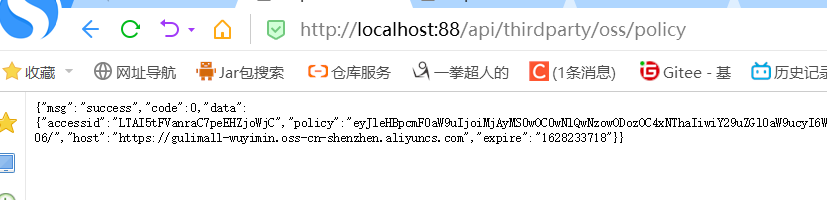
测试签名返回数据

配置网关
spring:
  cloud:
    gateway:
      routes:
        #商品的路由
        #localhost:88/api/product/category/list/tree--->localhost:10000/product....
        #优先级比下面的哪个路由要高所以要放在上面,不然会被截断
        - id: product_route
          uri: lb://gulimall-product
          predicates:
            - Path=/api/product/**
          filters:
            - RewritePath=/api/(?<segment>.*),/$\{segment}
#第三方路由配置
        - id: third_party_route
          uri: lb://gulimall-third-party
          predicates:
            - Path=/api/thirdparty/**
          filters:
            - RewritePath=/api/thirdparty/(?<segment>.*),/$\{segment}

        - id: admin_route
          #lb表示负载均衡
          uri: lb://renren-fast
          #规定前端项目必须带有一个api前缀
          #原来验证码的uri ...localhost:88/api/captcha.jpg
          #应该改成的uri ...localhost:88/renrenfast/captcha.jpg
          predicates:
            - Path=/api/**
          filters:
            - RewritePath=/api/(?<segment>.*),/renren-fast/$\{segment}
6.前端
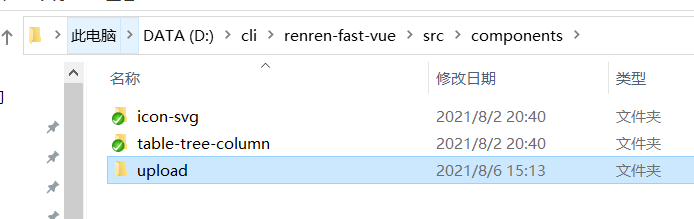
增加文件夹
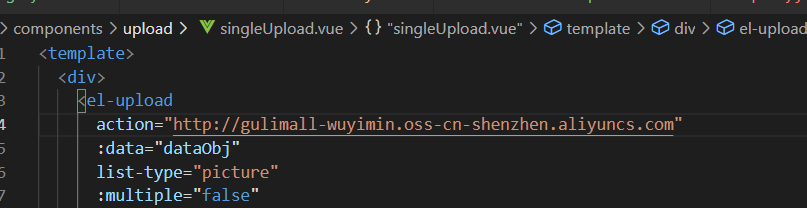
需要把这个地址改掉,单文件和多文件都要改

<template>
  <el-dialog
    :title="!dataForm.id ? '新增' : '修改'"
    :close-on-click-modal="false"
    :visible.sync="visible"
  >
    <el-form
      :model="dataForm"
      :rules="dataRule"
      ref="dataForm"
      @keyup.enter.native="dataFormSubmit()"
      label-width="140px"
    >
      <el-form-item label="品牌名" prop="name">
        <el-input v-model="dataForm.name" placeholder="品牌名"></el-input>
      </el-form-item>
      <el-form-item label="品牌logo地址" prop="logo">
        <!-- <el-input v-model="dataForm.logo" placeholder="品牌logo地址"></el-input> -->
        <single-upload v-model="dataForm.logo"></single-upload>
      </el-form-item>
      <el-form-item label="介绍" prop="descript">
        <el-input v-model="dataForm.descript" placeholder="介绍"></el-input>
      </el-form-item>
      <el-form-item label="显示状态" prop="showStatus">
        <el-switch
          v-model="dataForm.showStatus"
          active-color="#13ce66"
          inactive-color="#ff4949"
          :active-value="1"
          :inactive-value="0"
        ></el-switch>
      </el-form-item>
      <el-form-item label="检索首字母" prop="firstLetter">
        <el-input v-model="dataForm.firstLetter" placeholder="检索首字母"></el-input>
      </el-form-item>
      <el-form-item label="排序" prop="sort">
        <el-input v-model.number="dataForm.sort" placeholder="排序"></el-input>
      </el-form-item>
    </el-form>
    <span slot="footer" class="dialog-footer">
      <el-button @click="visible = false">取消</el-button>
      <el-button type="primary" @click="dataFormSubmit()">确定</el-button>
    </span>
  </el-dialog>
</template>

<script>
import SingleUpload from '@/components/upload/singleUpload';

export default {
  components: {SingleUpload},
  data() {
    return {
      visible: false,
      dataForm: {
        brandId: 0,
        name: "",
        logo: "",
        descript: "",
        showStatus: 1,
        firstLetter: "",
        sort: 0
      },
      dataRule: {
        name: [{required: true, message: "品牌名不能为空", trigger: "blur"}],
        logo: [
          {required: true, message: "品牌logo地址不能为空", trigger: "blur"}
        ],
        descript: [
          {required: true, message: "介绍不能为空", trigger: "blur"}
        ],
        showStatus: [
          {
            required: true,
            message: "显示状态[0-不显示;1-显示]不能为空",
            trigger: "blur"
          }
        ],
        firstLetter: [
          {
            validator: (rule, value, callback) => {
              if (value == "") {
                callback(new Error("首字母必须填写"));
              } else if (!/^[a-zA-Z]$/.test(value)) {
                callback(new Error("首字母必须a-z或者A-Z之间"));
              } else {
                callback();
              }
            },
            trigger: "blur"
          }
        ],
        sort: [
          {
            validator: (rule, value, callback) => {
              if (value == "") {
                callback(new Error("排序字段必须填写"));
              } else if (!Number.isInteger(value) || value < 0) {
                callback(new Error("排序必须是一个大于等于0的整数"));
              } else {
                callback();
              }
            },
            trigger: "blur"
          }
        ]
      }
    };
  },
  methods: {
    init(id) {
      this.dataForm.brandId = id || 0;
      this.visible = true;
      this.$nextTick(() => {
        this.$refs["dataForm"].resetFields();
        if (this.dataForm.brandId) {
          this.$http({
            url: this.$http.adornUrl(
              `/product/brand/info/${this.dataForm.brandId}`
            ),
            method: "get",
            params: this.$http.adornParams()
          }).then(({data}) => {
            if (data && data.code === 0) {
              this.dataForm.name = data.brand.name;
              this.dataForm.logo = data.brand.logo;
              this.dataForm.descript = data.brand.descript;
              this.dataForm.showStatus = data.brand.showStatus;
              this.dataForm.firstLetter = data.brand.firstLetter;
              this.dataForm.sort = data.brand.sort;
            }
          });
        }
      });
    },
    // 表单提交
    dataFormSubmit() {
      this.$refs["dataForm"].validate(valid => {
        if (valid) {
          this.$http({
            url: this.$http.adornUrl(
              `/product/brand/${!this.dataForm.brandId ? "save" : "update"}`
            ),
            method: "post",
            data: this.$http.adornData({
              brandId: this.dataForm.brandId || undefined,
              name: this.dataForm.name,
              logo: this.dataForm.logo,
              descript: this.dataForm.descript,
              showStatus: this.dataForm.showStatus,
              firstLetter: this.dataForm.firstLetter,
              sort: this.dataForm.sort
            })
          }).then(({data}) => {
            if (data && data.code === 0) {
              this.$message({
                message: "操作成功",
                type: "success",
                duration: 1500,
                onClose: () => {
                  this.visible = false;
                  this.$emit("refreshDataList");
                }
              });
            } else {
              this.$message.error(data.msg);
            }
          });
        }
      });
    }
  }
};
</script>
7.修改oss跨域


点击上传文件后
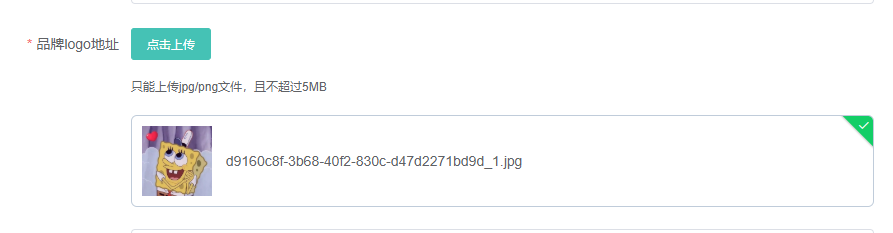
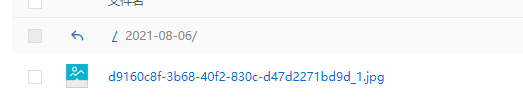
可以看到oss里也有了
8.JSR303校验注解
product加入依赖
<dependency>
<groupId>org.springframework.boot</groupId>
<artifactId>spring-boot-starter-validation</artifactId>
</dependency>
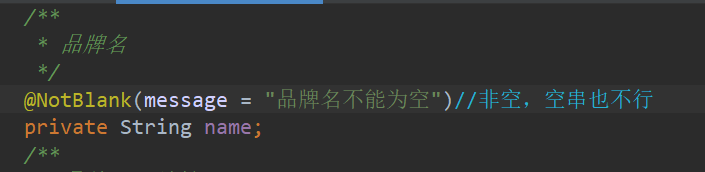
添加notBlank注解
添加@Valid注解
/**
     * 保存
     */
    @RequestMapping("/save")
    //@RequiresPermissions("product:brand:save")
    public R save(@Valid @RequestBody BrandEntity brand, BindingResult result){//告诉springMVC这个字段需要校验,后面紧跟一个参数可以获取错误信息
        if(result.hasErrors()){
            Map<String ,String> map=new HashMap<>();
            result.getFieldErrors().forEach((item)->{
                String defaultMessage = item.getDefaultMessage();//获取信息
                String field=item.getField();//获取错误的名字
                map.put(field,defaultMessage);
            });
            return R.error(400,"提交的数据不合法").put("data",map);
        }else{
            brandService.save(brand);
            return R.ok();
        }
    }
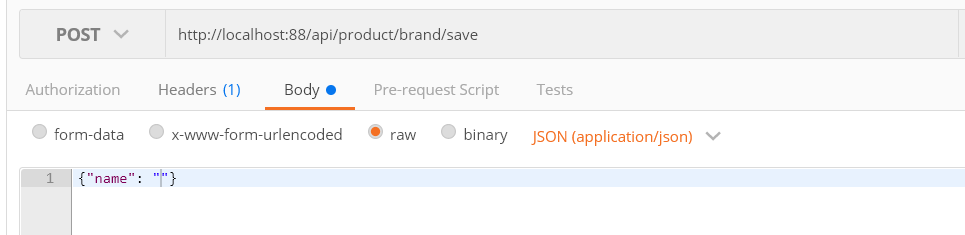
用postman发送一个空串,这时候就会报400错误

给出完整的校验Bean
@Data
@TableName("pms_brand")
public class BrandEntity implements Serializable {
    private static final long serialVersionUID = 1L;

    /**
     * 品牌id
     */
    @TableId
    private Long brandId;
    /**
     * 品牌名
     */
    @NotBlank(message = "品牌名不能为空")//非空,空串也不行
    private String name;
    /**
     * 品牌logo地址
     */
    @NotEmpty
    @URL(message = "logo必须是url地址")//必须是一个url地址
    private String logo;
    /**
     * 介绍
     */
    private String descript;
    /**
     * 显示状态[0-不显示;1-显示]
     */
    private Integer showStatus;
    /**
     * 检索首字母
     */
    @NotEmpty
    @Pattern(regexp = "/^[a-zA-z]$/",message = "检索首字母必须是一个字母")//自定义的规则
    private String firstLetter;
    /**
     * 排序
     */
    @NotNull//integer不能使用notEmpty
    @Min(value = 0,message = "排序必须大于等于0")
    private Integer sort;

}
9.集中异常处理
我们之前的方法处理异常非常麻烦,现在来统一处理异常
首先把bindingresult那一段代码删掉,不去感知异常,异常就会抛出去

@Slf4j//记录日志
//restController+ControllerAdvice
@RestControllerAdvice(basePackages = "com.wuyimin.gulimall.product.controller")
public class GulimallExceptionControllerAdvice {
    @ExceptionHandler(value = MethodArgumentNotValidException.class)
    public R handleValidException(MethodArgumentNotValidException e){
        log.error("数据校验出现问题:{},异常类型:{}",e.getMessage(),e.getClass());
        BindingResult bindingResult = e.getBindingResult();//之前的BindingResult属性
        Map<String,String> map=new HashMap<>();
        bindingResult.getFieldErrors().forEach(item->{
            map.put(item.getField(),item.getDefaultMessage());
        });
        return R.error(400,"数据校验出现问题").put("data",map);
    }
}

为了规范枚举一下各种错误状态码放在common模块里
/**
 * @author wuyimin
 * @create 2021-08-06 16:44
 * @description 错误状态码枚举
 */
    /***
     * 错误码和错误信息定义类
     * 1. 错误码定义规则为5为数字
     * 2. 前两位表示业务场景,最后三位表示错误码。例如:100001。10:通用 001:系统未知异常
     * 3. 维护错误码后需要维护错误描述,将他们定义为枚举形式
     * 错误码列表:
     *  10: 通用
     *      001:参数格式校验
     *  11: 商品
     *  12: 订单
     *  13: 购物车
     *  14: 物流
     * @author ZSY
     */
    public enum BizCodeEnum {
        /**
         * 系统未知异常
         */
        UNKNOWN_EXCEPTION(10000, "系统未知异常"),
        /**
         * 参数校验错误
         */
        VALID_EXCEPTION(10001, "参数格式校验失败");
        private final int code;
        private final String msg;
        BizCodeEnum(int code, String msg) {
            this.code = code;
            this.msg = msg;
        }
        public int getCode() {
            return code;
        }
        public String getMsg() {
            return msg;
        }
    }
更改后的代码
@Slf4j//记录日志
//restController+ControllerAdvice
@RestControllerAdvice(basePackages = "com.wuyimin.gulimall.product.controller")
public class GulimallExceptionControllerAdvice {
    @ExceptionHandler(value = MethodArgumentNotValidException.class)
    public R handleValidException(MethodArgumentNotValidException e){
        log.error("数据校验出现问题:{},异常类型:{}",e.getMessage(),e.getClass());
        BindingResult bindingResult = e.getBindingResult();//之前的BindingResult属性
        Map<String,String> map=new HashMap<>();
        bindingResult.getFieldErrors().forEach(item->{
            map.put(item.getField(),item.getDefaultMessage());
        });
        return R.error(BizCodeEnum.VALID_EXCEPTION.getCode(),BizCodeEnum.VALID_EXCEPTION.getMsg()).put("data",map);
    }

    //其他任何异常都默认返回error
    @ExceptionHandler(value=Throwable.class)
    public R handleException(Throwable throwable){
        return R.error(BizCodeEnum.UNKNOWN_EXCEPTION.getCode(),BizCodeEnum.UNKNOWN_EXCEPTION.getMsg());
    }
}
/**
 * @author wuyimin
 * @create 2021-08-06 16:44
 * @description 错误状态码枚举
*/
    /***
     * 错误码和错误信息定义类
* 1. 错误码定义规则为5为数字
* 2. 前两位表示业务场景,最后三位表示错误码。例如:100001。10:通用 001:系统未知异常
* 3. 维护错误码后需要维护错误描述,将他们定义为枚举形式
* 错误码列表:
*  10: 通用
*      001:参数格式校验
*  11: 商品
*  12: 订单
*  13: 购物车
*  14: 物流
* @author ZSY
     */
public enum BizCodeEnum {
        /**
         * 系统未知异常
*/
UNKNOWN_EXCEPTION(10000, "系统未知异常"),
/**
         * 参数校验错误
*/
VALID_EXCEPTION(10001, "参数格式校验失败");
        private final int code;
        private final String msg;
BizCodeEnum(int code, String msg) {
            this.code = code;
            this.msg = msg;
}
        public int getCode() {
            return code;
}
        public String getMsg() {
            return msg;
}
    }
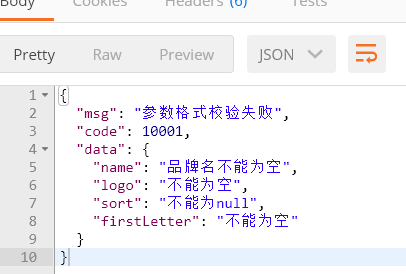
测试校验
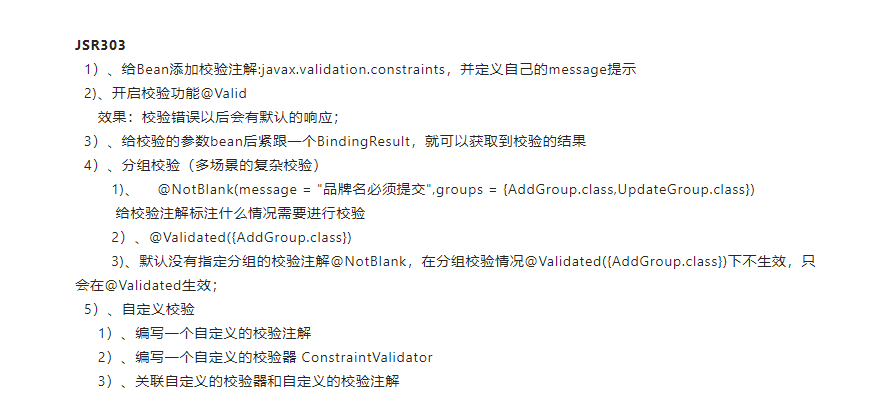
10.分组校验+自定义校验注解
entity和controller
/**
 * 品牌
 *
 * @author wuyimin
 * @email 565482647@qq.com
 * @date 2021-08-03 11:43:58
 */
@Data
@TableName("pms_brand")
public class BrandEntity implements Serializable {
    private static final long serialVersionUID = 1L;

    /**
     * 品牌id
     */
    @NotNull(message = "修改必须指定品牌id", groups = {UpdateGroup.class})
    @Null(message = "新增不能指定id", groups = {AddGroup.class})
    @TableId
    private Long brandId;
    /**
     * 品牌名
     */
    @NotBlank(message = "品牌名必须提交", groups = {AddGroup.class, UpdateGroup.class})
    private String name;
    /**
     * 品牌logo地址
     */
    @NotBlank(groups = {AddGroup.class})
    @URL(message = "logo必须是一个合法的url地址", groups = {AddGroup.class, UpdateGroup.class})
    private String logo;
    /**
     * 介绍
     */
    private String descript;
    /**
     * 显示状态[0-不显示;1-显示]
     */
//  @Pattern()
    @NotNull(groups = {AddGroup.class, UpdateStatusGroup.class})
    @ListValue(vals = {0, 1}, groups = {AddGroup.class, UpdateStatusGroup.class})
    private Integer showStatus;
    /**
     * 检索首字母
     */
    @NotEmpty(groups = {AddGroup.class})
    @Pattern(regexp = "^[a-zA-Z]$", message = "检索首字母必须是一个字母", groups = {AddGroup.class, UpdateGroup.class})
    private String firstLetter;
    /**
     * 排序
     */
    @NotNull(groups = {AddGroup.class})
    @Min(value = 0, message = "排序必须大于等于0", groups = {AddGroup.class, UpdateGroup.class})
    private Integer sort;

}
    /**
     * 修改
     */
    @RequestMapping("/update")
    //@RequiresPermissions("product:brand:update")
    public R update(@RequestBody BrandEntity brand){
        brandService.updateById(brand);

        return R.ok();
    }

    /**
     * 修改状态
     */
    @RequestMapping("/update/status")
    //@RequiresPermissions("product:brand:update")
    public R updateStatus(@Validated(UpdateStatusGroup.class)@RequestBody BrandEntity brand){
        brandService.updateById(brand);
        return R.ok();
    }
自定义校验:
common引入依赖
<!-- https://mvnrepository.com/artifact/javax.validation/validation-api -->
<dependency>
    <groupId>javax.validation</groupId>
    <artifactId>validation-api</artifactId>
    <version>2.0.1.Final</version>
</dependency>
自定义注解
add update updateStatus是三个空接口用于给校验注解分类
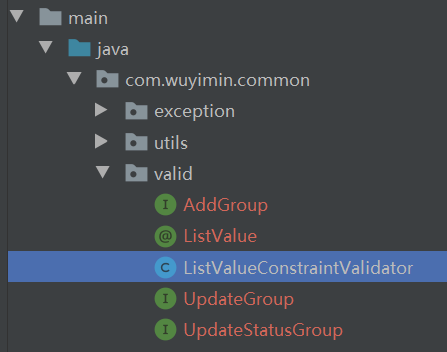
ListValue自定义注解
@Documented
@Constraint(validatedBy = {ListValueConstraintValidator.class})//关联自定义的校验器
@Target({METHOD, FIELD, ANNOTATION_TYPE, CONSTRUCTOR, PARAMETER, TYPE_USE})
@Retention(RUNTIME)
public @interface ListValue {
    String message() default "{com.wuyimin.common.valid.ListValue.message}";//提示信息从ValidationMessages.Properties里拿到,也可以直接定义

    Class<?>[] groups() default {};

    Class<? extends Payload>[] payload() default {};

    int[] vals() default {};
}
校验器 ListValueConstraintValidator
public class ListValueConstraintValidator implements ConstraintValidator<ListValue,Integer> {
    private Set<Integer> set=new HashSet<>();
    //初始化方法 把val值拿到存入集合
    @Override
    public void initialize(ListValue constraintAnnotation) {
        int[] vals=constraintAnnotation.vals();
        for (int val:vals){
            set.add(val);
        }
    }
    //判断是否校验成功
    /**
     *
     * @param integer 需要校验的值
     * @param constraintValidatorContext
     * @return
     */
    @Override
    public boolean isValid(Integer integer, ConstraintValidatorContext constraintValidatorContext) {
        return set.contains(integer);//包含就返回true,不包含就返回false
    }
}
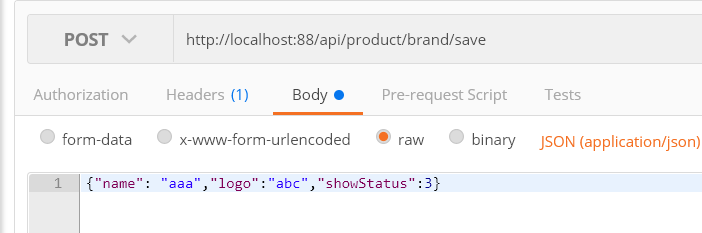
测试





 浙公网安备 33010602011771号