学习C#
day1
① 什么是 .NET ?
.NET 包含两部分 .NET 平台 和 .NET FrameWork 框架
.NET FrameWork 框架包含于 .NET 平台 , .NET FrameWork 框架提供环境和支撑保证 .NET 平台运行
② 什么是 C# ?
C# 是一种面向对象、运行于 .NET Framework 上的高级程序设计语言 , 而 Java 既是语言又是平台
③配置 Visual Studio 2019 Community环境
④C#的项目构造 : 解决方案
----项目文件夹
----类文件(.cs)
⑤类文件构造
       //导入命名空间 , 类似 Java 中的 import
    using System;
    using System.Collections.Generic;
    using System.Linq;
    using System.Text;
    using System.Threading.Tasks;
    //命名空间 , 类似 Java 中的 package
    namespace day01_MyFirstDemo{
      //声明类 , 跟 Java 不同的是 , C# 的类名不用跟文件名一致
      class Program{
        //声明方法 , 与 Java 一样
        static void Main(string[] args){
          Console.WriteLine("Hello World!");   //把 Hello World 打印在控制台中 , 类似 Java 的 System.out.println();
          Console.ReadKey();          //将用户此后第一次按下的按键 , 显示在控制台中 ,  暂时用来暂停程序 , 不知道有没有别的用处
        }
      }
    }
④ 启动项目
右键解决方案 → 属性 → 通用属性 → 启动项目 , 选中当前选定内容 , 然后点击正上方的  或按下 F5 启动项目
day2
① 注释
//单行注释
/*多行注释*/
///文档注释 类似 Java 的 /**
② 常用快捷键
代码格式化 Ctrl + K + D , 被我改成了 Ctrl + Alt + L
快速注释代码 Ctrl + Shift + /
快速移动光标 Shift + Home / Shift + End
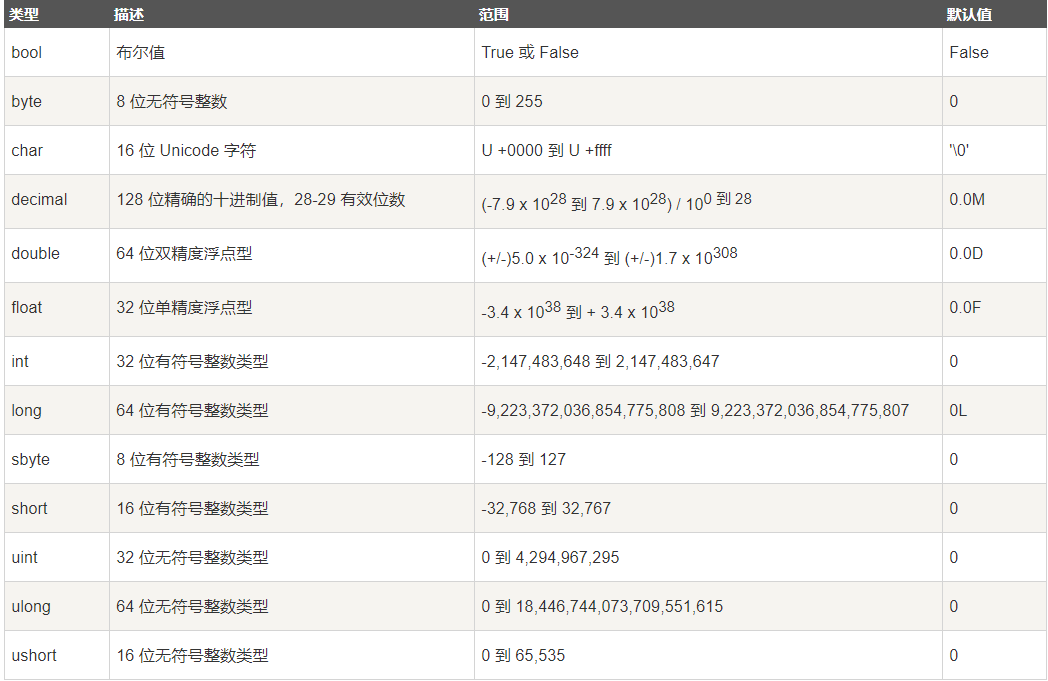
③ 基本数据类型
④ 使用占位符方式打印字符串
string name = "张三";
char sex = '男';
int age = 22;
Console.WriteLine("姓名:{0},性别:{1},年龄:{2}",name,sex,age);
Console.ReadKey();

⑤ 定义一个字符串接收用户的输入
string input = Console.ReadLine();
⑥ 转义符
" \ " + 字符 , 和 Java 用法一样
string 字符串的前面可以加 " @ " 将字符串里所有的 " \ " 当作普通字符对待 , 并且按照原格式输出 , 常用来表示路径
day3
① 结构体
struct xxx{}
和 class 类似,但是有以下不同
类是引用类型,结构是值类型
结构不支持继承
结构不能声明默认的构造函数
day4
① delegate 委托
委托是存有对某个方法的引用的一种引用类型变量。引用可在运行时被改变。
声明 :
delegate <return type> <delegate-name> <parameter list>
实例化 :
public delegate void MyDelegate(string s);
......
MyDelegate myDelegate = new MyDelegate(show);
触发 :
myDelegate("Hello World");
② event 事件
事件在类中声明且生成,且通过使用同一个类或其他类中的委托与事件处理程序关联。包含事件的类用于发布事件。这被称为 发布器 类。其他接受该事件的类被称为 订阅器 类。
事件使用 发布-订阅(publisher-subscriber) 模型。
发布器(publisher) 是一个包含事件和委托定义的对象。事件和委托之间的联系也定义在这个对象中。发布器(publisher)类的对象调用这个事件,并通知其他的对象。
订阅器(subscriber) 是一个接受事件并提供事件处理程序的对象。在发布器(publisher)类中的委托调用订阅器(subscriber)类中的方法(事件处理程序)。
声明 :
public event MyDelegate myEvent;
绑定 :
a.myEvent += new A.MyDelegate(show);
触发 :
TransfEvent("Hello World");
③ out 和 ref
使用 :
          static void doFirst(out string msg) {
        msg = "信息";
      }
      static void doSecond(ref int num) {
        num = 10;
      }
      static void Main(string[] args) {
        string msg;
        doFirst(out msg);
        int num = 0;
        doSecond(ref num);
      }
相同 : 都按地址传递参数,使用后都将改变原来参数的数值。
不同 : out 在传递参数前不需要将参数初始化 , ref 需要
④ parmas 可变参数
public void doSome(parmas int[] nums){
}
和 Java 的 int... nums 一样
day5
① 封装 , 快捷键 Alt + Enter
public class User {
private String name;
public string Name { get => name; set => name = value; }
}
......
User user = new User();
user.Name="张三";
Console.WriteLine("NAME: {0} " , user.Name);
② static class 静态类
静态类只允许有静态成员 , 不允许出现实例成员 ,并且不能被实例化
       public static class{
      private static int num;
      public static int Num{
        set{num = value;}
        get{return num;}
      }
    }
③ ~ 析构函数
当程序结束的时候自动执行
~ ClassName() {
......
}
day6
① FileStream 文件流
            //1. 读文件
            FileStream fs = new FileStream(@"路径",FileMode.OpenOrCreate,FileAccess.Read);
            byte[] buffer = new byte[1024*1024];
            int num = fs.Read(buffer, 0, buffer.Length);   //返回读取到的有效字节数
            fs.Close();     //关闭流
            fs.Dispose();   //释放流的资源
            string bufferStr = Encoding.UTF8.GetString(buffer,0,num);
            Console.WriteLine(bufferStr);
            */
            //2. 写文件
            /*string str = "这是一条测试语句";
            byte[] buffer = Encoding.UTF8.GetBytes(str);
            //覆盖文本
            //使用using自动关闭流和释放流的资源
            using ( FileStream fs = new FileStream(@"路径", FileMode.OpenOrCreate, FileAccess.Write)) {
                fs.Write(buffer,0,buffer.Length);
            }*/
            //追加文本
            using ( FileStream fs = new FileStream(@"路径", FileMode.Append, FileAccess.Write) ) {
                fs.Position = fs.Length;
                fs.Write(buffer, 0, buffer.Length);
            }
            //3. 复制文件
            using ( FileStream fsRead = new FileStream(@"源文件路径", FileMode.Open, FileAccess.Read) ) {
                using ( FileStream fsWrite = new FileStream(@"目标文件路径", FileMode.OpenOrCreate, FileAccess.Write) ) {
                    byte[] buffer = new byte[1024 * 1024];
                    while ( true ) {
                        int num = fsRead.Read(buffer, 0, buffer.Length);
                        if ( num == 0 ) {
                            break;
                        }
                        Console.WriteLine("进行复制中");
                        fsWrite.Write(buffer, 0, num);
                    }
                }
            }
② Stream 流
            using ( StreamReader read = new StreamReader(@"路径") ) {
                while ( !read.EndOfStream ) {
                    Console.WriteLine(read.ReadLine());
                }
            }
            //true追加,false覆盖,默认是false
            using ( StreamWriter writer = new StreamWriter(@"路径", true) ) {
                writer.WriteLine("这是一条测试语句");
            }
③ virtual 虚方法
和 JAVA 不同的是 , C# 默认是不使用多态的 , 需要在父类的方法上添加 virtual 关键字 , 并且在子类的方法上添加 override 关键字才可以使用
namespace VirtualTest {
    class Program {
        static void Main(string[] args) {
            Person person = new Person();
            Chinese chinese = new Chinese();
            Japanese japanese = new Japanese();
            Person[] persons = { person , chinese , japanese };
            foreach ( var item in persons ) {
                item.sayHello();
            }
            Console.ReadKey();
        }
    }
    class Person {
        public virtual void sayHello() {
            Console.WriteLine("你好,我是人");
        }
    }
    class Chinese:Person {
        public override void sayHello() {
            Console.WriteLine("你好,我是中国人");
        }
    }
    class Japanese:Person {
        public override void sayHello() {
            Console.WriteLine("八嘎,我是傻逼");
        }
    }
}
使用 virtual 和override之前 :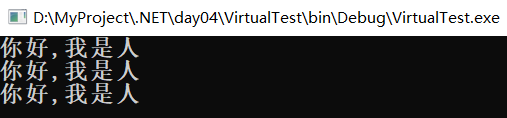
使用 virtual 和override之后 :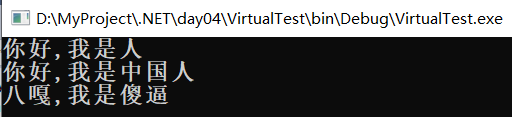
④ abstract 抽象类
子类实现抽象方法需要加上 override 关键字, 其他语法和 Java 一样
namespace AbstractTest {
    class Program {
        static void Main(string[] args) {
            Bird bird = new Bird();
            Fish fish = new Fish();
            Horse horse = new Horse();
            Animal[] animals = { bird, fish, horse };
            foreach ( var item in animals ) {
                item.move();
            }
            Console.ReadKey();
        }
    }
    abstract class Animal {
        public abstract void move();
    }
    class Bird : Animal {
        public override void move() {
            Console.WriteLine("鸟儿在飞");
        }
    }
    class Fish : Animal {
        public override void move() {
            Console.WriteLine("鱼儿在游");
        }
    }
    class Horse : Animal {
        public override void move() {
            Console.WriteLine("马儿在奔跑");
        }
    }
}

⑤ 访问修饰符
和 Java 不同的是 , C# 类默认的修饰符是 internal , 属性和方法默认是 private , 并且 C# 要求子类的访问权限不能高于父类 , 重写方法的访问权限必须一致
⑥ 工厂设计模式
namespace FactoryPatternTest {
    public class Program {
        // 简单工厂的核心 : 根据用户输入把对象赋值给父类
        public static void Main(string[] args) {
            Console.Clear();
            Console.WriteLine("请输入你需要的笔记本品牌");
            GetNotebook(Console.ReadLine()).sayHello();
            Console.ReadKey(false);
        }
        public static Notebook GetNotebook(string name) {
            Notebook notebook = null;
            switch ( name ) {
                case "戴尔":
                    notebook = new DaiEr();
                    break;
                case "联想":
                    notebook = new LianXiang();
                    break;
                case "华硕":
                    notebook = new HuaShuo();
                    break;
            }
            return notebook;
        }
    }
    public abstract class Notebook {
        public abstract void sayHello();
    }
    public class DaiEr : Notebook {

        public override void sayHello() {
            Console.WriteLine("我是戴尔,我的价格是10000");
        }
    }
    public class LianXiang : Notebook {
        public override void sayHello() {
            Console.WriteLine("我是联想,我的价格是8000");
        }
    }
    public class HuaShuo : Notebook {
        public override void sayHello() {
            Console.WriteLine("我是华硕,我的价格是99999");
        }
    }
}
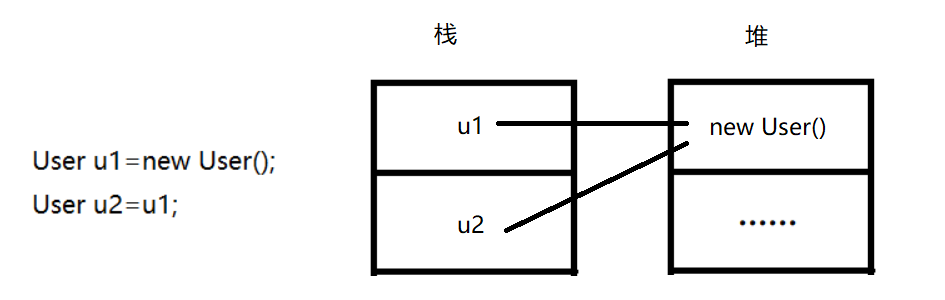
⑦ 值传递和引用传递
值传递是一种复制传递 , 传递过程中对对象的值进行修改不影响对象本身的值
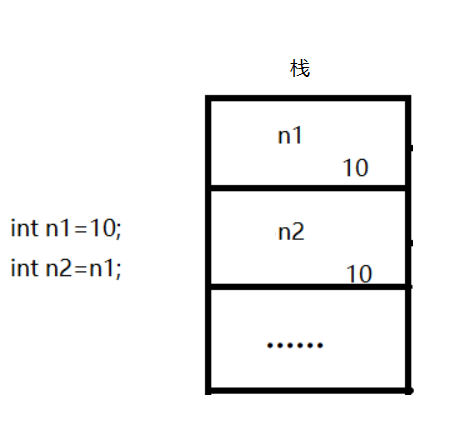
引用传递是传递的对象本身 , 传递过程中对对象的值进行修改影响对象本身的值
day7
① 序列化和反序列化
/*
 *  序列化 : 把对象转为二进制
 *  反序列化 : 把二进制转为对象
 *  作用 : 传输数据
 *  tips : ① 只有被[Serializable]修饰的类的对象才可以被序列化
 */
namespace 序列化和反序列化 {

    class Program {
        static void Main(string[] args) {
            //序列化
            using ( FileStream fs = new FileStream(@"D:\test\序列化.txt", FileMode.OpenOrCreate, FileAccess.Write) ) {
                BinaryFormatter bf = new BinaryFormatter();
                bf.Serialize(fs, new User("1", "张三", "男"));
            }
            //反序列化
            using ( FileStream fs = new FileStream(@"D:\test\序列化.txt", FileMode.OpenOrCreate, FileAccess.Read) ) {
                BinaryFormatter bf = new BinaryFormatter();
                object obj= bf.Deserialize(fs);
                Console.WriteLine((User)obj);
            }
            Console.WriteLine("成功");
            Console.ReadKey();
        }
    }
    [Serializable]
    class User {
        private string id;
        private string name;
        private string sex;
        public User(string id, string name, string sex) {
            this.id = id;
            this.name = name;
            this.sex = sex;
        }
        public override string ToString() {
            return "ID:" + id + ", NAME:" + name + ", SEX:" + sex;
        }
    }
}
② pertial 部分类
同一个命名空间下 , 被 pertial 修饰的类可以被允许重复 , 部分类顾名思义就是每个部分类都是类的一部分
③ sealed 密封类
被 sealed 修饰的类不能被继承
④ interface 接口类
命名规范 : public interface I...able
实现接口类 : 和继承的语法一致 , className : interfaceName
实现方法的访问权限默认是 private 并且不能被修改 , 其他和 Java 一致
⑤ 普通属性和自动属性
class A {
        private string name;
        //普通属性, 需要手动声明字段
        public string Name { get => name; set => name = value; }
        //自动属性, 会自动生成一个私有的字段
        public string Age { get; set; }
    }
⑥ MD5 加密
namespace MD5Test {
    class Program {
        static void Main(string[] args) {
            string psw = "123";
            MD5 md5 = MD5.Create();
            byte[] pswByte = Encoding.Default.GetBytes(psw);
            byte[] md5Byte = md5.ComputeHash(pswByte);
            string md5Str = "";
            foreach ( byte b in md5Byte ) {
                md5Str+=b.ToString("x");        //转为16进制的字符串
            }
            Console.WriteLine(md5Str);
            Console.ReadKey();
            }
    }
}
day8
① Process 线程类
namespace ProcessTest {
    public partial class Form1 : Form {
        public Form1() {
            InitializeComponent();
        }

        private void button1_Click(object sender, EventArgs e) {
            /*
             *  打开计算器
             */
            Process.Start("calc");
        }

        private void button2_Click(object sender, EventArgs e) {
            /*
             *  打开test.tet
             */
            ProcessStartInfo psi = new ProcessStartInfo(@"D:\test\txt\test.txt");
            Process process = new Process();
            process.StartInfo = psi;
            process.Start();
        }
    }
}
② Thread 进程类
namespace ThreadTest {
    public partial class Form1 : Form {
        public Form1() {
            InitializeComponent();
        }

        private void button1_Click(object sender, EventArgs e) {
            //doSome();                   //不启用线程的话要等doSome()执行完毕才能关闭窗口
            Thread t = new Thread(doSome);
            t.IsBackground = true;        //设置这个进程为后台进程(等同于Java中的守护进程)
            t.Start();
            /*
            t.Abort();                  //终止线程
            t.Start();                  //报错,线程终止后不能被重新开启
            */
        }
        private void doSome() {
            //textBox1.Text = "button1被点击了!";   //报错,只能在主线程才能访问到Form控件
            Thread.Sleep(10000);
        }

        private void Form1_Load(object sender, EventArgs e) {
            //Control.CheckForIllegalCrossThreadCalls = false;
            //设置不捕获错误线程的调用,这样其他线程访问Form控件就不会报错
        }
    }
}
③ Socket 网络编程
/*
 *  Socket 服务端
 */
namespace SocketTest1 {
    public partial class Form1 : Form {
        public Form1() {
            InitializeComponent();
        }
        Socket socketSend;
        List<Socket> sockets = new List<Socket>();
        private void button1_Click(object sender, EventArgs e) {
            try {
                //创建一个Socket对象
                Socket socketListen = new Socket(AddressFamily.InterNetwork, SocketType.Stream, ProtocolType.Tcp);
                //创建一个IP和端口号对象
                IPEndPoint point = new IPEndPoint(IPAddress.Any, Convert.ToInt32(textBox2.Text));
                //让负责监听的Socket绑定IP和端口号
                socketListen.Bind(point);

                //设置监听队列(同一时间最大连接数)
                socketListen.Listen(3);
                showMsg("监听成功");
                Thread t = new Thread(listen);
                t.IsBackground = true;
                t.Start(socketListen);
            } catch {
                showMsg("监听失败");
            }
            //开启一个线程等待客户端连接
        }
        private void showMsg(string msg) {
            textBox3.AppendText(msg + "\r\n");
        }
        private void listen(object obj) {
            while ( true ) {
                try {
                    Socket socketListen = obj as Socket;
                    socketSend = socketListen.Accept();
                    showMsg(socketSend.RemoteEndPoint.ToString() + "连接成功");
                    sockets.Add(socketSend);
                    comboBox1.Items.Add(socketSend.RemoteEndPoint.ToString());
                    //开启一个线程接收客户端发送的数据
                    Thread t = new Thread(receive);
                    t.IsBackground = true;
                    t.Start(socketSend);
                } catch { }
            }
        }
        //可以不用传参,因为socketSend已经是全局变量了,这里主要是演示一下怎么把有参方法用多线程启动
        private void receive(object obj) {
            while ( true ) {
                try {
                    socketSend = obj as Socket;
                    byte[] buffer = new byte[1024 * 1024];
                    int r = (socketSend as Socket).Receive(buffer);
                    if ( r == 0 ) {
                        break;
                    }
                    string str = Encoding.UTF8.GetString(buffer, 0, r);
                    showMsg(socketSend.RemoteEndPoint.ToString() + ":" + str);
                } catch {
                    showMsg("数据接收失败");
                    break;
                }
            }
        }
        private void Form1_Load(object sender, EventArgs e) {
            Control.CheckForIllegalCrossThreadCalls = false;
        }
        private void button2_Click(object sender, EventArgs e) {
            if ( comboBox1.SelectedIndex == -1 ) {
                MessageBox.Show("请选择发送目标");
            } else {
                byte[] buffer = Encoding.UTF8.GetBytes(textBox4.Text);
                List<byte> bufferList = new List<byte>();
                bufferList.Add(0);
                bufferList.AddRange(buffer);
                try {
                    sockets[comboBox1.SelectedIndex].Send(bufferList.ToArray());
                    showMsg("我:" + textBox4.Text);
                } catch {
                    showMsg("数据发送失败");
                }
            }
        }
        string path;
        private void button3_Click(object sender, EventArgs e) {
            OpenFileDialog ofd = new OpenFileDialog();
            ofd.InitialDirectory = @"D:\test";
            ofd.Title = "选择你要发送的文件";
            ofd.Filter = "全部文件|*.*";
            ofd.ShowDialog();
            path = ofd.FileName;
            if ( path != null && path != "" ) {
                textBox5.Text = path;
            }
        }
        private void button4_Click(object sender, EventArgs e) {
            if ( comboBox1.SelectedIndex == -1 ) {
                MessageBox.Show("请选择发送目标");
            } else if ( path != null && path != "" ) {
                using ( FileStream fsRead = new FileStream(path, FileMode.Open, FileAccess.Read) ) {
                    byte[] buffer = new byte[1024 * 1024];
                    int r = fsRead.Read(buffer, 0, buffer.Length);
                    List<byte> bufferList = new List<byte>();
                    bufferList.Add(1);
                    bufferList.AddRange(buffer);
                    try {
                        sockets[comboBox1.SelectedIndex].Send(bufferList.ToArray(), 0, r + 1, SocketFlags.None);
                        showMsg("文件发送成功");
                    } catch {
                        showMsg("文件发送失败");
                    }
                }
            }
        }
        private void button5_Click(object sender, EventArgs e) {
            if ( comboBox1.SelectedIndex == -1 ) {
                MessageBox.Show("请选择发送目标");
            } else {
                byte[] buffer = new byte[]{ 2 };
                try {
                    sockets[comboBox1.SelectedIndex].Send(buffer);
                    showMsg("震动发送成功");
                } catch {
                    showMsg("震动发送失败");
                }
            }
        }
    }
}
/*
 *  Socket客户端
 */
namespace SocketTest2 {
    public partial class Form1 : Form {
        public Form1() {
            InitializeComponent();
        }
        Socket socketSend;
        private void button1_Click(object sender, EventArgs e) {
            try {
                socketSend = new Socket(AddressFamily.InterNetwork, SocketType.Stream, ProtocolType.Tcp);
                IPAddress ip = IPAddress.Parse(textBox1.Text);
                IPEndPoint point = new IPEndPoint(ip, Convert.ToInt32(textBox2.Text));
                socketSend.Connect(point);
                showMsg("连接成功");
            } catch {
                showMsg("连接失败");
            }
            //开启一个线程接收服务器发送的数据
            Thread t = new Thread(receive);
            t.IsBackground = true;
            t.Start();
        }
        void showMsg(string msg) {
            textBox3.AppendText(msg + "\r\n");
        }
        private void button2_Click(object sender, EventArgs e) {
            byte[] buffer = Encoding.UTF8.GetBytes(textBox4.Text);
            try {
                socketSend.Send(buffer);
                showMsg("我:" + textBox4.Text);
            } catch {
                showMsg("消息发送失败");
            }
        }
        private void receive(object obj) {
            while ( true ) {
                byte[] buffer = new byte[1024 * 1024];
                try {
                    int r = socketSend.Receive(buffer);
                    if ( r == 0 ) {
                        break;
                    }
                    if ( buffer[0] == 0 ) {
                        string str = Encoding.UTF8.GetString(buffer, 1, r - 1);
                        showMsg(socketSend.RemoteEndPoint.ToString() + ":" + str);
                    } else if ( buffer[0] == 1 ) {
                        SaveFileDialog sfd = new SaveFileDialog();
                        sfd.InitialDirectory = @"D:\test";
                        sfd.Title = "请选择你要保存的路径";
                        sfd.Filter = "所有文件|*.*";
                        sfd.ShowDialog(this);
                        string path = sfd.FileName;
                        if ( path != null && path != "" ) {
                            using ( FileStream fsWrite = new FileStream(path, FileMode.Create, FileAccess.Write) ) {
                                fsWrite.Write(buffer, 1, r - 1);
                                showMsg("文件接收成功");
                            }
                        }
                    } else if ( buffer[0] == 2 ) {
                        for(int i=0;i<500;i++ ) {
                            this.Location = new Point(250, 250);
                            this.Location = new Point(280, 280);
                        }
                    }
                } catch {
                    showMsg("数据接收失败");
                    break;
                }
            }
        }
        private void Form1_Load(object sender, EventArgs e) {
            Control.CheckForIllegalCrossThreadCalls = false;
        }
    }
}
④ GDI+ 图形设备接口
namespace GDI_Test {
    public partial class Form1 : Form {
        public Form1() {
            InitializeComponent();
        }
        private void button1_Click(object sender, EventArgs e) {
            //绘制一条直线
            Pen pen = new Pen(Brushes.Red);
            Point p1 = new Point(30, 50);
            Point p2 = new Point(250, 250);
            Graphics g = this.CreateGraphics();
            g.DrawLine(pen, p1, p2);
        }
        private void Form1_Paint(object sender, PaintEventArgs e) {
            //在这里可以当图形被拖出屏幕时,重新绘制图形
        }
        private void button2_Click(object sender, EventArgs e) {
            //绘制一个矩形
            Pen pen = new Pen(Brushes.Red);
            Rectangle rec = new Rectangle(new Point(50, 50), new Size(80, 80));
            Graphics g = this.CreateGraphics();
            g.DrawRectangle(pen, rec);
        }
        private void button3_Click(object sender, EventArgs e) {
            //绘制一个扇形
            Pen pen = new Pen(Brushes.Red);
            Rectangle rec = new Rectangle(new Point(50, 50), new Size(80, 80));
            Graphics g = this.CreateGraphics();
            g.DrawPie(pen, rec, 60, 60);
        }
        private void button4_Click(object sender, EventArgs e) {
            //绘制一个文本
            Graphics g = this.CreateGraphics();
            g.DrawString("文本", new Font("宋体", 20, FontStyle.Underline), Brushes.Black, new Point(200, 200));
        }
        private void button5_Click(object sender, EventArgs e) {
            //绘制一张验证码
            Random r = new Random();
            Bitmap bitmap = new Bitmap(120, 40);
            Graphics g = Graphics.FromImage(bitmap);
            string[] fonts = { "宋体", "微软雅黑", "黑体", "隶书", "仿宋" };
            Color[] colors = { Color.Blue, Color.Black, Color.Red, Color.Green, Color.Gray };
            //字
            for ( int i = 0; i < 4; i++ ) {
                Point p = new Point(i * 30, r.Next(0, 10));
                g.DrawString(Convert.ToString(r.Next(0, 10)), new Font(fonts[r.Next(0, 5)], 20, FontStyle.Bold), new SolidBrush(colors[r.Next(0, 5)]), p);
            }
            //线
            for ( int i = 0; i < 10; i++ ) {
                Point p1 = new Point(r.Next(0, bitmap.Width), r.Next(0, bitmap.Height));
                Point p2 = new Point(r.Next(0, bitmap.Width), r.Next(0, bitmap.Height));
                g.DrawLine(new Pen(Brushes.Green), p1, p2);
            }
            //点
            for ( int i = 0; i < 500; i++ ) {
                Point p = new Point(r.Next(0, bitmap.Width), r.Next(0, bitmap.Height));
                bitmap.SetPixel(p.X, p.Y,Color.Black);
            }
            pictureBox1.Image = bitmap;
        }
    }
}
day8
① 单例模式
步骤 : 将构造函数私有化 → 创建一个静态方法返回一个对象 → 创建一个单例对象
 public partial class Form1 : Form {
        private static Form1 form1 = null;
        private Form1() {
            InitializeComponent();
        }
        public Form1 getForm1() {
            if ( form1 == null ) {
                form1 = new Form1();
            }
            return form1;
        }
    }
② XML
class Program {
        static void Main(string[] args) {
            //1.创建Xml文档对象
            XmlDocument doc = new XmlDocument();
            //2.创建行描述信息 <?xml version="1.0" encoding="utf-8"?>
            XmlDeclaration dec = doc.CreateXmlDeclaration("1.0", "utf-8", null);
            doc.AppendChild(dec);
            //3.创建根节点Books
            XmlElement books = doc.CreateElement("Books");
            doc.AppendChild(books);
            //4.创建Books的子节点Book
            XmlElement book1 = doc.CreateElement("Book");
            books.AppendChild(book1);
            //4.创建Book的子节点Name、Price
            XmlElement name1 = doc.CreateElement("Name");
            name1.InnerText = "三国演义";
            book1.AppendChild(name1);
            XmlElement price1 = doc.CreateElement("Price");
            price1.InnerText = "20";
            book1.AppendChild(price1);
            //5.保存Xml文档
            doc.Save("Books.xml");
            Console.WriteLine("保存成功");
            Console.ReadKey();
        }
    }
③ 泛型委托
class Program {
        delegate int DelMax<T>(T t1, T t2);
        static void Main(string[] args) {
            int[] nums = { 1, 564, 8741, 545, 3, 9, 444 };
            int max=Max<int>(nums, compare);
            //string[] strs = { "abc", "defg", "hi", "jklmnopq", "r" };
            //string max = Max<string>(strs, compare);
            Console.WriteLine(max);
            Console.ReadKey();
        }
        static T Max<T>(T[] ts, DelMax<T> dm) {
            T max = ts[0];
            for ( int i = 0; i < ts.Length; i++ ) {
                if ( dm(ts[i], max) > 0 ) {
                    max = ts[i];
                }
            }
            return max;
        }
        static int compare(int num1, int num2) {
            return num1 - num2;
        }
        static int compare(string str1,string str2) {
            return str1.Length - str2.Length;
        }
    }

 浙公网安备 33010602011771号