
一、安装Jenkins后新建一个freestyle的项目工程
二、插件安装
1、git plugin(git相关的插件安装)
2、Groovy
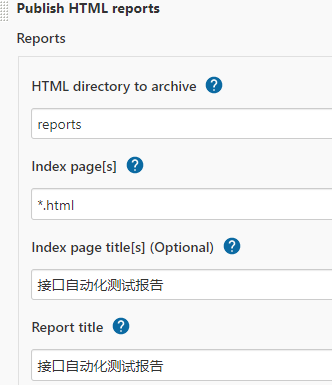
3、HTML Publisher plugin(报告输出)、
注意:解决插件下载失败问题
1、修改jenkins插件的下载源地址,点击manage jenkins,点击manage plugins;
2、点击高级,更改升级站点下的url为https://mirrors.tuna.tsinghua.edu.cn/jenkins/updates/update-center.json,点击提交,再点击立即获取(重要);
3、可以重新再次下载插件,在插件管理中,点击可选插件,搜索框中输入想要的插件,点击直接安装。
三、全局配置
1、Jenkins Location:Jenkins URL:http://localhost:8081/
2、Global properties:Environment variables:Name:JAVA_TOOL_OPTIONS,Value:-Dfile.encoding=UTF8; Name:LANG,Value:zh_CN.UTF-8。
3、GitHub:名称:测试; API URL:https://api.github.com
四、项目配置
1、Source Code Management
Repository URL:https://github.com/sunwusunwu/miniparty.git
Credentials:git 账号密码
2、Build
Excute Windows batch command:D:\Python3.7.1\python.exe run_suite.py(python安装位置+脚本运行入口文件)
Excute system Groovy script:System.setProperty("hudson.model.DirectoryBrowserSupport.CSP", "");解决报告显示异常
3、Post-build Actions
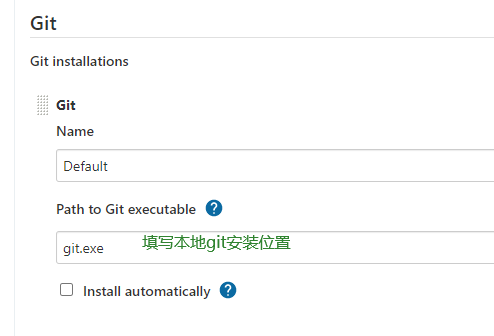
五、可能需要配置git的安装位置
Global Tool Configuration:例如-->D:\Git\bin\git.exe

 浙公网安备 33010602011771号