
div+elementUI实现穿梭框
element-ui自带的穿梭框两边都是列表的格式,想要更多样式就自己造吧~
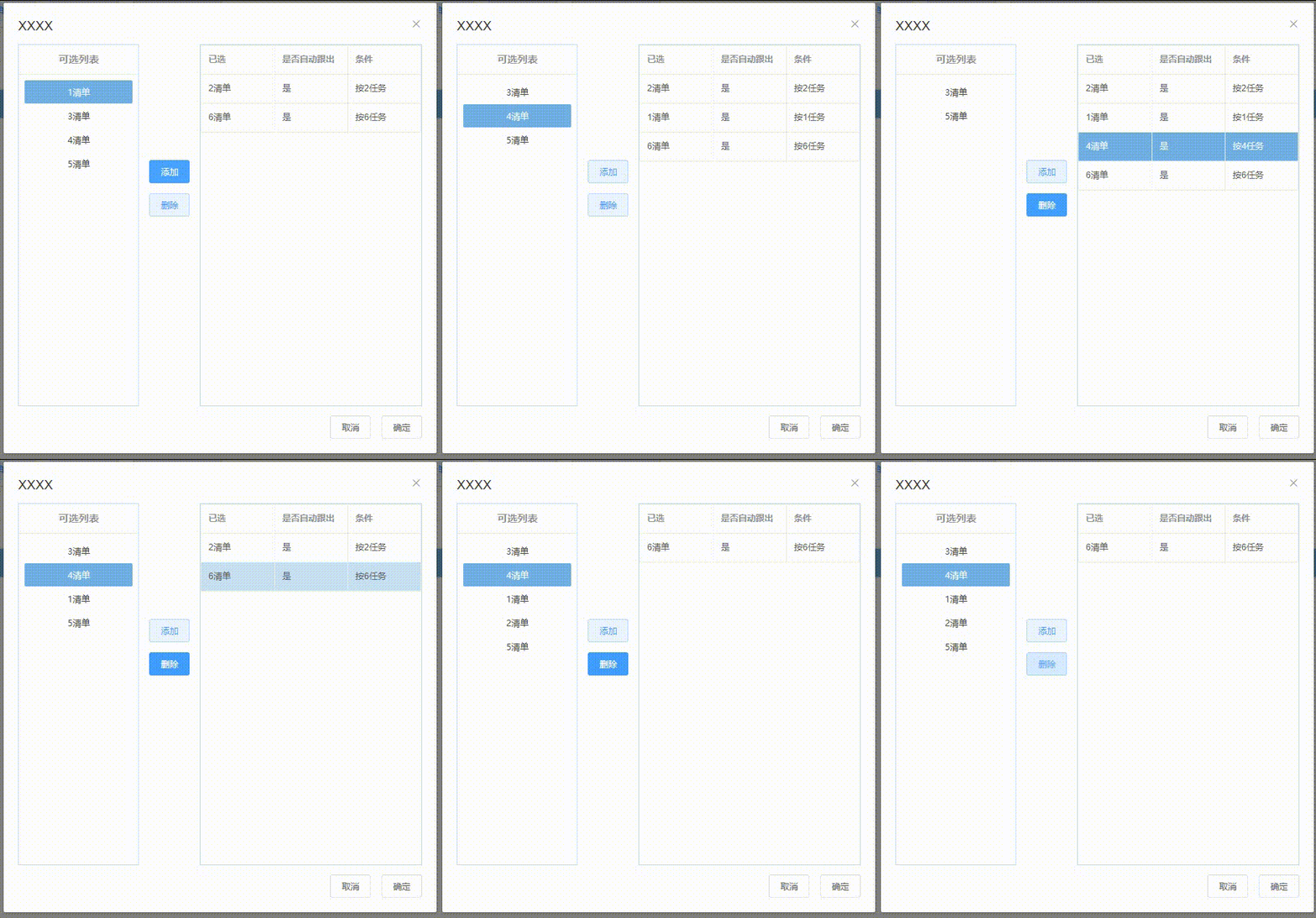
思想是:点击“添加”数据从左边列表删除,插入到右边列表中,由于没有添加后台,刷新之后数据就恢复了,实际使用的时候得访问后台接口才行~
完整代码在最后面。
效果图:左边是一排按钮组成的列表,也可以用ul li实现,右边是el-table表格。

1.布局:添加对话框,将对话框的body从左到右分成三部分
<el-dialog title="XXXX" :visible.sync="reportDlgVisible" :close-on-click-modal="false" class="report-config-dialog">
      <div class="dialog-body">
        <div class="dialog-left"></div>
        <div class="dialog-middle"></div>
        <div class="dialog-right"></div>
      </div>
      <div slot="footer">
        <el-button>取消</el-button>
        <el-button>确定</el-button>
      </div>
    </el-dialog>
2.添加组件:
左边列表:
<div class="dialog-left">
   <div class="report-list-div">
      <el-button v-for="(item, key) in leftList" :key="key" type="text" class="report-list" :class="reportBtnActive === item ? 'active' : 'normal'" @click="reportChoose(item)">{{ item.label }}</el-button>
   </div>
</div>
中间按钮(主要靠样式):
<div class="dialog-middle">
   <div class="dialog-middle-button">
      <el-button type="primary" plain class="report-add" @click="reportAddDlg">添加</el-button>
      <el-button type="primary" plain class="report-delete" @click="reportDelete">删除</el-button>
   </div>
</div>
右边表格:
<div class="dialog-right">
    <el-table
       :data="rightTable"
        border
        highlight-current-row
        @row-click="reportRowClick"
     >
        <el-table-column prop="label" label="已选" />
        <el-table-column prop="auto" label="是否自动跟出" />
        <el-table-column prop="condition" label="条件" />
      </el-table>
</div>
2.绑定数据
reportDlgVisible: false,
   leftList: [{
     label: '1清单',
     auto: '是',
     condition: '按1任务'
   }, {
     label: '2清单',
     auto: '是',
     condition: '按2任务'
   }, {
     label: '3清单',
     auto: '是',
     condition: '按3任务'
   }, {
     label: '4清单',
     auto: '是',
     condition: '按4任务'
   }, {
     label: '5清单',
     auto: '是',
     condition: '按5任务'
   }],
   rightTable: [{
     label: '6清单',
     auto: '是',
     condition: '按6任务'
   }],
checkReport: [],
reportBtnActive: -1,
reportRadio: []
3.绑定事件函数:
    // 选中左边列表的某一条,checkReport存放左边选中的数据
    reportChoose: function(item) {
      console.log(item)
      if (this.checkReport.length === 0) {
        this.checkReport.push(item)
      } else {
        this.checkReport.splice(0, 1, item)
      }
      this.reportBtnActive = item // 选中高亮
    },
    // 清单配置页面添加按钮
    reportAddDlg: function() {
      console.log(this.checkReport)
      if (this.checkReport.length === 0) {
        this.$message.warning('请选择要添加的数据')
      } else {
        for (let i = 0; i < this.reportList.length; i++) {
          const item = this.reportList[i]
          if (item === this.checkReport[0]) {
            this.reportList.splice(i, 1) // 数据从左边列表删除
            this.reportTable.splice(-1, 0, item) // 数据添加到右边列表
            this.checkReport = []
          }
        }
      }
    },
    // 右边表格表格选中行,reportRadio 存放右边选中的数据
    reportRowClick: function(item) {
      this.reportRadio = item
    },
    // 清单配置删除按钮
    reportDelete: function() {
      const reportRow = this.reportRadio
      if (reportRow.length === 0) {
        this.$message.warning('请选择要删除的数据')
      } else {
        for (let i = 0; i < this.reportTable.length; i++) {
          const item = this.reportTable[i]
          if (item === reportRow) {
            this.reportList.splice(-1, 0, reportRow) // 数据添加到左边列表
            this.reportTable.splice(i, 1) // 数据从右边表格删除
          }
        }
      }
    },
4.完整代码
 <el-dialog title="XXXX" :visible.sync="reportDlgVisible" :close-on-click-modal="false" class="report-config-dialog">
      <div class="dialog-body">
        <div class="dialog-left">
          <div class="report-list-div">
            <el-button v-for="(item, key) in reportList" :key="key" type="text" class="report-list" :class="reportBtnActive === item ? 'active' : 'normal'" @click="reportChoose(item)">{{ item.label }}</el-button>
          </div>
        </div>
        <div class="dialog-middle">
          <div class="dialog-middle-button">
            <el-button type="primary" plain class="report-add" @click="reportAddDlg">添加</el-button>
            <el-button type="primary" plain class="report-delete" @click="reportDelete">删除</el-button>
          </div>
        </div>
        <div class="dialog-right">
          <el-table
            :data="reportTable"
            border
            highlight-current-row
            @row-click="reportRowClick"
          >
            <el-table-column prop="label" label="已选" />
            <el-table-column prop="auto" label="是否自动跟出" />
            <el-table-column prop="condition" label="条件" />
          </el-table>
        </div>
      </div>
      <div slot="footer">
        <el-button>取消</el-button>
        <el-button>确定</el-button>
      </div>
    </el-dialog>
data() {
    return {
      reportDlgVisible: false,
      reportList: [{
        label: '1清单',
        auto: '是',
        condition: '按1任务'
      }, {
        label: '2清单',
        auto: '是',
        condition: '按2任务'
      }, {
        label: '3清单',
        auto: '是',
        condition: '按3任务'
      }, {
        label: '4清单',
        auto: '是',
        condition: '按4任务'
      }, {
        label: '5清单',
        auto: '是',
        condition: '按5任务'
      }],
      reportTable: [{
        label: '6清单',
        auto: '是',
        condition: '按6任务'
      }],
      checkReport: [],
      reportBtnActive: -1,
      reportRadio: []
 }
},
methods: {
    // 选中左边列表的某一条,checkReport存放左边选中的数据
    reportChoose: function(item) {
      console.log(item)
      if (this.checkReport.length === 0) {
        this.checkReport.push(item)
      } else {
        this.checkReport.splice(0, 1, item)
      }
      this.reportBtnActive = item // 选中高亮
    },
    // 清单配置页面添加按钮
    reportAddDlg: function() {
      console.log(this.checkReport)
      if (this.checkReport.length === 0) {
        this.$message.warning('请选择要添加的数据')
      } else {
        for (let i = 0; i < this.reportList.length; i++) {
          const item = this.reportList[i]
          if (item === this.checkReport[0]) {
            this.reportList.splice(i, 1) // 数据从左边列表删除
            this.reportTable.splice(-1, 0, item) // 数据添加到右边列表
            this.checkReport = []
          }
        }
      }
    },
    // 右边表格表格选中行,reportRadio 存放右边选中的数据
    reportRowClick: function(item) {
      this.reportRadio = item
    },
    // 清单配置删除按钮
    reportDelete: function() {
      const reportRow = this.reportRadio
      if (reportRow.length === 0) {
        this.$message.warning('请选择要删除的数据')
      } else {
        for (let i = 0; i < this.reportTable.length; i++) {
          const item = this.reportTable[i]
          if (item === reportRow) {
            this.reportList.splice(-1, 0, reportRow) // 数据添加到左边列表
            this.reportTable.splice(i, 1) // 数据从右边表格删除
          }
        }
      }
    },
}
<style scoped>
.dialog-body {
  // background-color: #6fb0e6;
  height: 500px;
  width: 100%;
}
.dialog-left {
  // background-color: salmon;
  width: 30%;
  height: 100%;
  float: left;
  border: 1px solid rgb(193, 222, 250);
}
.dialog-middle {
  // background-color: skyblue;
  width: 15%;
  height: 100%;
  float: left;
  // line-height: 100%;
  // vertical-align: middle;
}
.dialog-middle-button {
  // background-color: blueviolet;
  margin-top: 160px;
  // height: 100%;
  // vertical-align: middle;
  text-align: center;
}
.dialog-right {
  // background-color: honeydew;
  float: left;
  height: 100%;
  width: 55%;
  border: 1px solid rgb(193, 222, 250);
}
.report-list-div {
  height: 90%;
  // width: 100%;
  margin: 0px;
  padding: 8px;
  // background-color: #6fb0e6;
  // border: 1px solid rgb(193, 222, 250);
}
.report-list-title {
  // background-color: #6fb0e6;
  display: inline-block;
  width: 100%;
  line-height: 40px;
  // margin-top: 6px;
  text-align: center;
  color: rgb(151, 148, 150);
  font-weight: 600;
  font-family:inherit;
  border-bottom: 1px solid rgb(234,238,244);
}
.report-list {
  width: 100%;
  margin: 0.5px 0px;
  border-radius: 2px
}
.report-add {
  // margin: 0px;
  margin-bottom: 7px;
}
.report-delete {
  margin: 7px 0px;
}
</style>

 浙公网安备 33010602011771号