
pycharm无法安装三方库排查
记一次被抓包代理坑哭的历程
1.现象
Try to run this command from the system terminal. Make sure that you use the correct version of 'pip' installed for your Python interpreter located at 'C:\Users\wusong\AppData\Local\Programs\Python\Python37\python.exe'.
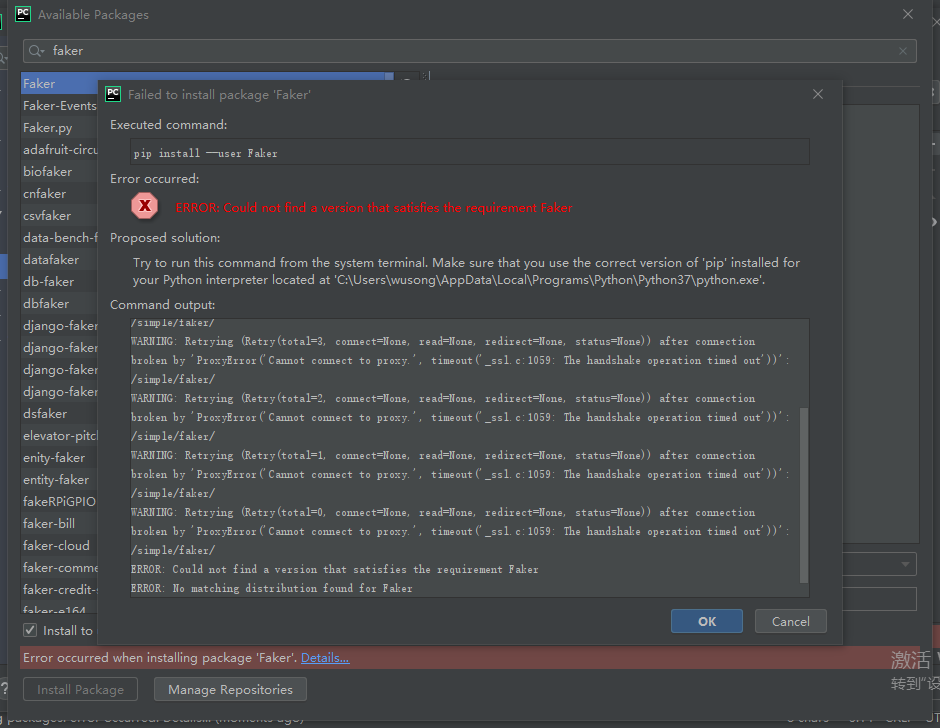
2.百度“Try to run this command from the system terminal. Make sure that you use the correct version of 'pip' installed for your Python interpreter located”
(1)https://blog.csdn.net/weixin_43998791/article/details/105707271
找到类似报错,跟着把python解释器变更;变更后重新安装三方库,仍报错,继续找下一个解决方案
3.换个错误关键词百度“ERROR: Could not find a version that satisfies the requirement Faker”
(1)https://www.cnblogs.com/pergrand/p/12931837.html
找到了一个类似错误的帖子,可能原因是网络不好,联想到公司网络是加了360报错,于是换手机热点4G,重新安装三方库,仍报错(内心快崩溃了),继续排查可能原因。
还在网络原因这块找突破口,想到抓包代理模拟弱网,一看底部有一个菱形中间有一个F的图标,WC脱口而出,赶紧把fiddler关了再试一次,这一次没让我失望。

 浙公网安备 33010602011771号