

111-140分支控制/switch分支/循环控制/break
一、分支控制继续
多分支练习题:
// 代码,看看输出什么?
boolean b = true;
if (b == false) {  // false
	System.out.println("a");
} else if (b) {  // true
	System.out.println("b");
} else if (!b) {
	System.out.println("c");
} else {
	System.out.println("d");
}
第二种情况
boolean b = true;
if (b = false) {  // false
	System.out.println("a");
} else if (b) {  // false
	System.out.println("b");
} else if (!b) {  // true
	System.out.println("c");
} else {
	System.out.println("d");
}
嵌套分支:
基本介绍,在一个分支结构中又完整的嵌套了另外一个完整的分支结构,里面的分支结构称为内层分支外面的分支结构称为外层分支。规范,不要超过三层分支,这样让可读性不好。
基本语法:
if() {
if(){
// if-else
} else {
// if-else
}
}
嵌套分支应用案例:
参加歌手比赛,如果初赛成绩大于8.0进入决赛,否则提示淘汰。并且根据性别提示进入男子组或者是女子组。输入成绩和性别,进行判断和输出信息。NestedIf.java提示double score; char gender;
接收字符:char gender = scanner.next().charAt(0);
import java.util.Scanner;
public class NestedIf {
    public static void main(String[] args) {
        Scanner scanner = new Scanner(System.in);
        System.out.print("请输入您的初赛成绩:");
        double score = scanner.nextDouble();
        if (score > 8.0) {
            System.out.print("请输入您的性别:");
            char gender = scanner.next().charAt(0);
            if (gender == '男') {
                System.out.println("进入男子组!");
            } else if (gender == '女') {
                System.out.println("进入女子组!");
            } else {
                System.out.println("性别输入有误!");
            }
        } else {
            System.out.println("你已淘汰!");
        }
    }
}

// QianTao.java
import java.util.Scanner;
public class QianTao {
    public static void main(String[] args) {
        // 1、淡季,旺季 4-10月为旺季,其他为淡季
        // 2、票价 成人(18-60):60元
        //         儿童 (<18):半价
        //         老人(>60):1/3
        //         以上是旺季
        //    淡季:
        //          成人:40
        //          其他:20
        Scanner scanner = new Scanner(System.in);
        System.out.print("请输入月份:");
        byte month = scanner.nextByte();
        System.out.print("请输入年龄:");
        byte age = scanner.nextByte();
        if (month >= 1 && month <= 12) {
            if (month >= 4 && month <= 10) {
                if (age > 60) {  // else <= 60
                    System.out.println("20元");
                } else if (age >= 18) {  // else < 18
                    System.out.println("60元");
                } else {
                    System.out.println("30元");
                }
            } else {
                if (age > 18 && age <= 60) {
                    System.out.println("40元");
                } else {
                    System.out.println("20元");
                }
            }
        } else {
            System.out.println("月份输入有误!");
        }
    }
}
二、switch分支结构
基本语法
switch (表达式) {
case 常量1: // 当...
语句块1;
break;
case 常量2:
语句块2;
break;
...
case 常量3:
语句块n;
break;
default:
default的语句块;
break;
}
1、switch关键字,表示switch分支
2、表达式对应一个值
3、case 常量1,当表达式的值等于常量1,就会执行语句块1
4、break,表示退出swtich
5、如果和case常量1匹配,就会执行语句块1,如果没有匹配,就会继续匹配case 常量2
6、如果一个都没有匹配上就会执行default
tip:常量指的是一个具体的值,有的地方称常量为字面量。
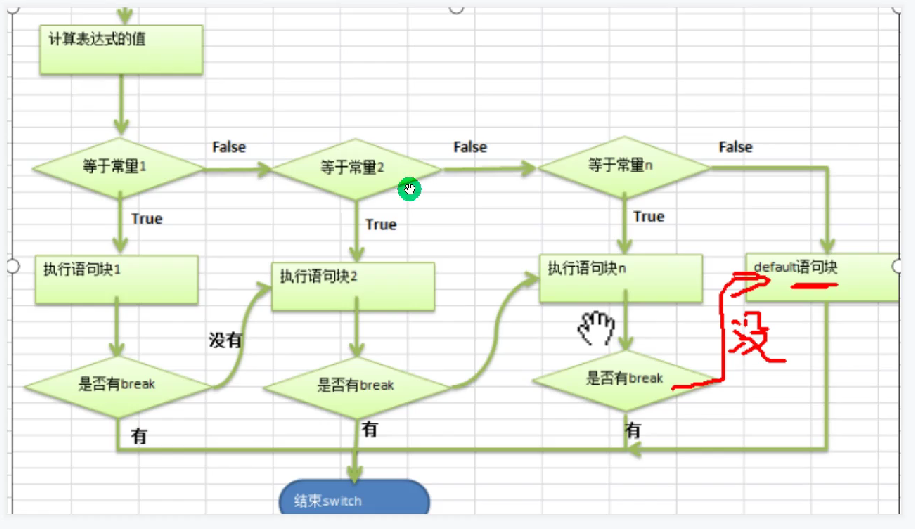
switch分支结构快速入门
Switch01.java
1、编写一个程序,该程序可以接收一个字符,比如:
a b c d e f g
2、a表示星期一,b表示星期二以此类推
3、根据用户的输入显示相应的信息,要求使用switch语句完成
import java.util.Scanner;
public class Switch01 {
    public static void main(String[] args) {
        Scanner scanner = new Scanner(System.in);
        System.out.print("请输入一个字符(a-g): ");
        char ch = scanner.next().charAt(0);
        switch (ch) {
            case 'a':
                System.out.println("星期一");
                break;
            case 'b':
                System.out.println("星期二");
                break;
            case 'c':
                System.out.println("星期三");
                break;
            case 'd':
                System.out.println("星期四");
                break;
            case 'e':
                System.out.println("星期五");
                break;
            case 'f':
                System.out.println("星期六");
                break;
            case 'g':
                System.out.println("星期天");
                break;
            default:
                System.out.println("请正确输入!");
                break;
        }
    }
}
// Switch注意事项
1、表达式数据类型,应该和case后的常量类型一致,或者是可以自动转换成可以相互比较的类型,比如输入的是字符类型,而常量是int
比如:
	char c = 'a';
	switch(c) {
		case 'a':
			System.out.println("ok1");
			break;
		case 'b':
			System.out.println("ok2");
			break;
		default:
			System.out.println("ok3");
	}
	上面这个代码是表达式的数据类型和case后面的常量类型一致。
	如果有一个case "hello"这种就不是一致的,case后面的是字符串常量,而表达式是一个char。
	但是改成一个Case 20:,20是int类型,int类型可以,char类型可以自动转换成一个int。
2、switch(表达式)中表达式的返回值必须是:(byte,short,int,char,enum,String)
比如:
	double c = 1.1;
	switch(c) {
		case 1.1:  // 错误
			System.out.println("ok3");
			break;
	}
3、case子句中的值必须是常量,而不能是变量
像下面这种就是错误的:
char c = 'a';
char c2 = 'c';
switch(c) {
	case 'a':
		System.out.println("ok1");
		break;
	case c2:
		System.out.println("ok2");
		break;
	default:
		System.out.println("ok3");
}
case后面是常量表达式也可以,比如'b' + 1
4、default子句是可选的,当没有匹配的case时,执行default,default也是可以不写的。
char c = 'a';
switch(c) {
	case 'a':
		System.out.println("ok1");
		break;
	case 'b':
		System.out.println("ok2");
		break;
}
5、break语句用来在执行完一个case分支后使程序跳出switch语句块;如果没有写break,程序会顺序执行到switch结尾。
char c = 'a';
switch(c) {
	case 'a':
		System.out.println("ok1");
	case 'b':
		System.out.println("ok2");
		break;
	default:
		System.out.println("ok3");
}
ok1和ok2都会输出
课堂练习switch,SwitchExercise.java
1、使用switch将小写类型的char类型转换为大写的,要求键盘输入。只转换a b c d e其他的输出other
2、对学生成绩大于60分的,输出“合格”,低于60分的输出”不合格“。(注:输入的成绩不能大于100),提示成绩/60.
3、根据指定月份,打印该月份所属的季节,345春季,678夏季,9 10 11秋季,12 1 2冬季,提示:使用穿透。
import java.util.Scanner;
public class SwitchExercise {
    public static void main(String[] args) {
        // 第一题
        // 1、使用switch将小写类型的char类型转换为大写的,要求键盘输入。只转换a b c d e其他的输出other
        Scanner scanner = new Scanner(System.in);
        System.out.print("请输入一个小写字母:");
        char ch = scanner.next().charAt(0);
        switch (ch) {
            case 'a':
                ch = 'A';
                break;
            case 'b':
                ch = 'B';
                break;
            case 'c':
                ch = 'C';
                break;
            case 'd':
                ch = 'D';
                break;
            case 'e':
                ch = 'E';
                break;
            default:
                System.out.println("other");
        }
        System.out.println(ch);

        // 第二题
        // 2、对学生成绩大于60分的,输出“合格”,低于60分的输出”不合格“。(注:输入的成绩不能大于100),提示成绩/60.
        System.out.print("请输入您的成绩:");
        int score = scanner.nextInt();
        if (score >= 0 && score <= 100) {
            switch (score / 60) {
                case 1:
                    System.out.println("合格");
                    break;
                case 0:
                    System.out.println("不合格");
                    break;
            }
        } else {
            System.out.println("输入的成绩不能大于100,需要在[0,100]范围内!");
        }

        // 第三题
        // 3、根据指定月份,打印该月份所属的季节,345春季,678夏季,9 10 11秋季,12 1 2冬季,提示:使用穿透。
        System.out.print("请输入月份:");
        byte month = scanner.nextByte();
        switch (month) {
            case 3:
            case 4:
            case 5:
                System.out.println("春季");
                break;
            case 6:
            case 7:
            case 8:
                System.out.println("夏季");
                break;
            case 9:
            case 10:
            case 11:
                System.out.println("秋季");
                break;
            case 12:
            case 1:
            case 2:
                System.out.println("冬季");
                break;
            default:
                System.out.println("请正常输入月份!");
        }
    }
}
switch和if进行比较:
1、如果判断的具体数值不多,而且符合byte、short、int、char、enum、String这六种类型,虽然这两个语句都可以使用,但是建议使用的是switch语句。
2、其他情况:对区间判断,对结果为boolean类型判断,使用if,if的使用范围更广。
三、循环控制
1、for循环控制
编写一个程序,可以打印10句"hello,world"。
直接手动输入一个个的打印语句这样太笨了。
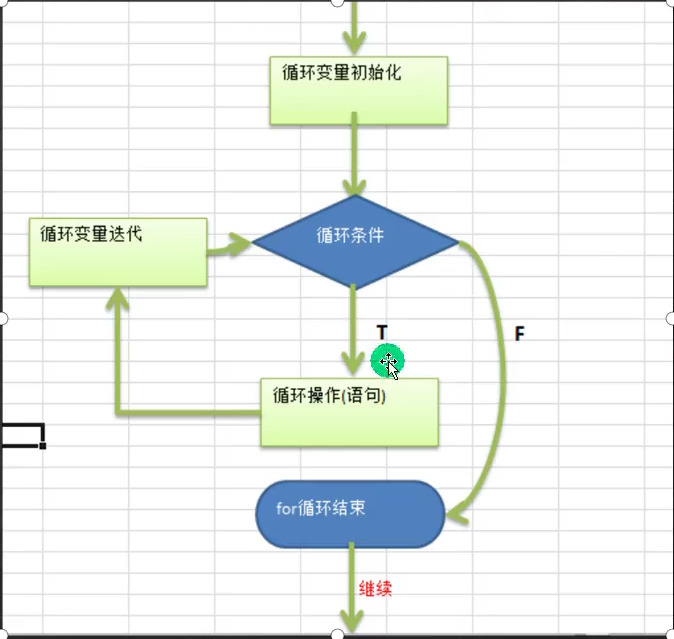
for循环控制说明:
for(循环变量初始化;循环条件;循环变量迭代){
循环操作(语句);
}
1、for关键字,表示循环控制
2、for有四要素:
循环变量初始化
循环条件
循环操作
循环变量迭代
3、循环操作,这里可以有多条语句,也就是我们要循环执行的代码
4、如果循环操作只有一条语句,可以省略{},但是建议不要省略
for (int i = 1; i <= 10; i++) {
	System.out.println("hello,world");
}
for循环的注意事项和细节,
1、循环条件是返回一个布尔值的表达式
2、for(;循环判断条件;)中的初始化和变量迭代可以写道其他地方,但是两边的分号不能省略。
int i = 1;  // 有时候会写道外面成为全局的方便后面使用,如果放到for中就是局部变量
for (;i <= 10;) {
	System.out.println("你好");
	i++;
}
System.out.println(i);  // 可以访问到
for可以写成无限循环的形式:
for (;;) {
	代码块
}
3、循环初始值可以有多条初始化语句,但是要求类型一样,并且中间使用逗号隔开,循环变量迭代也可以有多条变量迭代语句,中间使用逗号隔开。
比如:
int count = 3;
for (int i = 0,j = 0; i < count; i++, j += 2) {
	System.out.println("i = " + i + " j = " + j);
}
4、使用内存分析法来分析循环语句。方便理解。

for循环练习题:
ForExercise.java
1、打印1-100之间所有是9的倍数的整数,统计个数以及总和。
2、完成下面的表达式输出:
0 + 5 = 5
1 + 4 = 5
2 + 3 = 5
3 + 2 = 5
4 + 1 = 5
5 + 0 = 5
(编程思想:化繁为简,先死后活)
1、化繁为简,将复杂的需求,拆解成简单的需求,逐步完成。
2、先死后活:先考虑固定的值,然后转换成可以灵活变化的值。
比如做第一题:
	完成1-100的输出
	for(int i = 1; i <= 100; i++) {
		System.out.println("i = " + i);
	}
	然后完成过滤,只输出9的倍数i % 9 == 0
	for(int i = 1; i<= 100; i++) {
		if (i % 9 == 0) {
			System.out.println("i = " + i);
		}
	}
	统计个数,说明后面还需要使用到这个个数
	声明一个变量来存放这个个数
	总数同理

	以上的过程是化繁为简,为了更好的适应需求,需要将范围的起始值和结束的值做成变量就更加灵活了。到时候只需要在全局中修改变量就可以灵活的修改这个循环的功能了。
	int count = 0;
	int sum = 0;
	int start = 1;
	int end = 100;
	for(int i = start; i <= end; i++) {
		if(i % 9 == 0) {
			System.out.println("i = " + i);
			count++;
			sum += i;
		}
	}
	System.out.println("count = " + count);
	System.out.println("sum = " + sum);
	同理还可以更进一步将倍数也设置成为变量。

第二题
	先输出0-5
	然后输出5-0
	找规律 5-i
	int n = 9;
	for (int i = 0; i <= n; i++) {
		System.out.println(i + "+" + (n - i) + "=" +n);
	}

public class ForExercise {
    public static void main(String[] args) {
        // 1、打印1-100之间所有是9的倍数的整数,统计个数以及总和。
        int sum = 0;  // 统计总和
        int count = 0;  // 统计个数
        for (int i = 1; i <= 100; i++) {
            if (i % 9 == 0) {
                count++;
                sum += i;
            }
        }
        System.out.println("count = " + count);
        System.out.println("sum = " + sum);

        // 2、完成表达式的输出
        for (int i = 0, j = 5; i <= 5; i++, j--) {
            System.out.println(i + "  +  " + j + "  =  " + (i + j));
        }
    }
}
while循环控制
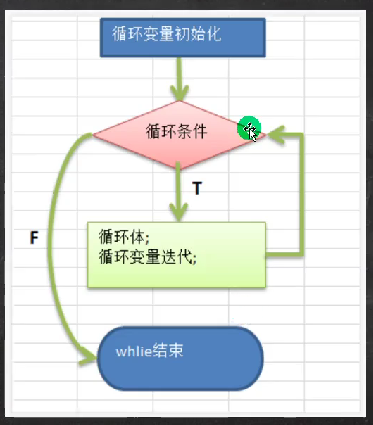
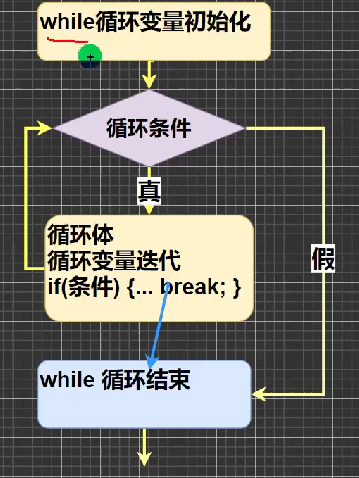
基本语法!:
循环变量初始化:
while(循环条件) {
循环体(语句);
循环变量迭代;
}
说明:
1、while循环也有四要素
2、只四要素放的位置不一样
例如:
int i = 1;
while (i <= 10) {
System.out.println("你好");
i++;
}
while的注意事项和细节说明
1、循环条件是返回一个布尔值的表达式
2、while循环是先判断然后执行语句
WhileExercise.java
1、打印1-100之间所有能够被3整除的数
2、打印40-200之间的所有偶数
public class WhileExercise {
    public static void main(String[] args) {
        // 1、打印1-100之间所能够被3整除的数
        int i = 1;
        while (i <= 100) {
            if (i % 3 == 0) {
                System.out.println("i = " + i);
            }
            i++;
        }

        // 2、打印40-200之间的所有偶数
        int j = 40;
        while (j <= 200) {
            if (j % 2 == 0) {
                System.out.println("j = " + j);
            }
            j++;
        }
    }
}
这里先死后活就不做了
do while循环控制
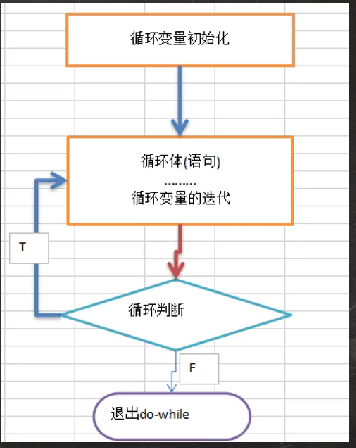
基本语法:
循环变量初始化;
do {
循环体(语句);
循环变量迭代;
}while(循环条件);
说明:
1、do while是关键字
2、也有循环四要素,只位置不一样
3、先执行,再判断,也就是一定会执行一次
4、最后有一个分号;
5、while和do while的区别举例:要账
while是上来叫你还钱,如果你不还钱就打你;do while是上来就打你,然后叫你还钱,如果你不还钱就一直打你。
例如:
int i = 1;
do {
System.out.println("你好");
i++;
}while(i <= 10);
do while循环控制练习:
1、打印1-100
2、计算1-100的和
3、统计1-200之间能被5整除但是不能被3整除的个数
DoWhileExercise01.java
4、如果李三不还钱,则老韩将一直使出五连鞭,直到李三说还钱为止。
DoWhileExercise02.java
【System.out.println("老韩问:还钱吗?y/n");】
public class DoWhileExercise01 {
    public static void main(String[] args) {
        // 1、打印1-100
        int i = 1;
        do {
            System.out.println("i = " + i);
            i++;
        }while(i <= 100);

        // 2、计算1-100的和
        int j = 1;
        int sum = 0;
        do {
            sum += j;
            j++;
        }while(j <= 100);
        System.out.println("sum = " + sum);

        // 3、统计1-200之间能被5整除但是不能被3整除的个数
        int k = 1;
        int count = 0;
        do {
            if (k % 5 == 0 && k % 3 != 0) {
                count++;
            }
            k++;
        }while(k <= 200);
        System.out.println("count = " + count);
    }
}
import java.util.Scanner;
public class DoWhileExercise02 {
    public static void main(String[] args) {
        Scanner scanner = new Scanner(System.in);
        char ch = ' ';
        do {
            System.out.print("老韩问:还钱吗?y/n:");
            ch = scanner.next().charAt(0);
            if (ch == 'y') {
                System.out.println("李三已还钱。");
                break;
            } else if (ch == 'n') {
                System.out.println("李三不还钱,老韩使出五连鞭!");
            } else {
                System.out.println("叫你输入y或者是n!");
            }
        }while(true);
    }
}
多重循环控制(难点和重点)
介绍:
1、将一个循环放在另外一个循环体内,就形成了嵌套循环。其中for,while,do while都可以作为外层循环和内层循环,建议一般使用两层循环,最多不要超过三层,否则代码的可读性非常差。
2、实际上,嵌套循环就是将内层循环当成外层循环的循环体。只有当内层循环的循环条件为flase的时候才能完全跳出内层循环,才可结束外层的当次循环,开始下一次的循环。
3、设外层循环的循环次数为m次,内层为n次,则内层循环体实际上需要执行m*n次。
for(int i = 1; i <= 7; i++) {
for(int j = 1; j <= 2; j++) {
System.out.println("ok!"); // 14
}
}
MulForExercise01.java
多重循环控制练习题:
统计三个班成绩情况,每个班有五名同学,求出各个班级的平均分和所有班级的平均分,学生成绩从键盘那输入。
统计三个班及格人数,每个班有5名同学。
打印出九九乘法表。
import java.util.Scanner;
public class MulForExercise01 {
    public static void main(String[] args) {
        // 1、统计三个班成绩情况,每个班有五名同学,求出各个班级的平均分和所有班级的平均分
        // 学生成绩从键盘输入。
        // 2、统计及格人数。
        Scanner scanner = new Scanner(System.in);
        int classNum = 3;
        int stuOfClass = 5;
        double sum;
        double classSum;
        double average = 0.0;
        double averageSum = 0.0;
        int countPass = 0;
        int score = 0;
        for (int i = 1; i <= classNum; i++) {
            sum = 0.0;
            for (int j = 1; j <= stuOfClass; j++) {
                System.out.print("请输入第" + j + "位同学的成绩:");
                score = scanner.nextInt();
                sum += score;
                if (score >= 60) {
                    countPass++;
                }
            }
            average = sum / stuOfClass;
            averageSum += average;
            System.out.println("第" + i + "班的平均分:" + average);
        }
        System.out.println(classNum + "个班级的平均分:" + (averageSum / classNum));
        System.out.println("总及格人数:" + countPass);

        // 3、乘法口诀
        for (int i = 1; i <= 9; i++) {
            for (int j = 1; j <= i; j++) {
                System.out.print(j + "  *  " +  i + "  =  " + (j * i) + '\t');
            }
            System.out.println();
        }
    }
}
多重循环练习继续:
多重循环控制,经典的打印金字塔
请编写一个程序,可以接收一个整数,表示层数
totalLevel,打印出金字塔。Stars.java
完成的思路是,可以先从矩形开始打,请使用while来实现。
完成金字塔之后打印空心金字塔,然后空心菱形
public class Stars {
    public static void main(String[] args) {
        // 1、打印矩形
        int i = 0;
        int j = 0;
        int x = 5;
        int y = 4;
        while (i <= x) {
            j = 0;
            while (j <= y) {
                System.out.print("*");
                j++;
            }
            System.out.println();
            i++;
        }
    }
}
public class Stars {
    public static void main(String[] args) {
        // 2、打印直角三角形
        int i = 0;
        int j = 0;
        int row = 5;
        while (i <= row) {
            j = 0;
            while (j <= i) {
                System.out.print("*");
                j++;
            }
            System.out.println();
            i++;
        }
    }
}

public class Stars {
    public static void main(String[] args) {
        int rows = 5;  // 金字塔的行数
        int i = 1;
        int j = 1;
        int k = 1;
        while (i <= rows) {
            j = 1;
            k = 1;
            while (j <= rows - i) {  // 打印空格等于总行数-当前行数
                System.out.print(" ");
                j++;
            }
            while (k <= 2 * i - 1) {  // 打印星星数等于2*当前行数-1
                System.out.print("*");
                k++;
            }
            System.out.println();
            i++;
        }
    }
}

public class Stars {
    public static void main(String[] args) {
        int rows = 5;  // 空心金字塔的层数
        int i = 1;
        int j = 1;
        int k = 1;
        while (i <= rows) {  // 空心金字塔层数控制
            j = 1;
            k = 1;
            while (j <= rows - i) {  // 空格数 = 总层数 - 当前层数
                System.out.print(" ");
                j++;
            }
            while (k <= 2 * i - 1) {  // 星星数 = 2 * 当前层数 - 1
                if (k == 1 || k == 2 * i - 1 || i == rows) {  // 第一次打印星星和最后一次打印星星以及最后一行打印星星
                    System.out.print("*");
                } else {  // 不是星星的情况就挖空
                    System.out.print(" ");
                }
                k++;
            }
            System.out.println();
            i++;
        }
    }
}

public class Stars {
    public static void main(String[] args) {
        int rows = 5;
        int i = 1;
        int j = 1;
        int k = 1;
        // 1、上半部分
        while (i <= rows) {  // 层数
            j = 1;
            k = 1;
            while (j <= rows - i) {  // 空格数 = 总层数 - 当前层数
                System.out.print(" ");
                j++;
            }
            while (k <= 2 * i - 1) {  // 星星数 = 2 * 当前层数 - 1
                if (k == 1 || k == 2 * i - 1) {  // 第一次打印星星和最后一次打印星星,没有最后一行的情况
                    System.out.print("*");
                } else {  // 掏空
                    System.out.print(" ");
                }
                k++;
            }
            System.out.println();
            i++;
        }
        // 2、下半部分
        i = rows - 1;
        j = 1;
        k = 1;
        while (i >= 1) {  // 回到最开始
            j = 1;
            k = 1;
            while (j <= rows - i) {  // 空格数 = 总行数 - 当前行数
                System.out.print(" ");
                j++;
            }
            while (k <= 2 * i - 1) {  // 星星数 = 2 * 当前行数 - 1
                if (k == 1 || k == 2 * i - 1) {  // 第一次星星和最后一次星星
                    System.out.print("*");
                } else {  // 掏空
                    System.out.print(" ");
                }
                k++;
            }
            System.out.println();
            i--;
        }
    }
}
四、break
需求:
	随机生成1-100的一个数,直到生成了97这个数,看看你一共用了几次?
	提示使用(int)(Math.random() * 100) + 1
使用循环,但是循环的次数是不知道的,到了的时候使用break终止循环,通过该需求可以说明其他的流程控制数据的必要性。
比如:
for(int i = 0; i < 10; i++) {
	if (i == 3) {
		break;
	}
	System.out.println("ok" + i);
}
break语句的细节:
跳转控制语句break的细节和注意事项
1、break语句出现在多层嵌套的语句块中的时候,可以通过标签指明要终止的是哪一层语句块。
lable1:
for(int j = 0; j < 4; j++) {
lable2:
for(int i = 0; i < 10; i++) {
if(i == 2){
break lable1;
}
System.out.println("i = " + i);
}
}跳转到lable2相当于直接break,跳转到lable1相当于直接结束了外层的这个循环
break语句可以指定退出哪一层;
label1是标签,可以由程序员指定;
break后指定到哪个label就退出到哪里;
在实际的开发中,尽量不要使用标签;
如果没有指定break,默认退出最近的循环体。

 浙公网安备 33010602011771号