JAVA多线程整理总结
线程
线程状态
1. 新建状态(New):新创建了一个线程对象。
2. 就绪状态(Runnable):线程对象创建后,其他线程调用了该对象的start()方法。该状态的线程位于可运行线程池中,变得可运行,等待获取CPU的使用权。
3. 运行状态(Running):就绪状态的线程获取了CPU,执行程序代码。
4. 阻塞状态(Blocked):阻塞状态是线程因为某种原因放弃CPU使用权,暂时停止运行。直到线程进入就绪状态,才有机会转到运行状态。阻塞的情况分三种:
(一)、等待阻塞(WAITING):运行的线程执行wait()方法,JVM会把该线程放入等待池中。join()不带超时时间也会进入WAITING状态。
(二)、同步阻塞(BLOCKED):运行的线程在获取对象的同步锁时,若该同步锁被别的线程占用,则JVM会把该线程放入锁池中。线程被notify或notifyAll唤醒以后也会进入BLOCKED状态等待对象锁。
(三)、其他阻塞(TIMED-WAITING):运行的线程执行sleep()或带有超时时间的join()方法,或者发出了I/O请求时,JVM会把该线程置为阻塞状态。当sleep()状态超时、join()等待线程终止或者超时、或者I/O处理完毕时,线程重新转入就绪状态。
5. 死亡状态(Dead):线程执行完了或者因异常退出了run()方法,该线程结束生命周期。
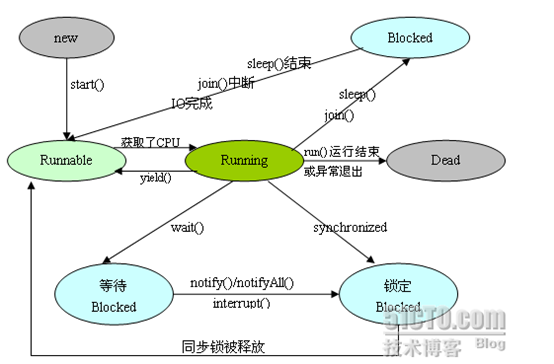
如:
sleep阻塞时,用jstack看到状态如下:

被synchronized阻塞的线程状态如下:

创建线程用Thread的子类或者实现Runnable接口的类。
停止线程
stop(已废弃)
停止线程有stop方法,不过不要使用,太暴力,容易出现数据不一致等问题。
interrupt中断
中断线程通过调用线程的interrupt方法。
如果线程是RUNNABLE状态,则会对线程设置一个中断标志,然后实际的中断还是要程序中通过标志来判断自行处理。
如:
public static void main(String[] args) throws InterruptedException {
Thread t1 = new Thread() {
@Override
public void run() {
while(true) {
Thread.yield();
}
}
};
t1.start();
Thread.sleep(2000);
t1.interrupt();
}
这里执行了t1.interrupt();并不会让t1线程中断。
改成如下即可:
public static void main(String[] args) throws InterruptedException {
Thread t1 = new Thread() {
@Override
public void run() {
while(true) {
System.out.println("kkk");
Thread.yield();
if (this.isInterrupted()) {
break;
}
}
}
};
t1.start();
Thread.sleep(2000);
t1.interrupt();
}
如果线程正在WAITING、TIME-WAITING状态,收到interrupt则会抛出InterruptedException异常,不会设置标志位。
而在BLOCKED状态则要区分,普通BLOCKED状态不会抛异常,如果是等待ReentrantLock的lockInterruptibly锁,则会抛出异常
状态切换
wait、notify、notifyAll
wait、notify、notifyAll是对象上的方法,一个线程调用了某个对象wait方法,当前线程会进入阻塞状态(WAITING),加入到对象的阻塞队列中,一个对象的阻塞队列可能有多个线程,调用对象的notify方法会从阻塞队列中随机唤醒一个线程,唤醒的线程会进入blocked状态,等待对象的锁,notifyAll会唤醒该对象阻塞队列的所有阻塞线程。
调用wait和notify方法前必须获得对象的锁,直接调用是不行的,如:
public class Test3 {
public static void main(String[] args) throws InterruptedException {
Object o = new Object();
o.wait();
}
}
会报错

所以一般都在synchronize中调用,改为如下即可:
public class Test3 {
public static void main(String[] args) throws InterruptedException {
Object o = new Object();
synchronized (o) {
o.wait();
}
}
}
唤醒的线程不会直接向下执行,而是进入blocked状态,等待拿到对象的锁以后才进入往下执行。
如:
public class Test2 {
static Object o = new Object();
public static void main(String[] args) throws InterruptedException {
Thread t1 = new Thread() {
@Override
public void run() {
try {
synchronized (o) {
o.wait();
}
System.out.println("t1 end");
} catch (InterruptedException e) {
e.printStackTrace();
}
}
};
t1.start();
Thread.sleep(1000);
synchronized (o) {
o.notify();
System.out.println("t1 notified");
Thread.sleep(2000);
System.out.println("main end");
}
}
}
输出:
t1 notified
main end
t1 end
其中t1唤醒之后并没有马上执行,而是等待主线程执行完synchronize方法释放锁以后才执行。
调用wait方法会释放当前的锁,而sleep方法不会释放锁。
suspend、resume(已废弃)
suspend会挂起线程,resume恢复线程,挂起的线程状态还是RUNNABLE,如下:

由于挂起线程代码一般是在本线程中执行,而线程挂起之后就能通过其他线程来执行恢复本线程的代码,而线程间的先后顺序往往不能保证,很容易导致resume先于suspend执行,这样挂起的线程就无法恢复了,所以此方式已被废弃使用。
join、yield
join等待一个线程执行完,本线程再执行,用于一个线程依赖另一个线程的执行结果的情况,如:
public class Test2 {
static volatile int a = 0;
public static void main(String[] args) throws InterruptedException {
Thread t1 = new Thread() {
public void run() {
for (int i = 0 ; i < 1000000; i++) {
a++;
}
};
};
t1.start();
t1.join(); // 等待t1线程累加完再打印a,否则打印的a可能会小于1000000
System.out.println(a); // 结果打印出1000000
}
}
yield会让线程从运行状态转为就绪状态,重新争夺CPU资源,用于优先级低的线程让出CPU资源。
volatile
见"jvm.docx"
线程组
把多个线程归成一个组,起个组名,统一管理。
如:
public class Test3 {
public static void main(String[] args) throws InterruptedException {
ThreadGroup threadGroup = new ThreadGroup("threadGroup");
Thread t1 = new Thread(threadGroup, "t1") {
@Override
public void run() {
while(true) {
try {
Thread.sleep(3000);
} catch (InterruptedException e) {
e.printStackTrace();
}
System.out.println(this.getThreadGroup().getName() + "-" + this.getName());
}
}
};
Thread t2 = new Thread(threadGroup, "t2") {
@Override
public void run() {
while(true) {
try {
Thread.sleep(3000);
} catch (InterruptedException e) {
e.printStackTrace();
}
System.out.println(this.getThreadGroup().getName() + "-" + this.getName());
}
}
};
t1.start();
t2.start();
threadGroup.list();
}
}
打印:
java.lang.ThreadGroup[name=threadGroup,maxpri=10]
Thread[t1,5,threadGroup]
Thread[t2,5,threadGroup]
threadGroup-t1
threadGroup-t2
threadGroup-t1
threadGroup-t2
……
守护线程
当一个Java应用内,所有非守护进程都结束时,Java虚拟机就会自然退出,守护线程自动结束
如:
/**
* 守护线程测试
* @author Administrator
*
* 当一个Java应用内,所有非守护进程都结束时,Java虚拟机就会自然退出,守护线程自动结束
*
*/
public class DaemonThreadTest {
public static class DaemonThread extends Thread {
@Override
public void run() {
System.out.println("start");
try {
Thread.sleep(2000);
} catch (InterruptedException e) {
e.printStackTrace();
}
System.out.println("end"); // 这句代码没有执行,因为主线程已经提前执行完了
}
}
public static void main(String[] args) throws InterruptedException {
DaemonThread dt = new DaemonThread();
dt.setDaemon(true);
dt.start();
Thread.sleep(1000);
}
}
输出:
start
其中 dt.setDaemon(true);要先于start()方法,执行,否则抛出如下异常:
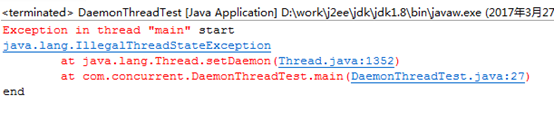
而线程会被当做非守护线程继续执行,此时打印了end。
线程优先级
优先级越高,争夺到CPU的概率越高。
/**
* 测试线程优先级,优先级高的线程先执行完的概率大
* @author Administrator
*
*/
public class PriorityTest {
public static class High extends Thread {
static int count = 0;
@Override
public void run() {
while (true) {
synchronized (PriorityTest.class) {
count++;
if (count > 10000000) {
System.out.println("High");
break;
}
}
}
}
}
public static class Low extends Thread {
static int count = 0;
@Override
public void run() {
while (true) {
synchronized (PriorityTest.class) {
count++;
if (count > 10000000) {
System.out.println("Low");
break;
}
}
}
}
}
public static void main(String[] args) throws InterruptedException {
High high = new High();
Low low = new Low();
// 设置线程优先级
high.setPriority(Thread.MAX_PRIORITY);
low.setPriority(Thread.MIN_PRIORITY);
low.start();
high.start();
}
}
多次试验之后High先执行完的概率高于Low
synchronized
见"jvm.docx"
注意:不要锁Integer等包装对象,因为它的值一旦变化,就会自动创建一个新对象。
ArrayList、HashMap的并发问题
见"jvm.docx"
Vector、ConcurrentHashMap是线程安全的
队列
概念
Queue是jdk1.5以后提供的队列接口,与List、Set平级,都是Collection的子接口
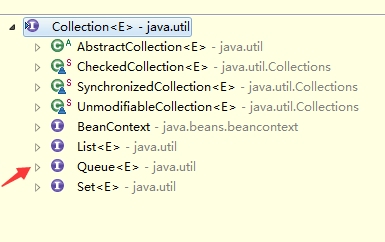
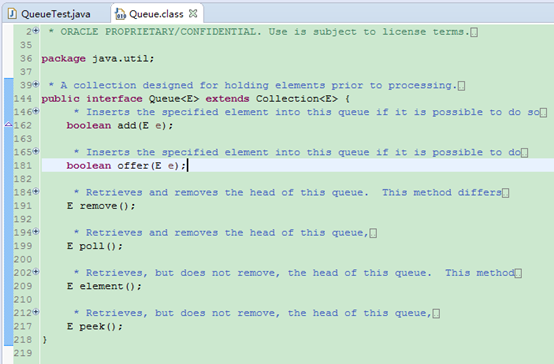
Queue队列先进先出,从队尾进,队首出。
队列的方法:
add、offer都是入列,队列满时,add抛出异常,offer返回false。
remove、poll都是出列,返回出列的值,队列空时,remove抛出异常,poll返回null
element、peek都是返回队首值,不出列,队列空时,element抛出异常,peek返回null
ps:由于poll和peek方法出错就返回null。因此,尽量不要向队列插入null值。
使用,如:
public class QueueTest {
public static void main(String[] args) {
// add()和remove()方法在失败的时候会抛出异常(不推荐)
Queue<String> queue = new LinkedList<String>();
// 添加元素(入列)
queue.offer("a"); // 如果队列已满,返回false
queue.add("b"); // 如果队列已满,会抛出异常
for (String q : queue) {
System.out.println(q);
}
// 获取第一个元素,不删除
System.out.println("peek=" + queue.peek()); // 返回第一个元素,队列如果为空,返回null
// 遍历队列
for (String q : queue) {
System.out.println(q);
}
// 删除元素(出列)
System.out.println("poll1=" + queue.poll()); // 返回第一个元素,并在队列中删除,如果队列为空,返回null
System.out.println("poll2=" + queue.remove());// 返回第一个元素,并在队列中删除,果队列为空,返回抛出异常
System.out.println("poll3=" + queue.poll()); // 队列为空,返回null
// 获取第一个元素,不删除
System.out.println("peek=" + queue.peek()); // 返回第一个元素,队列如果为空,返回null
System.out.println("element=" + queue.element()); // 返回第一个元素,队列如果为空,抛出异常
}
}
Queue的子类
Queue有许多实现,如:
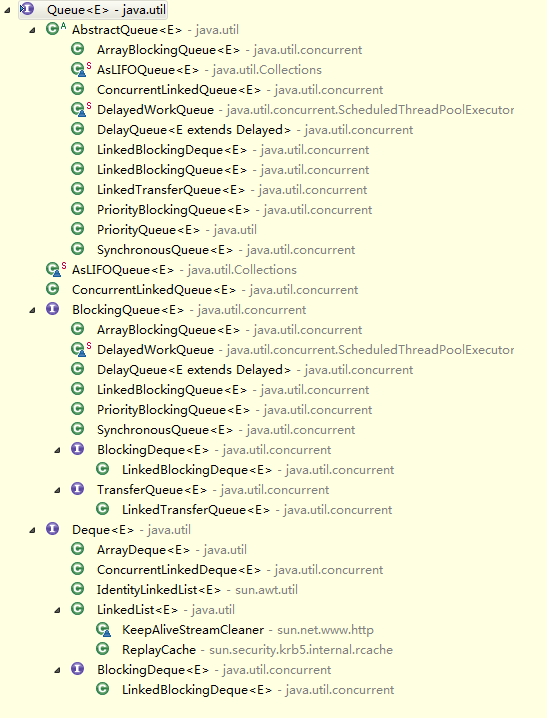
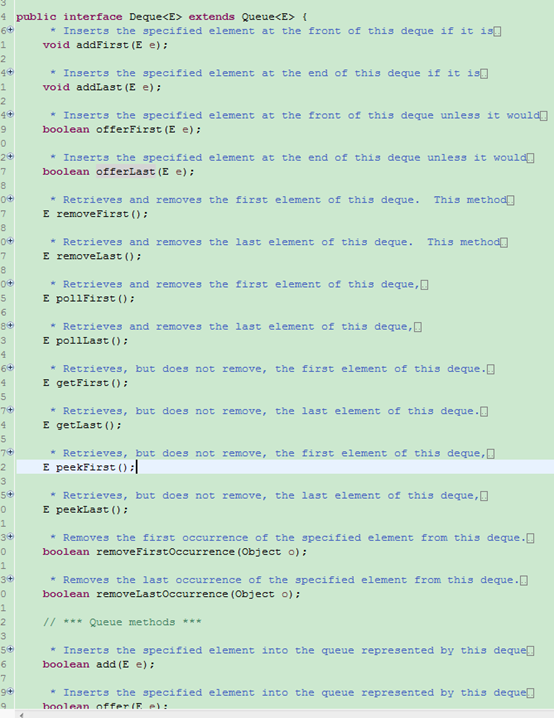
双向队列Deque
双向队列,提供addFirst、addLast、offerFirst、offerLast等可以从队首队尾操作的方法。
线程安全队列ConcurrentLinkedQueue
采用无锁的volatile做的,效率很高
阻塞队列BlockingQueue(线程安全)
实现阻塞接口BlockingQueue的队列,如:
ArrayBlockingQueue、LinkedBlockingQueue、PriorityBlockingQueue、SynchronousQueue、DelayQueue
阻塞队列是线程安全的,内部用ReentrantLock保证,如:
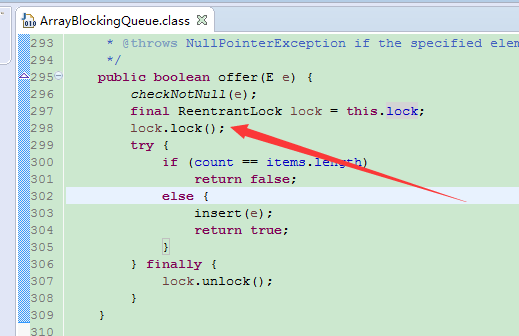
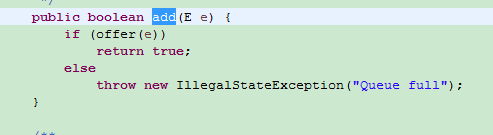
阻塞接口的Queue有put入列,take出列,put时如果队列已满,会阻塞等待,take时队列如果为空,也会阻塞等待。通常用于生产者、消费者模式。
ArrayBlockingQueue:创建时必须指定大小。
LinkedBlockingQueue:创建时可不指定大小,如果没有指定大小,则put时,只有容量达到Integer.MAX_VALUE才会阻塞。
/**
* 阻塞队列测试
* @author Administrator
*
*/
public class QueueTest {
static BlockingQueue<Integer> blockingQueue = new ArrayBlockingQueue<Integer>(2);
public static void main(String[] args) throws InterruptedException {
new Thread(new Runnable() {
@Override
public void run() {
try {
Thread.sleep(2000); // 新线程启动后先sleep2秒。
blockingQueue.put(123);
System.out.println("branch thread end");
} catch (Exception e) {
e.printStackTrace();
}
}
}).start();
// take空队列会阻塞当前线程,等待队列put完后才继续执行
blockingQueue.take();
System.out.println("main thread end");
}
}
输出:
branch thread end
main thread end
SynchronousQueue
一种特殊的BlockingQueue,put和take必须交替执行,其中每个 put 必须等待一个 take,反之亦然。
* iterator() 永远返回空,因为里面没东西。
* peek() 永远返回null。
* put() 往queue放进去一个element以后就一直wait直到有其他thread进来把这个element取走。
* offer() 往queue里放一个element后立即返回,如果碰巧这个element被另一个thread取走了,offer方法返回true,认为offer成功;否则返回false。
* offer(2000, TimeUnit.SECONDS) 往queue里放一个element但是等待指定的时间后才返回,返回的逻辑和offer()方法一样。
* take() 取出并且remove掉queue里的element(认为是在queue里的。。。),取不到东西他会一直等。
* poll() 取出并且remove掉queue里的element(认为是在queue里的。。。),只有到碰巧另外一个线程正在往queue里offer数据或者put数据的时候,该方法才会取到东西。否则立即返回null。
* poll(2000, TimeUnit.SECONDS) 等待指定的时间然后取出并且remove掉queue里的element,其实就是再等其他的thread来往里塞。
* isEmpty()永远是true。
* remainingCapacity() 永远是0。
* remove()和removeAll() 永远是false。
优先级队列PriorityQueue
每次入列,整个队列都会重新排序,出列时按排序后的顺序出列,不能有null元素(会抛空指针异常),使用如:
/**
* 优先级列队测试
* @author Administrator
*
*/
public class QueueTest {
public static void main(String[] args) throws InterruptedException {
PriorityQueue<Integer> priorityQueue = new PriorityQueue<Integer>();
priorityQueue.offer(2);
priorityQueue.offer(1);
priorityQueue.offer(6);
priorityQueue.offer(3);
priorityQueue.offer(4);
System.out.println(priorityQueue.poll());
System.out.println(priorityQueue.poll());
priorityQueue.offer(5);
System.out.println(priorityQueue.poll());
System.out.println(priorityQueue.poll());
System.out.println(priorityQueue.poll());
System.out.println(priorityQueue.poll());
}
}
输出:
1
2
3
4
5
6
/**
* 带比较器的优先级列队测试
*
* @author Administrator
*
*/
public class QueueTest {
public static void main(String[] args) throws InterruptedException {
Comparator<Integer> cmp;
cmp = new Comparator<Integer>() {
public int compare(Integer e1, Integer e2) {
return e2 - e1;
}
};
PriorityQueue<Integer> priorityQueue = new PriorityQueue<Integer>(2, cmp);
priorityQueue.offer(2);
priorityQueue.offer(1);
priorityQueue.offer(6);
priorityQueue.offer(3);
priorityQueue.offer(4);
System.out.println(priorityQueue.poll());
System.out.println(priorityQueue.poll());
priorityQueue.offer(5);
System.out.println(priorityQueue.poll());
System.out.println(priorityQueue.poll());
System.out.println(priorityQueue.poll());
System.out.println(priorityQueue.poll());
}
}
输出:
6
4
5
3
2
1
其中构造方法的第一个参数是初始容量,后面会自动扩展。
JDK并发包
ReentrantLock
ReentrantLock全路径java.util.concurrent.locks.ReentrantLock,可重入锁,是synchronize的增强,它是用代码手动指定加锁(lock)和解锁(unlock),使用更灵活,效率跟synchronize差不多。
如:
public class ReentrantLockTest implements Runnable {
public static ReentrantLock lock = new ReentrantLock();
public static int i = 0;
@Override
public void run() {
for (int j = 0; j < 10000000; j++) {
lock.lock(); // 加锁
i++;
lock.unlock(); // 释放锁
}
}
public static void main(String[] args) throws InterruptedException {
ReentrantLockTest test = new ReentrantLockTest();
Thread t1 = new Thread(test);
Thread t2 = new Thread(test);
t1.start();
t2.start();
t1.join();
t2.join();
System.out.println("i=" + i); // 输出20000000
}
}
可中断
使用lockInterruptibly()获取锁可以使当前线程在等待锁的时候如果收到中断消息抛出异常,可以用于死锁等情况。
如:
/**
* 打断两个互为死锁的线程
* @author Administrator
*
*/
public class ReentrantLockInterrupt2 implements Runnable {
public static ReentrantLock lock1 = new ReentrantLock();
public static ReentrantLock lock2 = new ReentrantLock();
int lock;
public ReentrantLockInterrupt2(int lock) {
this.lock = lock;
}
@Override
public void run() {
try {
if (lock == 1) {
lock1.lockInterruptibly();
Thread.sleep(500);
lock2.lockInterruptibly();
System.out.println("thread1顺利完成");
} else {
lock2.lockInterruptibly();
Thread.sleep(500);
lock1.lockInterruptibly();
System.out.println("thread2顺利完成");
}
} catch (Exception e) {
} finally {
if (lock1.isHeldByCurrentThread()) {
lock1.unlock();
}·
if (lock2.isHeldByCurrentThread()) {
lock2.unlock();
}
System.out.println(Thread.currentThread().getId() + ":线程退出");
}
}
public static void main(String[] args) throws InterruptedException {
ReentrantLockInterrupt2 t1 = new ReentrantLockInterrupt2(1);
ReentrantLockInterrupt2 t2 = new ReentrantLockInterrupt2(2);
Thread thread1 = new Thread(t1);
Thread thread2 = new Thread(t2);
thread1.start();
thread2.start();
Thread.sleep(2000);
thread2.interrupt();
}
输出:
11:线程退出
thread1顺利完成
10:线程退出
只有线程1顺利完成了,线程2等待锁时被中断了。
可超时
tryLock可设置获取锁超时,不会阻塞当前线程,超时返回false,获取成功返回true
如果不带参数,相当于为0,立刻超时。
如:
/**
* ReentrantLock可限时,超时未获得锁返回false,否则返回true
* @author Administrator
*
*/
public class ReentrantLockTimeout implements Runnable {
public static ReentrantLock lock = new ReentrantLock();
@Override
public void run() {
try {
if (lock.tryLock(1, TimeUnit.SECONDS)) {
Thread.sleep(3000);
} else {
System.out.println("get lock failed");
}
} catch (Exception e) {
} finally {
if (lock.isHeldByCurrentThread()) {
lock.unlock();
}
}
}
public static void main(String[] args) {
ReentrantLockTimeout t = new ReentrantLockTimeout();
Thread t1 = new Thread(t);
Thread t2 = new Thread(t);
t1.start();
t2.start();
}
}
输出:
get lock failed
公平锁
带构造参数true即可,等待队列中先申请的线程先获取到锁,不过效率会下降,默认是非公平的。
如:
public class ReentrantLockFair implements Runnable {
public static ReentrantLock lock = new ReentrantLock(true);
@Override
public void run() {
while (true) {
try {
lock.lock();
System.out.println(Thread.currentThread().getName() + "获得锁");
} catch (Exception e) {
} finally {
if (lock.isHeldByCurrentThread()) {
lock.unlock();
}
}
}
}
public static void main(String[] args) {
ReentrantLockFair t = new ReentrantLockFair();
Thread t1 = new Thread(t, "t1");
Thread t2 = new Thread(t, "t2");
t1.start();
t2.start();
}
}
打印:
t2获得锁
t1获得锁
t2获得锁
t1获得锁
t2获得锁
t1获得锁
t2获得锁
t1获得锁
t2获得锁
t1获得锁
t2获得锁
t1获得锁
t2获得锁
t1获得锁
t2获得锁
t1获得锁
…
Condition
调用一个可重入锁的newCondition()方法,得到一个Condition对象,调用它的方法可以实现wait、notify等synchronize的功能。
await():与synchronnize锁的wait()功能相同,释放当前线程的锁,进入等待队列
signal():同notify()
signalAll():同notifyAll()
awaitUninterruptibly():收到中断消息不抛异常。
有很多方法,如:
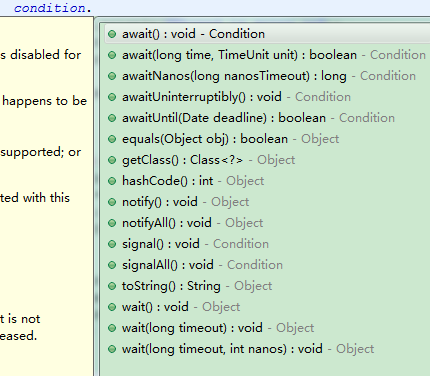
一般情况下signal()一个线程后,会立即释放当前锁,让该线程获取。
例如:
/**
* 让一个线程await()住,然后让主线程去唤醒它
* @author Administrator
*
*/
public class ReentrantLockCondition implements Runnable {
public static ReentrantLock lock = new ReentrantLock();
public static Condition condition = lock.newCondition();
@Override
public void run() {
try {
lock.lock();
condition.await();
System.out.println("Thread is going on");
} catch (Exception e) {
e.printStackTrace();
} finally {
lock.unlock();
}
}
public static void main(String[] args) throws InterruptedException {
ReentrantLockCondition t = new ReentrantLockCondition();
Thread thread = new Thread(t);
thread.start();
Thread.sleep(2000);
lock.lock();
System.out.println("main Thread has lock");
condition.signal();
System.out.println("main Thread end");
lock.unlock();
}
}
输出:
main Thread has lock
main Thread end
Thread is going on
Semaphore
共享锁,允许指定个数的线程共同持有,有很多跟ReentrantLock类似的方法,如:
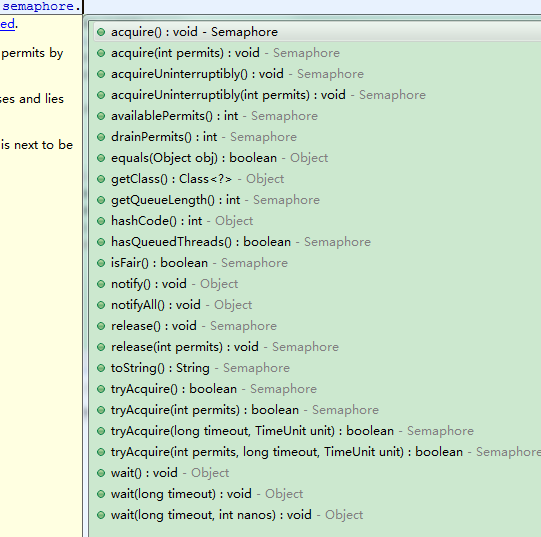
使用,如:
/**
* Semaphore锁支持多个线程同时进入,它是共享锁
*
* @author Administrator
*
*/
public class SemaphoreTest implements Runnable {
final Semaphore semaphore = new Semaphore(5);
@Override
public void run() {
try {
semaphore.acquire();
Thread.sleep(1000);
System.out.println(Thread.currentThread().getId() + " done");
} catch (Exception e) {
e.printStackTrace();
} finally {
semaphore.release();
}
}
public static void main(String[] args) throws InterruptedException {
ExecutorService executorService = Executors.newFixedThreadPool(20);
final SemaphoreTest t = new SemaphoreTest();
for (int i = 0; i < 20; i++) {
executorService.submit(t);
}
}
}
每隔1秒输出5行
10 done
13 done
12 done
11 done
14 done
17 done
18 done
15 done
20 done
16 done
21 done
22 done
19 done
24 done
23 done
25 done
26 done
29 done
27 done
28 done
ReentrantReadWriteLock读写锁
读写锁可以让都是读的线程不阻塞,有写的线程才阻塞。

如:
ReentrantReadWriteLock reentrantReadWriteLock = new ReentrantReadWriteLock();
CountDownLatch读写锁
创建一个CountDownLatch对象,声明需要countDown的个数,线程调用该对象的await方法时,如countDownLatch.await(),会等待countDown()方法执行,个数就是前面声明的,然后继续往下执行。
如:
/**
* 主线程等待所有其他线程都执行完,才继续执行
* @author Administrator
*
*/
public class CountDownLatchTest implements Runnable {
// 10表示需要10个线程的countDown()被执行,await线程才会继续往下执行
static final CountDownLatch countDownLatch = new CountDownLatch(10);
static final CountDownLatchTest t = new CountDownLatchTest();
@Override
public void run() {
try {
Thread.sleep(2000);
System.out.println("complete");
countDownLatch.countDown();
} catch (Exception e) {
e.printStackTrace();
}
}
public static void main(String[] args) throws InterruptedException {
ExecutorService executorService = Executors.newFixedThreadPool(10);
// 让10个线程执行countDown(),如果这里小于10,则主线程会一直await()不往下执行
for (int i = 0; i < 10; i++) {
executorService.execute(t);
}
countDownLatch.await();
System.out.println("end");
executorService.shutdown();
}
}
/**
* 主线程等待所有其他线程都执行完,才继续执行
* @author Administrator
*
*/
public class CountDownLatchTest implements Runnable {
// 10表示需要10个线程的countDown()被执行,await线程才会继续往下执行
static final CountDownLatch countDownLatch = new CountDownLatch(10);
static final CountDownLatchTest t = new CountDownLatchTest();
@Override
public void run() {
try {
Thread.sleep(2000);
System.out.println("complete");
countDownLatch.countDown();
} catch (Exception e) {
e.printStackTrace();
}
}
public static void main(String[] args) throws InterruptedException {
ExecutorService executorService = Executors.newFixedThreadPool(10);
// 让10个线程执行countDown(),如果这里小于10,则主线程会一直await()不往下执行
for (int i = 0; i < 10; i++) {
executorService.execute(t);
}
countDownLatch.await();
System.out.println("end");
executorService.shutdown();
}
}
CyclicBarrier循环栅栏
功能比CountDownLatch强大,如:
/**
* 等待其他线程执行完再继续执行,可重复使用
* @author Administrator
*
*/
public class CyclicBarrierTest implements Runnable {
private String soldier;
private final CyclicBarrier cyclic;
public CyclicBarrierTest(String soldier, CyclicBarrier cyclic) {
this.soldier = soldier;
this.cyclic = cyclic;
}
@Override
public void run() {
try {
// 等待所有士兵到齐
cyclic.await();
dowork();
// 等待所有士兵完成工作
cyclic.await();
} catch (Exception e) {
e.printStackTrace();
}
}
private void dowork() {
try {
Thread.sleep(3000);
} catch (Exception e) {
}
System.out.println(soldier + ": done");
}
public static class BarrierRun implements Runnable {
boolean flag;
int n;
public BarrierRun(boolean flag, int n) {
super();
this.flag = flag;
this.n = n;
}
@Override
public void run() {
if (flag) {
System.out.println(n + "个任务完成");
} else {
System.out.println(n + "个集合完成");
flag = true;
}
}
}
public static void main(String[] args) {
final int n = 10;
Thread[] threads = new Thread[n];
boolean flag = false;
CyclicBarrier barrier = new CyclicBarrier(n, new BarrierRun(flag, n));
System.out.println("集合");
for (int i = 0; i < n; i++) {
System.out.println(i + "报道");
threads[i] = new Thread(new CyclicBarrierTest("士兵" + i, barrier));
threads[i].start();
}
}
}
输出:
集合
0报道
1报道
2报道
3报道
4报道
5报道
6报道
7报道
8报道
9报道
10个集合完成
士兵0: done
士兵7: done
士兵4: done
士兵8: done
士兵3: done
士兵2: done
士兵9: done
士兵6: done
士兵1: done
士兵5: done
10个任务完成
LockSupport
用于替代suspend()和resume()。
park相当于suspend,unpack相当于resume,不过不会造成死锁
unpack时,会提供一个许可,park时会去获得,如果park先于unpack执行,则会等待unpack的许可。
park()等待时,线程是waiting状态,便于分析。
如:
/**
* park相当于suspend,unpack相当于resume,不过不会造成死锁
* unpack时,会提供一个许可,park时会去获得,如果park先于unpack执行,则会等待unpack的许可
* @author Administrator
*
*/
public class LockSupportTest {
static Object u = new Object();
static TestSuspendThread t1 = new TestSuspendThread("t1");
static TestSuspendThread t2 = new TestSuspendThread("t2");
public static class TestSuspendThread extends Thread {
public TestSuspendThread(String name) {
setName(name);
}
@Override
public void run() {
synchronized (u) {
System.out.println("in " + getName());
// Thread.currentThread().suspend();
LockSupport.park();
}
}
}
public static void main(String[] args) throws InterruptedException {
t1.start();
Thread.sleep(100);
t2.start();
// t1.resume();
// t2.resume();
LockSupport.unpark(t1);
LockSupport.unpark(t2);
t1.join();
t2.join();
}
}
输出:
in t1
in t2
并发集合
ConcurrentHashMap
普通的HashMap、LinkedHashMap等线程不安全。
线程安全的HashMap可以通过Collections.synchronizedMap(Map<K,V> m)取得,它的原理是在里面放一个对象作为信号量(mutex),put、get等同步它,效率很低
ConcurrentHashMap采用分段的方式,只对每一段进行同步,效率高很多。
CopyOnWriteArrayList
ArrayList、linkedList都不是线程安全的,Vector线程安全,不过效率比较低。
CopyOnWriteArrayList是线程安全的list,原理是写入的时候会复制一份,然后替换原来的,因此只有写写需要同步,读读、读写都不需要同步,效率高一些(不变模式)
ConcurrentLinkedQueue
高效读写队列,线程安全。
ThreadLocal
ThreadLocal可用于解决线程安全问题,创建线程隔离的变量。是一种无锁解决线程安全问题的方式。
每个线程都有一个ThreadLocalMap,可以通过thread. threadLocals取得,可以将它当做一个map。
因此可以将线程私有的变量放到这个map中。thread. threadLocals不能直接操作,因为它是package作用域,只能同一包下访问。
通过ThreadLocal<E>创建对象,它提供了get和set方法,可以操作thread. threadLocals,set和get时它会把自身作为key去操作线程的ThreadLocalMap。
因此可以将多个ThreadLocal对象放到一个线程中。
线程退出时,会自动清理ThreadLocalMap,但如果用线程池,则不会回收,需要手动清理,可以调用ThreadLocal的remove方法回收。
也可以直接将ThreadLocal设置为null,这样所有线程的该ThreadLocal变量都会回收,因为ThreadLocalMap是里面的Entity是弱引用。
示例:
public class ThreadLocalTest implements Runnable {
static ThreadLocal<SimpleDateFormat> threadLocal = new ThreadLocal<SimpleDateFormat>();
public static void main(String[] args) {
ExecutorService es = Executors.newFixedThreadPool(1000);
for (int i = 0; i < 1000; i++) {
es.execute(new ThreadLocalTest());
}
es.shutdown();
}
@Override
public void run() {
try {
if (threadLocal.get() == null) {
threadLocal.set(new SimpleDateFormat("yyyy-MM-dd"));
}
System.out.println(threadLocal.get().parse("2016-03-31"));
} catch (Exception e) {
e.printStackTrace();
}
}
}
线程池
概念
线程池的顶层接口是Executor,它有许多子接口和对应实现,如子接口:ExecutorService对应实现类ThreadPoolExecutor,子接口ScheduledExecutorService对应实现类ScheduledThreadPoolExecutor。
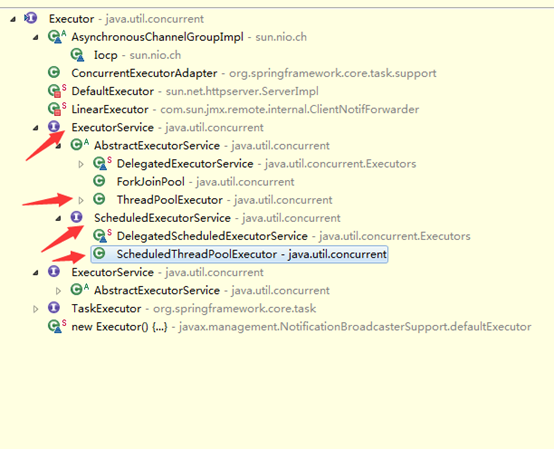
Executors是产生线程池的工厂,调用它的方法可以得到线程池,如:
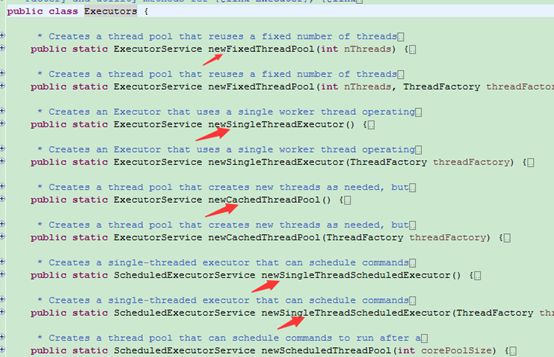
public static ExecutorService newFixedThreadPool(int nThreads)
返回固定个数线程的线程池,不会自动扩展
public static ExecutorService newSingleThreadExecutor()
返回只有一个线程的线程池,不会自动扩展
public static ExecutorService newCachedThreadPool()
返回可扩展个数的线程池
public static ScheduledExecutorService newSingleThreadScheduledExecutor()
返回只有一个线程的线程池,不会自动扩展,可以指定任务在指定延迟时间后执行,或者周期性执行。
public static ScheduledExecutorService newScheduledThreadPool(int corePoolSize)
同上可以指定任务在指定延迟时间后执行,或者周期性执行,可以指定线程个数。
FixedThreadPool
固定个数的线程池,如:
public class ThreadPoolTest implements Runnable {
@Override
public void run() {
try {
Thread.sleep(1000);
System.out.println("Thread ID=" + Thread.currentThread().getId() + "," + new Date());
} catch (InterruptedException e) {
e.printStackTrace();
}
}
public static void main(String[] args) {
ExecutorService executorService = Executors.newFixedThreadPool(5);
for (int i = 0; i < 10; i++) {
executorService.submit(new ThreadPoolTest());
}
}
}
输出:
Thread ID=13,Mon Apr 10 14:59:48 CST 2017
Thread ID=11,Mon Apr 10 14:59:48 CST 2017
Thread ID=12,Mon Apr 10 14:59:48 CST 2017
Thread ID=9,Mon Apr 10 14:59:48 CST 2017
Thread ID=10,Mon Apr 10 14:59:48 CST 2017
Thread ID=11,Mon Apr 10 14:59:49 CST 2017
Thread ID=12,Mon Apr 10 14:59:49 CST 2017
Thread ID=13,Mon Apr 10 14:59:49 CST 2017
Thread ID=9,Mon Apr 10 14:59:49 CST 2017
Thread ID=10,Mon Apr 10 14:59:49 CST 2017
前5个和后5个中间间隔了1秒,说明每次执行5个线程,有5个线程在排队。
ScheduledExecutorService
延迟周期性任务线程池。
schedule(Runnable command, long delay, TimeUnit unit)
延迟执行
scheduleWithFixedDelay(Runnable command,
long initialDelay,
long delay,
TimeUnit unit);
延迟,并指定间隔时间重复执行(间隔时间包含任务执行时间,也就是从前一个任务执行开始就计算间隔时间),如果任务执行时间大于间隔时间,不会出现任务堆叠,后一个任务会等待前一个任务执行完成后再立即执行。
scheduleAtFixedRate(Runnable command,
long initialDelay,
long period,
TimeUnit unit)
延迟,并执行间隔时间重复执行(间隔时间不包含任务执行时间,也就是从前一个任务执行结束后开始计算间隔时间)
ps:周期性任务如果出现异常,后面子任务都不会再执行了。
例子:
public class ThreadPoolTest implements Runnable {
@Override
public void run() {
try {
System.out.println("Thread ID=" + Thread.currentThread().getId() + "," + new Date());
} catch (Exception e) {
e.printStackTrace();
}
}
public static void main(String[] args) {
System.out.println("开始执行" + new Date());
ScheduledExecutorService scheduledExecutorService = Executors.newSingleThreadScheduledExecutor();
for (int i = 0; i < 10; i++) {
scheduledExecutorService.schedule(new ThreadPoolTest(), 2, TimeUnit.SECONDS);
}
}
}
输出:
开始执行Tue Nov 21 10:28:10 CST 2017
Thread ID=9,Tue Nov 21 10:28:15 CST 2017
Thread ID=9,Tue Nov 21 10:28:18 CST 2017
Thread ID=9,Tue Nov 21 10:28:21 CST 2017
Thread ID=9,Tue Nov 21 10:28:24 CST 2017
Thread ID=9,Tue Nov 21 10:28:27 CST 2017
Thread ID=9,Tue Nov 21 10:28:30 CST 2017
Thread ID=9,Tue Nov 21 10:28:33 CST 2017
Thread ID=9,Tue Nov 21 10:28:36 CST 2017
Thread ID=9,Tue Nov 21 10:28:40 CST 2017
Thread ID=9,Tue Nov 21 10:28:43 CST 2017
间隔了2秒(加上执行的耗时,所以输出时间隔了3秒左右)。
ThreadPoolExecutor
Executors的newFixedThreadPool、newSingleThreadExecutor、newCachedThreadPool等获取的线程池,其实都是返回的ThreadPoolExecutor对象,只是传入了不同的构造参数。通常可以自己创建ThreadPoolExecutor对象,这样参数更灵活。
如:



ThreadPoolExecutor构造函数定义是:
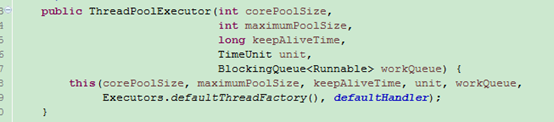
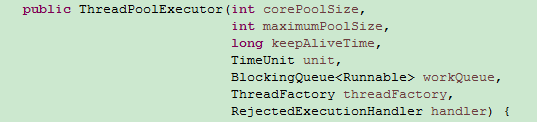
int corePoolSize:线程池大小
int maximumPoolSize:线程池最大大小
long keepAliveTime:当实际线程数多于corePoolSize时,多余线程保留时间,超过时间就回收。
TimeUnit unit:时间单位
BlockingQueue<Runnable> workQueue:等待执行的线程队列。
当执行execute(Runnable command)方法时的逻辑:
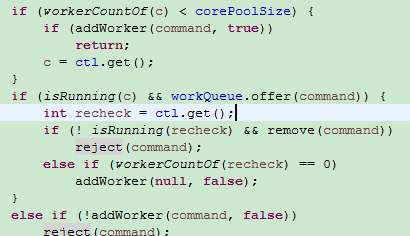
1、当前线程数如果小于corePoolSize,则新开线程执行Runnable command。
2、如果当前线程数等于corePoolSize,则将Runnable command加入到workQueue队列等待。等待有空余线程,就从队列出列去执行。
3、如果workQueue已满,判断当前线程数如果小于maximumPoolSize,则新开线程执行(新开的线程直接执行最新的请求,而不是队列中的)。
4、如果workQueue已满,且当前线程数等于maximumPoolSize,则执行reject方法,它会回调执行拒绝策略的rejectedExecution方法。

newFixedThreadPool、newSingleThreadExecutor使用的是LinkedBlockingQueue无界队列,理论大小是Integer.MAX_VALUE,很难满,所以如果请求不断而处理很慢,可能导致因队列数过大系统资源耗光。
而newCachedThreadPool的maximumPoolSize是Integer.MAX_VALUE,原因是它使用的SynchronousQueue队列,只能有一个队列等待线程(队列容量为0),如果设置过小,线程数一旦到达maximumPoolSize,就很容易执行拒绝策略。因此newCachedThreadPool它几乎会对所有请求都新开线程。
如果请求不断而处理很慢,可能导致因线程数过多资源耗光。
拒绝策略
ThreadPoolExecutor最后一个参数传入实现了拒绝策略RejectedExecutionHandler接口的对象,默认有4种实现。
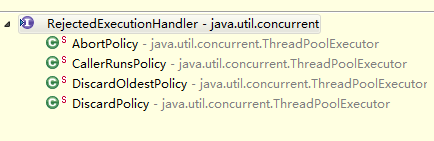
AbortPolicy:抛异常
CallerRunsPolicy:让提交任务的线程去执行
DiscardOldestPolicy:丢弃最老的一个任务
DiscardPolicy:丢弃当前提交的任务
也可以自己实现RejectedExecutionHandler接口,自定义拒绝策略,实现rejectedExecution方法即可。
ThreadFactory
ThreadPoolExecutor的倒数第二个参数是实现ThreadFactory接口的类,这接口只有一个newThread(Runnable r)方法,用来创建线程,线程池创建线程就是调用的它。
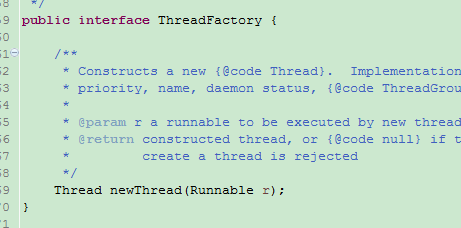
下面这个是ThreadPoolExecutor默认的ThreadFactory实现类,newTread时设置线程名字、非守护线程、优先级。
也可以自己实现这个接口,做一些为线程指定名字等工作,
还可以将所有线程设置为守护线程,当主线程退出,则线程池自动销毁。
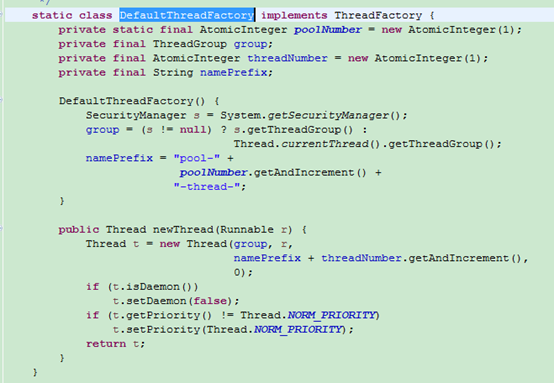
线程池扩展(beforeExecute、afterExecute、terminated)
execute(Runnable command)传入的Runnable command,没有直接给由ThreadFactory的newThread创建的Thread,而是将它封装到了Worker的成员变量,Worker实现了Runnable接口,将Worker对象传给了newThread创建的Thread,最后调用的是worker的start方法。
worker的run方法调用了Runnable command的run方法,而在调用前后分别调用了beforeExecute和afterExecute。
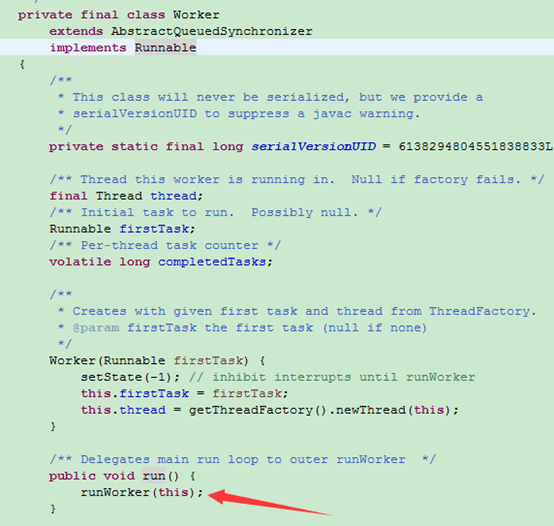
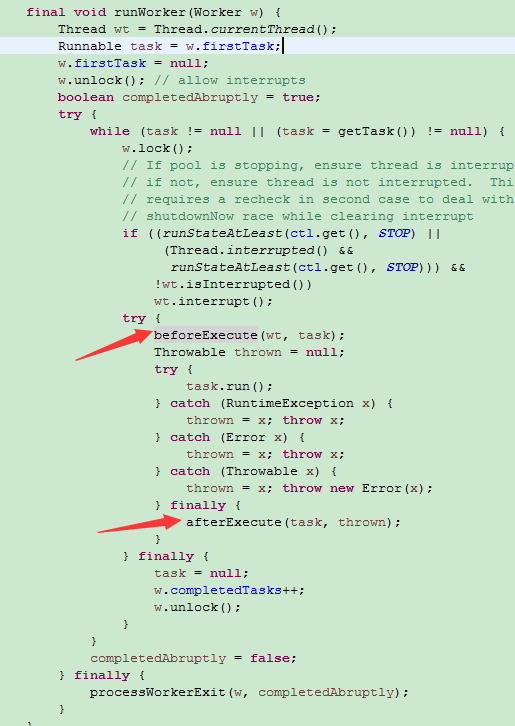
而默认beforeExecute和afterExecute是空的,因此可以对它进行扩展,类似于aop,如:
public class ThreadPoolTest implements Runnable {
@Override
public void run() {
try {
System.out.println("Thread ID=" + Thread.currentThread().getId() + "," + new Date());
} catch (Exception e) {
e.printStackTrace();
}
}
public static void main(String[] args) throws InterruptedException {
ThreadPoolExecutor threadPoolExecutor = new ThreadPoolExecutor(10, 10, 10, TimeUnit.SECONDS, new ArrayBlockingQueue<Runnable>(20)) {
@Override
protected void beforeExecute(Thread t, Runnable r) {
// 线程执行前执行
System.out.println("before:Thread ID=" + Thread.currentThread().getId());
}
@Override
protected void afterExecute(Runnable r, Throwable t) {
// 线程执行后执行
System.out.println("after:Thread ID=" + Thread.currentThread().getId());
}
@Override
protected void terminated() {
// 线程池关闭时执行
System.out.println("terminated:Thread ID=" + Thread.currentThread().getId());
}
};
threadPoolExecutor.execute(new ThreadPoolTest());
// shutdown会等待所有线程执行完关闭线程池
threadPoolExecutor.shutdown();
}
}
输出
before:Thread ID=9
Thread ID=9,Thu Apr 13 16:20:24 CST 2017
after:Thread ID=9
terminated:Thread ID=9
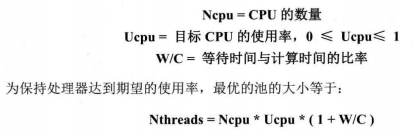
最优线程数量
最优线程数量=Ncpu*Ucpu*(1+W/C)
打印异常堆栈
线程执行抛出异常时,使用submit提交的不会打印异常堆栈,
如果要打印,使用execute或者改用下面的形式
Future<?> fe = pools.submit(new DivTask(100, i));
fe.get();
如:
/**
* 测试堆栈打印
* @author Administrator
*
*/
public class DivTask implements Runnable {
int a, b;
public int divTask() {
return 10/a;
}
public DivTask(int a, int b) {
this.a = a;
this.b = b;
}
@Override
public void run() {
System.out.println(a/b);
}
public static void main(String[] args) throws Exception {
ThreadPoolExecutor pools = new ThreadPoolExecutor(0, Integer.MAX_VALUE, 0, TimeUnit.SECONDS, new SynchronousQueue<Runnable>());
for (int i = 0; i < 5; i++) {
pools.execute(new DivTask(100, i));
// Future<?> fe = pools.submit(new DivTask(100, i));
// fe.get();
}
pools.shutdown();
}
}
打印:
Exception in thread "pool-1-thread-1" java.lang.ArithmeticException: / by zero
at DivTask.run(DivTask.java:22)
at java.util.concurrent.ThreadPoolExecutor.runWorker(ThreadPoolExecutor.java:1145)
at java.util.concurrent.ThreadPoolExecutor$Worker.run(ThreadPoolExecutor.java:615)
at java.lang.Thread.run(Thread.java:745)
100
50
25
33
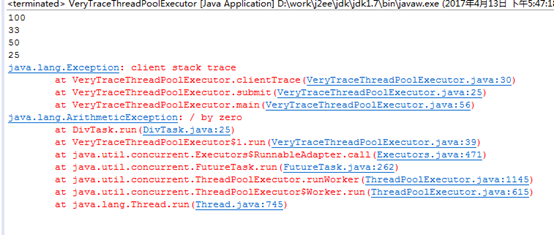
但只打印线程内的堆栈,提交者的参数和堆栈没有,不方便查看,可以用如下方式打印提交者的堆栈(只能用submit提交)。
相当于将提交线程的Exception传给了新开线程,并且将原run方法封装到了新run方法捕获所有异常,先打印提交线程的Exception的堆栈,再抛出新线程的异常。
继承ThreadPoolExecutor类。
VeryTraceThreadPoolExecutor.java:
/**
* 自己扩展线程池获取异常位置 重写submit:可以拉取异常
*/
public class VeryTraceThreadPoolExecutor extends ThreadPoolExecutor {
// 初始化
public VeryTraceThreadPoolExecutor(int corePoolSize, int maxmumPoolSize, long keepAliveTime, TimeUnit unit, BlockingQueue<Runnable> workQueue) {
super(corePoolSize, maxmumPoolSize, keepAliveTime, unit, workQueue);
}
// 执行方法
@Override
public void execute(Runnable command) {
super.execute(command);
}
@Override
public Future<?> submit(Runnable task) {
return super.submit(wrap(task, clientTrace(), Thread.currentThread().getName()));
}
private Exception clientTrace() {
// 扔出异常
return new Exception("client stack trace");
}
private Runnable wrap(final Runnable task, final Exception clientStack, String clientThreadName) {
return new Runnable() {
public void run() {
try {
task.run();
} catch (Exception e) {
clientStack.printStackTrace();
throw e;
}
}
};
}
public static void main(String[] args) {
ThreadPoolExecutor pools = new VeryTraceThreadPoolExecutor(0, Integer.MAX_VALUE, 0l, TimeUnit.SECONDS, new SynchronousQueue<Runnable>());
// 错误堆栈中可以看到是在哪里提交的任务
for (int i = 0; i < 5; i++) {
pools.submit(new DivTask(100, i));
}
}
}
DivTask.java:
/**
* 测试堆栈打印
* @author Administrator
*
*/
public class DivTask implements Runnable {
int a, b;
public int divTask() {
return 10/a;
}
public DivTask(int a, int b) {
this.a = a;
this.b = b;
}
@Override
public void run() {
System.out.println(a/b);
}
}
打印
手写简单线程池实现
import java.util.Queue;
import java.util.concurrent.ArrayBlockingQueue;
/**
* 线程池
*
* @author Administrator
*
*/
public class ThreadPool {
int threadCount = 10;
Queue<Runnable> taskQueue = new ArrayBlockingQueue<Runnable>(20);
// 执行worker
Worker[] workers;
/**
* 执行新线程
*
* @param task
*/
public synchronized void execute(Runnable task) {
// 将新任务加入任务队列
if (!taskQueue.offer(task)) {
System.out.println("队列已满,加入失败");
} else {
System.out.println("加入成功");
}
}
public ThreadPool() {
this(10);
}
public ThreadPool(int threadCount) {
super();
this.threadCount = threadCount;
// 初始化workers
workers = new Worker[threadCount];
for (int i = 0; i < workers.length; i++) {
workers[i] = new Worker();
new Thread(workers[i]).start();
}
}
/**
* 执行worker
*
* @author Administrator
*
*/
class Worker implements Runnable {
private boolean isRunning = true;
public void run() {
while (true) {
try {
Thread.sleep(20);
} catch (InterruptedException e) {
e.printStackTrace();
}
if (!isRunning) {
return;
}
// 到任务队列中取出任务
if (taskQueue.isEmpty()) {
continue;
}
Runnable task = taskQueue.poll();
if (task == null) {
continue;
}
// 执行目标任务
task.run();
}
}
public void stopWorker() {
isRunning = false;
}
}
/**
* 关闭线程池
*/
public void shutdown() {
for (int i = 0; i < workers.length; i++) {
workers[i].stopWorker();
}
}
}
测试类:
public class Test {
public static void main(String[] args) throws InterruptedException {
ThreadPool threadPool = new ThreadPool();
for (int i = 0; i < 1000; i++) {
final int num = i;
// 每隔0.1秒加入一个任务
Thread.sleep(100);
threadPool.execute(new Runnable() {
@Override
public void run() {
try {
// 每个任务执行1-2秒
Thread.sleep(1000 + new Random().nextInt(2) * 1000);
} catch (InterruptedException e) {
e.printStackTrace();
}
System.out.println("ThreadId=" + Thread.currentThread().getId() + ",client=" + num);
}
});
}
}
}
打印:
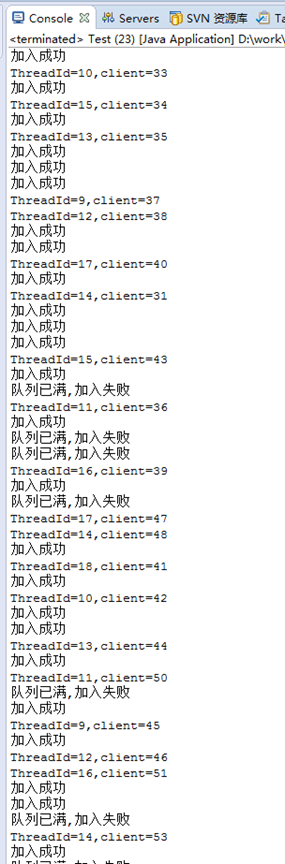
由于消费速度小于加入速度,因此当执行队列满了以后,会有加入失败的情况发生。
无锁
无锁采用cas操作,函数是CAS(V,E,N),当V=E时,将V更新成N,否则不操作,返回V的真实值,通过比较返回值是否是新值,来判断是否更新成功。通过处理器的CPU指令集实现CAS的原子操作。
Unsafe
Unsafe类只能由java内部使用,由于它使用了指针的方式,因此是unsafe的,它内部实现了getAndAddInt等原子操作,都是无锁CAS方式,这些方法都是native方法
atomicInteger的原子操作就是调用unsafe的这些方法实现的。
AtomicInteger
Integer的原子操作类,是线程安全的,如
incrementAndGet:自增1,并且返回
getAndSet:设置新值,返回旧值
如:
/**
* 使用两个线程同时对AtomicInteger变量累加,不会有线程安全问题
* @author Administrator
*
*/
public class AtomicTest implements Runnable {
static AtomicInteger j = new AtomicInteger(0);
public static void main(String[] args) throws InterruptedException {
Thread t1 = new Thread(new AtomicTest());
Thread t2 = new Thread(new AtomicTest());
t1.start();
t2.start();
t1.join();
t2.join();
System.out.println("j=" + j); // 输出j=200000
}
@Override
public void run() {
for (int i = 0; i < 100000; i++) {
j.incrementAndGet();
}
}
}
AtomicLong、AtomicReference都与AtomicInteger类似。
AtomicStampedReference
带有版本号的原子操作,可以防止ABA问题。
AtomicIntegerArray
无锁的数组,线程安全

 浙公网安备 33010602011771号