MFC 多线程访问同一个变量之互斥锁(CSingleLock )
先来一个例子:
一个进程开两个线程,这两个线程修改一个变量,并把这个变量的值打印出来
以下是代码(VS2010):
新建一个解决方案:MutexTest
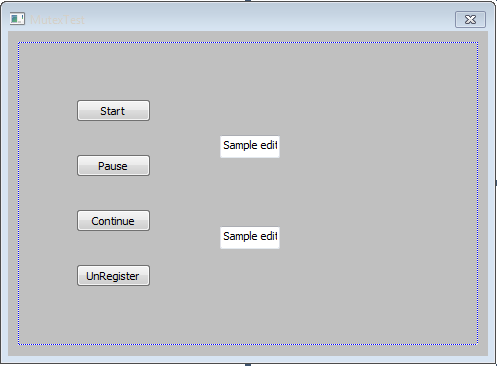
修改MutexTestDlg.h
// MutexTestDlg.h : header file
//

#pragma once

#include <Windows.h>


// CMutexTestDlg dialog
class CMutexTestDlg : public CDialogEx
{
// Construction
public:
	CMutexTestDlg(CWnd* pParent = NULL);	// standard constructor

// Dialog Data
	enum { IDD = IDD_MUTEXTEST_DIALOG };

	protected:
	virtual void DoDataExchange(CDataExchange* pDX);	// DDX/DDV support


	int m_nCount;
	CString m_strCount;
	BOOL	m_bKillThread;

	static UINT MyThread1(LPVOID* pParam);//thread1 function
	CWinThread *Thread1;//thread1

	static UINT MyThread2(LPVOID* pParam);//thread2 function
	CWinThread *Thread2;//thread2


// Implementation
protected:
	HICON m_hIcon;

	// Generated message map functions
	virtual BOOL OnInitDialog();
	afx_msg void OnSysCommand(UINT nID, LPARAM lParam);
	afx_msg void OnPaint();
	afx_msg HCURSOR OnQueryDragIcon();
	DECLARE_MESSAGE_MAP()
public:
	afx_msg void OnBnClickedButton1();
	afx_msg void OnBnClickedButton2();
	afx_msg void OnBnClickedButton3();
	afx_msg void OnBnClickedButton4();
};
修改MutexTestDlg.cpp
// MutexTestDlg.cpp : implementation file
//

#include "stdafx.h"
#include "MutexTest.h"
#include "MutexTestDlg.h"
#include "afxdialogex.h"

#ifdef _DEBUG
#define new DEBUG_NEW
#endif


// CAboutDlg dialog used for App About

class CAboutDlg : public CDialogEx
{
public:
	CAboutDlg();

// Dialog Data
	enum { IDD = IDD_ABOUTBOX };

	protected:
	virtual void DoDataExchange(CDataExchange* pDX);    // DDX/DDV support

// Implementation
protected:
	DECLARE_MESSAGE_MAP()
};

CAboutDlg::CAboutDlg() : CDialogEx(CAboutDlg::IDD)
{
}

void CAboutDlg::DoDataExchange(CDataExchange* pDX)
{
	CDialogEx::DoDataExchange(pDX);
}

BEGIN_MESSAGE_MAP(CAboutDlg, CDialogEx)
END_MESSAGE_MAP()


// CMutexTestDlg dialog

CMutexTestDlg::CMutexTestDlg(CWnd* pParent /*=NULL*/)
	: CDialogEx(CMutexTestDlg::IDD, pParent)
{
	m_hIcon = AfxGetApp()->LoadIcon(IDR_MAINFRAME);
	m_nCount = 0;
	m_strCount = "";
	m_bKillThread = FALSE;
}

void CMutexTestDlg::DoDataExchange(CDataExchange* pDX)
{
	CDialogEx::DoDataExchange(pDX);
}

BEGIN_MESSAGE_MAP(CMutexTestDlg, CDialogEx)
	ON_WM_SYSCOMMAND()
	ON_WM_PAINT()
	ON_WM_QUERYDRAGICON()
	ON_BN_CLICKED(IDC_BUTTON1, &CMutexTestDlg::OnBnClickedButton1)
	ON_BN_CLICKED(IDC_BUTTON2, &CMutexTestDlg::OnBnClickedButton2)
	ON_BN_CLICKED(IDC_BUTTON3, &CMutexTestDlg::OnBnClickedButton3)
	ON_BN_CLICKED(IDC_BUTTON4, &CMutexTestDlg::OnBnClickedButton4)
END_MESSAGE_MAP()


// CMutexTestDlg message handlers

BOOL CMutexTestDlg::OnInitDialog()
{
	CDialogEx::OnInitDialog();

	// Add "About..." menu item to system menu.

	// IDM_ABOUTBOX must be in the system command range.
	ASSERT((IDM_ABOUTBOX & 0xFFF0) == IDM_ABOUTBOX);
	ASSERT(IDM_ABOUTBOX < 0xF000);

	CMenu* pSysMenu = GetSystemMenu(FALSE);
	if (pSysMenu != NULL)
	{
		BOOL bNameValid;
		CString strAboutMenu;
		bNameValid = strAboutMenu.LoadString(IDS_ABOUTBOX);
		ASSERT(bNameValid);
		if (!strAboutMenu.IsEmpty())
		{
			pSysMenu->AppendMenu(MF_SEPARATOR);
			pSysMenu->AppendMenu(MF_STRING, IDM_ABOUTBOX, strAboutMenu);
		}
	}

	// Set the icon for this dialog.  The framework does this automatically
	//  when the application's main window is not a dialog
	SetIcon(m_hIcon, TRUE);			// Set big icon
	SetIcon(m_hIcon, FALSE);		// Set small icon

	// TODO: Add extra initialization here

	return TRUE;  // return TRUE  unless you set the focus to a control
}

void CMutexTestDlg::OnSysCommand(UINT nID, LPARAM lParam)
{
	if ((nID & 0xFFF0) == IDM_ABOUTBOX)
	{
		CAboutDlg dlgAbout;
		dlgAbout.DoModal();
	}
	else
	{
		CDialogEx::OnSysCommand(nID, lParam);
	}
}

// If you add a minimize button to your dialog, you will need the code below
//  to draw the icon.  For MFC applications using the document/view model,
//  this is automatically done for you by the framework.

void CMutexTestDlg::OnPaint()
{
	if (IsIconic())
	{
		CPaintDC dc(this); // device context for painting

		SendMessage(WM_ICONERASEBKGND, reinterpret_cast<WPARAM>(dc.GetSafeHdc()), 0);

		// Center icon in client rectangle
		int cxIcon = GetSystemMetrics(SM_CXICON);
		int cyIcon = GetSystemMetrics(SM_CYICON);
		CRect rect;
		GetClientRect(&rect);
		int x = (rect.Width() - cxIcon + 1) / 2;
		int y = (rect.Height() - cyIcon + 1) / 2;

		// Draw the icon
		dc.DrawIcon(x, y, m_hIcon);
	}
	else
	{
		CDialogEx::OnPaint();
	}
}

// The system calls this function to obtain the cursor to display while the user drags
//  the minimized window.
HCURSOR CMutexTestDlg::OnQueryDragIcon()
{
	return static_cast<HCURSOR>(m_hIcon);
}


UINT CMutexTestDlg::MyThread1(LPVOID* pParam)
{

	CMutexTestDlg * pMutexTestDlg= (CMutexTestDlg *)pParam;
	while(1)
	{
		if(pMutexTestDlg->m_bKillThread)
		{
			DWORD dwExitCode;
			GetExitCodeThread(pMutexTestDlg->Thread1, &dwExitCode);
			AfxEndThread(dwExitCode, TRUE);
		}
		else
		{
			pMutexTestDlg->m_nCount = 1;
			pMutexTestDlg->m_strCount.Format(_T("%d"), pMutexTestDlg->m_nCount);
			pMutexTestDlg->SetDlgItemText(IDC_EDIT1, pMutexTestDlg->m_strCount);
			Sleep(300);
		}

	}	return 0;
}


UINT CMutexTestDlg::MyThread2(LPVOID* pParam)
{

	CMutexTestDlg * pMutexTestDlg= (CMutexTestDlg *)pParam;
	while(1)
	{
		if(pMutexTestDlg->m_bKillThread)
		{
			DWORD dwExitCode;
			GetExitCodeThread(pMutexTestDlg->Thread2, &dwExitCode);
			AfxEndThread(dwExitCode, TRUE);
		}
		else
		{
			pMutexTestDlg->m_nCount = 2;
			pMutexTestDlg->m_strCount.Format(_T("%d"), pMutexTestDlg->m_nCount);
			pMutexTestDlg->SetDlgItemText(IDC_EDIT2, pMutexTestDlg->m_strCount);
			Sleep(300);
		}

	}	return 0;
}


void CMutexTestDlg::OnBnClickedButton1()
{
	// TODO: Add your control notification handler code here
	Thread1 = AfxBeginThread((AFX_THREADPROC)MyThread1, this);	//Start thread
	Thread2 = AfxBeginThread((AFX_THREADPROC)MyThread2, this);	//Start thread

	m_bKillThread = FALSE;
}


void CMutexTestDlg::OnBnClickedButton2()
{
	// TODO: Add your control notification handler code here
	Thread1->SuspendThread();	//Pause thread
	Thread2->SuspendThread();	//Pause thread
}


void CMutexTestDlg::OnBnClickedButton3()
{
	// TODO: Add your control notification handler code here
	Thread1->ResumeThread();	//Continue
	Thread2->ResumeThread();	//Continue
}


void CMutexTestDlg::OnBnClickedButton4()
{
	// TODO: Add your control notification handler code here
	m_bKillThread = TRUE;
	Thread1->ResumeThread();	//Continue thread run (if thread is suspend, end thread will failed.)
	Thread2->ResumeThread();	//Continue thread run (if thread is suspend, end thread will failed.)
}
编译-运行,点击【Start】按钮后,【Pause】和【Continue】互相切换点击, 会发现这两个编辑框会显示相同的值,并不是代码中写的第一个编辑框设置1,第二个编辑框设置2
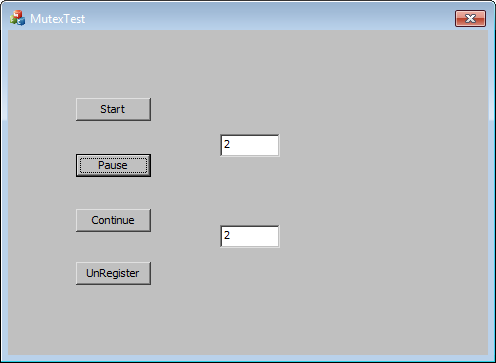
以上的原因时因为两个线程修改设置同一个变量,导致一个线程准备显示值得时候,被另一个线程修改了,导致两个编辑框显示的值一致
解决办法就是加互斥锁Mutex
将代码做如下修改:
1.在MutexTestDlg.cpp中加入全局类变量 CMutex Mutex;
2.在两个线程中定义互斥锁类变量 CSingleLock singleLock(&Mutex);
3.把在线程中需要保护的代码保护起来
singleLock.Lock();
if (singleLock.IsLocked())
{
  //需要保护的变量
}
singleLock.Unlock();
修改后的Cpp如下:
// MutexTestDlg.cpp : implementation file
//

#include "stdafx.h"
#include "MutexTest.h"
#include "MutexTestDlg.h"
#include "afxdialogex.h"

#ifdef _DEBUG
#define new DEBUG_NEW
#endif


CMutex Mutex;  //mutex


// CAboutDlg dialog used for App About

class CAboutDlg : public CDialogEx
{
public:
    CAboutDlg();

// Dialog Data
    enum { IDD = IDD_ABOUTBOX };

    protected:
    virtual void DoDataExchange(CDataExchange* pDX);    // DDX/DDV support

// Implementation
protected:
    DECLARE_MESSAGE_MAP()
};

CAboutDlg::CAboutDlg() : CDialogEx(CAboutDlg::IDD)
{
}

void CAboutDlg::DoDataExchange(CDataExchange* pDX)
{
    CDialogEx::DoDataExchange(pDX);
}

BEGIN_MESSAGE_MAP(CAboutDlg, CDialogEx)
END_MESSAGE_MAP()


// CMutexTestDlg dialog

CMutexTestDlg::CMutexTestDlg(CWnd* pParent /*=NULL*/)
    : CDialogEx(CMutexTestDlg::IDD, pParent)
{
    m_hIcon = AfxGetApp()->LoadIcon(IDR_MAINFRAME);
    m_nCount = 0;
    m_strCount = "";
    m_bKillThread = FALSE;
}

void CMutexTestDlg::DoDataExchange(CDataExchange* pDX)
{
    CDialogEx::DoDataExchange(pDX);
}

BEGIN_MESSAGE_MAP(CMutexTestDlg, CDialogEx)
    ON_WM_SYSCOMMAND()
    ON_WM_PAINT()
    ON_WM_QUERYDRAGICON()
    ON_BN_CLICKED(IDC_BUTTON1, &CMutexTestDlg::OnBnClickedButton1)
    ON_BN_CLICKED(IDC_BUTTON2, &CMutexTestDlg::OnBnClickedButton2)
    ON_BN_CLICKED(IDC_BUTTON3, &CMutexTestDlg::OnBnClickedButton3)
    ON_BN_CLICKED(IDC_BUTTON4, &CMutexTestDlg::OnBnClickedButton4)
END_MESSAGE_MAP()


// CMutexTestDlg message handlers

BOOL CMutexTestDlg::OnInitDialog()
{
    CDialogEx::OnInitDialog();

    // Add "About..." menu item to system menu.

    // IDM_ABOUTBOX must be in the system command range.
    ASSERT((IDM_ABOUTBOX & 0xFFF0) == IDM_ABOUTBOX);
    ASSERT(IDM_ABOUTBOX < 0xF000);

    CMenu* pSysMenu = GetSystemMenu(FALSE);
    if (pSysMenu != NULL)
    {
        BOOL bNameValid;
        CString strAboutMenu;
        bNameValid = strAboutMenu.LoadString(IDS_ABOUTBOX);
        ASSERT(bNameValid);
        if (!strAboutMenu.IsEmpty())
        {
            pSysMenu->AppendMenu(MF_SEPARATOR);
            pSysMenu->AppendMenu(MF_STRING, IDM_ABOUTBOX, strAboutMenu);
        }
    }

    // Set the icon for this dialog.  The framework does this automatically
    //  when the application's main window is not a dialog
    SetIcon(m_hIcon, TRUE);            // Set big icon
    SetIcon(m_hIcon, FALSE);        // Set small icon

    // TODO: Add extra initialization here

    return TRUE;  // return TRUE  unless you set the focus to a control
}

void CMutexTestDlg::OnSysCommand(UINT nID, LPARAM lParam)
{
    if ((nID & 0xFFF0) == IDM_ABOUTBOX)
    {
        CAboutDlg dlgAbout;
        dlgAbout.DoModal();
    }
    else
    {
        CDialogEx::OnSysCommand(nID, lParam);
    }
}

// If you add a minimize button to your dialog, you will need the code below
//  to draw the icon.  For MFC applications using the document/view model,
//  this is automatically done for you by the framework.

void CMutexTestDlg::OnPaint()
{
    if (IsIconic())
    {
        CPaintDC dc(this); // device context for painting

        SendMessage(WM_ICONERASEBKGND, reinterpret_cast<WPARAM>(dc.GetSafeHdc()), 0);

        // Center icon in client rectangle
        int cxIcon = GetSystemMetrics(SM_CXICON);
        int cyIcon = GetSystemMetrics(SM_CYICON);
        CRect rect;
        GetClientRect(&rect);
        int x = (rect.Width() - cxIcon + 1) / 2;
        int y = (rect.Height() - cyIcon + 1) / 2;

        // Draw the icon
        dc.DrawIcon(x, y, m_hIcon);
    }
    else
    {
        CDialogEx::OnPaint();
    }
}

// The system calls this function to obtain the cursor to display while the user drags
//  the minimized window.
HCURSOR CMutexTestDlg::OnQueryDragIcon()
{
    return static_cast<HCURSOR>(m_hIcon);
}


UINT CMutexTestDlg::MyThread1(LPVOID* pParam)
{
    CSingleLock singleLock(&Mutex);  //Mutex

    CMutexTestDlg * pMutexTestDlg= (CMutexTestDlg *)pParam;
    while(1)
    {
        if(pMutexTestDlg->m_bKillThread)
        {
            DWORD dwExitCode;
            GetExitCodeThread(pMutexTestDlg->Thread1, &dwExitCode);
            AfxEndThread(dwExitCode, TRUE);
        }
        else
        {
            singleLock.Lock();      //Mutex
      if (singleLock.IsLocked())
            {
                pMutexTestDlg->m_nCount = 1;
                pMutexTestDlg->m_strCount.Format(_T("%d"), pMutexTestDlg->m_nCount);
                pMutexTestDlg->SetDlgItemText(IDC_EDIT1, pMutexTestDlg->m_strCount);
                Sleep(300);
           singleLock.Unlock();  //Mutex
            }
        }

    }    return 0;
}


UINT CMutexTestDlg::MyThread2(LPVOID* pParam)
{
    CSingleLock singleLock(&Mutex);  //mutex

    CMutexTestDlg * pMutexTestDlg= (CMutexTestDlg *)pParam;
    while(1)
    {
        if(pMutexTestDlg->m_bKillThread)
        {
            DWORD dwExitCode;
            GetExitCodeThread(pMutexTestDlg->Thread2, &dwExitCode);
            AfxEndThread(dwExitCode, TRUE);
        }
        else
        {
            singleLock.Lock();  //mutex
            if (singleLock.IsLocked())  //mutex
            {
                pMutexTestDlg->m_nCount = 2;
                pMutexTestDlg->m_strCount.Format(_T("%d"), pMutexTestDlg->m_nCount);
                pMutexTestDlg->SetDlgItemText(IDC_EDIT2, pMutexTestDlg->m_strCount);
                Sleep(300);
        singleLock.Unlock();  //mutex
            }
        }

    }    return 0;
}


void CMutexTestDlg::OnBnClickedButton1()
{
    // TODO: Add your control notification handler code here
    Thread1 = AfxBeginThread((AFX_THREADPROC)MyThread1, this);    //Start thread
    Thread2 = AfxBeginThread((AFX_THREADPROC)MyThread2, this);    //Start thread

    m_bKillThread = FALSE;
}


void CMutexTestDlg::OnBnClickedButton2()
{
    // TODO: Add your control notification handler code here
    Thread1->SuspendThread();    //Pause thread
    Thread2->SuspendThread();    //Pause thread
}


void CMutexTestDlg::OnBnClickedButton3()
{
    // TODO: Add your control notification handler code here
    Thread1->ResumeThread();    //Continue
    Thread2->ResumeThread();    //Continue
}


void CMutexTestDlg::OnBnClickedButton4()
{
    // TODO: Add your control notification handler code here
    m_bKillThread = TRUE;
    Thread1->ResumeThread();    //Continue thread run (if thread is suspend, end thread will failed.)
    Thread2->ResumeThread();    //Continue thread run (if thread is suspend, end thread will failed.)
}
之后就可以正常运行了
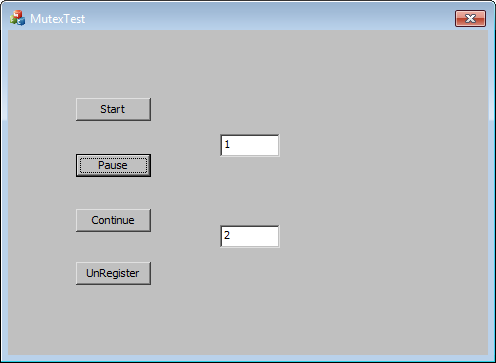
【注意】:多线程涉及访问修改同一变量,一定要加🔒进行保护。
扩展知识:临界区也可以实现以上的功能,区别在于临界区速度快,只可用于进程中的多个线程,
互斥量可以防止多个进程对共享数据的同时修改操作。
另外,用 WaitForSingleObject 和 ReleaseMutex也可以

 浙公网安备 33010602011771号