


K8S service详解
1,Service 介绍
(1)Kubernetes Service 从逻辑上代表了一组 Pod,具体是哪些 Pod 则是由 label 来挑选。
(2)Service 有自己 IP,而且这个 IP 是不变的。
- 客户端只需要访问 Service 的 IP,Kubernetes 则负责建立和维护 Service 与 Pod 的映射关系。
- 无论后端 Pod 如何变化,对客户端不会有任何影响,因为 Service 没有变
2,clusterIP类型
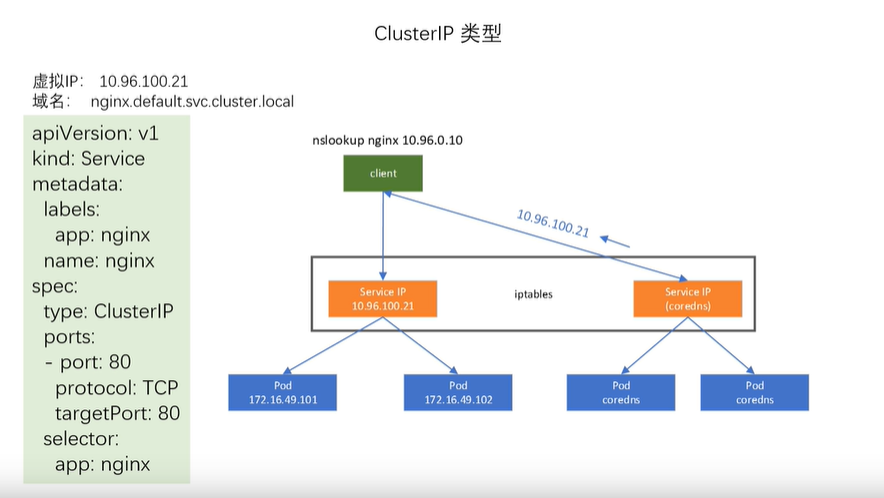
(1)首先编辑一个配置文件 httpd.yml,内容如下:
多个资源文件可以都在一个 YAML 中定义,用“---”分割。这里我们将 Deployment 和 Service 都放在一个配置文件中:
- Deployment 部分:启动了三个 pod,运行 httpd 镜像,label 是 run:httpd,service 将会用这个 label 来挑选 pod。
- Service 部分:挑选那些 label 为 run:httpd 的 pod 作为 service 后端的,并且将 8080 端口映射到 pod 的 80 端口。
[root@k8s-master deploy]# cat deploy.yaml
apiVersion: apps/v1
kind: Deployment
metadata:
  name: httpd
spec:
  selector:
    matchLabels:
      run: httpd
  replicas: 3
  template:
    metadata:
      labels:
        run: httpd
    spec:
      containers:
      - name: httpd
        image: httpd
        ports:
        - containerPort: 80
---
apiVersion: v1 # v1是service的apiversion
kind: Service # 当前资源的类型为 Service。
metadata:
  name: httpd-svc # Service 的名字为 httpd-svc。
spec:
  selector: # elector 指明挑选那些 label 为 run: httpd 的 Pod 作为 Service 的后端。
    run: httpd
  ports: # 将 Service 的 8080 端口映射到 Pod 的 80 端口,使用 TCP 协议。
  - protocol: TCP
    port: 8080
    targetPort: 80
(2)、查看创建的pods,可以看到目前启动了三个 pod,pod 分配了各自的 IP,这些 IP 只能被 kubernetes Cluster 中的容器和节点访问

(3)、查看svc,查看到被分配的ip类型为ClusterIP,值为10.111.30.121

(4)、ping一下ip发现是不通的

(5)、clusetIp只能是默认在集群内部被curl,在集群外部是无法访问的,集群外部访问错误

3、NodePort类型
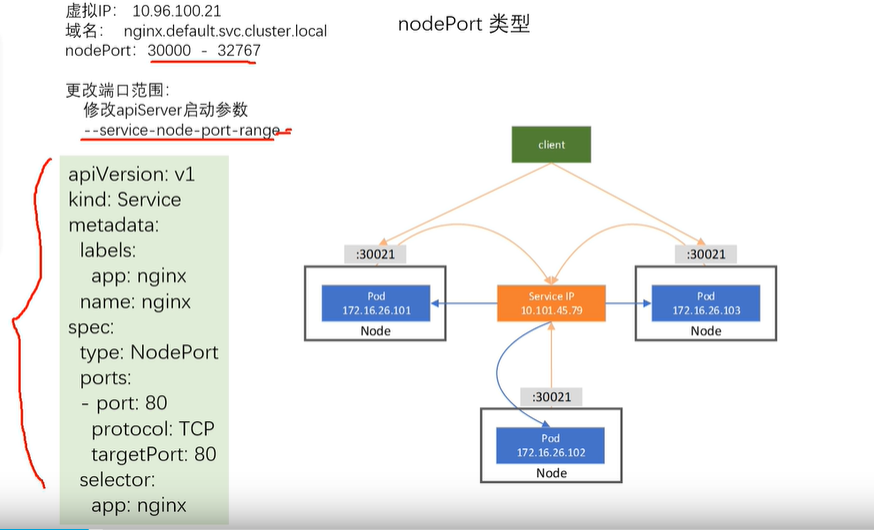
(1)、要启用 NodePort,首先我们需要在 Service 配置中添加 type: NodePort。
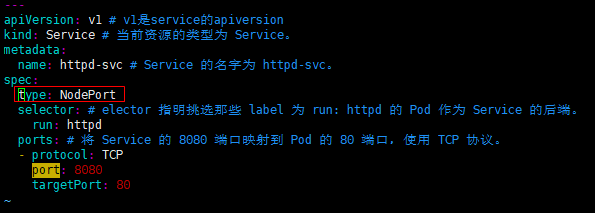
(2)、查看创建好的nodeport类型的service

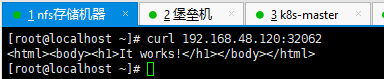
(3)、测试Cluster 外部可以通过 <NodeIP>:<NodePort> 访问 Service,成功

 浙公网安备 33010602011771号