
OpenXML与Word概述
OpenXML与Word概述
一、Word
1.1 Word 格式演进
| 版本 | 标准 | 文件格式 |
|---|---|---|
| Word 97-2003 | OLE复合文档技术 | .doc格式 |
| Word2007及其之后 | Office OpenXML协议 | .docx格式 |
- OLE:
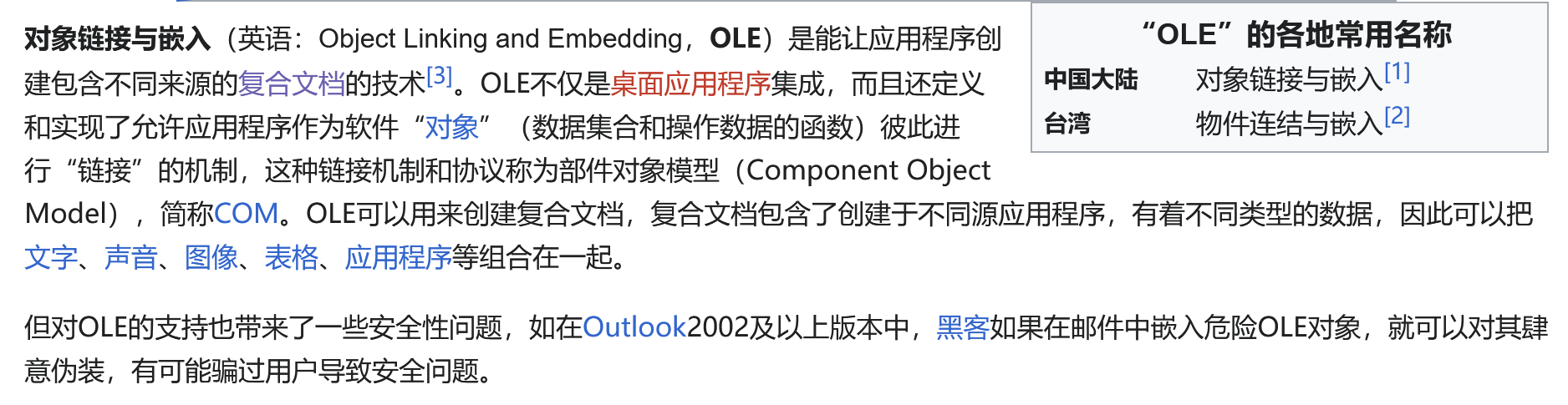
- 复合文档:


1.2 .docx 文档构成
Word文档(.docx)实质上是一个包含多个XML文件和资源的ZIP压缩包,主要由以下部分组成:
|- [Content_Types].xml 允许用户确定数据包中每个部件的内容类型
|- _rels 关系部件,定义ZIP包中各个Part之间的关系
|- docProps 存放文档的属性信息
    |- app.xml 记录应用程序特定的文档属性
    |- core.xml 存储核心属性
|- word 文档的主要内容存放于此目录
    |- _rels
        |- document.xml.rels
    |- theme
    |- document.xml 文档中所有可见文字的内容和属性及不可见部分的内容和属性
    |- fontTable.xml
    |- settings.xml 存储文档的设置
    |- styles.xml
    |- webSettings.xml
Word(.docx)文档内部组成:
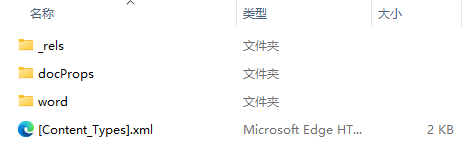
提示:Word文档本质上是一个ZIP包,换句话说Word文档以包的形式存储。我们可以新建一个Word文档,更改其后缀名.docx为.zip,解压缩后查看其内部结构。
二、OpenXML
2.1 概述
2.1.1 Open XML定义
Office Open XML (Open XML、OpenXML、OOXML)
一种能涵盖现有文档主题中所表示功能的标准;一项针对字处理文档、演示文稿和电子表格的建议开放标准,可由多个应用程序在多个平台上自由地实施。
2.1.2 OpenXML SDK
SDK(Software Development Kit):软件开发工具包。
Open XML SDK基于System.IO.Packaging API构建而成,并提供强类型类来处理符合Open XML文件格式规范的文档。
类似于OpenXML SDK的有NPOI、Xceed Words for .NET、DocX
2.2 标准变迁
Open XML(简称为OOXML)是可由不同平台上的多个应用程序自由实现的字处理文档、演示文稿和电子表格的开放式标准。
| 序号 | 标准名 | 实施规范 |
|---|---|---|
| 1 | ECMA-376 | MS-OE376 |
| 2 | ISO/IEC 29500 | MS-OI29500 |
2.3 分类
Open XML定义了字处理、演示文稿和电子表格文档的格式。
-
Word processing document(Word):使用WordProcessingML标记进行描述。WordprocessingML文档由文章集合组成,其中每个文章是以下类型之一:
- 主文档
- 词汇表文档
- 子文档
- 页眉
- 页脚
- 注释
- 框架
- 文本框
- 脚注或尾注
-
Presentations (演示文稿):使用PresentationML标记进行描述。
-
Spreadsheet workbooks(电子表格工作薄):使用SpreadsheetML 标记进行描述。
2.5 最小WordprocessingML文档组成
该文档包含三个部件:内容类型部件、数据包关系部件、主文档部件
- 内容类型部件“./[Content_Types].xml”描述其他两个必须部件的内容类型
<Types xmlns="http://schemas.openxmlformats.org/package/2006/content-types">
    <Default Extension="rels" ContentType="application/vnd. openxml formats -package . relationships+xml"/>
    <Default Extension="xml" ContentType="application/vnd.openxmlformats-officedocument.wordprocessingml.document.main+xml"/>
</Types>
- 数据包关系部件“./_rels/ .rels”描述数据包与主文档部件之间的关系
<Relationships xmlns="http://schemas.openxmlformats.org/package/2006/relationships">
    <Relationship Id="rId1" Type="http://schemas.openxmlformats.org/officeDocument/2006/relationships/officeDocument" Target="document.xml"/>
</Relationships>
- 主文档部件“./word/document.xml”包含文档内容
<w:document xmlns:w="http://schemas.openxmlformats.org/wordprocessingml/2006/main">
    <w:body>
        <w:p>
            <w: r>
                <w:t>Hello, world.</w:t>
            </w:r>
        </w:p>
    </w:body>
</w:document>
三、DocumentFormat.OpenXML包在Word文档自动化中的应用
3.1 安装
Install-Package DocumentFormat.OpenXML
3.2 基本操作
创建 WordprocessingDocument对象(WordprocessingDocument类表示Word文档包):
// docPath = @"C:\Desktop\Test.docx";

using (var wordDoc = WordprocessingDocument.Create(docPath, WordprocessingDocumentType.Document))
{
    // Insert other code here.
}
获取 WordprocessingDocument对象(true-读/写模式;false-读模式):
// docPath = @"C:\Desktop\Test.docx";

using (var wordDoc = WordprocessingDocument.Open(docPath, true))
{
    // Insert other code here.
}
3.3 使用XML内容创建docx文档
// docPath = @"C:\Desktop\Test.docx";

// To create a new package as a Word document.
public static void CreateNewWordDocument(string docPath)
{
    using (var wordDoc = WordprocessingDocument.Create(docPath, WordprocessingDocumentType.Document))
    {
        // Set the content of the document so that Word can open it.
        var mainPart = wordDoc.AddMainDocumentPart();

        string docXml = @"<?xml version=""1.0"" encoding=""utf-8""?>
                            <w:document xmlns:w=""http://schemas.openxmlformats.org/wordprocessingml/2006/main"">
                              <w:body>
                                <w:p>
                                  <w:r>
                                    <w:t>Hello World</w:t>
                                  </w:r>
                                </w:p>
                              </w:body>
                            </w:document>";

        using (var stream = mainPart.GetStream())
        {
            byte[] buf = (new UTF8Encoding()).GetBytes(docXml);
            stream.Write(buf, 0, buf.Length);
        }
    }
}
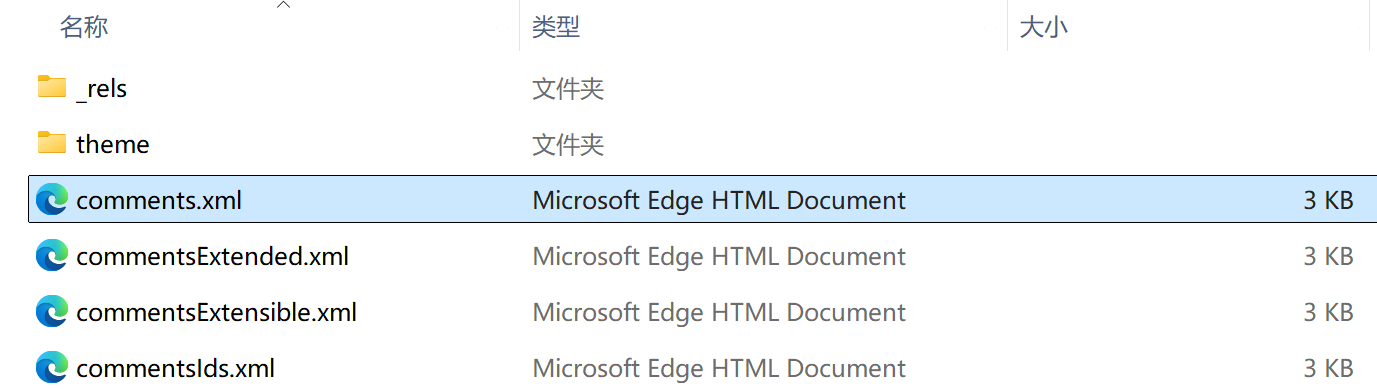
3.4 从docx文档中获取文档批注的内容
本质上是读取 word/comments.xml 文件内容:
// docPath = @"C:\Desktop\Test.docx";

// To get the contents of a document part.
public static string GetCommentsFromDoc(string docPath)
{
    string? comments = null;

    using (var wordDoc = WordprocessingDocument.Open(docPath, false))
    {
        var mainPart = wordDoc.MainDocumentPart ?? throw new InvalidOperationException("文档缺少主部件");
        var commentsPart = mainPart.WordprocessingCommentsPart;

        // if 批注部件不存在,直接返回 null
        if (commentsPart is null) return;

        using (var streamReader = new StreamReader(commentsPart.GetStream()))
        {
            comments = streamReader.ReadToEnd();
        }
    }

    return comments;
}
3.5 从docx文档中移除文档部件
// docPath = @"C:\Desktop\Test.docx";

// To remove a document part from a package.
public static void RemovePart(string docPath)
{
    using (var wordDoc = WordprocessingDocument.Open(docPath, true))
    {
        var mainPart = wordDoc.MainDocumentPart;

        if (mainPart is not null && mainPart.DocumentSettingsPart is not null)
        {
            mainPart.DeletePart(mainPart.DocumentSettingsPart);
        }
    }
}
3.6 从docx文档中替换文档的主题
// docPath = @"C:\Desktop\Test.docx";
// themeFilePath = @"C:\Desktop\ThemeReplace.xml"

// This method can be used to replace the theme part in a package.
public static void ReplaceTheme(string docPath, string themeFilePath)
{
    using (var wordDoc = WordprocessingDocument.Open(docPath, true))
    {
        if (wordDoc.MainDocumentPart is null || wordDoc.MainDocumentPart.Document.Body is null || wordDoc.MainDocumentPart.ThemePart is null)
        {
            throw new ArgumentNullException("MainDocumentPart and/or Body and/or ThemePart is null.");
        }

        var mainPart = wordDoc.MainDocumentPart;

        // Delete the old document part.
        mainPart.DeletePart(mainPart.ThemePart);

        // Add a new document part and then add content.
        ThemePart themePart = mainPart.AddNewPart<ThemePart>();

        using (var streamReader = new StreamReader(themeFilePath))
        using (var streamWriter = new StreamWriter(themePart.GetStream(FileMode.Create)))
        {
            streamWriter.Write(streamReader.ReadToEnd());
        }
    }
}
3.7 从docx文档中替换文档部件的内容
// docPath = @"C:\Desktop\Test.docx";

// To search and replace content in a document part.
static void SearchAndReplace(string docPath)
{
    using (var wordDoc = WordprocessingDocument.Open(docPath, true))
    {
        string? docText = null;

        if (wordDoc.MainDocumentPart is null)
        {
            throw new ArgumentNullException("MainDocumentPart and/or Body is null.");
        }

        using (var sr = new StreamReader(wordDoc.MainDocumentPart.GetStream()))
        {
            docText = sr.ReadToEnd();
        }

        Regex regexText = new Regex("Hello world!");
        docText = regexText.Replace(docText, "Hi Everyone!");

        using (var sw = new StreamWriter(wordDoc.MainDocumentPart.GetStream(FileMode.Create)))
        {
            sw.Write(docText);
        }
    }
}
3.8 向docx文档中添加文字
public static void OpenAndAddTextToWordDocument(string docPath, string txt)
{
    // Open a WordprocessingDocument for editing using the filepath.
    var wordprocessingDocument = WordprocessingDocument.Open(docPath, true);

    if (wordprocessingDocument is null)
    {
        throw new ArgumentNullException(nameof(wordprocessingDocument));
    }

    // Assign a reference to the existing document body.
    var mainDocumentPart = wordprocessingDocument.MainDocumentPart ?? wordprocessingDocument.AddMainDocumentPart();
    mainDocumentPart.Document ??= new Document();
    mainDocumentPart.Document.Body ??= mainDocumentPart.Document.AppendChild(new Body());
    Body body = wordprocessingDocument.MainDocumentPart!.Document!.Body!;

    // Add new text.
    Paragraph para = body.AppendChild(new Paragraph());
    Run run = para.AppendChild(new Run());
    run.AppendChild(new Text(txt));

    // Dispose the handle explicitly.
    wordprocessingDocument.Dispose();
}
3.9 向docx文档中添加表格
///<summary>
///string[,] data = new string[,]
///{
///    {"名称", "描述"}
///}
///<summary>
public static void AddFixedTable(string docPath, string[,] data)
{
    using (var document = WordprocessingDocument.Open(docPath, true))
    {
        var doc = document.MainDocumentPart.Document;

        Table table = doc.Body.AppendChild(new Table());

        TableProperties props = table.PrependChild(new TableProperties());

        TableBorders tableBorders = props.AppendChild(new TableBorders(
            new TopBorder() { Val = new EnumValue<BorderValues>(BorderValues.Single), Size = 12 },
            new BottomBorder() { Val = new EnumValue<BorderValues>(BorderValues.Single), Size = 12 },
            new LeftBorder() { Val = new EnumValue<BorderValues>(BorderValues.Single), Size = 12 },
            new RightBorder() { Val = new EnumValue<BorderValues>(BorderValues.Single), Size = 12 },
            new InsideHorizontalBorder() { Val = new EnumValue<BorderValues>(BorderValues.Single), Size = 6 },
            new InsideVerticalBorder() { Val = new EnumValue<BorderValues>(BorderValues.Single), Size = 6 }
        ));

        for (var i = 0; i < data.GetLength(0); i++)
        {
            var tr = table.AppendChild(new TableRow());

            for (var j = 0; j < data.GetLength(1); j++)
            {
                var tc = tr.AppendChild(new TableCell());
                tc.Append(new Paragraph(new Run(new Text(data[i, j].ToString()))));

                Run run = tc.Elements<Paragraph>().First().Elements<Run>().First();
                RunProperties runProperties = run.PrependChild(new RunProperties());
                runProperties.AppendChild(new FontSize()
                {
                    Val = "20"
                });
                runProperties.AppendChild(new RunFonts()
                {
                    EastAsia = "宋体"
                });

                // Bold the title
                if (i == 0)
                {
                    Bold bold = runProperties.AppendChild(new Bold());
                }

                double widthInDxa = 7.23 * 567; // 1cm ≈ 567 Dxa
                tc.AppendChild(new TableCellProperties(
                new TableCellWidth { Type = TableWidthUnitValues.Dxa, Width = widthInDxa.ToString() }));
            }
        }
    }
}
四、Nuget包
DocumentFormat.OpenXML:包含部件和元素的所有强类型类。
DocumentFormat.OpenXML.Framework:包含启用 SDK 的基础框架。 这是从 v3.0 开始的新包,包含以前包含在 中的 DocumentFormat.OpenXml许多类型。
五、引用文章
-
Word解析之Word内部结构:
https://blog.csdn.net/pdfcxc/article/details/113260490 -
复合文档格式文件格式研究
https://club.excelhome.net/thread-227502-1-1.html -
Office Open XML白皮书
https://www.ecma-international.org/wp-content/uploads/OpenXML_White_Paper_Chinese.pdf -
Open XML SDK for Office
https://learn.microsoft.com/zh-cn/office/open-xml/open-xml-sdk -
docx格式文档详解
https://juejin.cn/post/7166821284087595038
posted on 2024-12-17 14:53 wubing7755 阅读(1648) 评论(1) 收藏 举报

 浙公网安备 33010602011771号