AJAX底层无刷新联动代码示例
AJAX底层无刷新联动代码示例
吴剑 2008-02-18
转载请注明出处:http://www.cnblogs.com/wu-jian/
前言
在陆续整理之前的笔记,翻出了AJAX这篇,05年06年AJAX刚刚兴起,那会儿到处鼓吹WEB2.0,就像现在到处鼓吹云计算,不过直到现在我也没怎么弄明白什么是WEB2.0。看看JQuery之前的原生AJAX代码吧,用不了多久,没人再会记得这样的代码,它将成为古董了。
原理
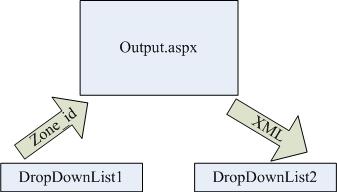
如上图,两个下拉列表控件DropDownList1代表省,DropDownList2代表城市,当DropDownList1发生变化时DropDownList2产生联动,这里使用AJAX技术来实现无刷新联动效果,过程如下:
1、当DropDownList1的值发生变更时会向一页面文件Output.aspx发送GET请求,将当前选中省份的ID传送过去。
2、Output.aspx收到ID,并根据该省份ID从数据库中查询出属于该省份的所有城市列表,以XML方式将数据返回给页面。
3、页面接收到城市数据,重新构造DropDownList2。
代码实现
为方便大家理解,在代码中作了详细注释。
Output.aspx与Output.aspx.cs:
using System;
using System.Data;
using System.Configuration;
using System.Collections;
using System.Web;
using System.Web.Security;
using System.Web.UI;
using System.Web.UI.WebControls;
using System.Web.UI.WebControls.WebParts;
using System.Web.UI.HtmlControls;
using System.Text;

public partial class Service_ZoneXml : System.Web.UI.Page
{
    protected void Page_Load(object sender, EventArgs e)
    {
        if (Request.QueryString["ZoneId"] != null)
        {
            //根据zone_id获取城市列表,以DataTable方式存放。(此处代码根据各自情况编写)
            PaoTiao.IDAL.IAdmin myAdmin = new PaoTiao.DAL.Admin();
            DataTable dt = this.myAdmin.ZoneList(int.Parse(Request.QueryString["ZoneId"]));

            if (dt.Rows.Count > 0)
            {
                //构造xml
                StringBuilder sb = new StringBuilder();
                sb.Append("<?xml version='1.0' encoding='utf-8' ?>");
                sb.Append("<zoneList>");
                for (int i = 0; i < dt.Rows.Count; i++)
                {
                    sb.Append("<zone id='" + dt.Rows[i]["zone_id"].ToString() + "' name='" + dt.Rows[i]["zone_name"] + "' />");
                }
                sb.Append("</zoneList>");

                //输出xml
                Response.Clear();
                Response.ContentType = "text/xml";
                Response.ContentEncoding = System.Text.Encoding.UTF8;
                Response.Write(sb.ToString());
                Response.End();
            }
        }
    }
}
建好该页面后可以后工输入参数测试一下XML输出,比如我的项目中山西省的ID为10:
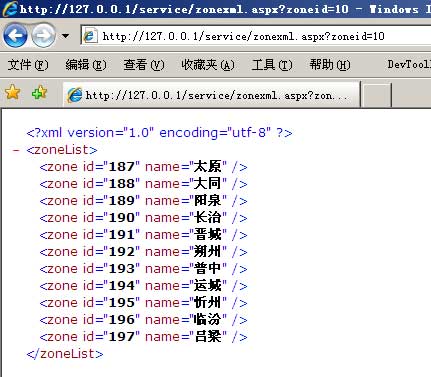
包含DropDownList的主页面:
<!DOCTYPE html PUBLIC "-//W3C//DTD XHTML 1.0 Transitional//EN" "http://www.w3.org/TR/xhtml1/DTD/xhtml1-transitional.dtd">
<html xmlns="http://www.w3.org/1999/xhtml" >
<head>
    <meta http-equiv="Content-Type" content="text/html; charset=utf-8" />
    <script type="text/javascript">
    <!--
    //定义一个全局的xmlhttprequest对象
    var http_request;
    //创建xmlhttprequest对象函数
    function createXMLHttpRequest()
    {
        //针对IE浏览器
        if (window.ActiveXObject)
        {
               http_request = new ActiveXObject("Microsoft.XMLHTTP");
        }
        //针对非IE浏览器
        else if(window.XMLHttpRequest)
        {
               http_request = new XMLHttpRequest();
        }
        if (http_request.overrideMimeType)
        {
            http_request.overrideMimeType('text/xml');
        }
    }
    //定义一个生成随机数的函数,辅助AJAX以防止IE缓存产生的数据重复
    function getRandom()
    {
        var result = new Date();
        return result.getTime();
    }
    //主要实现
    function sendZoneId()
    {
        //创建xmlhttprequest对象
        createXMLHttpRequest();
        //指定接收服务器响应的函数
        http_request.onreadystatechange = function getZoneXml()
        {
            if(http_request.readyState == 4)
            {
                if(http_request.status == 200)
                {
                    //获取xml
                    var xmlDoc = http_request.responseXML;
                    //如果xml不为空
                    if(xmlDoc != null)
                    {
                        //找到待变更的城市控件
                        var dropZone2 = document.getElementById("dropZone2");
                        //清空
                        dropZone2.length = 0;
                        //获取xml根节点
                        var xmlRoot = xmlDoc.documentElement;
                           //遍历根节点
                        for(var i = 0; i < xmlRoot.childNodes.length; i++)
                           {
                            //添加项
                            var itemOption = new Option(xmlRoot.childNodes[i].getAttribute("name"), xmlRoot.childNodes[i].getAttribute("id"));
                            dropZone2.options.add(itemOption);
                        }
                    }
                }
            }
        };
        //异步方式发送GET请求
        http_request.open('GET', '/Service/ZoneXml.aspx?ZoneId='+document.getElementById("dropZone1").value+'&Random='+getRandom(), true);
        http_request.send(null);
    }
    //-->
    </script>
</head>
<body>
<form id="form1" runat="server">
    <!--注:本文基于.net 2.0 示例,DropDownList初始化过程省略;如为其它开发环境,请更改相应的服务端代码-->
    <!--省分,客户端触发onchange事件时调用sendZoneId()函数-->
    <asp:DropDownList runat="server" id="dropZone1" onchange="sendZoneId();"></asp:DropDownList>
    <!--城市-->
    <asp:DropDownList runat="server" id="dropZone2"></asp:DropDownList>
</form>
</body>
</html>

 浙公网安备 33010602011771号