
前端实现页面截图及截图内容包含跨域图片时的处理
项目中遇到需要实现指定位置的截图,采取使用依赖 html2canvas 实现。
参考:https://html2canvas.hertzen.com/
一、实现步骤:
1、下载依赖或者使用官方js文件链接,本文使用的js链接;
2、代码
style
.screen-box {
  padding: 20px;
  background-color: #f5f5f5;
}
html
<div id="screen-box" class="screen-box">
  <h1>这是一个需要截图的区域</h1>
</div>
<button onclick="screenShot()">点击截图</button>
script
<script src="https://html2canvas.hertzen.com/dist/html2canvas.min.js"></srcipt>
<script>
function screenShot() {
  const element = document.getElementById('screen-box');
  html2canvas(element).then(canvas => {
    const img = canvas.toDataURL('image/png');
    downloadImage(img);
  })
}

function downloadImage(imgUrl, fileName = 'image.png') {
  // 1. 创建a标签
  const link = document.createElement('a');
  // 2. 设置下载属性(指定文件名)
  link.download = fileName;
  // 3. 设置图片地址为a标签的href
  link.href = imgUrl;
  // 4. 隐藏a标签(可选,避免页面渲染)
  // link.style.display = 'none';
  // 5. 将a标签添加到DOM中(部分浏览器需要)
  document.body.appendChild(link);
  // 6. 触发点击事件下载
  link.click();
  // 7. 下载后移除a标签(清理DOM)
  document.body.removeChild(link);
}
二、易错:
1、当 html 中包含有同源图片时,此代码可下载的图片文件中包含html的图片;
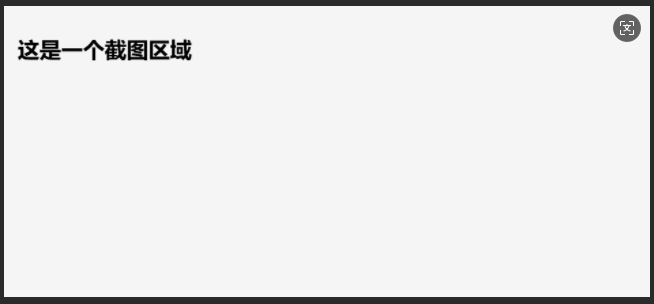
2、当 html 中包含跨域图片时,此代码下载的图片文件会中不会显示html包含的文件。
例如,当需截图的代码片段中含有由第三方引入的图片地址:
html:
<div id="screen-box" class="screen-box">
  <h1>这是一个需要截图的区域</h1>
  <img src="https://gips3.baidu.com/it/u=1821127123,1149655687&fm=3028&app=3028&f=JPEG&fmt=auto?w=720&h=1280"
      height="300px" title="截图区图片" alt="图片" />
</div>
<button onclick="screenShot()">点击截图</button>
截图:
原因:
这是由于 canvas 受限于 CORS 策略, 会存在跨域问题, 虽然可以使用图像, 但是绘制到画布上会污染画布, 一旦一个画布被污染, 就无法提取画布的数据。比如无法使用画布 toBlod() , toDataURL() 或者 getImageData() 方法。
解决办法:
增加代码:
// 将文件读入到 blob 文件对象, 然后使用 URL.createObjectURL 转换成 src 可用的地址
async function toBlob() {
  const domUrl = document.getElementsByTagName('img')[0];
  const response = await fetch(domUrl.src, { mode: 'cors' });
  if (!response.ok) throw new Error('图片请求失败');
  const blob = await response.blob();
  const blobUrl = URL.createObjectURL(blob);
  domUrl.setAttribute('src', blobUrl);
}
修改 screenShot 函数:
async function screenShot() {
  await toBlob();
  ...
}
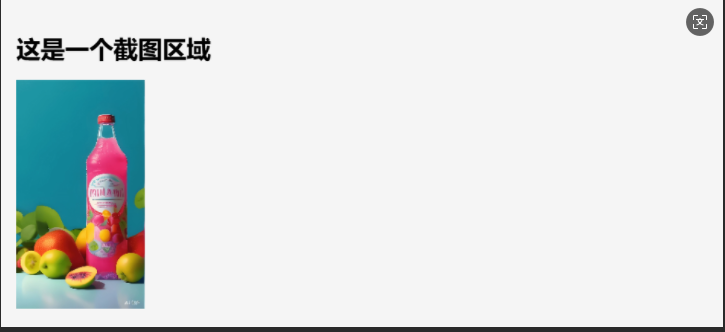
修改代码后,截图如下:
三、本地地址的图片(地址为"file://"开头)不支持此方法
解决办法:
可将图片转码后赋值img标签的src属性再进行操作。
以上。

 浙公网安备 33010602011771号