
零.docker的安装
零、安装 Docker
Docker引擎支持主流的操作系统: windows、macos、linux、uinx。
0.1、centos 安装 Docker
1.提供yum-config-manager的实用程序
yum -y install yum-utils
2.设置docker yum仓库并配置阿里源
yum install -y device-mapper-persistent-data lvm2
yum-config-manager --add-repo https://mirrors.aliyun.com/docker-ce/linux/centos/docker-ce.repo
#官方源:
yum-config-manager --add-repo https://download.docker.com/linux/centos/docker-ce.repo
3.安装docker客户端并启动并查看是否运行
 yum -y install docker-ce
  systemctl enable docker
systemctl start docker
docker run hello-world
0.2、ubuntu 安装 Docker
1.使用官方脚本安装
apt-get update
apt-get install -y curl
#官方源
curl -fsSL https://get.docker.com | bash -s docker --mirror Aliyun
#国内源
curl -sSL https://get.daocloud.io/docker | sh
2.手动安装
安装必要的一些系统工具
sudo apt-get update sudo apt-get -y install apt-transport-https ca-certificates curl software-properties-common
安装GPG证书
curl -fsSL http://mirrors.aliyun.com/docker-ce/linux/ubuntu/gpg | sudo apt-key add -
写入软件源信息
sudo add-apt-repository "deb [arch=amd64] http://mirrors.aliyun.com/docker-ce/linux/ubuntu $(lsb_release -cs) stable"
更新并安装Docker-CE
sudo apt-get -y install docker-ce
测试是否安装成功
sudo docker pull hello-world
sudo docker run hello-world
修改国内镜像源:
sudo tee /etc/docker/daemon.json <<-'EOF'
{
  "registry-mirrors": ["https://dolv75bc.mirror.aliyuncs.com"]
}
EOF
systemctl restart docker
sudo systemctl restart docker
0.3、kali 安装 Docker
1.修改国内镜像源
vim /etc/apt/sources.list

#中科大
deb http://mirrors.ustc.edu.cn/kali kali-rolling main non-free contrib
deb-src http://mirrors.ustc.edu.cn/kali kali-rolling main non-free contrib

#阿里云
deb http://mirrors.aliyun.com/kali kali-rolling main non-free contrib
deb-src http://mirrors.aliyun.com/kali kali-rolling main non-free contrib

#清华大学
#deb http://mirrors.tuna.tsinghua.edu.cn/kali kali-rolling main contrib non-free
#deb-src https://mirrors.tuna.tsinghua.edu.cn/kali kali-rolling main contrib non-free

#浙大
#deb http://mirrors.zju.edu.cn/kali kali-rolling main contrib non-free
#deb-src http://mirrors.zju.edu.cn/kali kali-rolling main contrib non-free

#东软大学
#deb http://mirrors.neusoft.edu.cn/kali kali-rolling/main non-free contribp.kali.org/kali kali-rolling main non-free contrib

#重庆大学
#deb http://http.kali.org/kali kali-rolling main non-free contrib
#deb-src http://http.kali.org/kali kali-rolling main non-free contrib
第一步:更新apt
apt-get update
第二步:安装必要组件
 apt-get install -y apt-transport-https ca-certificates
 apt-get install -y dirmngr
第三步:apt换源[清华教育] 可以选择阿里、中科大等其他源
curl -fsSL https://mirrors.tuna.tsinghua.edu.cn/docker-ce/linux/debian/gpg | sudo apt-key add -
echo 'deb https://mirrors.tuna.tsinghua.edu.cn/docker-ce/linux/debian/ buster stable' | sudo tee /etc/apt/sources.list.d/docker.list
第四步:安装最新版本docker 以及docker文件管理项目
apt-get install -y docker docker-compose
0.4、windows 安装 Docker
下载地址:https://www.docker.com/get-started
2.4.1、开启Hyper-V
1.使用PowerShell启动Hyper-V
以管理员身份打开PowerShell控制台,运行以下命令:
Enable-WindowsOptionalFeature -Online -FeatureName Microsoft-Hyper-V -All
2.通过控制面板“设置”启用Hyper-V角色
win+R输入control 打开控制面板---->程序---->启用或关闭windows功能---->选择Hyper-V----->重启计算机。
然后开始安装Docker Desktop,双击下载的 Docker for Windows Installer 安装文件,一路 Next,点击 Finish 完成安装。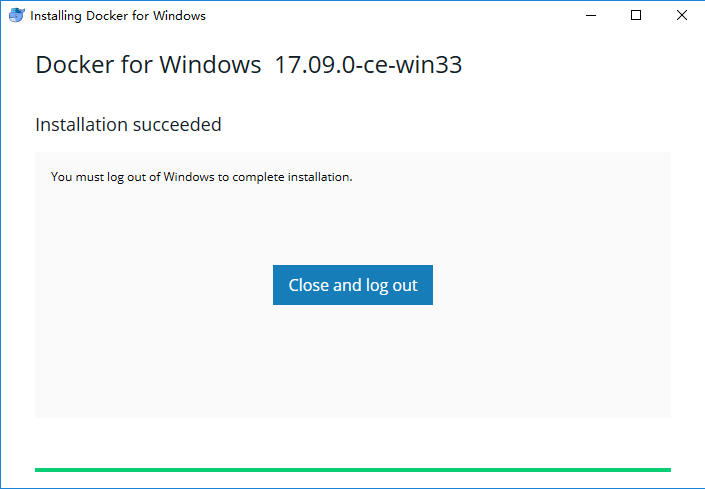
安装完成后,Docker 会自动启动。通知栏上会出现个小鲸鱼的图标
,这表示 Docker 正在运行。
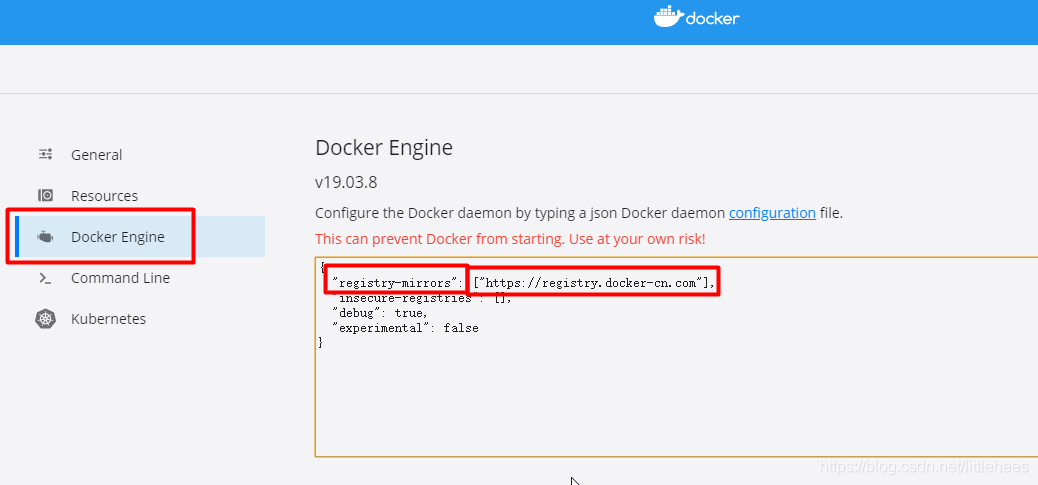
配置加速镜像源:阿里云镜像源地址:https://cr.console.aliyun.com/cn-hangzhou/instances/mirrors 登录后搜索镜像加速器,查看自己专属的连接。

 浙公网安备 33010602011771号