
Java第二次bolg作业
一:前言
1.知识点:
题目集04:共有3道题目,难度较大,考察点线型系列的运算。
题目集06:共有5道题目,难度较小。主要考察字符串的解析及正则表达式的运用和学习。
题目集07:共有3道题,有些难度,主要考察类设计和几何图形相关的运算,及正则表达式的练习。
期中考试:共3道题,考察了类设计,继承与多态及容器类的使用。
链表练习:考察了对链表的理解及设计。
2.题量和难度:
总的来说题量和难度适中,题目也契合阶段性的java学习,考察内容精确,循序渐进,有很好的java学习引导和锻炼作用。
二:设计与分析
1.PTA 题目集07 7-2
图形类设计 点线形系列4-凸四边形的计算
要求:
用户输入一组选项和数据,进行与四边形有关的计算。
以下四边形顶点的坐标要求按顺序依次输入,连续输入的两个顶点是相邻顶点,第一个和最后一个输入的顶点相邻。
选项包括:
1:输入四个点坐标,判断是否是四边形、平行四边形,判断结果输出true/false,结果之间以一个英文空格符分隔。
2:输入四个点坐标,判断是否是菱形、矩形、正方形,判断结果输出true/false,结果之间以一个英文空格符分隔。 若四个点坐标无法构成四边形,输出"not a quadrilateral"
3:输入四个点坐标,判断是凹四边形(false)还是凸四边形(true),输出四边形周长、面积,结果之间以一个英文空格符分隔。 若四个点坐标无法构成四边形,输出"not a quadrilateral"
4:输入六个点坐标,前两个点构成一条直线,后四个点构成一个四边形或三角形,输出直线与四边形(也可能是三角形)相交的交点数量。如果交点有两个,再按面积从小到大输出四边形(或三角形)被直线分割成两部分的面积(不换行)。若直线与四边形或三角形的一条边线重合,输出"The line is coincide with one of the lines"。若后四个点不符合四边形或三角形的输入,输出"not a quadrilateral or triangle"。
后四个点构成三角形的情况:假设三角形一条边上两个端点分别是x、y,边线中间有一点z,另一顶点s:
1)符合要求的输入:顶点重复或者z与xy都相邻,如x x y s、x z y s、x y x s、s x y y。此时去除冗余点,保留一个x、一个y。
2) 不符合要求的输入:z 不与xy都相邻,如z x y s、x z s y、x s z y
5:输入五个点坐标,输出第一个是否在后四个点所构成的四边形(限定为凸四边形,不考虑凹四边形)或三角形(判定方法见选项4)的内部(若是四边形输出in the quadrilateral/outof the quadrilateral,若是三角形输出in the triangle/outof the triangle)。如果点在多边形的某条边上,输出"on the triangle或者on the quadrilateral"。若后四个点不符合四边形或三角形,输出"not a quadrilateral or triangle"。
以下为类设计:
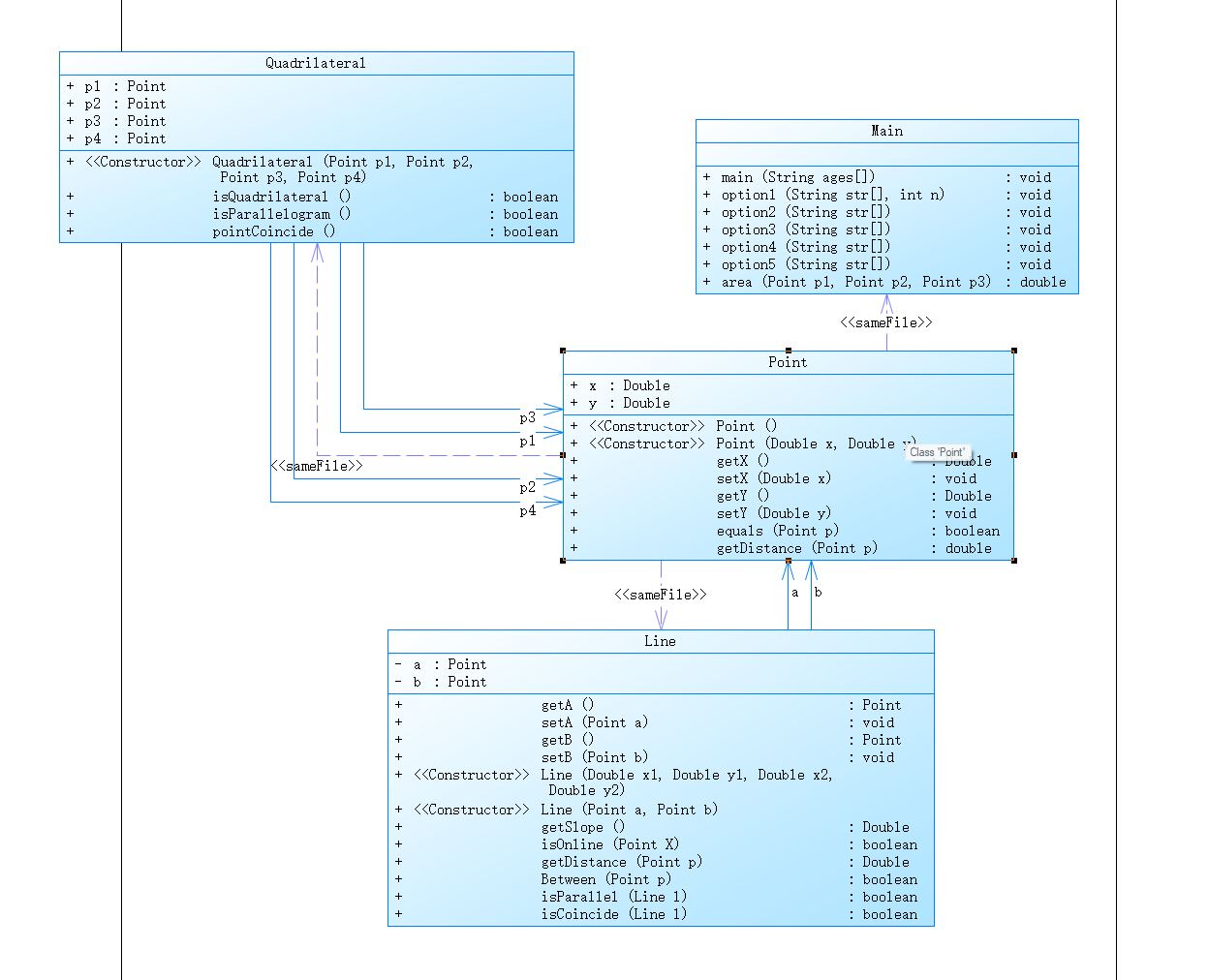
解释与心得:
设计了三个类:点类 Point 线类 Line 四边形类 Quadrilateral
Line 类传入两个Point 构成线 在类内完成两点距离,斜率,点线距离的计算 和判断点在线上,两线平行及是否重合的方法。
在 Quadrilateral 类内传入 4个Point 在类内完成判断是否构成四边形及平行四边形的方法。
采坑心得:
在输出数值的时候容易忽略小数位数的规定
如下:
注意:输出的数据若小数点后超过3位,只保留小数点后3位,多余部分采用四舍五入规则进到最低位。小数点后若不足3位,按原始位数显示,不必补齐。例如:1/3的结果按格式输出为 0.333,1.0按格式输出为1.0
if((((p1.getDistance(p2)+p2.getDistance(p3)+p3.getDistance(p4)+p4.getDistance(p1))*1e3)%10 != 0))
                    System.out.printf("%.3f ",p1.getDistance(p2)+p2.getDistance(p3)+p3.getDistance(p4)+p4.getDistance(p1));
                else
                    System.out.print(p1.getDistance(p2)+p2.getDistance(p3)+p3.getDistance(p4)+p4.getDistance(p1)+" ");
采用该方法进行判断后输出
以下为Point类的代码:
class Point {
    public Double x;
    public Double y;

    public Point(){
    }

    public Point(Double x, Double y) {
        this.x = x;
        this.y = y;
    }

    public Double getX() {
        return x;
    }

    public void setX(Double x) {
        this.x = x;
    }

    public Double getY() {
        return y;
    }

    public void setY(Double y) {
        this.y = y;
    }

    public boolean equals(Point p){
        if(this.x.equals(p.getX()) && Objects.equals(this.y, p.getY())){
            return true;
        }
        else
            return false;
    }

    public double getDistance(Point p){
        return Math.sqrt((p.x-x)*(p.x-x)+(p.y-y)*(p.y-y));
    }


}
Line 类
class Line{
    private Point a;
    private Point b;

    public Point getA() {
        return a;
    }

    public void setA(Point a) {
        this.a = a;
    }

    public Point getB() {
        return b;
    }

    public void setB(Point b) {
        this.b = b;
    }

    public Line(Double x1,Double y1, Double x2 ,Double y2){
        this.a.setX(x1);
        this.a.setY(y1);
        this.b.setX(x2);
        this.b.setY(y2);
    }

    public Line(Point a, Point b) {
        this.a = a;
        this.b = b;
    }

    public Double getSlope(){
        return (b.getY()-a.getY())/(b.getX()-a.getX());
    }

    public boolean isOnline(Point X){//在延长线上
        double slope1 = (X.y-a.y)/(X.x-a.x);
        if(slope1 == getSlope() && !Between(X)){
            return true;
        }
        else
            return false;

    }

    public Double getDistance(Point p){

        double l1 = a.getDistance(p);
        double l2 = b.getDistance(p);
        double l3 = a.getDistance(b);
        double l = (l1 + l2 + l3) / 2;
        double s = Math.sqrt(l * (l - l1) * (l - l2) * (l - l3));// 海伦公式
        return  2 * s / l3;// 返回点到线的距离 用三角形面积求高
    }

    public boolean Between(Point p){//在线内
        return a.getDistance(p) + b.getDistance(p) == a.getDistance(b);
    }

    public boolean isParallel(Line l){
        return Math.abs(getSlope()) == Math.abs(l.getSlope());
    }

    public boolean isCoincide(Line l){//两线重合
        return (a.equals(l.a) && b.equals(l.b)) || (a.equals(l.b) && b.equals(l.a));
    }


    //public Point getIntersection(Line l){}//求两线交点

}
四边形类:
class Quadrilateral{
    public Point p1;
    public Point p2;
    public Point p3;
    public Point p4;

    public Quadrilateral(Point p1, Point p2, Point p3, Point p4) {
        this.p1 = p1;
        this.p2 = p2;
        this.p3 = p3;
        this.p4 = p4;
    }

    public boolean isQuadrilateral(){//任意三个顶点成直线,非四边形

            if ((p4.y - p3.y) * (p4.x - p2.x) == (p4.y - p2.y) * (p4.x - p3.x)||(p4.y - p3.y) * (p4.x - p1.x) == (p4.y - p1.y) * (p4.x - p3.x)||(p4.y - p2.y) * (p4.x - p1.x) == (p4.y - p1.y) * (p4.x - p2.x)||(p3.y - p2.y) * (p3.x - p1.x) == (p3.y - p1.y) * (p3.x - p2.x)) {
                return false;
            }
            else
                return true;
    }

    public boolean isParallelogram(){
        Line line1 = new Line(p1,p2);
        Line line2 = new Line(p2,p3);
        Line line3 = new Line(p3,p4);
        Line line4 = new Line(p4,p1);

        if(line1.isParallel(line3)&&p1.getDistance(p2)==p3.getDistance(p4)){//对边平行相等
            return true;
        }
        else if(line2.isParallel(line4)&&p2.getDistance(p3)==p4.getDistance(p1)){
            return true;
        }
        else{
            return false;
        }

    }
    public boolean pointCoincide(){
        if(p1.equals(p2)|| p3.equals(p4)|| p1.equals(p3)|| p1.equals(p4)||p2.equals(p3)||p2.equals(p4)){
            return true;
        }
        else
            return false;
    }
}
2.双向链表练习
要求:
实现双向链表的设计,要求实现如下功能
判断链表是否为空
获取当前链表节点数量
获取链表中第index个位置的节点的data值
删除链表最后一个节点
删除链表中第index位置的节点
在链表的第index个位置之前插入一个节点,值为theElement,index∈[1,size]
在链表尾插入节点,插入节点data值为element
获取第一个节点的data值
获取链表最后一个节点的data值
类图如下:
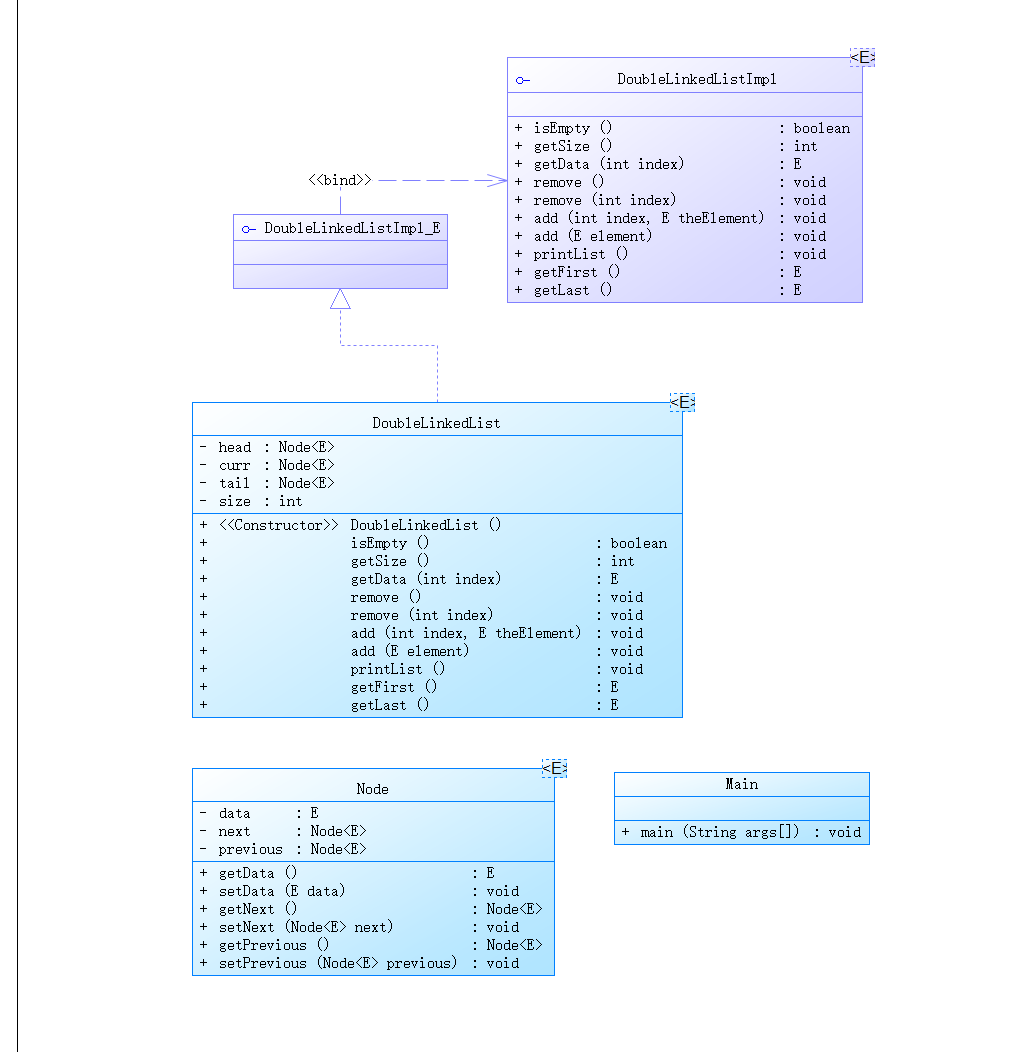
解释与分析:
话不多说 上代码:
删除某个节点 删除最后的节点只要删除尾节点
public void remove(int index) {
        if(index < 1||index>this.size) {
             return ;
         }
         curr = head;
         if(index == 1) {
             curr = head.getNext();
             head.setNext(curr.getNext());
             curr.getNext().setPrevious(head);
         }
         else if(index == this.size) {//设置tail
             tail.getPrevious().setNext(null);
             tail = tail.getPrevious();
         }
         else {
             for(int i=1;i<index;i++) {//找到被删除节点的前一个节点
                 curr = curr.getNext();
             }

             curr.setNext(curr.getNext().getNext());
             curr.getNext().getNext().setPrevious(curr);

         }
         this.size--;
    }
在指定位置添加一个节点的数据
public void add(int index, E theElement) {
//创建新增节点
         Node<E> curr = new Node<>();
         curr.setData(theElement);
         curr.setNext(null);

         if(index == 0) {//插入第一个位置
             head.setNext(curr);
             curr.setPrevious(head);
         }
         else if(index == this.size ) {//插入最后一个位置
             curr.setPrevious(tail);
             this.tail.setNext(curr);
             this.tail = curr;
         }
         else {//插入中间位置
             Node<E> tempNoed =head;
             for(int i=0;i<index;i++) {
                 tempNoed = tempNoed.getNext();
             }

             curr.setNext(tempNoed.getNext());
             tempNoed.getNext().setPrevious(curr);
             tempNoed.setNext(curr);
             curr.setPrevious(tempNoed);

         }
         this.size++;

         if(this.size == 1) {
             tail = curr;
         }
    }
输出链表:
public void printList() {
        curr = head.getNext();
        for(int i = 0;i<size;i++) {
            System.out.print(curr.getData()+" ");
            curr = curr.getNext();
        }
        System.out.println();
    }
采坑心得:
注意在添加或删除后要注意将前后节点的 前驱引用(指针) 后继引用(指针)连接到相应位置。
3.期中考试题集
7-1:
-
设计一个类表示平面直角坐标系上的点Point,私有属性分别为横坐标x与纵坐标y,数据类型均为实型数,除构造方法以及属性的getter与setter方法外,定义一个用于显示信息的方法display(),用来输出该坐标点的坐标信息,格式如下:
(x,y),数值保留两位小数。为简化题目,其中,坐标点的取值范围设定为(0,200]。若输入有误,系统则直接输出Wrong Format -
设计一个类表示平面直角坐标系上的线Line,私有属性除了标识线段两端的点point1、point2外,还有一个字符串类型的color,用于表示该线段的颜色,同样,除构造方法以及属性的getter与setter方法外,定义一个用于计算该线段长度的方法getDistance(),还有一个用于显示信息的方法display(),用来输出线段的相关信息,输出格式如下:
  ```
      The line's color is:颜色值
      The line's begin point's Coordinate is:
      (x1,y1)
      The line's end point's Coordinate is:
      (x2,y2)
      The line's length is:长度值
  ```
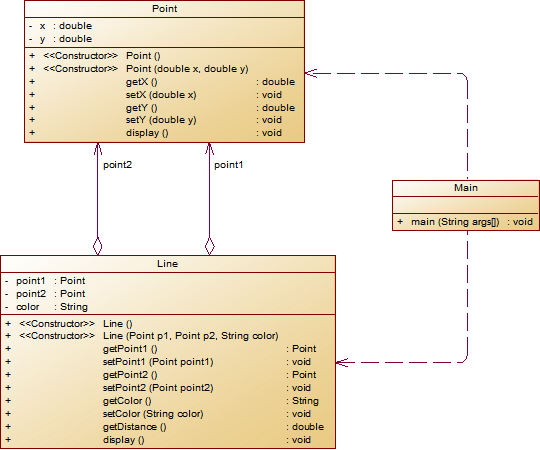
解释与心得:
line 类传入两点构成线并设置了颜色属性 及和Point 类都设计了display 输出内容
代码如下:
class Line {
    private Point a;
    private Point b;

    public Line() {
    }

    public Line(Point a, Point b, String color) {
        this.a = a;
        this.b = b;
        this.color = color;
    }

    private String color;

    public Point getA() {
        return a;
    }

    public void setA(Point a) {
        this.a = a;
    }

    public Point getB() {
        return b;
    }

    public void setB(Point b) {
        this.b = b;
    }

    public String getColor() {
        return color;
    }

    public void setColor(String color) {
        this.color = color;
    }

    public double getDistance(){
        return Math.sqrt((b.getX()-a.getX())*(b.getX()-a.getX())+(b.getY()-a.getY())*(b.getY()-a.getY()));
    }

    public void display(){
        System.out.println("The line's color is:"+color);
        System.out.println("The line's begin point's Coordinate is:");
        a.display();
        System.out.println("The line's end point's Coordinate is:");
        b.display();
        System.out.println("The line's length is:"+String.format("%.2f",getDistance()));
    }


}
class Point {
    private Double x;
    private Double y;

    public Point(){
    }

    public Point(Double x, Double y) {
        this.x = x;
        this.y = y;
    }

    public Double getX() {
        return x;
    }

    public void setX(Double x) {
        this.x = x;
    }

    public Double getY() {
        return y;
    }

    public void setY(Double y) {
        this.y = y;
    }

    public void display(){
        System.out.printf("("+"%.2f"+","+"%.2f"+")",x,y);
        System.out.println();
    }

}
7-2 : 点线面问题重构(继承与多态)
要求:
在“点与线(类设计)”题目基础上,对题目的类设计进行重构,以实现继承与多态的技术性需求。
- 对题目中的点Point类和线Line类进行进一步抽象,定义一个两个类的共同父类Element(抽象类),将display()方法在该方法中进行声明(抽象方法),将Point类和Line类作为该类的子类。
- 再定义一个Element类的子类面Plane,该类只有一个私有属性颜色color,除了构造方法和属性的getter、setter方法外,display()方法用于输出面的颜色,输出格式如下:
The Plane's color is:颜色 - 在主方法内,定义两个Point(线段的起点和终点)对象、一个Line对象和一个Plane对象,依次从键盘输入两个Point对象的起点、终点坐标和颜色值(Line对象和Plane对象颜色相同),然后定义一个Element类的引用,分别使用该引用调用以上四个对象的display()方法,从而实现多态特性。示例代码如下:
      element = p1;//起点Point
      element.display();

      element = p2;//终点Point
      element.display();

      element = line;//线段
      element.display();

      element = plane;//面
      element.display();
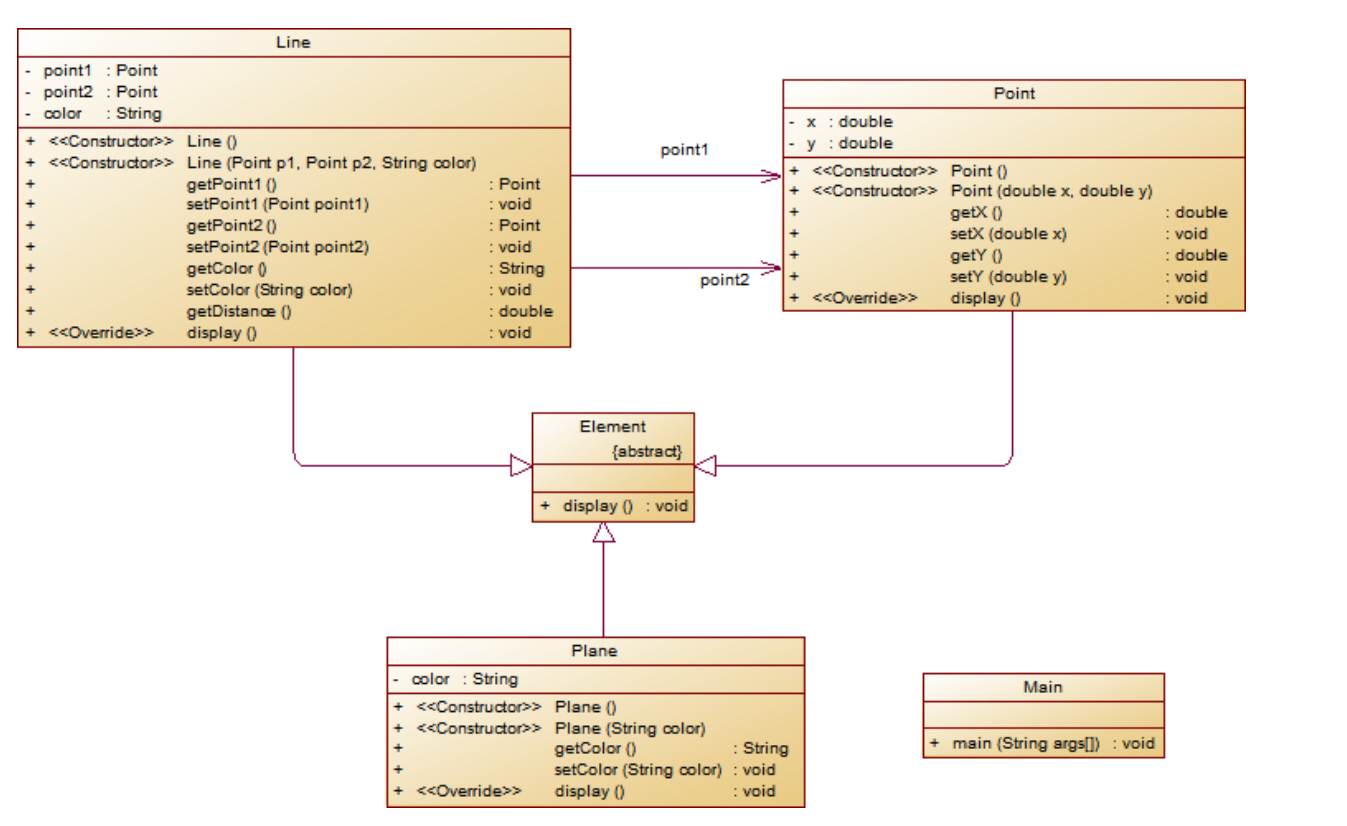
解释与分析:
设计了Point 和 Line 类共同的父类 Element 设置了一个抽象方法display以实现最后的多态。
代码如下:
public class Main {
    public static void main(String[] ages){
        Scanner in = new Scanner(System.in);
        double x1 = in.nextDouble();
        double y1 = in.nextDouble();
        double x2 = in.nextDouble();
        double y2 = in.nextDouble();
        String str = in.next();

        if(x1>0&&x1<=200&&x2>0&&x2<=200&&y1>0&&y1<=200&&y2>0&&y2<=200){
            Element p1 = new Point(x1,y1);
            p1.display();
            Element p2 = new Point(x2,y2);
            p2.display();

            Element line = new Line(new Point(x1,y1),new Point(x2,y2),str);
            line.display();
            Element color = new Plane(str);
            color.display();

        }
        else{
            System.out.println("Wrong Format");
        }
    }
}

class Line extends Element{
    private Point a;
    private Point b;

    public Line() {
    }

    public Line(Point a, Point b, String color) {
        this.a = a;
        this.b = b;
        this.color = color;
    }

    private String color;

    public Point getA() {
        return a;
    }

    public void setA(Point a) {
        this.a = a;
    }

    public Point getB() {
        return b;
    }

    public void setB(Point b) {
        this.b = b;
    }

    public String getColor() {
        return color;
    }

    public void setColor(String color) {
        this.color = color;
    }

    public double getDistance(){
        return Math.sqrt((b.getX()-a.getX())*(b.getX()-a.getX())+(b.getY()-a.getY())*(b.getY()-a.getY()));
    }

    public void display(){
        System.out.println("The line's color is:"+color);
        System.out.println("The line's begin point's Coordinate is:");
        a.display();
        System.out.println("The line's end point's Coordinate is:");
        b.display();
        System.out.println("The line's length is:"+String.format("%.2f",getDistance()));
    }


}
class Point extends Element{
    private Double x;
    private Double y;

    public Point(){
    }

    public Point(Double x, Double y) {
        this.x = x;
        this.y = y;
    }

    public Double getX() {
        return x;
    }

    public void setX(Double x) {
        this.x = x;
    }

    public Double getY() {
        return y;
    }

    public void setY(Double y) {
        this.y = y;
    }

    public void display(){
        System.out.printf("("+"%.2f"+","+"%.2f"+")",x,y);
        System.out.println();
    }

}

abstract class Element{

    public abstract void display();
}

class Plane extends Element{
    private String color;


    public Plane() {

    }


    public Plane(String str) {
        this.color = str;
    }


    public String getColor() {
        return color;
    }


    public void setColor(String color) {
        this.color = color;
    }


    public void display() {
        System.out.println("The Plane's color is:"+color);
    }
}
在“点与线(继承与多态)”题目基础上,对题目的类设计进行重构,增加容器类保存点、线、面对象,并对该容器进行相应增、删、遍历操作。
- 在原有类设计的基础上,增加一个GeometryObject容器类,其属性为
ArrayList<Element>类型的对象(若不了解泛型,可以不使用<Element>) - 增加该类的
add()方法及remove(int index)方法,其功能分别为向容器中增加对象及删除第index - 1(ArrayList中index>=0)个对象 - 在主方法中,用户循环输入要进行的操作(choice∈[0,4]),其含义如下:
- 1:向容器中增加Point对象
- 2:向容器中增加Line对象
- 3:向容器中增加Plane对象
- 4:删除容器中第index - 1个数据,若index数据非法,则无视此操作
- 0:输入结束
   choice = input.nextInt();
    while(choice != 0) {
        switch(choice) {
        case 1://insert Point object into list
          ...
            break;
        case 2://insert Line object into list
            ...
            break;
        case 3://insert Plane object into list
            ...
            break;
        case 4://delete index - 1 object from list
            int index = input.nextInt();
            ...
        }
        choice = input.nextInt();
    }
同样有类图:
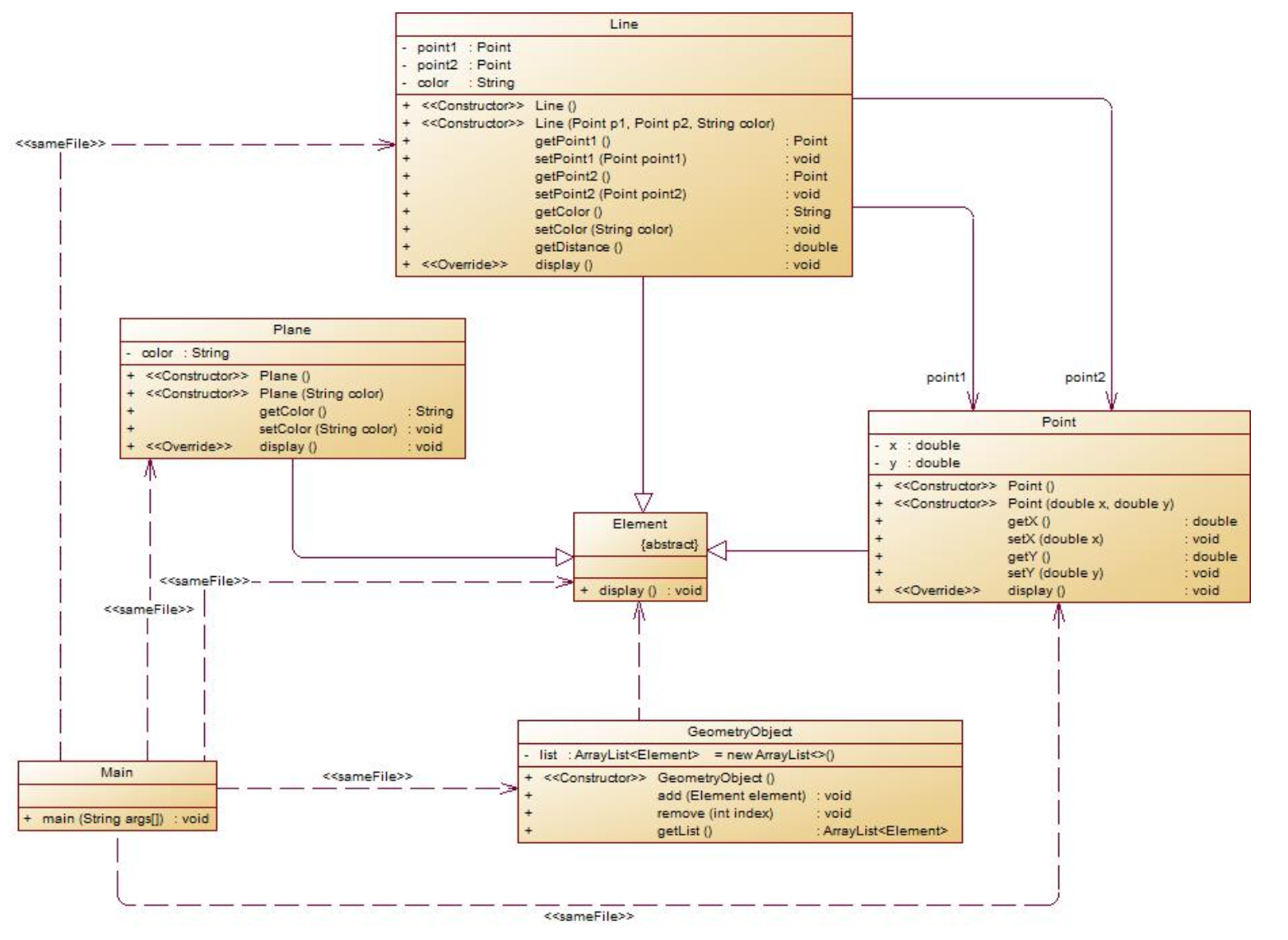
解释与心得:
代码如下:
容器类:
class GeometryObject{
    private ArrayList<Element> list = new ArrayList<>();

    public ArrayList<Element> getList() {
        return list;
    }

    public void add(Element element){
        list.add(element);
    }

    public void remove(int index){
        list.remove(index);
    }
}
主函数:
public class Main {
    public static void main(String[] ages){
        Scanner in = new Scanner(System.in);
        int choice = in.nextInt();
        GeometryObject g = new GeometryObject();
        while(choice!=0){
            switch(choice) {
                case 1://insert Point object into list
                    double x1 = in.nextDouble();
                    double y1 = in.nextDouble();
                    if(x1<=0||y1<=0||x1>200||y1>200){
                        System.out.println("Wrong Format");
                        System.exit(0);
                    }
                    Element p1 = new Point(x1,y1);
                    g.add(p1);
                    break;
                case 2://insert Line object into list
                    double x = in.nextDouble();
                    double y = in.nextDouble();
                    double x2 = in.nextDouble();
                    double y2 = in.nextDouble();
                    String str = in.next();
                    if(x<=0||y<=0||x>200||y>200||x2<=0||y2<=0||x2>200||y2>200){
                        System.out.println("Wrong Format");
                        System.exit(0);
                    }
                    Element line = new Line(new Point(x,y),new Point(x2,y2),str);
                    g.add(line);
                    break;
                case 3://insert Plane object into list
                    Element Plane = new Plane(in.next());
                    g.add(Plane);
                    break;
                case 4://delete index - 1 object from list
                    int i = in.nextInt();
                    if(i-1>= g.getList().size()||i-1<0){
                        choice = in.nextInt();
                        continue;
                    }
                    else{
                        g.remove(i-1);
                    }
                    break;


                default:
                    System.out.println("Wrong Format");
            }
            choice = in.nextInt();
        }
        for(Element e: g.getList()){
            e.display();
        }
    }
}
采坑❤得:
注意输出两位数和点的范围。注意删除容器中第index - 1个数据,若index数据非法,则无视此操作。
三:改进建议
在类设计上要符合单一职责原则,降低类与类间的耦合性,改进代码结构,让代码更加高效。
四:总结
在这阶段的学习中,学习了正则表达式的使用,加强了类设计,容器,继承与多态的练习。

 浙公网安备 33010602011771号