
解决 Spring Boot 中读取配置文件出现中文乱码问题
问题描述
-
在
application.properties文件中添加如下代码:自定义配置 Property
com.neo.title=Spring Boot 2.0
com.neo.description=自定义配置项 -
自定义配置类
@Component
public class NeoProperties {@Value("${com.neo.title}")
private String title;@Value("${com.neo.description}")
private String description;public String getTitle() {
return title;
}public void setTitle(String title) {
this.title = title;
}public String getDescription() {
return description;
}public void setDescription(String description) {
this.description = description;
}
} -
使用自定义配置类,获取属性信息
@RestController
@RequestMapping(value = "/api/neo")
public class NeoController {@Autowired
NeoProperties neoProperties;@GetMapping(value = "/test")
public String aopTest() {
JSONObject obj = new JSONObject();
obj.put("title", neoProperties.getTitle());
obj.put("description", neoProperties.getDescription());
return obj.toString();
}
}访问
127.0.0.1:8080/api/neo/test,返回结果出现中文乱码。
解决方法(Idea)
-
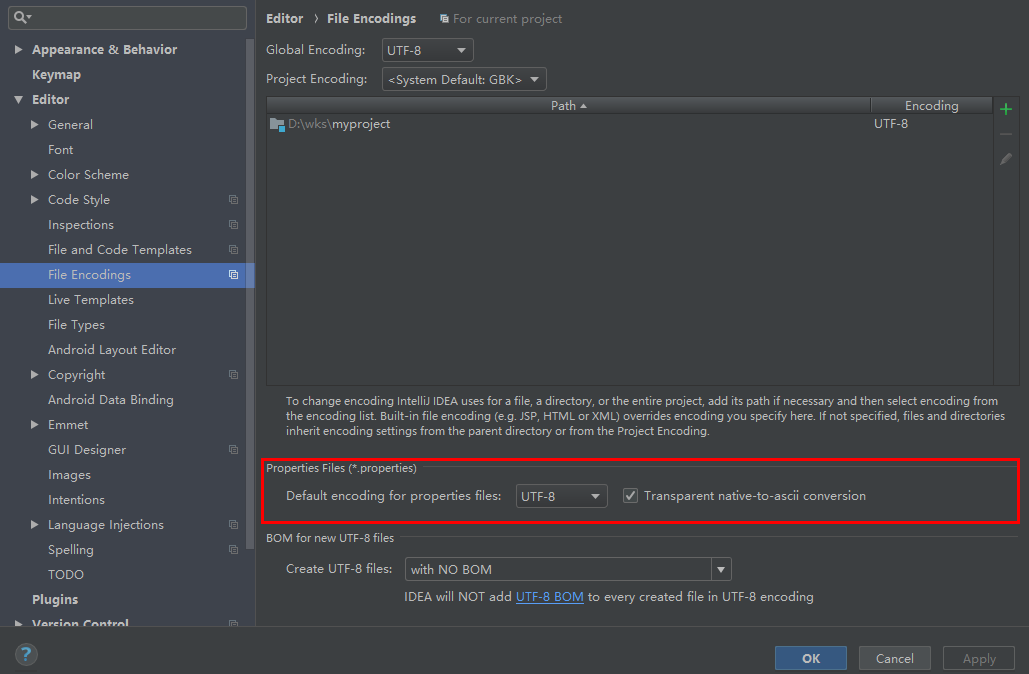
ctrl + alt + s打开settings页面或者依次点击File->Sttings -
选择
Editor->File Encodings -
将
Properties Files (*.properties)下的Default encoding for properties files设置为UTF-8 -
勾选
Transparent native-to-ascii conversion
 posted on

 浙公网安备 33010602011771号