


102102126吴启严数据采集与融合技术实践作业三
作业内容
gitee
作业①:
要求:
指定一个网站,爬取这个网站中的所有的所有图片,例如:中国气象网(http://www.weather.com.cn)。使用scrapy框架分别实现单线程和多线程的方式爬取。
–务必控制总页数(学号尾数2位)、总下载的图片数量(尾数后3位)等限制爬取的措施。
输出信息:
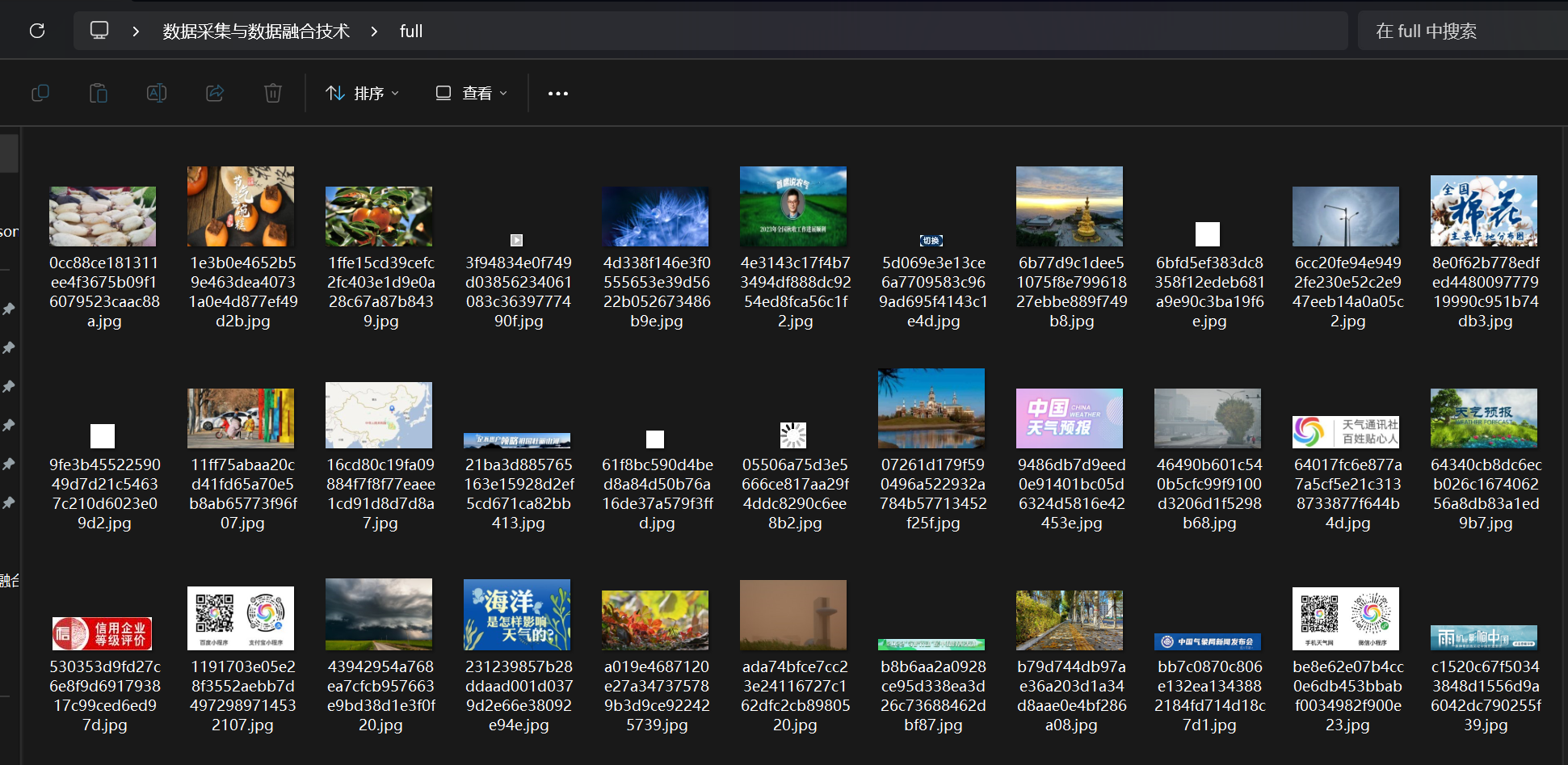
将下载的Url信息在控制台输出,并将下载的图片存储在images子文件中,并给出截图。
代码如下:
-
定义爬虫:
编辑weather_images/weather_images/spiders/weather_spider.py文件,以实现以下爬虫定义:import scrapy from scrapy.linkextractors import LinkExtractor from scrapy.spiders import CrawlSpider, Rule class WeatherSpider(CrawlSpider): name = 'weather_spider' allowed_domains = ['weather.com.cn'] start_urls = ['http://www.weather.com.cn'] total_pages = 0 # 初始化已爬取的页面数 total_images = 0 # 初始化已下载的图片数 max_pages = 26 # 你的学号尾数2位 max_images = 126 # 你的尾数后3位 rules = ( Rule(LinkExtractor(), callback='parse_item', follow=True), ) def parse_item(self, response): if self.total_pages < self.max_pages: self.total_pages += 1 img_urls = response.css('img::attr(src)').extract() for img_url in img_urls: if self.total_images < self.max_images: self.total_images += 1 yield { 'image_url': response.urljoin(img_url), } -
配置Scrapy设置:
编辑weather_images/weather_images/settings.py文件,以添加以下设置:ITEM_PIPELINES = { 'scrapy.pipelines.images.ImagesPipeline': 1, } IMAGES_STORE = r'D:\桌面\数据采集与数据融合技术\full' # 图片将被保存在项目根目录的images子文件夹中 CONCURRENT_REQUESTS = 1 # 单线程 # 为了多线程,可以将CONCURRENT_REQUESTS设置为一个更高的值
URL如下:
点击查看代码
https://i.i8tq.com/weather2020/search/rbAd.jpg
https://i.i8tq.com/weather2020/search/rbAd.jpg
https://i.i8tq.com/weather2020/search/rbAd.jpg
https://i.i8tq.com/weather2020/search/rbAd.jpg
http://pi.weather.com.cn/i//product/pic/l/sevp_nsmc_wxbl_fy4a_etcc_achn_lno_py_20231024234500000.jpg
http://pic.weather.com.cn/images/cn/photo/2023/10/24/202310240901372B0E8FDF7D8ED736C3BF947676D00ADA.jpg
http://pic.weather.com.cn/images/cn/photo/2023/10/24/2023102409575512407332009374DDA12F1788006B444F.jpg
http://pic.weather.com.cn/images/cn/photo/2023/10/24/2023102411140839FCD91101374DD69FD3ABD5A86259CA.jpg
http://pi.weather.com.cn/i//product/pic/m/sevp_nmc_stfc_sfer_er24_achn_l88_p9_20231025010002400.jpg
http://i.weather.com.cn/images/cn/video/lssj/2023/10/24/20231024160107F79724290685BB5A07B8E240DD90185B_m.jpg
http://i.weather.com.cn/images/cn/index/2023/08/14/202308141514280EB4780D353FB4038A49F4980BFDA8F4.jpg
http://i.tq121.com.cn/i/weather2014/index_neweather/v.jpg
https://i.i8tq.com/video/index_v2.jpg
https://i.i8tq.com/adImg/tanzhonghe_pc1.jpg
http://i.weather.com.cn/images/cn/life/shrd/2023/10/17/202310171416368174046B224C8139BAD7CC113E3B54B2.jpg
http://i.weather.com.cn/images/cn/life/shrd/2023/10/16/20231016172856E95A6146BB0849E1C165777507CEAB0D.jpg
http://i.weather.com.cn/images/cn/life/shrd/2023/10/16/20231016163046E594C5EB7CD06C31B6452B01A097907E.jpg
http://i.weather.com.cn/images/cn/life/shrd/2023/10/16/2023101610255146894E5E20CD8F84ABB5C4EDA8F7223E.jpg
http://i.weather.com.cn/images/cn/life/shrd/2023/09/27/202309271054160CE1AF5F9EC5516A795F3528B5C1A284.jpg
http://i.weather.com.cn/images/cn/life/shrd/2023/09/25/202309251837219DDB4EB6B391A780A1E027DA3CA553A6.jpg
http://i.weather.com.cn/images/cn/sjztj/2020/07/20/20200720142523B5F07D41B4AC4336613DA93425B35B5E_xm.jpg
http://pic.weather.com.cn/images/cn/photo/2019/10/28/20191028144048D58023A73C43EC6EEB61610B0AB0AD74_xm.jpg
http://pic.weather.com.cn/images/cn/photo/2023/10/20/20231020170222F2252A2BD855BFBEFFC30AE770F716FB.jpg
http://pic.weather.com.cn/images/cn/photo/2023/10/24/20231024152112F91EE473F63AC3360E412346BC26C108.jpg
http://pic.weather.com.cn/images/cn/photo/2023/10/24/202310240901372B0E8FDF7D8ED736C3BF947676D00ADA.jpg
http://pic.weather.com.cn/images/cn/photo/2023/09/20/2023092011133671187DBEE4125031642DBE0404D7020D.jpg
http://pic.weather.com.cn/images/cn/photo/2023/10/16/20231016145553827BF524F4F576701FFDEC63F894DD29.jpg
http://i.weather.com.cn/images/cn/news/2021/05/14/20210514192548638D53A47159C5D97689A921C03B6546.jpg
http://i.weather.com.cn/images/cn/news/2021/03/26/20210326150416454FB344B92EC8BD897FA50DF6AD15E8.jpg
http://i.weather.com.cn/images/cn/science/2020/07/28/202007281001285C97A5D6CAD3BC4DD74F98B5EA5187BF.jpg
http://pi.weather.com.cn/i//product/pic/m/sevp_nmc_stfc_sfer_er24_achn_l88_p9_20231025010002400.jpg
http://pi.weather.com.cn/i//product/pic/m/sevp_nsmc_wxbl_fy4a_etcc_achn_lno_py_20231024234500000.jpg
部分结果图片如下
心得体会:
了解多线程相较于单线程的处理方式。
作业②:
要求:
熟练掌握 scrapy 中 Item、Pipeline 数据的序列化输出方法;使用scrapy框架+Xpath+MySQL数据库存储技术路线爬取股票相关信息。
候选网站:东方财富网:https://www.eastmoney.com/
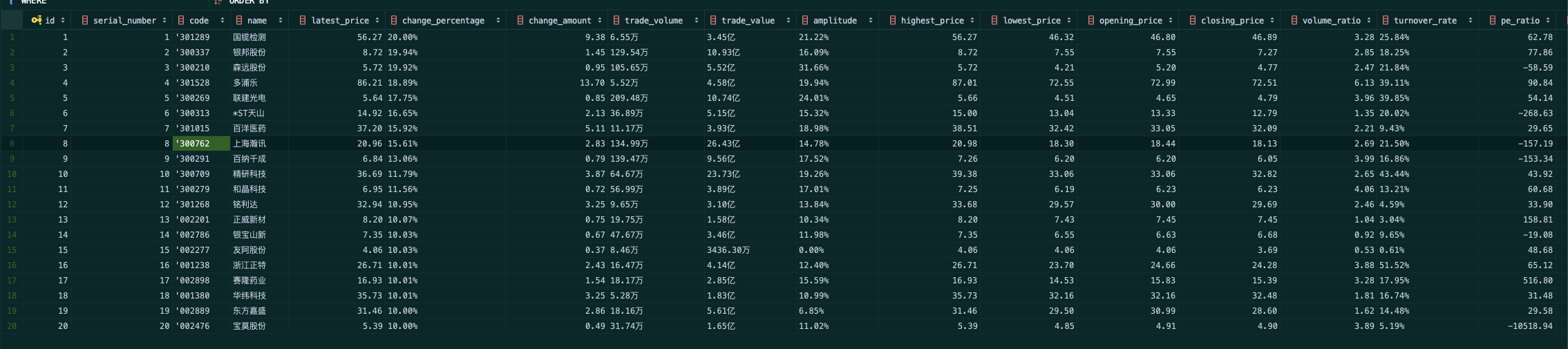
输出信息:MySQL数据库存储和输出格式如下:
表头英文命名例如:序号id,股票代码:
具体代码步骤如下:
创建一个股票信息爬虫使用Scrapy框架,XPath和MySQL可能包括几个主要步骤。请注意,开发这种爬虫可能需要一些时间,并且需要一定的编程知识。以下是基本步骤的概述:
-
定义Item:
import scrapy class StockItem(scrapy.Item): id = scrapy.Field() bStockNo = scrapy.Field() name = scrapy.Field() latest_price = scrapy.Field() change_percent = scrapy.Field() change_amount = scrapy.Field() volume = scrapy.Field() amplitude = scrapy.Field() high = scrapy.Field() low = scrapy.Field() opening = scrapy.Field() closing = scrapy.Field() -
创建Spider:
import scrapy from items import StockItem class StockSpider(scrapy.Spider): name = "stock" start_urls = ['https://www.eastmoney.com/'] def parse(self, response): # 使用XPath选择器抽取数据 for stock in response.xpath('//your_xpath_selector'): item = StockItem() item['id'] = stock.xpath('your_xpath_selector').extract_first() item['bStockNo'] = stock.xpath('your_xpath_selector').extract_first() # ...为其他字段重复此操作 yield item -
配置Pipeline以存储数据到MySQL:
import mysql.connector

class StockPipeline(object):
    def __init__(self):
        self.conn = mysql.connector.connect(
            host='your_host',
            user='your_user',
            passwd='your_password',
            db='your_database'
        )
        self.cursor = self.conn.cursor()

    def process_item(self, item, spider):
        sql = "INSERT INTO your_table_name (id, bStockNo, name, latest_price, change_percent, change_amount, volume, amplitude, high, low, opening, closing) VALUES (%s, %s, %s, %s, %s, %s, %s, %s, %s, %s, %s, %s)"
        values = (item['id'], item['bStockNo'], item['name'], item['latest_price'], item['change_percent'], item['change_amount'], item['volume'], item['amplitude'], item['high'], item['low'], item['opening'], item['closing'])
        self.cursor.execute(sql, values)
        self.conn.commit()
        return item

    def close_spider(self, spider):
        self.cursor.close()
        self.conn.close()
运行后结果如下
心得体会
对scrapy有了更深的体会。
作业③:
要求:
熟练掌握 scrapy 中 Item、Pipeline 数据的序列化输出方法;使用scrapy框架+Xpath+MySQL数据库存储技术路线爬取外汇网站数据。
候选网站:中国银行网:https://www.boc.cn/sourcedb/whpj/
具体代码步骤如下:
- 创建Item:
- 在项目的
items.py文件中定义一个Item类来保存外汇数据。
- 在项目的
import scrapy

class ExchangeRateItem(scrapy.Item):
    currency = scrapy.Field()
    tbp = scrapy.Field()
    cbp = scrapy.Field()
    tsp = scrapy.Field()
    csp = scrapy.Field()
    time = scrapy.Field()
- 创建Spider:
- 创建一个新的Spider类来爬取外汇数据。
import scrapy
from item1 import ExchangeRateItem

class ExchangeRateSpider(scrapy.Spider):
    name = 'exchange_rate'
    start_urls = ['https://www.boc.cn/sourcedb/whpj/']

    def parse(self, response):
        rows = response.xpath('//table[@class="publish"]/tr')[1:]
        for row in rows:
            item = ExchangeRateItem()
            item['currency'] = row.xpath('td[1]/text()').get()
            item['tbp'] = row.xpath('td[2]/text()').get()
            item['cbp'] = row.xpath('td[3]/text()').get()
            item['tsp'] = row.xpath('td[4]/text()').get()
            item['csp'] = row.xpath('td[5]/text()').get()
            item['time'] = row.xpath('td[6]/text()').get()
            yield item
- 创建Pipeline:
- 创建一个新的Pipeline类来将外汇数据保存到MySQL数据库。
import mysql.connector

class MySQLPipeline(object):

    def open_spider(self, spider):
        self.conn = mysql.connector.connect(
            host='your_host',
            user='your_username',
            passwd='your_password',
            db='your_database'
        )
        self.cursor = self.conn.cursor()

    def close_spider(self, spider):
        self.conn.commit()
        self.conn.close()

    def process_item(self, item, spider):
        self.cursor.execute("""
            INSERT INTO exchange_rates (currency, tbp, cbp, tsp, csp, time)
            VALUES (%s, %s, %s, %s, %s, %s)
        """, (
            item['currency'],
            item['tbp'],
            item['cbp'],
            item['tsp'],
            item['csp'],
            item['time']
        ))
        return item
在settings.py文件中启用新创建的Pipeline:
ITEM_PIPELINES = {
    'exchange_rate.pipelines.MySQLPipeline': 300,
}
- 创建MySQL数据库和表:
- 在MySQL中创建一个新的数据库和表来保存外汇数据。
CREATE DATABASE your_database;
USE your_database;
CREATE TABLE exchange_rates (
    id INT AUTO_INCREMENT PRIMARY KEY,
    currency VARCHAR(255),
    tbp DECIMAL(10,2),
    cbp DECIMAL(10,2),
    tsp DECIMAL(10,2),
    csp DECIMAL(10,2),
    time TIME
);
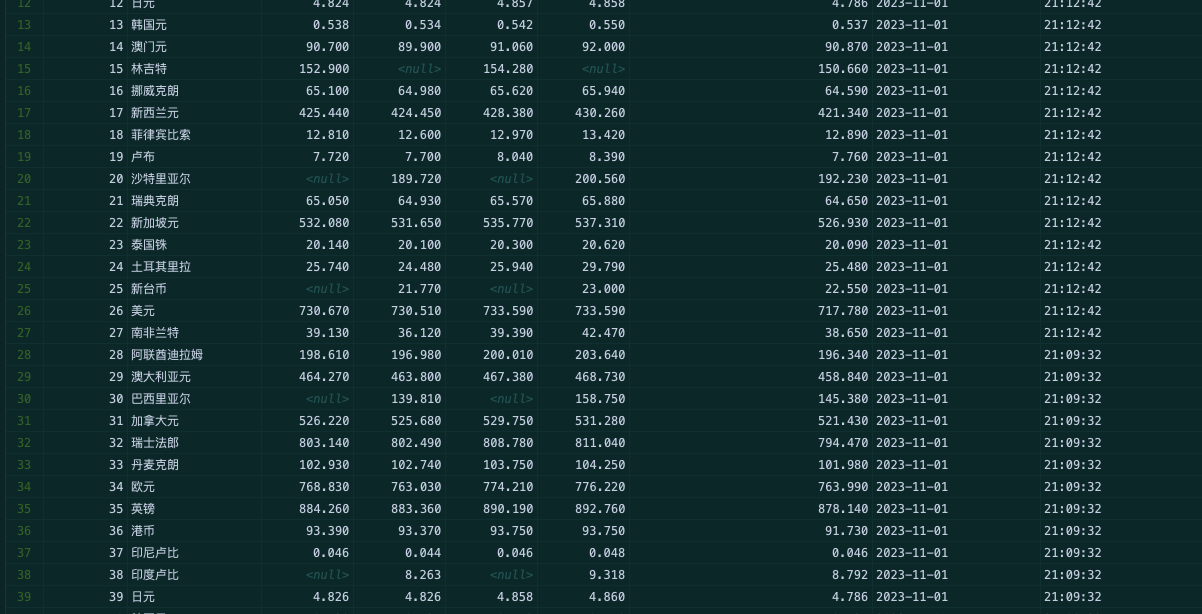
运行结果:
心得体会:
对scrapy和mysql有了更深的体会。

 浙公网安备 33010602011771号