


102102126 吴启严 数据采集与融合技术实践作业二
第二次作业
一、作业内容
作业①:
要求:在中国气象网http://www.weather.com.cn给定城市集的7日天气预报,并保存在数据库。
输出信息:
Gitee文件夹链接
代码如下:
点击查看代码
import requests
from bs4 import BeautifulSoup
import sqlite3
import logging

logging.basicConfig(level=logging.INFO)

class WeatherDB:
    def __init__(self, db_name):
        self.db_name = db_name

    def __enter__(self):
        self.con = sqlite3.connect(self.db_name)
        self.cursor = self.con.cursor()
        self.create_table()
        return self

    def __exit__(self, exc_type, exc_val, exc_tb):
        self.con.commit()
        self.con.close()

    def create_table(self):
        self.cursor.execute(
            "CREATE TABLE IF NOT EXISTS weathers (wCity VARCHAR(16), wDate VARCHAR(16), wWeather VARCHAR(64), wTemp VARCHAR(32), PRIMARY KEY (wCity, wDate))")

    def insert(self, city, date, weather, temp):
        try:
            self.cursor.execute("INSERT INTO weathers (wCity, wDate, wWeather, wTemp) VALUES (?, ?, ?, ?)",
                                (city, date, weather, temp))
        except sqlite3.IntegrityError:
            logging.warning(f"Duplicate entry for {city} on {date}")
        except Exception as e:
            logging.error(str(e))

class WeatherForecast:
    def __init__(self):
        self.headers = {
            "User-Agent": "Mozilla/5.0 (Windows NT 10.0; Win64; x64) AppleWebKit/537.36 (KHTML, like Gecko) Chrome/91.0.4472.124 Safari/537.36"}
        self.cityCode = {"北京": "101010100", "上海": "101020100", "广州": "101280101", "深圳": "101280601", "福州": "101230101"}

    def get_forecast(self, city):
        if city not in self.cityCode:
            logging.error(f"{city} code cannot be found")
            return None

        url = f"http://www.weather.com.cn/weather/{self.cityCode[city]}.shtml"
        response = requests.get(url, headers=self.headers)
        if response.status_code != 200:
            logging.error(f"Failed to get data for {city}")
            return None

        response.encoding = 'utf-8'  # Ensure using UTF-8 encoding
        soup = BeautifulSoup(response.text, 'lxml')
        lis = soup.select("ul[class='t clearfix'] li")

        forecasts = []
        for li in lis:
            try:
                date = li.select('h1')[0].text
                weather = li.select('p[class="wea"]')[0].text
                temp = li.select('p[class="tem"] span')[0].text + "/" + li.select('p[class="tem"] i')[0].text
                forecasts.append((city, date, weather, temp))
            except Exception as e:
                logging.error(f"Error processing data for {city}: {str(e)}")
        return forecasts

    def print_forecasts(self, city):
        forecasts = self.get_forecast(city)
        if forecasts:
            print(f"{city}天气信息:")
            print("序号\t日期\t\t天气信息\t温度")
            for i, (c, date, weather, temp) in enumerate(forecasts, start=1):
                print(f"{i}\t{date}\t{weather}\t{temp}")
        else:
            print(f"No forecast data available for {city}")

with WeatherDB("weathers.db") as db:
    wf = WeatherForecast()
    for city in ["北京", "上海", "广州", "深圳", "福州"]:
        forecasts = wf.get_forecast(city)
        if forecasts:
            for forecast in forecasts:
                db.insert(*forecast)
            wf.print_forecasts(city)  # Print weather forecast

logging.info("Completed")
运行结果:
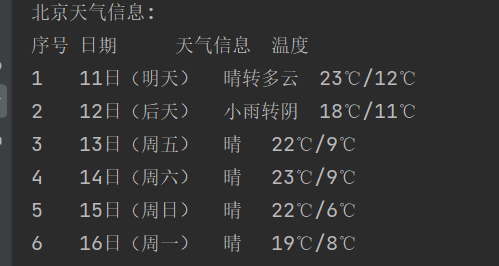
心得体会:通过爬取网站数据,了解了bs库的使用,对数据库有进一步的理解
作业②
要求:用requests和BeautifulSoup库方法定向爬取股票相关信息,并存储在数据库中。
候选网站:东方财富网:https://www.eastmoney.com/
新浪股票:http://finance.sina.com.cn/stock/
技巧:在谷歌浏览器中进入F12调试模式进行抓包,查找股票列表加载使用的url,并分析api返回的值,并根据所要求的参数可适当更改api的请求参数。根据URL可观察请求的参数f1、f2可获取不同的数值,根据情况可删减请求的参数。
参考链接:https://zhuanlan.zhihu.com/p/50099084
输出信息:
Gitee文件夹链接
代码如下:
点击查看代码
import requests
from bs4 import BeautifulSoup
import pandas as pd

def fetch_stock_data():
    print("开始运行脚本...")

    # 存储所有页的股票数据
    all_data = pd.DataFrame()

    # 爬取前 n 页的数据
    num_pages_to_scrape = 5  # 你可以根据需要修改这个值

    for page in range(1, num_pages_to_scrape + 1):
        print(f"获取第 {page} 页的数据...")

        url = f'http://quote.eastmoney.com/center/gridlist.html#hs_a_board'

        try:
            response = requests.get(url)
            response.raise_for_status()  # 检查请求是否成功

            soup = BeautifulSoup(response.text, 'html.parser')

            table = soup.find('table', class_='table_wrapper-table')

            if table:
                # 使用 pandas 读取表格数据
                df = pd.read_html(str(table), header=0)[0]

                # 在这里进行必要的数据清洗和转换

                # 添加数据到总的 DataFrame 中
                all_data = pd.concat([all_data, df], ignore_index=True)
            else:
                print(f"没有在第 {page} 页找到带有 class 'table_wrapper-table' 的表格")
                continue  # 跳过当前迭代,继续下一个页面的抓取

        except Exception as e:
            print("获取数据时出错:", e)
            break  # 如果出错,停止爬取

    print(all_data)

    # 保存数据到 CSV 文件
    all_data.to_csv('stocks.csv', index=False, encoding='utf-8-sig')

    print("数据保存成功。")

fetch_stock_data()
运行结果:
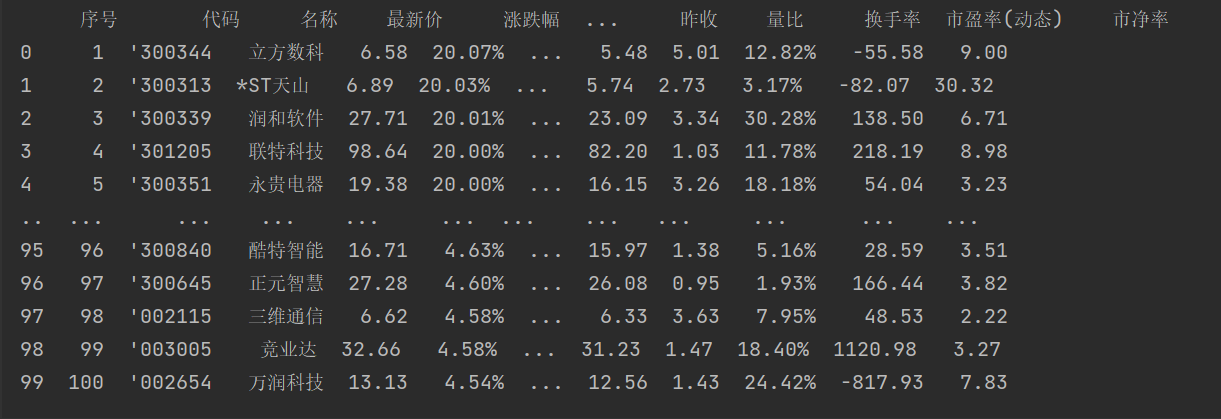
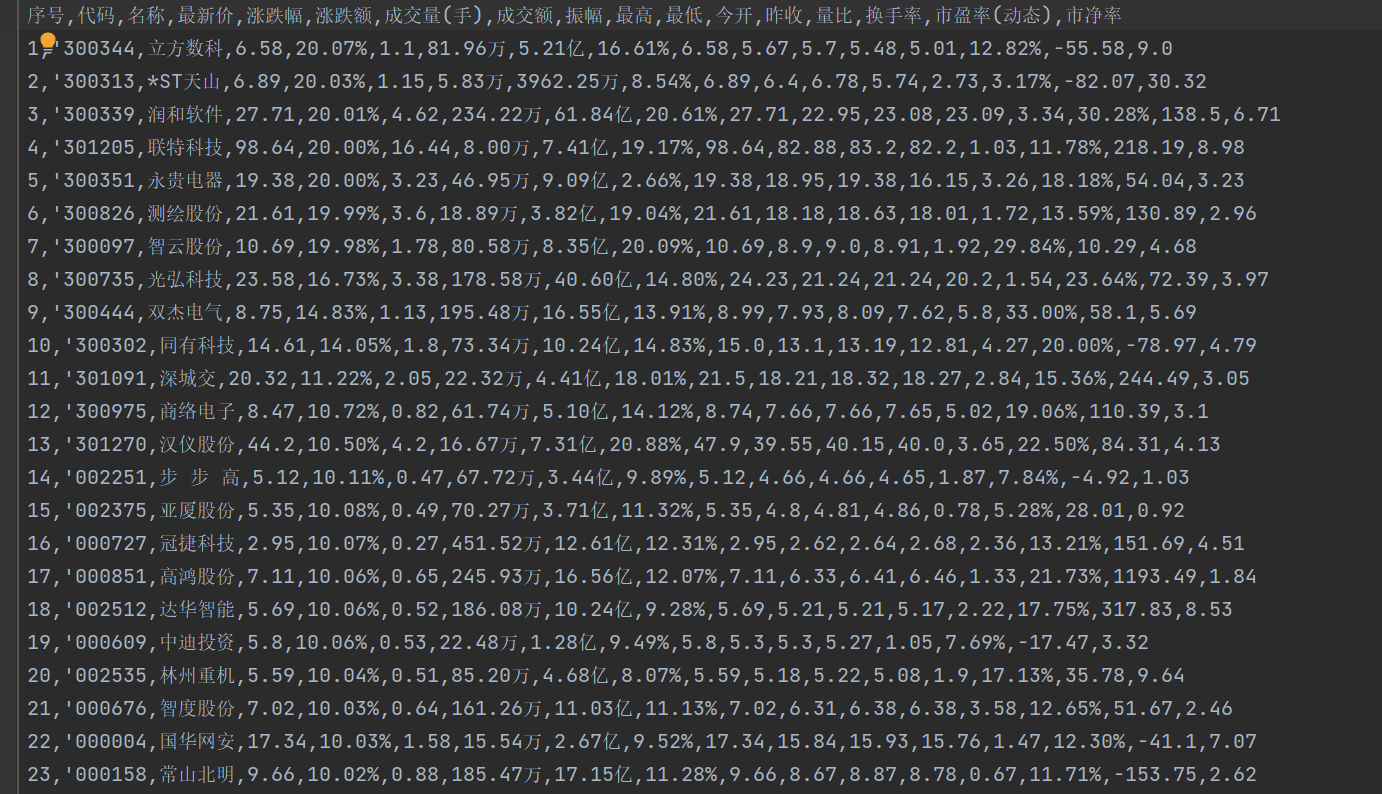
心得体会:进行了一系列url的对比,对网页爬取有更深刻的认识,学习了如何进行数据转换。
作业③:
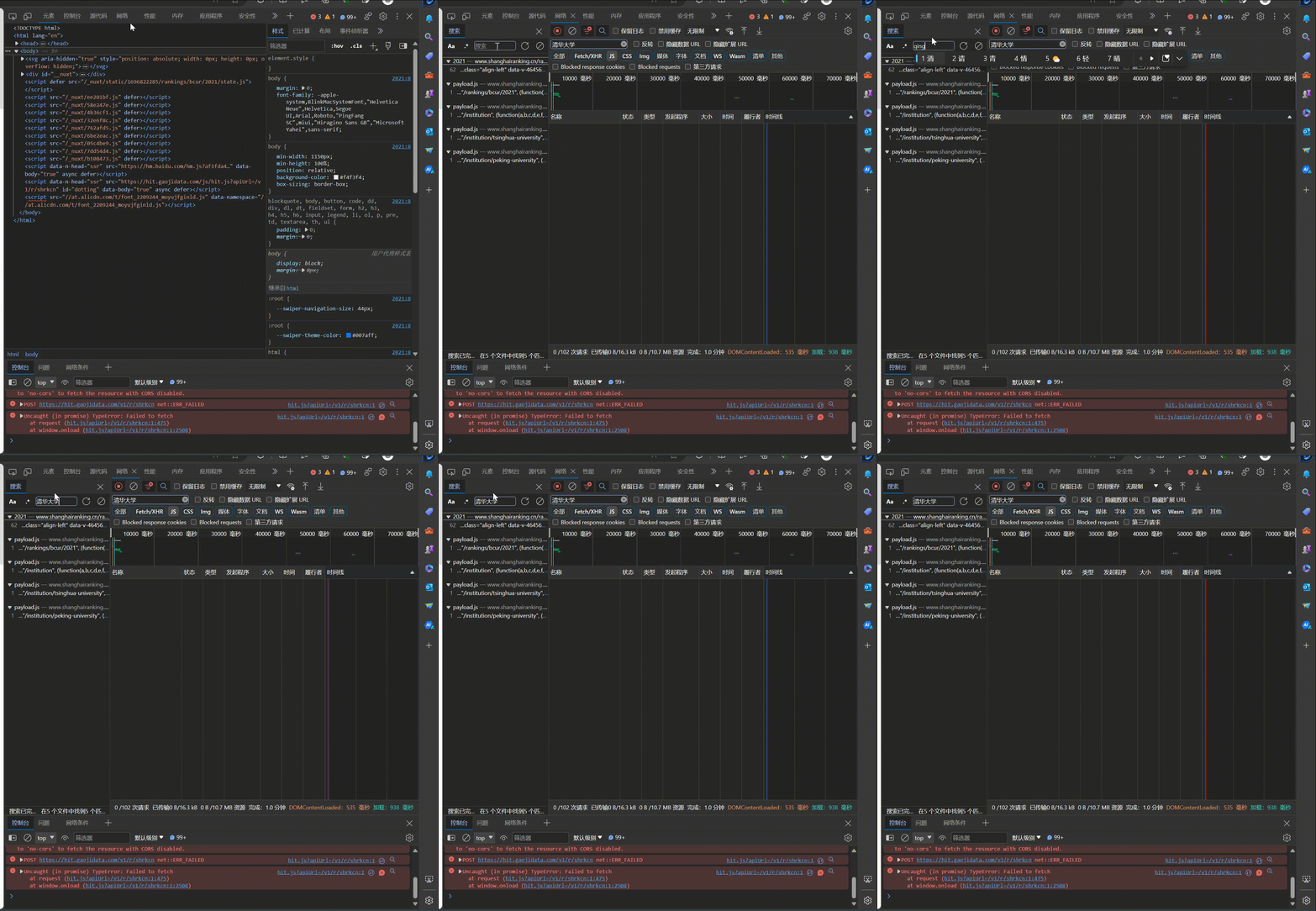
要求:爬取中国大学2021主榜(https://www.shanghairanking.cn/rankings/bcur/2021)所有院校信息,并存储在数据库中,同时将浏览器F12调试分析的过程录制Gif加入至博客中。
技巧:分析该网站的发包情况,分析获取数据的api
输出信息:
Gitee文件夹链接:
代码如下:
点击查看代码
from selenium import webdriver
import pandas as pd
import time

# 启动 Chrome 浏览器
chrome_driver_path = "D:\chromedriver-win64\chromedriver.exe"  # 请确保这是你的 chromedriver 的正确路径
driver = webdriver.Chrome(executable_path=chrome_driver_path)

# 请求网页
driver.get("https://www.shanghairanking.cn/rankings/bcur/2021")

# 准备数据列表
data_list = []

# 无限循环,直到“下一页”按钮不可点击时跳出循环
while True:
    # 获取所有的行元素
    rows = driver.find_elements_by_xpath('//tbody/tr')

    # 循环每行,获取并存储数据
    for row in rows:
        columns = row.find_elements_by_tag_name('td')
        ranking = int(columns[0].text)
        university = columns[1].text
        province = columns[2].text
        type_ = columns[3].text
        score = float(columns[4].text)
        data_list.append([ranking, university, province, type_, score])

    # 尝试点击“下一页”按钮
    try:
        next_page_button = driver.find_element_by_xpath('/html/body/div/div/div/div[2]/div/div[3]/div[2]/div[1]/div/ul/li[9]')
        if next_page_button.get_attribute('class') == 'ant-pagination-disabled ant-pagination-next':
            break
        next_page_button.click()
        time.sleep(10)  # 等待页面加载
    except Exception as e:
        print(e)
        break

# 将数据存储到 DataFrame,然后写入 CSV 文件
df = pd.DataFrame(data_list, columns=['排名', '学校', '省市', '类型', '总分'])
df.to_csv('universities.csv', index=False, encoding='utf-8-sig')

# 关闭浏览器
driver.quit()

print("数据已保存到 'universities.csv' 文件。")
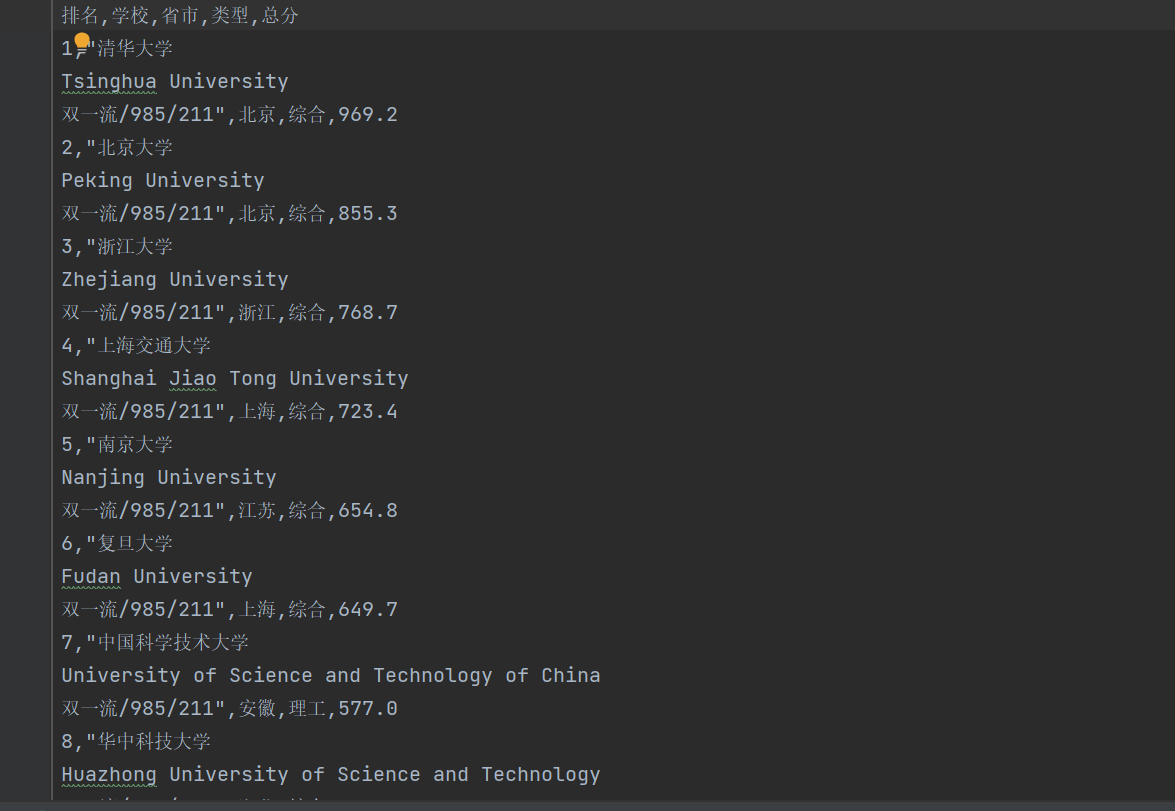
运行结果:
使用F12抓包的gif图片:

 浙公网安备 33010602011771号