
GFS分布式文件系统
一、GlusterFS概述
1.1、GlusterFS简介
1.1.1、开源的分布式文件系统
1.1.2、由存储服务器、客户端以及NFS/Samba存储网关组成
1.1.3、无元数据服务器
1.2、GlusterFS特点
1.2.1、扩展性和高性能
1.2.2、高可用性
1.2.3、全局统一命名空间
1.2.4、弹性卷管理
1.2.5、基于标准协议
1.3、GlusterFS术语
1.3.1、Brick
1.3.2、Volume
1.3.3、FUSE
1.3.4、VFS
1.3.5、Glusterd
1.4、模块化堆栈式架构
1.4.1、模块化、堆栈式的架构
1.4.2、通过对模块的组合,实现复杂的功能

二、GlusterFS工作原理
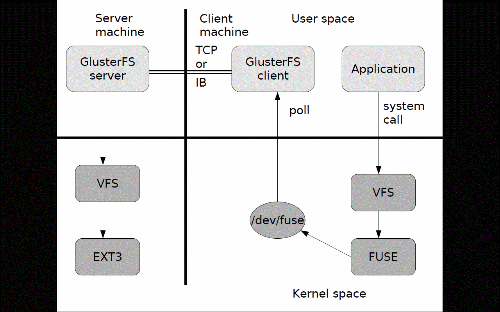
2.1、GlusterFS工作流程
2.2、弹性HASH算法
2.2.1、通过HASH算法得到一个32位的整数
2.2.2、划分为N个连续的子空间,每个空间对应一个Brick
2.2.3、弹性HASH算法的优点
①保证数据平均分布在每一个Brick中
②解决了对元数据服务器的依赖,进而解决了单点故障以及访问瓶颈
三、GlusterFS的卷类型
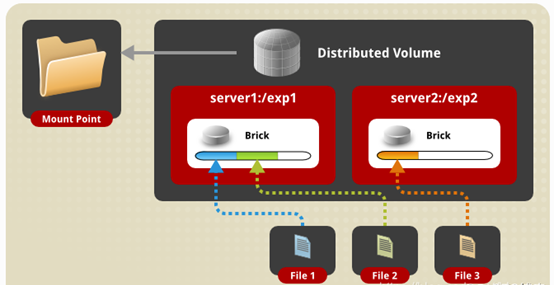
3.1、分布式卷
3.1.1、没有对文件进行分块处理
3.1.2、通过扩展文件属性保存HASH值
3.1.3、支持的底层文件系统有EXT3、EXT4、ZFS、XFS等
3.2、分布式卷的特点
3.2.1、文件分布在不同的服务器,不具备冗余性
3.2.2、更容易和廉价地扩展卷地大小
3.2.3、单点故障会造成数据丢失
3.2.4、依赖底层的数据保护
3.3、条带卷
3.3.1、根据偏移量将文件分层N块(N个条带节点),轮询地存储在每个Brick Server节点
3.3.2、存储大文件时,性能尤为突出
3.3.3、不具备冗余性,类型Reid0

3.4、条带卷的特点
3.4.1、数据被分割成更小块分布到块服务器群中的不同条带区
3.4.2、分布减少了负载且更小的文件加速了存取的速度
3.4.3、没有数据冗余
3.4.4、创建条带卷
创建了一个名为Stripe-volume的条带卷,文件将被分块轮询的存储在Server1:/dir1和Server2:/dir2两个Brick中
1 gluster volume create stripe-volume stripe 2 transport tcp server1:/dir1 server2:/dir2
3.5、复制卷
3.5.1、同一文件保存一份或多份副本
3.5.2、因为要保存副本,所以磁盘利用率较低
3.5.3、若多个节点上的存储空间不一致,将按照磁盘容量最低节点的容量作为该卷的总容量

3.6、复制卷的特点
3.6.1、卷中所有的服务器均保存一个完整的副本
3.6.2、卷的副本数量可由客户创建的时候决定
3.6.3、至少有两个块服务器或更多服务器
3.6.4、具备冗余性
3.6.5、创建复制卷
创建了一个名为rep-volume的条带卷,文件将同时存储两个副本,分布在Server1:/dir1和Server2:/dir2两个Brick中
1 gluster volume create rep-volume replica 2 transport tcp server1:/dir1 server2:/dir2
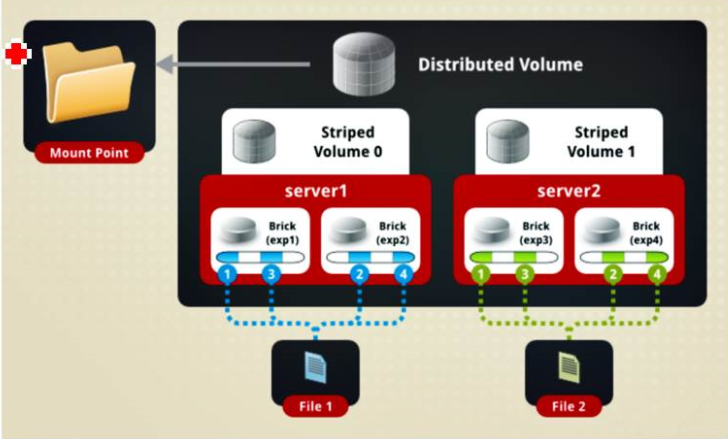
3.7、分布式条带卷
3.7.1、兼顾分布式卷和条带卷的功能
3.7.2、主要用于大文件访问处理
3.7.3、至少最少需要4台服务器
3.7.4、创建分布式条带卷
创建了名为dis-stripe的分布式条带卷,配置分布式的条带卷时,卷中Brick所包含的存储服务器数必须是条带数的倍数(>=2倍)
1 gluster volume create dis-stripe stripe 2 transport tcp server1:/dir1 server2:/dir2 server3:/dir3 server4:/dir4
3.8、分布式复制卷
3.8.1、兼顾分布式卷和复制卷的功能
3.8.2、用于需要冗余的情况

3.8.3、创建分布式条带卷
创建了名为dis-rep的分布式条带卷,配置分布式的复制卷时,卷中Brick所包含的存储服务器数必须是条带数的倍数(>=2倍)
1 gluster volume create dis-rep replica 2 transport tcp server1:/dir1 server2:/dir2 server3:/dir3 server4:/dir4
四、GlusterFS部署
4.1、群集环境

4.2、卷类型
|
卷名称 |
卷类型 |
空间大小 |
Brick |
|
dis-volume |
分布式卷 |
9.6G |
node1(/sdb1) node2(/sdb1) |
|
stripe-volume |
条带卷 |
9.6G |
node3(/sdb1) node4(/sdb1) |
|
rep-volume |
复制卷 |
4.8G |
node1(/sdc1) node2(/sdc1) |
|
dis-stripe |
分布式条带卷 |
20G |
node1(/sdd1)node2(/sdd1) node3(/sdd1)node4(/sdd1) |
|
dis-rep |
分布式复制卷 |
9.6G |
node1(/sde1)node2(/sde1) node3(/sde1)node4(/sde1) |
4.3、部署
每个node节点上设置四个磁盘,每个磁盘5G
4.3.1、添加映射(node1、node2、node3、node4和client上设置)
1 [root@node1 yum.repos.d]# systemctl stop firewalld
2 [root@node1 yum.repos.d]# setenforce 0
1 [root@node1 ~]# vi /etc/hosts         #node1上演示
2 20.0.0.10   node1
3 20.0.0.20   node2
4 20.0.0.30   node3
5 20.0.0.40   node4
4.3.2、解压缩并安装软件(node1、node2、node3、node4和client上安装)

 1 [root@node1 ~]# unzip gfsrepo.zip         #node上演示
 2 [root@node1 ~]# cd /etc/yum.repos.d/      #设置源
 3 [root@node1 yum.repos.d]# vi GLFS.repo
 4 [GLFS]
 5 name=glfs
 6 baseurl=file:///root/gfsrepo
 7 gpgcheck=0
 8 enabled=1
 9 [root@node1 yum.repo.d]# rm -rf local.repo
10 [root@node1 ~]# yum -y install glusterfs glusterfs-server gluster-fuse glusterfs-rdma
4.3.3、开启服务
1 [root@node1 yum.repos.d]# systemctl start glusterd.service
2 [root@node1 yum.repos.d]# systemctl enable glusterd.service
3 [root@node1 yum.repos.d]# systemctl status glusterd.service
4.3.4、时间同步(node1、node2、node3、node4上安装)
1 [root@node1 ~]# ntpdate ntp1.aliyun.com           #node上演示
2 16 Nov 22:40:31 ntpdate[2414]: step time server 120.25.115.20 offset 1.141361 sec
3 [root@node1 ~]# date
4 2020年 11月 16日 星期一 22:40:35 CST
4.3.5、添加入存储信任池只要在一台主机上添加其他机器(node1上设置)
1 [root@node1 yum.repos.d]# gluster peer probe node2
2 peer probe: success.
3 [root@node1 yum.repos.d]# gluster peer probe node3
4 peer probe: success.
5 [root@node1 yum.repos.d]# gluster peer probe node4
6 peer probe: success.
4.3.6、查看节点状态
 1 [root@node1 yum.repos.d]# gluster peer status
 2 Number of Peers: 3
 3
 4 Hostname: node2
 5 Uuid: 4f51d9b8-c635-498a-82ee-b46d841e4fa1
 6 State: Peer in Cluster (Connected)
 7
 8 Hostname: node3
 9 Uuid: b675a395-4dde-4b3d-8f8f-62c23b11abc7
10 State: Peer in Cluster (Connected)
11
12 Hostname: node4
13 Uuid: 3425cbbc-ce66-4c43-9934-3ed07d15f956
14 State: Peer in Cluster (Connected)
4.3.7、初始化磁盘(node1、node2、node3、node4)
 1 [root@node1 yum.repos.d]# fdisk -l
 2 [root@node1 yum.repos.d]# fdisk /dev/sdb
 3 [root@node1 yum.repos.d]# fdisk /dev/sdb
 4 [root@node1 yum.repos.d]# fdisk /dev/sdb
 5 [root@node1 yum.repos.d]# fdisk /dev/sdb
 6 [root@node1 yum.repos.d]# fdisk -l
 7 [root@node1 yum.repos.d]# mkfs.ext4 /dev/sdb1
 8 [root@node1 yum.repos.d]# mkfs.ext4 /dev/sdc1
 9 [root@node1 yum.repos.d]# mkfs.ext4 /dev/sdd1
10 [root@node1 yum.repos.d]# mkfs.ext4 /dev/sde1
4.3.8、创建卷类型(node1、node2、node3、node4)
挂载磁盘
 1 [root@node1 yum.repos.d]# mkdir -p /data/{sdb1,sdc1,sdd1,sde1}
 2 [root@node1 yum.repos.d]# mount /dev/sdb1 /data/sdb1
 3 [root@node1 yum.repos.d]# mount /dev/sdc1 /data/sdc1
 4 [root@node1 yum.repos.d]# mount /dev/sdd1 /data/sdd1
 5 [root@node1 yum.repos.d]# mount /dev/sde1 /data/sde1
 6 [root@node1 yum.repos.d]# df -Th
 7 文件系统                类型      容量  已用  可用 已用% 挂载点
 8 /dev/mapper/centos-root xfs        37G  4.5G   33G   13% /
 9 devtmpfs                devtmpfs  897M     0  897M    0% /dev
10 tmpfs                   tmpfs     912M     0  912M    0% /dev/shm
11 tmpfs                   tmpfs     912M  9.1M  903M    1% /run
12 tmpfs                   tmpfs     912M     0  912M    0% /sys/fs/cgroup
13 /dev/sr0                iso9660   4.3G  4.3G     0  100% /mnt
14 /dev/sda1               xfs      1014M  179M  836M   18% /boot
15 tmpfs                   tmpfs     183M   12K  183M    1% /run/user/42
16 tmpfs                   tmpfs     183M     0  183M    0% /run/user/0
17 /dev/sdb1               ext4      4.8G   20M  4.6G    1% /data/sdb1
18 /dev/sdc1               ext4      4.8G   20M  4.6G    1% /data/sdc1
19 /dev/sdd1               ext4      4.8G   20M  4.6G    1% /data/sdd1
20 /dev/sde1               ext4      4.8G   20M  4.6G    1% /date/sde1
①分布式卷
 1 [root@node1 yum.repos.d]# gluster volume create dis-vol node1:/data/sdb1 node2:/data/sdb1 force              #创建
 2 volume create: dis-vol: success: please start the volume to access data
 3
 4 [root@node1 yum.repos.d]# gluster volume info dis-vol       #查看状态信息
 5
 6 Volume Name: dis-vol
 7 Type: Distribute
 8 Volume ID: 88e88b9f-b3bc-4946-ac11-c7a90ec17acf
 9 Status: Created
10 Snapshot Count: 0
11 Number of Bricks: 2
12 Transport-type: tcp
13 Bricks:
14 Brick1: node1:/data/sdb1
15 Brick2: node2:/data/sdb1
16 Options Reconfigured:
17 transport.address-family: inet
18 nfs.disable: on
19
20 [root@node1 yum.repos.d]# gluster volume start dis-vol         #开启
21 volume start: dis-vol: success
22
23 [root@node1 yum.repos.d]# gluster volume status dis-vol       #查看状态
24 Status of volume: dis-vol
25 Gluster process                             TCP Port  RDMA Port  Online  Pid
26 ------------------------------------------------------------------------------
27 Brick node1:/data/sdb1                      49152     0          Y       2924
28 Brick node2:/data/sdb1                      49152     0          Y       2915
29
30 Task Status of Volume dis-vol
31 ------------------------------------------------------------------------------
32 There are no active volume tasks
②条带卷
 1 [root@node1 yum.repos.d]# gluster volume create stripe-vol stripe 2 node3:/data/sdb1 node4:/data/sdb1 force
 2 volume create: stripe-vol: success: please start the volume to access data
 3
 4 [root@node1 yum.repos.d]# gluster volume info stripe-vol
 5
 6 Volume Name: stripe-vol
 7 Type: Stripe
 8 Volume ID: a6f10da6-c933-469a-9c84-49f55c3ede0e
 9 Status: Created
10 Snapshot Count: 0
11 Number of Bricks: 1 x 2 = 2
12 Transport-type: tcp
13 Bricks:
14 Brick1: node3:/data/sdb1
15 Brick2: node4:/data/sdb1
16 Options Reconfigured:
17 transport.address-family: inet
18 nfs.disable: on
19
20 [root@node1 yum.repos.d]# gluster volume start stripe-vol
21 volume start: stripe-vol: success
22
23 [root@node1 yum.repos.d]# gluster volume status stripe-vol
24 Status of volume: stripe-vol
25 Gluster process                             TCP Port  RDMA Port  Online  Pid
26 ------------------------------------------------------------------------------
27 Brick node3:/data/sdb1                      49152     0          Y       13678
28 Brick node4:/data/sdb1                      49152     0          Y       13759
29
30 Task Status of Volume stripe-vol
31 ------------------------------------------------------------------------------
32 There are no active volume tasks
③复制卷
 1 [root@node1 yum.repos.d]# gluster volume create rep-vol replica 2 node1:/data/sdc1 node2:/data/sdc1 force
 2 volume create: rep-vol: success: please start the volume to access data
 3
 4 [root@node1 yum.repos.d]# gluster volume info rep-vol
 5
 6 Volume Name: rep-vol
 7 Type: Replicate
 8 Volume ID: 80ffeed8-6031-40a8-a2c3-80701d36d791
 9 Status: Created
10 Snapshot Count: 0
11 Number of Bricks: 1 x 2 = 2
12 Transport-type: tcp
13 Bricks:
14 Brick1: node1:/data/sdc1
15 Brick2: node2:/data/sdc1
16 Options Reconfigured:
17 transport.address-family: inet
18 nfs.disable: on
19
20 [root@node1 yum.repos.d]# gluster volume start rep-vol
21 volume start: rep-vol: success
22
23 [root@node1 yum.repos.d]# gluster volume status rep-vol
24 Status of volume: rep-vol
25 Gluster process                             TCP Port  RDMA Port  Online  Pid
26 ------------------------------------------------------------------------------
27 Brick node1:/data/sdc1                      49153     0          Y       3110
28 Brick node2:/data/sdc1                      49153     0          Y       3065
29 Self-heal Daemon on localhost               N/A       N/A        Y       3130
30 Self-heal Daemon on node2                   N/A       N/A        Y       3085
31 Self-heal Daemon on node3                   N/A       N/A        Y       13749
32 Self-heal Daemon on node4                   N/A       N/A        Y       13837
33
34 Task Status of Volume rep-vol
35 ------------------------------------------------------------------------------
36 There are no active volume tasks
④分布式条带卷
 1 [root@node1 yum.repos.d]# gluster volume create dis-stripe stripe 2 node1:/data/sdd1 node2:/data/sdd1 node3:/data/sdd1 node4:/data/sdd1 force
 2 volume create: dis-stripe: success: please start the volume to access data
 3
 4 [root@node1 yum.repos.d]# gluster volume info dis-stripe
 5
 6 Volume Name: dis-stripe
 7 Type: Distributed-Stripe
 8 Volume ID: 58895adb-c659-432c-a41a-5dbb741cc718
 9 Status: Created
10 Snapshot Count: 0
11 Number of Bricks: 2 x 2 = 4
12 Transport-type: tcp
13 Bricks:
14 Brick1: node1:/data/sdd1
15 Brick2: node2:/data/sdd1
16 Brick3: node3:/data/sdd1
17 Brick4: node4:/data/sdd1
18 Options Reconfigured:
19 transport.address-family: inet
20 nfs.disable: on
21
22 [root@node1 yum.repos.d]# gluster volume start dis-stripe
23 volume start: dis-stripe: success
24
25 [root@node1 yum.repos.d]# gluster volume status dis-stripe
26 Status of volume: dis-stripe
27 Gluster process                             TCP Port  RDMA Port  Online  Pid
28 ------------------------------------------------------------------------------
29 Brick node1:/data/sdd1                      49154     0          Y       3213
30 Brick node2:/data/sdd1                      49154     0          Y       3144
31 Brick node3:/data/sdd1                      49153     0          Y       13807
32 Brick node4:/data/sdd1                      49153     0          Y       13889
33
34 Task Status of Volume dis-stripe
35 ------------------------------------------------------------------------------
36 There are no active volume tasks
⑤分布式复制卷
 1 [root@node1 yum.repos.d]# gluster volume create dis-rep replica 2 node1:/data/sde1 node2:/data/sde1 node3:/data/sde1 node4:/data/sde1 force
 2 volume create: dis-rep: success: please start the volume to access data
 3
 4 [root@node1 yum.repos.d]# gluster volume info dis-rep
 5
 6 Volume Name: dis-rep
 7 Type: Distributed-Replicate
 8 Volume ID: 57dc83f8-a6ae-4af4-9d4c-75a0da661fff
 9 Status: Created
10 Snapshot Count: 0
11 Number of Bricks: 2 x 2 = 4
12 Transport-type: tcp
13 Bricks:
14 Brick1: node1:/data/sde1
15 Brick2: node2:/data/sde1
16 Brick3: node3:/data/sde1
17 Brick4: node4:/data/sde1
18 Options Reconfigured:
19 transport.address-family: inet
20 nfs.disable: on
21
22 [root@node1 yum.repos.d]# gluster volume start dis-rep
23 volume start: dis-rep: success
24
25 [root@node1 yum.repos.d]# gluster volume status dis-rep
26 Status of volume: dis-rep
27 Gluster process                             TCP Port  RDMA Port  Online  Pid
28 ------------------------------------------------------------------------------
29 Brick node1:/data/sde1                      49155     0          Y       3283
30 Brick node2:/data/sde1                      49155     0          Y       3195
31 Brick node3:/data/sde1                      49154     0          Y       13867
32 Brick node4:/data/sde1                      49154     0          Y       13947
33 Self-heal Daemon on localhost               N/A       N/A        Y       3303
34 Self-heal Daemon on node3                   N/A       N/A        Y       13887
35 Self-heal Daemon on node4                   N/A       N/A        Y       13967
36 Self-heal Daemon on node2                   N/A       N/A        Y       3215
37
38 Task Status of Volume dis-rep
39 ------------------------------------------------------------------------------
40 There are no active volume tasks
⑥查看卷列表
1 [root@node1 yum.repos.d]# gluster volume list
2 dis-rep
3 dis-stripe
4 dis-vol
5 rep-vol
6 stripe-vol
4.3.9、挂载卷(客户机)
 1 [root@client ~]# mkdir -p /text/{dis,stripe,rep,dis-stripe,dis-rep}  #创建挂载目录
 2 [root@client ~]# mount.glusterfs node1:dis-vol /text/dis    #挂载分布卷
 3 [root@client ~]# mount.glusterfs node1:stripe-vol /text/stripe   #挂载条带卷
 4 [root@client ~]# mount.glusterfs node1:rep-vol /text/rep    #挂载复制卷
 5 [root@client ~]# mount.glusterfs node1:dis-stripe /text/dis-stripe    #挂载分布式条带卷
 6 [root@client ~]# mount.glusterfs node1:dis-rep /text/dis-rep    #挂载分布式复制卷
 7
 8 [root@client ~]# df -Th          #查看磁盘占用情况
 9 文件系统                类型            容量  已用  可用 已用% 挂载点
10 /dev/mapper/centos-root xfs              17G  1.5G   16G    9% /
11 devtmpfs                devtmpfs        901M     0  901M    0% /dev
12 tmpfs                   tmpfs           912M     0  912M    0% /dev/shm
13 tmpfs                   tmpfs           912M  8.7M  904M    1% /run
14 tmpfs                   tmpfs           912M     0  912M    0% /sys/fs/cgroup
15 /dev/sr0                iso9660         4.3G  4.3G     0  100% /mnt
16 /dev/sda1               xfs            1014M  143M  872M   15% /boot
17 tmpfs                   tmpfs           183M     0  183M    0% /run/user/0
18 node1:dis-vol           fuse.glusterfs  9.6G   41M  9.1G    1% /text/dis
19 node1:stripe-vol        fuse.glusterfs  9.6G   41M  9.1G    1% /text/stripe
20 node1:rep-vol           fuse.glusterfs  4.8G   21M  4.6G    1% /text/rep
21 node1:dis-stripe        fuse.glusterfs   20G   81M   19G    1% /text/dis-stripe
22 node1:dis-rep           fuse.glusterfs  9.6G   41M  9.1G    1% /text/dis-rep
4.4、测试
4.4.1、创建文件
 1 创建测试文件
 2 [root@client ~]# dd if=/dev/zero of=/demo1.log bs=40M count=1
 3 记录了1+0 的读入
 4 记录了1+0 的写出
 5 41943040字节(42 MB)已复制,0.185274 秒,226 MB/秒
 6 [root@client ~]# dd if=/dev/zero of=/demo2.log bs=40M count=1
 7 记录了1+0 的读入
 8 记录了1+0 的写出
 9 41943040字节(42 MB)已复制,0.1539 秒,273 MB/秒
10 [root@client ~]# dd if=/dev/zero of=/demo3.log bs=40M count=1
11 记录了1+0 的读入
12 记录了1+0 的写出
13 41943040字节(42 MB)已复制,0.141536 秒,296 MB/秒
14 [root@client ~]# dd if=/dev/zero of=/demo4.log bs=40M count=1
15 记录了1+0 的读入
16 记录了1+0 的写出
17 41943040字节(42 MB)已复制,0.149856 秒,280 MB/秒
18 [root@client ~]# dd if=/dev/zero of=/demo5.log bs=40M count=1
19 记录了1+0 的读入
20 记录了1+0 的写出
21 41943040字节(42 MB)已复制,0.139292 秒,301 MB/秒
22
23 查看文件
24 [root@client ~]# cd /
25 [root@client /]# ll
26
27 拷贝文件到挂载目录下
28 [root@client /]# cp demo* /text/dis
29 [root@client /]# cp demo* /text/stripe
30 [root@client /]# cp demo* /text/rep
31 [root@client /]# cp demo* /text/dis-stripe
32 [root@client /]# cp demo* /text/dis-rep
33
34 查看文件
35 [root@client /]# ll /text/dis
36 [root@client /]# ll /text/stripe
37 [root@client /]# ll /text/rep
38 [root@client /]# ll /text/dis-stripe
39 [root@client /]# ll /text/dis-rep
4.4.2、查看分布式卷分布情况(node1:/data/sdb1,node2:/data/sdb1)
 1 [root@node1 yum.repos.d]# ls -lh /data/sdb1
 2 总用量 161M
 3 -rw-r--r--. 2 root root 40M 11月 17 10:14 demo1.log
 4 -rw-r--r--. 2 root root 40M 11月 17 10:14 demo2.log
 5 -rw-r--r--. 2 root root 40M 11月 17 10:14 demo3.log
 6 -rw-r--r--. 2 root root 40M 11月 17 10:14 demo4.log
 7 drwx------. 2 root root 16K 11月 17 09:14 lost+found
 8
 9 [root@node2 yum.repos.d]# ls -lh /data/sdb1
10 总用量 41M
11 -rw-r--r--. 2 root root 40M 11月 17 10:14 demo5.log
12 drwx------. 2 root root 16K 11月 17 09:14 lost+found
4.4.3、查看条带卷分布情况(node3:/data/sdb1,node4:/data/sdb1)
 1 [root@node3 yum.repos.d]# ls -lh /data/sdb1
 2 总用量 101M
 3 -rw-r--r--. 2 root root 20M 11月 17 10:14 demo1.log
 4 -rw-r--r--. 2 root root 20M 11月 17 10:14 demo2.log
 5 -rw-r--r--. 2 root root 20M 11月 17 10:14 demo3.log
 6 -rw-r--r--. 2 root root 20M 11月 17 10:14 demo4.log
 7 -rw-r--r--. 2 root root 20M 11月 17 10:14 demo5.log
 8 drwx------. 2 root root 16K 11月 17 09:14 lost+found
 9
10 [root@node4 yum.repos.d]# ls -lh /data/sdb1
11 总用量 101M
12 -rw-r--r--. 2 root root 20M 11月 17 10:14 demo1.log
13 -rw-r--r--. 2 root root 20M 11月 17 10:14 demo2.log
14 -rw-r--r--. 2 root root 20M 11月 17 10:14 demo3.log
15 -rw-r--r--. 2 root root 20M 11月 17 10:14 demo4.log
16 -rw-r--r--. 2 root root 20M 11月 17 10:14 demo5.log
17 drwx------. 2 root root 16K 11月 17 09:14 lost+found
4.4.4、查看复制卷分布情况(node1:/data/sdc1,node2:/data/sdc1)
 1 [root@node1 yum.repos.d]# ls -lh /data/sdc1
 2 总用量 201M
 3 -rw-r--r--. 2 root root 40M 11月 17 10:14 demo1.log
 4 -rw-r--r--. 2 root root 40M 11月 17 10:14 demo2.log
 5 -rw-r--r--. 2 root root 40M 11月 17 10:14 demo3.log
 6 -rw-r--r--. 2 root root 40M 11月 17 10:14 demo4.log
 7 -rw-r--r--. 2 root root 40M 11月 17 10:14 demo5.log
 8 drwx------. 2 root root 16K 11月 17 09:14 lost+found
 9
10 [root@node2 yum.repos.d]# ls -lh /data/sdc1
11 总用量 201M
12 -rw-r--r--. 2 root root 40M 11月 17 10:14 demo1.log
13 -rw-r--r--. 2 root root 40M 11月 17 10:14 demo2.log
14 -rw-r--r--. 2 root root 40M 11月 17 10:14 demo3.log
15 -rw-r--r--. 2 root root 40M 11月 17 10:14 demo4.log
16 -rw-r--r--. 2 root root 40M 11月 17 10:14 demo5.log
17 drwx------. 2 root root 16K 11月 17 09:14 lost+found
4.4.5、查看分布式条带卷分布情况(node1:/data/sdd1 node2:/data/sdd1 node3:/data/sdd1 node4:/data/sdd1)
 1 [root@node1 yum.repos.d]# ls -lh /data/sdd1
 2 总用量 81M
 3 -rw-r--r--. 2 root root 20M 11月 17 10:15 demo1.log
 4 -rw-r--r--. 2 root root 20M 11月 17 10:15 demo2.log
 5 -rw-r--r--. 2 root root 20M 11月 17 10:15 demo3.log
 6 -rw-r--r--. 2 root root 20M 11月 17 10:15 demo4.log
 7 drwx------. 2 root root 16K 11月 17 09:14 lost+found
 8
 9 [root@node2 yum.repos.d]# ls -lh /data/sdd1
10 总用量 81M
11 -rw-r--r--. 2 root root 20M 11月 17 10:15 demo1.log
12 -rw-r--r--. 2 root root 20M 11月 17 10:15 demo2.log
13 -rw-r--r--. 2 root root 20M 11月 17 10:15 demo3.log
14 -rw-r--r--. 2 root root 20M 11月 17 10:15 demo4.log
15 drwx------. 2 root root 16K 11月 17 09:14 lost+found
16
17 [root@node3 yum.repos.d]# ls -lh /data/sdd1
18 总用量 21M
19 -rw-r--r--. 2 root root 20M 11月 17 10:15 demo5.log
20 drwx------. 2 root root 16K 11月 17 09:14 lost+found
21
22 [root@node4 yum.repos.d]# ls -lh /data/sdd1
23 总用量 21M
24 -rw-r--r--. 2 root root 20M 11月 17 10:15 demo5.log
25 drwx------. 2 root root 16K 11月 17 09:14 lost+found
4.4.6、查看分布式复制卷分布情况(node1:/data/sde1 node2:/data/sde1 node3:/data/sde1 node4:/data/sde1)
 1 [root@node1 yum.repos.d]# ls -lh /data/sde1
 2 总用量 161M
 3 -rw-r--r--. 2 root root 40M 11月 17 10:15 demo1.log
 4 -rw-r--r--. 2 root root 40M 11月 17 10:15 demo2.log
 5 -rw-r--r--. 2 root root 40M 11月 17 10:15 demo3.log
 6 -rw-r--r--. 2 root root 40M 11月 17 10:15 demo4.log
 7 drwx------. 2 root root 16K 11月 17 09:14 lost+found
 8
 9 [root@node2 yum.repos.d]# ls -lh /data/sde1
10 总用量 161M
11 -rw-r--r--. 2 root root 40M 11月 17 10:15 demo1.log
12 -rw-r--r--. 2 root root 40M 11月 17 10:15 demo2.log
13 -rw-r--r--. 2 root root 40M 11月 17 10:15 demo3.log
14 -rw-r--r--. 2 root root 40M 11月 17 10:15 demo4.log
15 drwx------. 2 root root 16K 11月 17 09:14 lost+found
16
17 [root@node3 yum.repos.d]# ls -lh /data/sde1
18 总用量 41M
19 -rw-r--r--. 2 root root 40M 11月 17 10:15 demo5.log
20 drwx------. 2 root root 16K 11月 17 09:14 lost+found
21
22 [root@node4 yum.repos.d]# ls -lh /data/sde1
23 总用量 41M
24 -rw-r--r--. 2 root root 40M 11月 17 10:15 demo5.log
25 drwx------. 2 root root 16K 11月 17 09:14 lost+found
4.4.7、访问控制
1 仅拒绝:
2 [root@node1 yum.repos.d]# gluster volume set dis-vol auth.reject 20.0.0.50
3 volume set: success
4
5 仅允许
6 [root@node1 yum.repos.d]# gluster volume set dis-vol auth.allow 20.0.0.50
7 volume set: success

 浙公网安备 33010602011771号