
rsync实现远程同步
rsync实现远程同步
摘要
rsync命令是一个远程数据同步工具,可通过LAN/WAN快速同步多台主机间的文件。rsync使用所谓的“rsync算法”来使本地和远程两个主机之间的文件达到同步,这个算法只传送两个文件的不同部分,而不是每次都整份传送,因此速度相当快。 rsync是一个功能非常强大的工具,其命令也有很多功能特色选项,我们下面就对它的选项一一进行分析说明。
一、配置rsync源服务器
1.1、关于rsync
1.1.1、一款快速增量备份工具
1.1.2、Remote Sync,远程同步
1.1.3、支持本地复制,或者与其他SSH、rsync主机同步
1.1.4、官方网站:http://rsync.samba.org
1.2、rsync同步源
指备份操作的远程服务器,也称为备份源
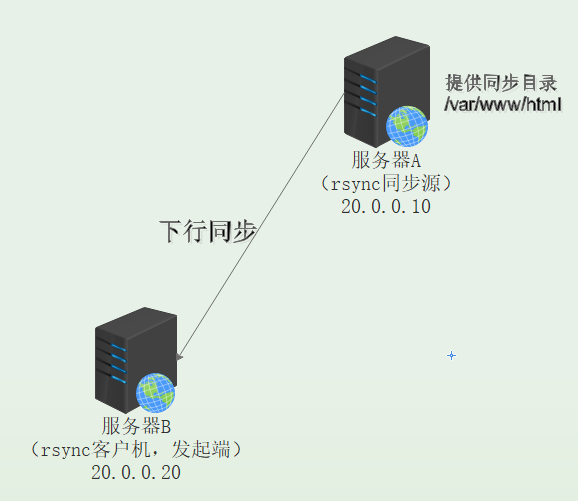
1.3、基本思路
1.3.1、建立rsyncd.conf配置文件、独立的账户文件
1.3.2、启用rsync的--daemon模式
1.4、应用示例
1.4.1、用户backuper,允许下行同步
1.4.2、操作的目录为/var/www/html
1.5、配置文件rsync.conf
1.5.1、需手动建立,语法类似于Samba配置
1.5.2、认证配置auth users、secrets file,不加则为匿名
1.6、rsync账户文件
1.6.1、采用“用户名:密码”的记录格式,每行一个用户记录
1.6.2、独立的账户数据,不依赖于系统账号
1.7、启用rsync服务
通过--daemon独自提供服务
二、使用rsync备份工具
2.1、rsync命令的用法

 1 语法
 2 rsync [选项] 原始位置 目标位置
 3
 4 常用选项
 5 -a:         归档模式,递归并保留对象属性,等同于-rlptgoD
 6 -v:         显示同步过程的详细(verbose)信息
 7 -z:         在传输文件时进行压缩(compress)
 8 -H:         保留硬连接文件
 9 -A:         保留ACL属性信息
10 -p:         保留文件的权限标记
11 -t:         保留文件的时间标记
12 -g:         保留文件的属组标记
13 -o:         保留文件的属主标记
14 -delete:    删除目标位置有而原始位置没有的文件
15 -checksum:  根据对象的校验和来决定是否跳过文件
2.2、配置源的两种表示方法
1 格式1
2 用户名@主机地址::共享模块名
3
4 格式2
5 rsync://用户名@主机地址/共享模块名
2.3、rsync源的免交互处理
使用 --password-file= 密码文件
三、rsync远程同步部署
3.1、环境说明
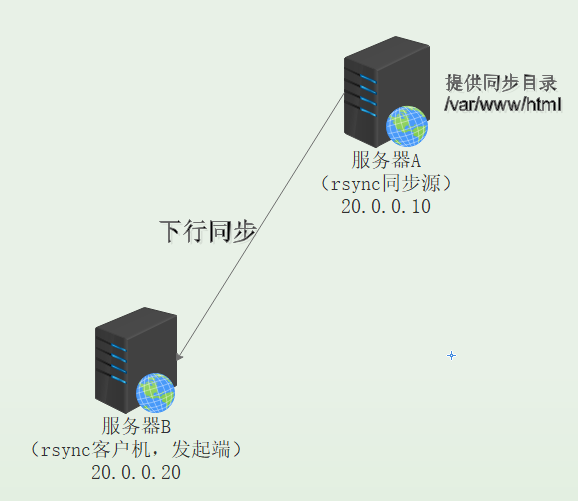
3.2、配置rsync源服务器A
①检查rsync是否安装
1 [root@rsync ~]# rpm -q rsync
2 rsync-3.0.9-18.el7.x86_64
②修改配置文件
 1 [root@rsync ~]# vi /etc/rsyncd.conf
 2 uid = nobody
 3 gid = nobody
 4 use chroot = yes                   #禁锢在宿主目录中
 5 address = 20.0.0.10              #监听地址
 6 port 873                                    #端口号
 7 pid file = /var/run/rsyncd.pid       #进程文件位置
 8 log file = /var/log/rsyncd.log         #日志文件位置
 9 hosts allow = 20.0.0.0/24               #允许地址范围
10 dont compress   = *.gz *.tgz *.zip *.z *.Z *.rpm *.deb *.bz2         #不再压缩这几种格式的文件
11 [wwwroot]
12 path = /var/www/html                   #同步的目录
13 comment = www.xuhao.com
14 read only = yes                        #只读
15 auth users = backuper
16 secrets file = /etc/rsyncd_users.db      #用户密码存放位置
③创建backuper用户的密码文件
1 [root@rsync ~]# vi /etc/rsyncd_users.db
2 backuper:123456
④给密码文件设置执行权限
1 [root@rsync ~]# chmod 600 /etc/rsyncd_users.db
⑤启动rsync
1 [root@rsync ~]# rsync --daemon
2 [root@rsync ~]# netstat -antp |grep rsync
3 tcp        0      0 20.0.0.10:873           0.0.0.0:*               LISTEN      14461/rsync
⑥安装httpd,有一个/var/www/html的共享目录,也可以自己创建
1 [root@rsync ~]# yum -y install httpd
2 [root@rsync ~]# echo "this is test web" > /var/www/html/index.html
3.3、客户机服务器B测试
①格式一
 1 [root@client ~]# rsync -avz backuper@20.0.0.10::wwwroot /opt
 2 Password:
 3 receiving incremental file list
 4 ./
 5 index.html
 6
 7 sent 83 bytes  received 172 bytes  56.67 bytes/sec
 8 total size is 17  speedup is 0.07
 9 [root@client ~]# cat /opt/index.html          #查看是否成功
10 this is test web
②格式二
 1 删除同步的文件再测试
 2 [root@client ~]# rm -rf /opt/index.html
 3 [root@client ~]# cat /opt/index.html
 4 cat: /opt/index.html: 没有那个文件或目录
 5
 6 同步
 7 [root@client ~]# rsync -avz rsync://backuper@20.0.0.10/wwwroot /opt
 8 Password:
 9 receiving incremental file list
10 ./
11 index.html
12
13 sent 83 bytes  received 172 bytes  56.67 bytes/sec
14 total size is 17  speedup is 0.07
15 [root@client ~]# cat /opt/index.html
16 this is test web
③免密方式登录
 1 创建免密登录文件
 2 [root@client ~]# vi /etc/server.pass
 2 123456
 3 [root@client ~]# chmod 600 /etc/server.pass
 4 [root@client ~]# rm -rf /opt/index.html
 5 [root@client ~]# rsync -avz --delete --password-file=/etc/server.pass backuper@20.0.0.10::wwwroot /opt
 6 receiving incremental file list
 7 deleting rh/
 8 ./
 9 index.html
10
11 sent 83 bytes  received 172 bytes  72.86 bytes/sec
12 total size is 17  speedup is 0.07
13 [root@client ~]# cat /opt/index.html
14 this is test web
四、rsync+inotify实时同步
4.1、rsync实时同步
4.1.1、定期同步的不足
①执行备份的时间固定,延迟明显、实时性差
②当同步源长期不变化时,密集的定期任务是不必要的
4.1.2、实时同步的优点
①一旦同步源出现变化,立即启动备份
②只要同步源无变化,则不执行备份
4.2、关于inotify
Linux内核的inotify机制
①从版本2.6.13开始提供
②可以从监控文件系统的变动情况,并做出通知响应
③辅助软件:inotify-tools
4.3、环境说明
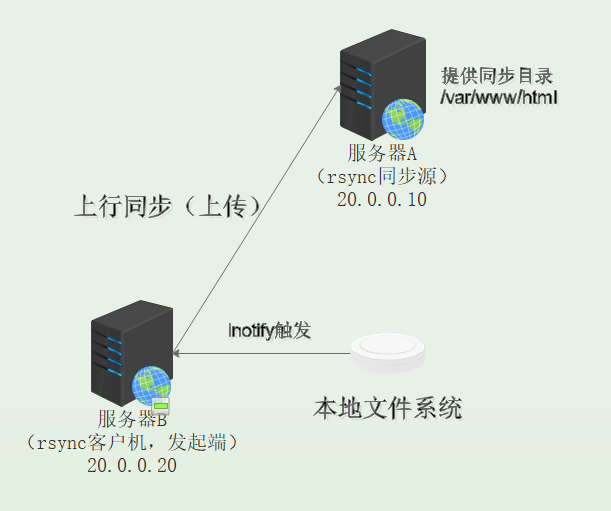
4.4、配置rsync源服务器A
①将只读模式关闭
1 [root@rsync ~]# vi /etc/rsyncd.conf
2 read only = no
②客户端更改内核参数,指定队列大小,最多监控实例数,每个实例最多监控文件数
 1 [root@rsync ~]# vim /etc/sysctl.conf
 2 fs.inotify.max_queued_events = 16384     #监控事件的最大队列数
 3 fs.inotify.max_user_instances = 1024       #监控的最大实例数
 4 fs.inotify.max_user_watches = 1048576     #监控的每实例的最大文件数
 5
 6 加载
 7 [root@rsync ~]# sysctl -p
 8 fs.inotify.max_queued_events = 16384
 9 fs.inotify.max_user_instances = 1024
10 fs.inotify.max_user_watches = 1048576
③重新启动rsync服务,注意:kill pid号和kill -9 pid号的区别:后者不会删除pid文件,导致服务起不来
 1 [root@rsync ~]# cd /var/run
 2 [root@rsync run]# cat rsyncd.pid
 3 14461
 4 [root@rsync run]# kill 14461            #删除pid文件
 5 [root@rsync run]# ll | grep rsync.pid
 6 [root@rsync run]# rsync --daemon
 7 [root@rsync run]# ll | grep rsyncd.pid
 8 -rw-r--r--.  1 root           root              6 11月 12 13:19 rsyncd.pid
 9
10 [root@rsync run]# cat rsyncd.pid
11 54028
12 [root@rsync run]# kill -9 54028        #不删除pid文件,导致启动不了
13 [root@rsync run]# ll | grep rsyncd.pid
14 -rw-r--r--.  1 root           root              6 11月 12 13:19 rsyncd.pid
15 [root@rsync run]# rsync --daemon
16 [root@rsync run]# failed to create pid file /var/run/rsyncd.pid: File exists
17
18 [root@rsync run]# rm -rf rsyncd.pid    #删除pid文件再启动
19 [root@rsync run]# rsync --daemon
20 [root@rsync run]# netstat -anpt | grep rsync
21 tcp        0      0 20.0.0.10:873           0.0.0.0:*               LISTEN      5406
4.5、客户机服务器B配置
①解压缩inotify并安装
inotifywait:用于持续监控,实时输出结果
inotifywatch:用于短期监控,任务完成后再出结果
1 [root@client ~]# tar zxf inotify-tools-3.14.tar.gz
2 [root@client ~]# cd inotify-tools-3.14/
3 [root@client inotify-tools-3.14]# ./configure
4 [root@client inotify-tools-3.14]# make && make install
②测试inotifywait监控命令是否正常使用
1 [root@client inotify-tools-3.14]# mkdir -p /var/www/html
2 [root@client inotify-tools-3.14]# inotifywait -mrq -e modify,create,move,delete /var/www/html
③执行完上面最后一条命令后处于监控状态,不能做输入操作,在开启一个新的终端设备
 1 另一个终端文件测试
 2 [root@client ~]# cd /var/www/html/
 3 [root@client html]# touch a.txt
 4 [root@client html]# vi 1.tat
 5 [root@client html]# rm -rf 1.txt
 6 [root@client html]# mv a.txt /opt
 7
 8 监控端查看
 9 [root@client inotify-tools-3.14]# inotifywait -mrq -e modify,create,move,delete /var/www/html
10 /var/www/html/ CREATE a.txt
11 /var/www/html/ CREATE 1.txt
12 /var/www/html/ DELETE 1.txt
13 /var/www/html/ MOVED_FROM a.txt
④客户端上编写脚本,将inotify监控和rsync远程同步结合起来
 1 [root@client inotify-tools-3.14]# vi /opt/inotify.sh
 2 #!/bin/bash
 3 INOTIFY="inotifywait -mrq -e modify,create,attrib,move,delete /var/www/html"
 4 RSYNC="rsync -azH --delete --password-file=/etc/server.pass /var/www/html/  backuper@20.0.0.10::wwwroot/"
 5 $INOTIFY | while read DIRECTORY EVENT FILE   #逐条读取监控记录
 6 do
 7         if [ $(pgrep rsync | wc -l) -le 0 ];then
 8             $RSYNC
 9         fi
10 done
11
12 [root@client inotify-tools-3.14]# chmod +x /opt/inotify.sh
13 [root@client inotify-tools-3.14]# cd /opt/
14
15 注:两边的同步目录权限都设置777
16 [root@rsync run]# chmod 777 /var/www/html/
17 [root@client html]# chmod 777 /var/www/html/
18
19 运行脚本
20 [root@client opt]# ./inotify.sh
⑤在客户端/var/www/html目录下创建文件,查看源端/var/www/html目录是否同步到
 1 客户端/var/www/html目录下创建目录
 2 [root@client html]# touch a.txt
 3 [root@client html]# touch b.txt
 4 [root@client html]# touch c.txt
 5 [root@client html]# touch d.txt
 6
 7 查看源端/var/www/html目录,新建的和原来就存在的文件都成功同步,且属主属组均为nobody用户
 8 [root@rsync ~]# cd /var/www/html/
 9 [root@rsync html]# ll
10 总用量 0
11 -rw-r--r--. 1 nobody nobody 0 11月 12 13:45 a.txt
12 -rw-r--r--. 1 nobody nobody 0 11月 12 13:45 b.txt
13 -rw-r--r--. 1 nobody nobody 0 11月 12 13:47 c.txt
14 -rw-r--r--. 1 nobody nobody 0 11月 12 13:48 d.txt
五、注意事项
5.1、kill pid号和kill -9 pid号的区别
 1 [root@rsync ~]# cd /var/run
 2 [root@rsync run]# cat rsyncd.pid
 3 14461
 4 [root@rsync run]# kill 14461            #删除pid文件
 5 [root@rsync run]# ll | grep rsync.pid
 6 [root@rsync run]# rsync --daemon
 7 [root@rsync run]# ll | grep rsyncd.pid
 8 -rw-r--r--.  1 root           root              6 11月 12 13:19 rsyncd.pid
 9
10 [root@rsync run]# cat rsyncd.pid
11 54028
12 [root@rsync run]# kill -9 54028        #不删除pid文件,导致启动不了
13 [root@rsync run]# ll | grep rsyncd.pid
14 -rw-r--r--.  1 root           root              6 11月 12 13:19 rsyncd.pid
15 [root@rsync run]# rsync --daemon
16 [root@rsync run]# failed to create pid file /var/run/rsyncd.pid: File exists
17
18 [root@rsync run]# rm -rf rsyncd.pid    #删除pid文件再启动
19 [root@rsync run]# rsync --daemon
20 [root@rsync run]# netstat -anpt | grep rsync
21 tcp        0      0 20.0.0.10:873           0.0.0.0:*               LISTEN      5406
5.2、同步时的注意项
使用如下命令进行上行同步(上传)时,本地目录最后要加上/,否则会将目录同步到对方目标文件夹下,而不仅仅是同步本地目录下的文件
①将上面的脚本源端目录/var/www/html/改成/var/www/html
 1 [root@client opt]# vi /opt/inotify.sh
 2 #!/bin/bash
 3 INOTIFY="inotifywait -mrq -e modify,create,attrib,move,delete /var/www/html"
 4 RSYNC="rsync -azH --delete --password-file=/etc/server.pass /var/www/html  backuper@20.0.0.10::wwwroot"
 5 $INOTIFY | while read DIRECTORY EVENT FILE   #逐条读取监控记录
 6 do
 7         if [ $(pgrep rsync | wc -l) -le 0 ];then
 8             $RSYNC
 9         fi
10 done
11
12 运行脚本
13 [root@client opt]# ./inotify.sh
②在客户端/var/www/html目录下创建文件,查看源端/var/www/html目录会发现直接同步的时目录
 1 客户机写入数据
 2 [root@client html]# touch e.txt
 3
 4 rsync上查看
 5 [root@rsync html]# ll
 6 总用量 0
 7 -rw-r--r--. 1 nobody nobody  0 11月 12 13:45 a.txt
 8 -rw-r--r--. 1 nobody nobody  0 11月 12 13:45 b.txt
 9 -rw-r--r--. 1 nobody nobody  0 11月 12 13:47 c.txt
10 -rw-r--r--. 1 nobody nobody  0 11月 12 13:48 d.txt
11 drwxrwxrwx. 2 nobody nobody 71 11月 12 14:01 html              #整个目录同步到目标主机上
12 [root@rsync html]# cd html/
13 [root@rsync html]# ll
14 总用量 0
15 -rw-r--r--. 1 nobody nobody 0 11月 12 13:45 a.txt
16 -rw-r--r--. 1 nobody nobody 0 11月 12 13:45 b.txt
17 -rw-r--r--. 1 nobody nobody 0 11月 12 13:47 c.txt
18 -rw-r--r--. 1 nobody nobody 0 11月 12 13:48 d.txt
19 -rw-r--r--. 1 nobody nobody 0 11月 12 14:01 e.txt

 浙公网安备 33010602011771号