


javascript学习笔记——Ajax
AJAX是什么?
- Asynchronous JavaScript & XML
- web开发的一种技术
- 异步发送 & 请求数据
- 不需要重新刷新当前页面
ajax工作流程图:
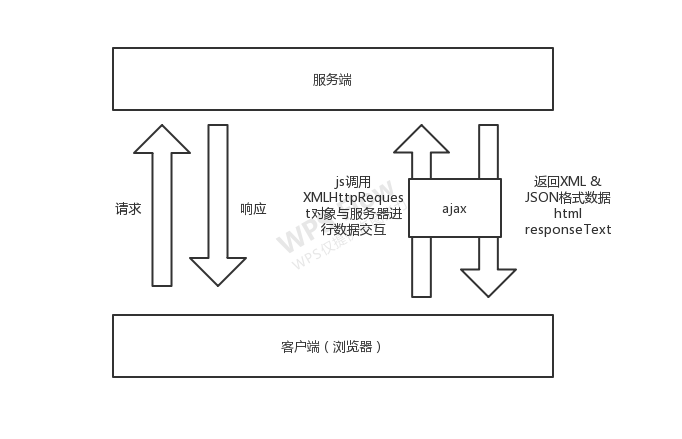
XHLHttpRequest对象
- 对象类型的API
- 在浏览器环境下使用
- 用于客户端和服务端数据的传递和接收
- 用于请求XML数据(JSON,纯文本text)
其他类似的技术 / 库
- jquery
- axios
- superagent
- fetch API
- prototype
- node HTTP
ajax请求的两种方式
- onload
- onreadystatechange
index.html
<!DOCTYPE html>
<html>
<head>
    <title>ajax - 请求纯文本</title>
</head>
<body>
    <button id="btn">请求纯文本</button>
    <p id="text"></p>
</body>
</html>
js
<script>
        document.getElementById('btn').addEventListener('click',loadText);
        let text = document.getElementById('text');

        function loadText(){
            // 1 创建XMLHTTPRequest对象,用于连接客户端与服务端
            let xhr = new XMLHttpRequest();
            // console.log(xhr);

            // 2
            xhr.open('GET','./sample.txt',true);

            // 3 请求的方式(两种)onload() 和 onreadystatechange()
                        // readyState 状态码
            // 0: 请求未初始化
            // 1: 服务器连接已建立
            // 2: 请求已接收
            // 3: 请求处理中
            // 4: 请求已完成,且响应已就绪
            //
            // HTTP 状态码
            // 200 - 服务器成功返回网页
            // 404 - 请求的网页不存在
            // 503 - 服务器暂时不可用

            // 3.1
            xhr.onload = function(){
                if (this.status == 200 && this.readyState == 4) {
                    console.log(this.readyState);
                    console.log(this.responseText);
                }
            }

            // 3.2
            // xhr.onreadystatechange = function(){
            //     if (this.status == 200 && this.readyState == 4) {
            //         text.innerHTML = this.responseText;
            //     }else if(this.status == 404){
            //         console.log('网页不存在!!');
            //     }
            // }

            // 4 发送请求
            xhr.send();
        }
    </script>
ajax请求不同数据
- ajax请求纯文本
- ajax请求json
- ajax请求github真实接口
- ajax请求PHP接口

 浙公网安备 33010602011771号